






dopeytree
Members
-
Joined
-
Last visited
Everything posted by dopeytree
-
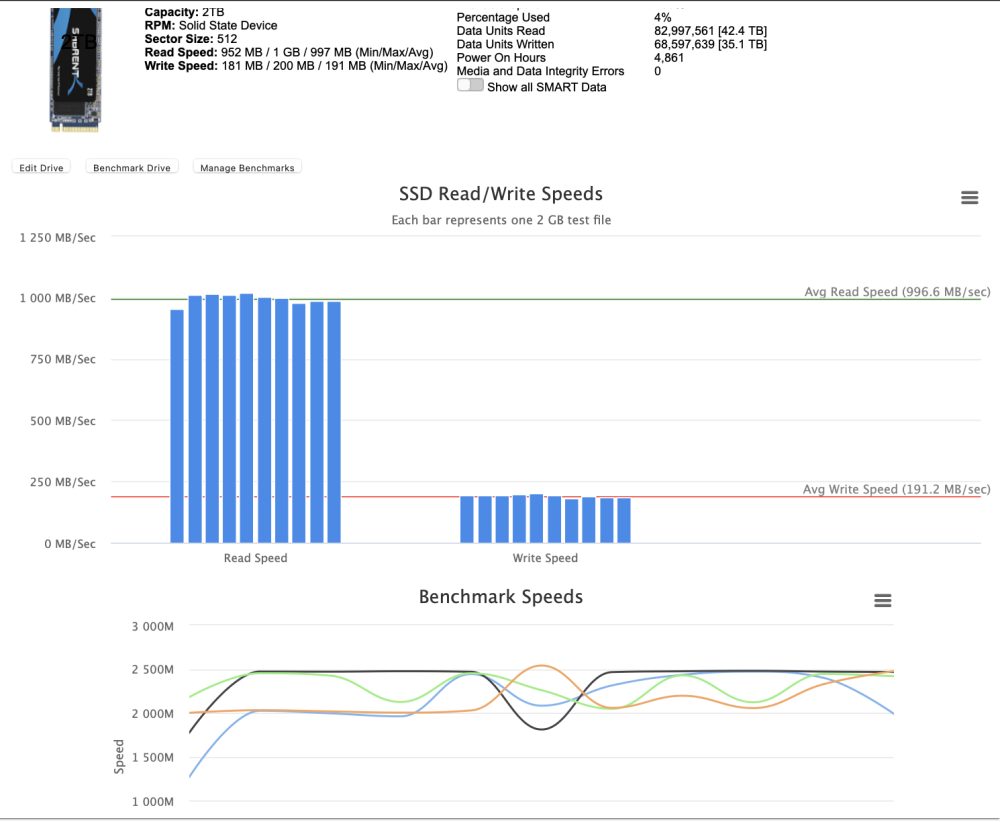
I found it kept saying it couldnt test any disk that is not part of the array but then after 5mins it seems to have found the nvme drives and is testing them. Will see if it finds the other sata ssds. Don't think these new speeds are quite right? We can see the previous method below. A cool docker non the less.
-
There is no option with wording 'unassign'. Both NVMe's are under graphics cards and bits so I didn't remove them physically just removed from the 'pool' option. I did eventually get it to remove a drive but then it realised too late I forgot to change the drive order. As I want the fastest gen4 drive to be a new pool. I'm going to use scripts to backup these drives & the appdata backup plugin. I then tried to re-add the other drive to make it a 2pool again. to then remove the gen4 drive. I presumed mirroring meant a direct copy but I think something else must work. If a drive did break in a cache mirror (raid1) how easy is it to make it work with the single drive left? It would be easier if the GUI let you change the number of drives from 2 to 1 and then just start the pool again. Would be really cool to add a little more detail to the manual for removing cache drive/s. Then give an example of how to de-mirror. There's lots of videos for adding & replacing a cache drive with a larger one but couldn't see anything for removing from cache pool. Anyway I sorted it out another way & am happy 🙂
-
Ah never mind I've just formatted them in the end. I wanted to swap which drive was the primary in the pool and remove the other one for a new pool but it's easier to just wipe them and start a fresh. I have a backup of dockers & appdata.
-
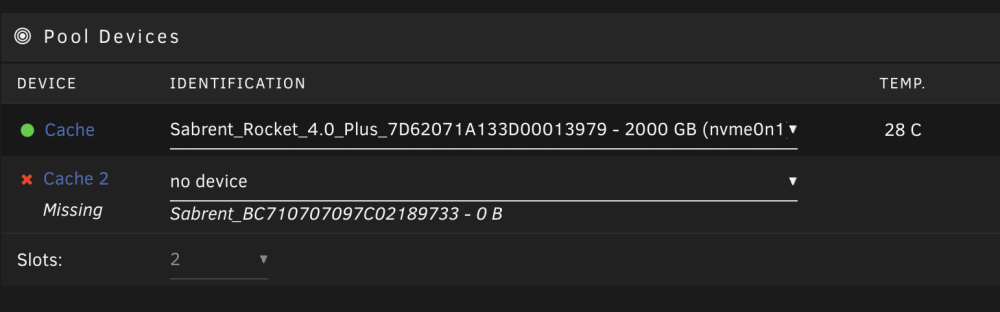
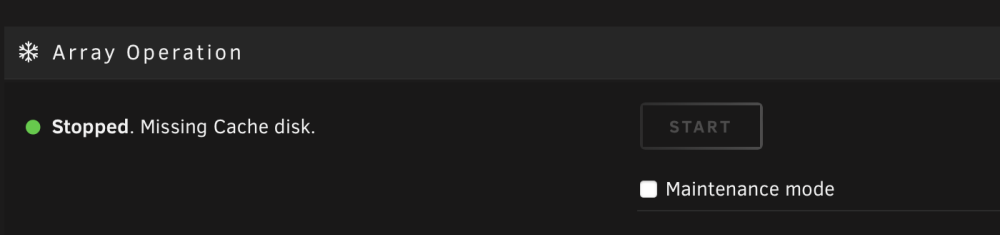
I cant get it to let me start the array with 1 drive removed from the pool. root@Tower:~# btrfs fi show Label: none uuid: 24e861c6-e86f-4b55-b120-6ad8847c8d97 Total devices 2 FS bytes used 1.12TiB devid 2 size 1.86TiB used 1.13TiB path /dev/nvme1n1p1 devid 3 size 1.82TiB used 1.13TiB path /dev/nvme0n1p1 Label: none uuid: 72c4582b-ce97-49cb-b904-4e2c05073dda Total devices 2 FS bytes used 898.84GiB devid 1 size 1.86TiB used 910.03GiB path /dev/sdg1 devid 2 size 1.86TiB used 910.03GiB path /dev/sdf1 Label: none uuid: 5179e4f0-91cc-4afb-a038-692b2e3afe1c Total devices 1 FS bytes used 468.00KiB devid 1 size 10.00GiB used 126.38MiB path /dev/loop2 root@Tower:~# tower-diagnostics-20230114-0419.zip
-
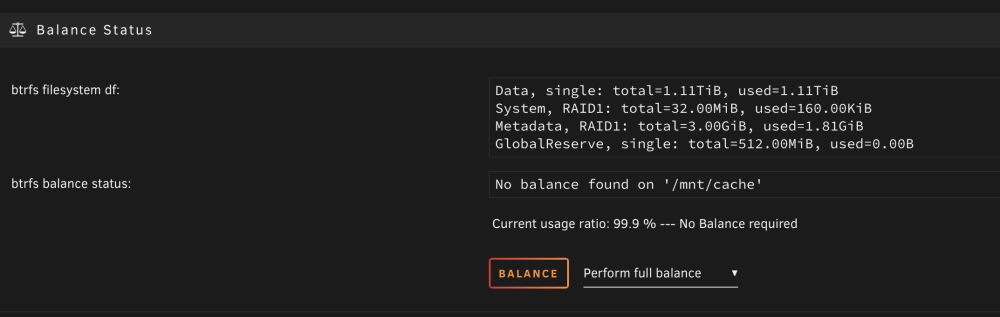
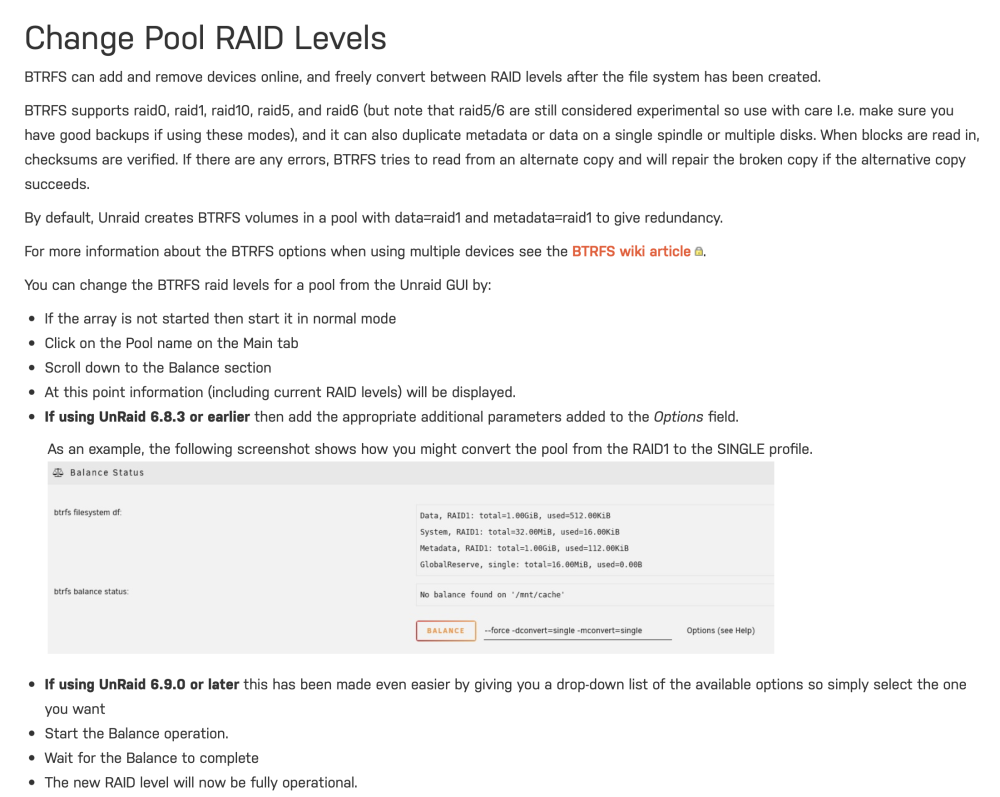
'Perform full balance' or 'convert to raid1'?
-
Thanks so much @JorgeB
-
With array started tower-diagnostics-20230113-1859.zip
-
Current Diagnostics. tower-diagnostics-20230113-1502.zip
-
Is it a steam version of cyberpunk or GOG? I couldn't get the GOG launcher to work so ended up buying cyberpunk2077 on steam in the winter sale.
-
Ace thanks @JorgeB Both pools backup. Panic over. Although still going to try different ram & usb stick for stability. Please could you just talk me through my original intention which was to remove the mirror on the NVMe pool & instead have 2nvme pools. 3 pools total. 1x each for NVMe drive (2) Then the existing pool two which is mirrored and stays mirrored. Do I need to do anything to check the NVMe are up to date as it sounds like one has more data than the other nvme drive? 2 size 1.86TiB used 516.03GiB path /dev/nvme1n1p1 3 size 1.82TiB used 630.03GiB path /dev/nvme0n1p1 Before then stoping array. remove nvme disk from cache pool. restart array with single nvme. Thanks
-
I see it has the FSCK0000.REC etc hmm ok so we are back to a bad usb stick... I had that a few months ago when initialising the server. We ended up replacing the usb3 samsung drive with a usb2 drive and everything was good until about last week. If I download the USB stick backup from my-servers it would be cool to be able to also jump back a week. The current one is from yesturday 24hours ago & I think the stick corruption happened today as I was still logging in with moulin-rouge.local yesterday so actually all ok. Anyway diags attached. Many thanks. Also there's a small bug in the code on the forum here to do with colour. Sometimes if you copy and past it chooses the wrong colour. It needs something that says if background is light use dark colour & vice versa for dark background. Or could be a safari bug. tower-diagnostics-20230113-1502.zip
-
Am I right in thinking if one creates a new 'cache' pool. If one chooses raidz1 and used the correct number of disks this has parity in it's self encased pool? raidz1 being 1 pool parity. raidz2 being 2 pool parity. Same as if you used BTFS raid5/6 but that is/was unstable?
-
Something strange is happening. Server name has changed to the default Tower when should be moulin-rouge. What causes this? Ran memtest overnight. I've read some people do memory test for 24hrs beyond but the free uefi one stoped after doing the 4 tests types. So not sure if there's a difference between the memtest website version compares to unraid bundled version. Result is Memtest said it passed but I will try some other ram to be safe. Here's the output commands requested above: root@Tower:~# btrfs-select-super -s 1 /dev/nvme1n1p1 using SB copy 1, bytenr 67108864 root@Tower:~# btrfs fi show Label: none uuid: 72c4582b-ce97-49cb-b904-4e2c05073dda Total devices 2 FS bytes used 889.57GiB devid 1 size 1.86TiB used 869.03GiB path /dev/sdg1 devid 2 size 1.86TiB used 869.03GiB path /dev/sdf1 Label: none uuid: 24e861c6-e86f-4b55-b120-6ad8847c8d97 Total devices 2 FS bytes used 1.11TiB devid 2 size 1.86TiB used 516.03GiB path /dev/nvme1n1p1 devid 3 size 1.82TiB used 630.03GiB path /dev/nvme0n1p1 root@Tower:~# I think this indicates I made the NVMe drives unsynced? The other pool (sdg1 & sdf1) has disconnected but am I able to mount both the drives with the unassigned plugin. The nvme drives are not mountable with the unassigned plugin.
-
Neat always thought it would work best as pools like at present but new format. Cool to have single zfs drives too. Is their pool to pool movement? What an exciting year!
-
Guessing reloading the docker doesn't do anything? Is there any code in the custom launch options for the game so steam -> library -> cyberpunk2077 -> settings If there is anything could try removing that. I did read somewhere else today there is a bug in steam beta in the current version but this is a red launcher issue.
-
It depends on the setup.. Please chime in if I'm wrong but I think general read should be way faster basicaly a bit less than double per drive. Writes should be somewhat faster but parity work is still slow by comparison as it's on a single drive not striped parity but still faster than current parity in unraid array. https://calomel.org/zfs_raid_speed_capacity.html ZFS Raid Speed Capacity and Performance Benchmarks (speeds in megabytes per second) 1x 4TB, single drive, 3.7 TB, w=108MB/s , rw=50MB/s , r=204MB/s 2x 4TB, mirror (raid1), 3.7 TB, w=106MB/s , rw=50MB/s , r=488MB/s 2x 4TB, stripe (raid0), 7.5 TB, w=237MB/s , rw=73MB/s , r=434MB/s 3x 4TB, mirror (raid1), 3.7 TB, w=106MB/s , rw=49MB/s , r=589MB/s 3x 4TB, stripe (raid0), 11.3 TB, w=392MB/s , rw=86MB/s , r=474MB/s 3x 4TB, raidz1 (raid5), 7.5 TB, w=225MB/s , rw=56MB/s , r=619MB/s 4x 4TB, 2 striped mirrors, 7.5 TB, w=226MB/s , rw=53MB/s , r=644MB/s 4x 4TB, raidz2 (raid6), 7.5 TB, w=204MB/s , rw=54MB/s , r=183MB/s 5x 4TB, raidz1 (raid5), 15.0 TB, w=469MB/s , rw=79MB/s , r=598MB/s 5x 4TB, raidz3 (raid7), 7.5 TB, w=116MB/s , rw=45MB/s , r=493MB/s 6x 4TB, 3 striped mirrors, 11.3 TB, w=389MB/s , rw=60MB/s , r=655MB/s 6x 4TB, raidz2 (raid6), 15.0 TB, w=429MB/s , rw=71MB/s , r=488MB/s 10x 4TB, 2 striped 5x raidz, 30.1 TB, w=675MB/s , rw=109MB/s , r=1012MB/s 11x 4TB, raidz3 (raid7), 30.2 TB, w=552MB/s , rw=103MB/s , r=963MB/s 12x 4TB, 6 striped mirrors, 22.6 TB, w=643MB/s , rw=83MB/s , r=962MB/s 12x 4TB, 2 striped 6x raidz2, 30.1 TB, w=638MB/s , rw=105MB/s , r=990MB/s 12x 4TB, raidz (raid5), 41.3 TB, w=689MB/s , rw=118MB/s , r=993MB/s 12x 4TB, raidz2 (raid6), 37.4 TB, w=317MB/s , rw=98MB/s , r=1065MB/s 12x 4TB, raidz3 (raid7), 33.6 TB, w=452MB/s , rw=105MB/s , r=840MB/s 22x 4TB, 2 striped 11x raidz3, 60.4 TB, w=567MB/s , rw=162MB/s , r=1139MB/s 23x 4TB, raidz3 (raid7), 74.9 TB, w=440MB/s , rw=157MB/s , r=1146MB/s 24x 4TB, 12 striped mirrors, 45.2 TB, w=696MB/s , rw=144MB/s , r=898MB/s 24x 4TB, raidz (raid5), 86.4 TB, w=567MB/s , rw=198MB/s , r=1304MB/s 24x 4TB, raidz2 (raid6), 82.0 TB, w=434MB/s , rw=189MB/s , r=1063MB/s 24x 4TB, raidz3 (raid7), 78.1 TB, w=405MB/s , rw=180MB/s , r=1117MB/s 24x 4TB, striped raid0, 90.4 TB, w=692MB/s , rw=260MB/s , r=1377MB/s
-
I don't really understand.. it says to scroll down to balance. It should then say scroll backup and just stop the array and remove the drive. I'm sure I did try this and it wouldn't let me re-start the array but perhaps it was after I did something else. BTRFS can add and remove devices online, and freely convert between RAID levels after the file system has been created. - I guess this doesn't mean single disk mode? What case use would someone use the balance single drive. Is that what you'd do after removing the mirrored cache? Anyway thanks for guidance guys. Am running memtest. You can't easily make the uefi image on mac anymore. Probably could have done it on the steamdeck in desktop mode.. Anyway my brother imaged the usb stick on windows. Will run those commands once memtest finishes.
-
Ok actually this happens when theres no GPU. Go back to the docker click edit and advanced mode. Then read the instructions on telling it you have an Nvidia card. It's copy & paste. Easy but say if you need more help. 🙂
-
Ok thanks - It said disk missing and wouldn't start the array. I must have missed a step. or just messed it up with the balance. Thanks - I suppose I don't really know what the highlighted bit in yellow means. Could we word it with an example in the manual. Diags attached. moulin-rouge-diagnostics-20230112-1654.zip
-
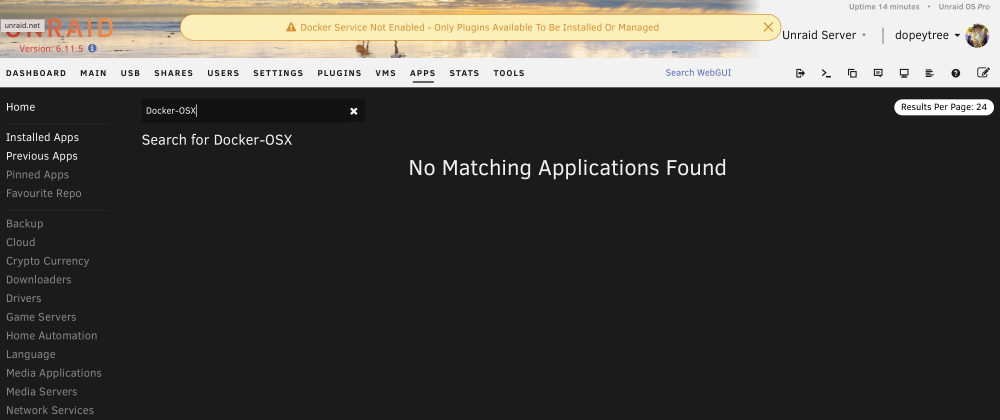
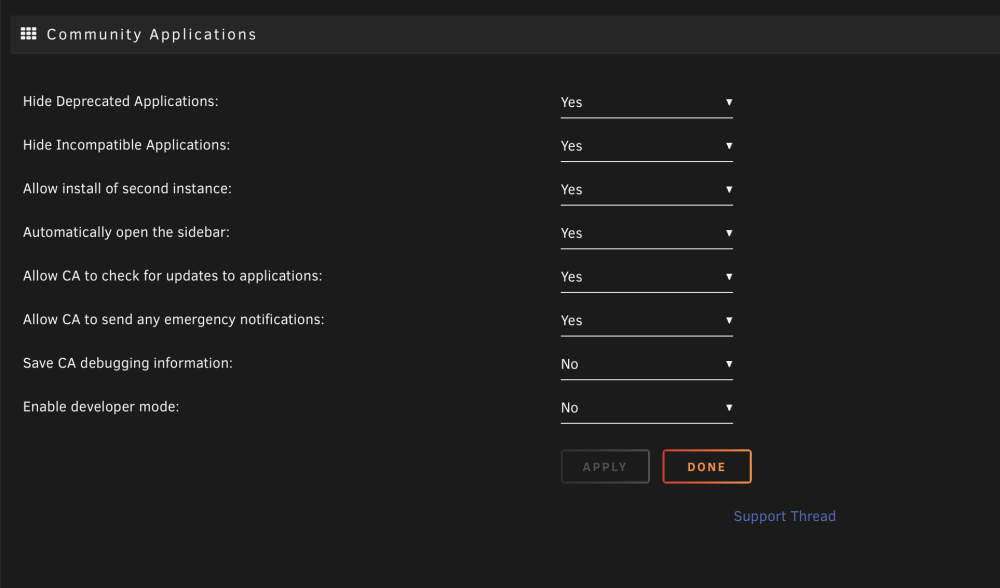
Is it hiding them because docker is off right at this moment?
-
root@Moulin-Rouge:~# blkid /dev/sda1: LABEL_FATBOOT="UNRAID" LABEL="UNRAID" UUID="2732-64F5" BLOCK_SIZE="512" TYPE="vfat" /dev/loop1: TYPE="squashfs" /dev/sdf1: UUID="72c4582b-ce97-49cb-b904-4e2c05073dda" UUID_SUB="30473b54-e841-4935-9880-ea16cc627683" BLOCK_SIZE="4096" TYPE="btrfs" PARTUUID="506db2dc-01" /dev/nvme0n1p1: UUID="24e861c6-e86f-4b55-b120-6ad8847c8d97" UUID_SUB="2f33bc93-9362-490f-a71e-04c42a03d74b" BLOCK_SIZE="4096" TYPE="btrfs" PARTUUID="506db2db-01" /dev/sdd1: UUID="aaa46ac2-3000-4696-b0eb-cea90fb5ea17" BLOCK_SIZE="512" TYPE="xfs" PARTUUID="998d4295-3b12-4efe-a724-bd27751fe6f4" /dev/sdb1: UUID="6c8c21d2-3659-46bd-b2bc-7a32eca49098" BLOCK_SIZE="512" TYPE="xfs" PARTUUID="0ec34a92-1dfd-48a3-9dbe-adf6bd457e17" /dev/sdg1: UUID="72c4582b-ce97-49cb-b904-4e2c05073dda" UUID_SUB="ca0c75b3-f370-4caf-988c-b6001af533be" BLOCK_SIZE="4096" TYPE="btrfs" PARTUUID="506db2d2-01" /dev/loop0: TYPE="squashfs" /dev/sde1: UUID="39879032-0914-4994-b0cb-53c9fd59f0b1" BLOCK_SIZE="512" TYPE="xfs" PARTUUID="32000865-aad5-4bfe-ba13-02573c2916c0" /dev/sdc1: UUID="ffafdb22-0f4d-49bf-b29c-e7521e488a3e" BLOCK_SIZE="512" TYPE="xfs" PARTUUID="2d2ef932-f44d-37fc-375d-6a90c02b990f" /dev/md2: UUID="aaa46ac2-3000-4696-b0eb-cea90fb5ea17" BLOCK_SIZE="512" TYPE="xfs" /dev/md3: UUID="39879032-0914-4994-b0cb-53c9fd59f0b1" BLOCK_SIZE="512" TYPE="xfs" /dev/md1: UUID="ffafdb22-0f4d-49bf-b29c-e7521e488a3e" BLOCK_SIZE="512" TYPE="xfs" /dev/nvme1n1p1: PARTUUID="506db2d0-01" root@Moulin-Rouge:~#
-
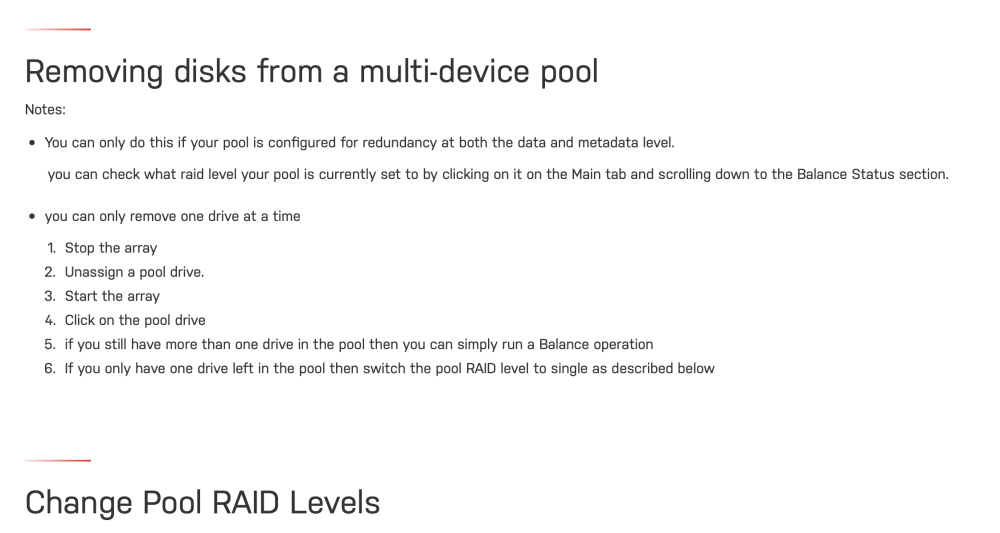
https://wiki.unraid.net/Manual/Storage_Management#Removing_disks_from_a_multi-device_pool I think I've probably killed the data which is ok as all the appdata is backed up to array. How is one supposed to remove a drive from a 2 drive cache pool. Pool TWO has 2 drives in raid1. I want to eliminate the mirror and run in single mode. Is it better to copy the data to another drive and wipe both drives? The system did hang during one of the BTFS balance check but this was actually when it was checking another pool not this one. Thanks for you help 🙂
-
Open up steam go to settings go to remote play click enable remote play choose proton experinental. Steam then relaunches. On cyberpunk click settings force proton experimental then relaunch the game it will load, I did this earlier. Also if you want to enable ray tracing paste this into launch options in steam for cyberpunk just below where you told it to use proton experimental VKD3D_CONFIG=dxr11 PROTON_CONFIG=dxr11 VKD3D_FEATURE_LEVEL=12_1 PROTON_HIDE_NVIDIA_GPU=0 PROTON_ENABLE_NVAPI=1 -dx12
-
I followed the steps in the manual for removing a drive. First perform a balance to change to a single drive. It confirmed it was in s single disk mode. I thought that meant it was then ok to stop the array and remove the drive. When I restarted the array it says there is not file system and it cannot read data on either disks. While there is no critical data. What steps should I have taken?
-
Earlier on today it said 'no results were found - would you like to search dockerhub' but now I can't get it to do the same thing. How does one force this option. Also if I say do a search for Ubuntu but don't what whats on the current store & would prefer the dockerhub image how do I do that? Thanks





