dopeytree
Members
-
Joined
-
Last visited
Everything posted by dopeytree
-
Would you be better just backing up the whole cache disk? That way it would cover any new shares + also backup any new folders before moving to array for other shares etc. While I know what is basically what mirroring does there is a big performance hit using mirror for some reason.
-
Got to play Control last night with ray-tracing on via steam link. For some reason it would crash moonlight every-time I went to shoot. Anyway very cool to see the ray-tracing vs steamdesk version. Thanks so much for making this docker 😄
-
So guys if I want to shutdown at 2am each night... #!/bin/bash powerdown User Cron script scheduled for 0 2 * * *
-
Legend
-
Hey guys has anyone figured out a decent way to make the system sleep & wake on drive access etc? This lives in every other OS & NAS around but isn't built into unraid - it's bizarre. Theres the s3 sleep plugin but it doesn't play nice with the array.. it must be possible to pause the array but perhaps this is the limitation of running the whole OS in ram is that it must be constantly powered up for it to work!?
-
Anyone know how to install sunshine? it's a better streaming solution than steam's link software & you then use moonlight as the client to play https://moonlight-stream.org https://github.com/LizardByte/Sunshine/releases/tag/v0.16.0
-
Anyone know how to implement the ‘steamdeck’ new style big picture mode? I tried changing to steam beta but then it crashed every-time I load big picture?
-
I sourced 9207 for £35 on ebay then bought cables off amazon - total was less than the cheap sata expander card I previously had. Did change the thermal paste & zip tied a 40mm fan to it and away she goes.
-
That's weird! but atleast you are into the system. Only other thing I can think of would be to remove web browser cache. Or try on another web browser? Also check the ident file on the usb stick in config folder to see if it is saving the SSL setting as yes?
-
Did you click provision to create new certs? Settings --> Management Access --> Provision Also make sure you SSL is set to 'Yes' Mine defaulted to 'No' so was only doing http. No idea why all this happened.
-
So after you delete you SSl certs. Unraid seems to turn SSL off. So you need to head back to 'Management Access' under settings. Then turn SSL back on. I use 'YES' rather than 'STRICT' to avoid this issue happening again. Then down a bit more click 'provision' and it will create the new SSL Certs.
-
The problem looks to be on unraid.net's side.
-
Its the ident file under config. Mine was set to SSL='auto' so should have been ok. I have deleted the SSL folder so hopefully that might force it to get new SSl certs. The only thin a bit odd I noticed is there was an old SSL certificate in the name of 'tower' which isn't my server. Now able to login.
-
Anyone know which file it is to change on the USB stick to allow local access instead of only the unraid.net address?
-
Hi is there an issue with the unraid TLS certificates? I'm getting no GUI access - Nginx 404 error if I access the local 192.168 ip and no response from the 123exampleserver.unraid.net All dockers that are online are up and running fine. Can access Heimdall, plex, all the rrr's etc. Shutdown via pressing server power button. Not sure of the exact cause. Will try removing the ultra secure TLS setting. Diagnostics attached. Thanks in advance for help. moulin-rouge-diagnostics-20221205-2328.zip
-
Latest update is causing my server to lockup after about an hour. This then needs a reboot. Also noticed it keeps starting the docker when it's not set to auto-start. Error message mentions 'libglib'? Thanks for your help. Dec 3 20:22:48 Moulin-Rouge kernel: nvidia-modeset: WARNING: GPU:0: Unable to read EDID for display device DP-0 Dec 3 20:22:48 Moulin-Rouge kernel: nvidia-modeset: WARNING: GPU:0: Unable to read EDID for display device DP-0 Dec 3 20:22:50 Moulin-Rouge kernel: nvidia-modeset: WARNING: GPU:0: Unable to read EDID for display device DP-0 Dec 3 20:22:50 Moulin-Rouge kernel: nvidia-modeset: WARNING: GPU:0: Unable to read EDID for display device DP-0 Dec 3 20:22:51 Moulin-Rouge kernel: traps: light-locker[21484] trap int3 ip:14aa81afaca7 sp:7fff3d7973b0 error:0 in libglib-2.0.so.0.6600.8[14aa81abe000+88000] Dec 3 20:22:51 Moulin-Rouge kernel: nvidia-modeset: WARNING: GPU:0: Unable to read EDID for display device DP-0 Dec 3 20:22:51 Moulin-Rouge kernel: nvidia-modeset: WARNING: GPU:0: Unable to read EDID for display device DP-0 Dec 3 20:23:06 Moulin-Rouge kernel: nvidia-modeset: WARNING: GPU:0: Unable to read EDID for display device DP-0 Dec 3 20:23:06 Moulin-Rouge kernel: nvidia-modeset: WARNING: GPU:0: Unable to read EDID for display device DP-0 Dec 3 20:23:07 Moulin-Rouge kernel: traps: xdg-desktop-por[23501] trap int3 ip:1474a6321ca7 sp:7ffde31a2030 error:0 in libglib-2.0.so.0.6600.8[1474a62e5000+88000] Dec 3 20:23:07 Moulin-Rouge kernel: traps: xdg-desktop-por[23467] trap int3 ip:154160487ca7 sp:7ffdc0c833e0 error:0 in libglib-2.0.so.0.6600.8[15416044b000+88000] moulin-rouge-diagnostics-20221203-2025.zip
-
Hi thanks it's not passed through to a VM only to steamheadless which is a docker. Its also not the primary GPU as there is a built in intel gpu in the i9. The intel gpu is on a separate HDMI cable. The nvida card uses a mini DP -> HDMI port which is always plugged in. Will see where we get with steamheadless support. Its not a big deal just odd it stopped working.
-
I've noticed latley my nvidia rtx a2000 seems to having more like it's been passsedthrough to a VM when used in dockers. Steamheadless is running and making use of the card. When that happens the card no longer outputs a video signal to the TV casuing this code error to appear in the unraid log: Dec 3 09:55:32 Moulin-Rouge kernel: nvidia-modeset: WARNING: GPU:0: Unable to read EDID for display device DP-0 Dec 3 09:55:32 Moulin-Rouge kernel: nvidia-modeset: WARNING: GPU:0: Unable to read EDID for display device DP-0 Dec 3 09:55:35 Moulin-Rouge kernel: nvidia-modeset: WARNING: GPU:0: Unable to read EDID for display device DP-0 Dec 3 09:55:35 Moulin-Rouge kernel: nvidia-modeset: WARNING: GPU:0: Unable to read EDID for display device DP-0 Dec 3 09:55:35 Moulin-Rouge kernel: nvidia-modeset: WARNING: GPU:0: Unable to read EDID for display device DP-0 Dec 3 09:55:35 Moulin-Rouge kernel: nvidia-modeset: WARNING: GPU:0: Unable to read EDID for display device DP-0 Dec 3 09:55:36 Moulin-Rouge kernel: traps: light-locker[24133] trap int3 ip:14d76b777ca7 sp:7ffce24d21e0 error:0 in libglib-2.0.so.0.6600.8[14d76b73b000+88000] Dec 3 09:55:51 Moulin-Rouge emhttpd: read SMART /dev/sdf Dec 3 09:55:58 Moulin-Rouge kernel: nvidia-modeset: WARNING: GPU:0: Unable to read EDID for display device DP-0 Dec 3 09:55:58 Moulin-Rouge kernel: nvidia-modeset: WARNING: GPU:0: Unable to read EDID for display device DP-0 Dec 3 09:56:00 Moulin-Rouge kernel: traps: xdg-desktop-por[25388] trap int3 ip:153139c26ca7 sp:7ffdf0571510 error:0 in libglib-2.0.so.0.6600.8[153139bea000+88000] Dec 3 09:56:00 Moulin-Rouge kernel: traps: xdg-desktop-por[25349] trap int3 ip:1522ceb10ca7 sp:7fffb2f9a690 error:0 in libglib-2.0.so.0.6600.8[1522cead4000+88000] Dec 3 09:56:26 Moulin-Rouge kernel: nvidia-modeset: WARNING: GPU:0: Unable to read EDID for display device DP-0 Dec 3 09:56:26 Moulin-Rouge kernel: nvidia-modeset: WARNING: GPU:0: Unable to read EDID for display device DP-0 Dec 3 09:56:36 Moulin-Rouge kernel: fossilize_repla[27672]: segfault at dc0 ip 0000561cb3c07ead sp 000015249261c940 error 4 in fossilize_replay[561cb3bbb000+23e000] Dec 3 09:56:36 Moulin-Rouge kernel: Code: 00 85 c0 74 13 48 8b 76 08 e9 0f ed ff ff 0f 1f 80 00 00 00 00 45 31 c0 44 89 c0 c3 90 8b 46 10 85 c0 75 61 55 53 48 83 ec 08 <48> 8b 2f 0f b6 85 c1 0e 00 00 84 c0 74 0d 48 83 c4 08 5b 5d c3 66 Dec 3 09:56:36 Moulin-Rouge kernel: fossilize_repla[27670]: segfault at dc0 ip 0000561cb3c07ead sp 00001524ac676940 error 4 in fossilize_replay[561cb3bbb000+23e000] Dec 3 09:56:36 Moulin-Rouge kernel: Code: 00 85 c0 74 13 48 8b 76 08 e9 0f ed ff ff 0f 1f 80 00 00 00 00 45 31 c0 44 89 c0 c3 90 8b 46 10 85 c0 75 61 55 53 48 83 ec 08 <48> 8b 2f 0f b6 85 c1 0e 00 00 84 c0 74 0d 48 83 c4 08 5b 5d c3 66 Dec 3 09:56:37 Moulin-Rouge kernel: fossilize_repla[27669]: segfault at dc0 ip 0000561cb3c07ead sp 000015249261c940 error 4 in fossilize_replay[561cb3bbb000+23e000] Dec 3 09:56:37 Moulin-Rouge kernel: Code: 00 85 c0 74 13 48 8b 76 08 e9 0f ed ff ff 0f 1f 80 00 00 00 00 45 31 c0 44 89 c0 c3 90 8b 46 10 85 c0 75 61 55 53 48 83 ec 08 <48> 8b 2f 0f b6 85 c1 0e 00 00 84 c0 74 0d 48 83 c4 08 5b 5d c3 66 It didn't happen before so trying to work out if its a bug in Unraid 6.11.5 or steamheadless bug or driver bug? Obviously VNC all works. Card is 2nd GPU. The main intel gpu is on a separate HDMI cable. The nvida card uses a mini DP -> HDMI port which is always plugged in. It's not a big deal just odd it stopped working.
-
I've noticed latley my nvidia rtx a2000 seems to having more like it's been passsedthrough to a VM when used in dockers. Steamheadless is running and making use of the card. When that happens the card no longer outputs a video signal to the TV casuing this code error to appear in the unraid log: Dec 3 09:55:32 Moulin-Rouge kernel: nvidia-modeset: WARNING: GPU:0: Unable to read EDID for display device DP-0 Dec 3 09:55:32 Moulin-Rouge kernel: nvidia-modeset: WARNING: GPU:0: Unable to read EDID for display device DP-0 Dec 3 09:55:35 Moulin-Rouge kernel: nvidia-modeset: WARNING: GPU:0: Unable to read EDID for display device DP-0 Dec 3 09:55:35 Moulin-Rouge kernel: nvidia-modeset: WARNING: GPU:0: Unable to read EDID for display device DP-0 Dec 3 09:55:35 Moulin-Rouge kernel: nvidia-modeset: WARNING: GPU:0: Unable to read EDID for display device DP-0 Dec 3 09:55:35 Moulin-Rouge kernel: nvidia-modeset: WARNING: GPU:0: Unable to read EDID for display device DP-0 Dec 3 09:55:36 Moulin-Rouge kernel: traps: light-locker[24133] trap int3 ip:14d76b777ca7 sp:7ffce24d21e0 error:0 in libglib-2.0.so.0.6600.8[14d76b73b000+88000] Dec 3 09:55:51 Moulin-Rouge emhttpd: read SMART /dev/sdf Dec 3 09:55:58 Moulin-Rouge kernel: nvidia-modeset: WARNING: GPU:0: Unable to read EDID for display device DP-0 Dec 3 09:55:58 Moulin-Rouge kernel: nvidia-modeset: WARNING: GPU:0: Unable to read EDID for display device DP-0 Dec 3 09:56:00 Moulin-Rouge kernel: traps: xdg-desktop-por[25388] trap int3 ip:153139c26ca7 sp:7ffdf0571510 error:0 in libglib-2.0.so.0.6600.8[153139bea000+88000] Dec 3 09:56:00 Moulin-Rouge kernel: traps: xdg-desktop-por[25349] trap int3 ip:1522ceb10ca7 sp:7fffb2f9a690 error:0 in libglib-2.0.so.0.6600.8[1522cead4000+88000] Dec 3 09:56:26 Moulin-Rouge kernel: nvidia-modeset: WARNING: GPU:0: Unable to read EDID for display device DP-0 Dec 3 09:56:26 Moulin-Rouge kernel: nvidia-modeset: WARNING: GPU:0: Unable to read EDID for display device DP-0 Dec 3 09:56:36 Moulin-Rouge kernel: fossilize_repla[27672]: segfault at dc0 ip 0000561cb3c07ead sp 000015249261c940 error 4 in fossilize_replay[561cb3bbb000+23e000] Dec 3 09:56:36 Moulin-Rouge kernel: Code: 00 85 c0 74 13 48 8b 76 08 e9 0f ed ff ff 0f 1f 80 00 00 00 00 45 31 c0 44 89 c0 c3 90 8b 46 10 85 c0 75 61 55 53 48 83 ec 08 <48> 8b 2f 0f b6 85 c1 0e 00 00 84 c0 74 0d 48 83 c4 08 5b 5d c3 66 Dec 3 09:56:36 Moulin-Rouge kernel: fossilize_repla[27670]: segfault at dc0 ip 0000561cb3c07ead sp 00001524ac676940 error 4 in fossilize_replay[561cb3bbb000+23e000] Dec 3 09:56:36 Moulin-Rouge kernel: Code: 00 85 c0 74 13 48 8b 76 08 e9 0f ed ff ff 0f 1f 80 00 00 00 00 45 31 c0 44 89 c0 c3 90 8b 46 10 85 c0 75 61 55 53 48 83 ec 08 <48> 8b 2f 0f b6 85 c1 0e 00 00 84 c0 74 0d 48 83 c4 08 5b 5d c3 66 Dec 3 09:56:37 Moulin-Rouge kernel: fossilize_repla[27669]: segfault at dc0 ip 0000561cb3c07ead sp 000015249261c940 error 4 in fossilize_replay[561cb3bbb000+23e000] Dec 3 09:56:37 Moulin-Rouge kernel: Code: 00 85 c0 74 13 48 8b 76 08 e9 0f ed ff ff 0f 1f 80 00 00 00 00 45 31 c0 44 89 c0 c3 90 8b 46 10 85 c0 75 61 55 53 48 83 ec 08 <48> 8b 2f 0f b6 85 c1 0e 00 00 84 c0 74 0d 48 83 c4 08 5b 5d c3 66 It didn't happen before so trying to work out if its a bug in Unraid 6.11.5 or steamheadless bug or driver bug?
-
Could we add create archive from selection option? Would be super useful to select a few files and have them bundled into a .zip file. Compression itself not important it's just handier for uploading files.
-
Anyone know what happened to the 'uinput' app? I have controllers working via steam Link apps but would like to also have an option to go direct to the steamheadless docker. I'm trying to workout how I can connect my bluetooth controller to headless docker. Bluetooth is loaded when unraid starts but can't see any driver settings. Would it be easier to use a cable?
-
This is it with the multifunction set up. But I don't think it boots properley as I cannot RDP into it. <?xml version='1.0' encoding='UTF-8'?> <domain type='kvm'> <name>Windows 10 Pro</name> <uuid>bb5e1415-65de-00c3-acef-6e348be21a90</uuid> <metadata> <vmtemplate xmlns="unraid" name="Windows 10" icon="windows.png" os="windows10"/> </metadata> <memory unit='KiB'>11010048</memory> <currentMemory unit='KiB'>6291456</currentMemory> <memoryBacking> <nosharepages/> </memoryBacking> <vcpu placement='static'>14</vcpu> <cputune> <vcpupin vcpu='0' cpuset='1'/> <vcpupin vcpu='1' cpuset='9'/> <vcpupin vcpu='2' cpuset='2'/> <vcpupin vcpu='3' cpuset='10'/> <vcpupin vcpu='4' cpuset='3'/> <vcpupin vcpu='5' cpuset='11'/> <vcpupin vcpu='6' cpuset='4'/> <vcpupin vcpu='7' cpuset='12'/> <vcpupin vcpu='8' cpuset='5'/> <vcpupin vcpu='9' cpuset='13'/> <vcpupin vcpu='10' cpuset='6'/> <vcpupin vcpu='11' cpuset='14'/> <vcpupin vcpu='12' cpuset='7'/> <vcpupin vcpu='13' cpuset='15'/> </cputune> <os> <type arch='x86_64' machine='pc-q35-6.2'>hvm</type> </os> <features> <acpi/> <apic/> </features> <cpu mode='host-passthrough' check='none' migratable='on'> <topology sockets='1' dies='1' cores='7' threads='2'/> <cache mode='passthrough'/> </cpu> <clock offset='localtime'> <timer name='hypervclock' present='yes'/> <timer name='hpet' present='no'/> </clock> <on_poweroff>destroy</on_poweroff> <on_reboot>restart</on_reboot> <on_crash>restart</on_crash> <devices> <emulator>/usr/local/sbin/qemu</emulator> <disk type='file' device='disk'> <driver name='qemu' type='raw' cache='writeback'/> <source file='/mnt/user/domains/Windows 10 Pro/vdisk1.img'/> <target dev='hdc' bus='virtio'/> <boot order='1'/> <address type='pci' domain='0x0000' bus='0x04' slot='0x00' function='0x0'/> </disk> <disk type='file' device='cdrom'> <driver name='qemu' type='raw'/> <source file='/mnt/user/isos/Win10_21H2_English_x64.iso'/> <target dev='hda' bus='sata'/> <readonly/> <boot order='2'/> <address type='drive' controller='0' bus='0' target='0' unit='0'/> </disk> <disk type='file' device='cdrom'> <driver name='qemu' type='raw'/> <source file='/mnt/user/isos/virtio-win-0.1.221.iso'/> <target dev='hdb' bus='sata'/> <readonly/> <address type='drive' controller='0' bus='0' target='0' unit='1'/> </disk> <controller type='pci' index='0' model='pcie-root'/> <controller type='pci' index='1' model='pcie-root-port'> <model name='pcie-root-port'/> <target chassis='1' port='0x10'/> <address type='pci' domain='0x0000' bus='0x00' slot='0x02' function='0x0' multifunction='on'/> </controller> <controller type='pci' index='2' model='pcie-root-port'> <model name='pcie-root-port'/> <target chassis='2' port='0x11'/> <address type='pci' domain='0x0000' bus='0x00' slot='0x02' function='0x1'/> </controller> <controller type='pci' index='3' model='pcie-root-port'> <model name='pcie-root-port'/> <target chassis='3' port='0x12'/> <address type='pci' domain='0x0000' bus='0x00' slot='0x02' function='0x2'/> </controller> <controller type='pci' index='4' model='pcie-root-port'> <model name='pcie-root-port'/> <target chassis='4' port='0x13'/> <address type='pci' domain='0x0000' bus='0x00' slot='0x02' function='0x3'/> </controller> <controller type='pci' index='5' model='pcie-root-port'> <model name='pcie-root-port'/> <target chassis='5' port='0x14'/> <address type='pci' domain='0x0000' bus='0x00' slot='0x02' function='0x4'/> </controller> <controller type='pci' index='6' model='pcie-root-port'> <model name='pcie-root-port'/> <target chassis='6' port='0x15'/> <address type='pci' domain='0x0000' bus='0x00' slot='0x02' function='0x5'/> </controller> <controller type='pci' index='7' model='pcie-to-pci-bridge'> <model name='pcie-pci-bridge'/> <address type='pci' domain='0x0000' bus='0x01' slot='0x00' function='0x0'/> </controller> <controller type='virtio-serial' index='0'> <address type='pci' domain='0x0000' bus='0x02' slot='0x00' function='0x0'/> </controller> <controller type='sata' index='0'> <address type='pci' domain='0x0000' bus='0x00' slot='0x1f' function='0x2'/> </controller> <controller type='usb' index='0' model='qemu-xhci' ports='15'> <address type='pci' domain='0x0000' bus='0x00' slot='0x07' function='0x0'/> </controller> <interface type='bridge'> <mac address='52:54:00:25:55:a3'/> <source bridge='br0'/> <model type='virtio-net'/> <address type='pci' domain='0x0000' bus='0x03' slot='0x00' function='0x0'/> </interface> <serial type='pty'> <target type='isa-serial' port='0'> <model name='isa-serial'/> </target> </serial> <console type='pty'> <target type='serial' port='0'/> </console> <channel type='unix'> <target type='virtio' name='org.qemu.guest_agent.0'/> <address type='virtio-serial' controller='0' bus='0' port='1'/> </channel> <input type='tablet' bus='usb'> <address type='usb' bus='0' port='1'/> </input> <input type='mouse' bus='ps2'/> <input type='keyboard' bus='ps2'/> <audio id='1' type='none'/> <hostdev mode='subsystem' type='pci' managed='yes'> <driver name='vfio'/> <source> <address domain='0x0000' bus='0x02' slot='0x00' function='0x0'/> </source> <address type='pci' domain='0x0000' bus='0x05' slot='0x00' function='0x0' multifunction='on'/> </hostdev> <hostdev mode='subsystem' type='pci' managed='yes'> <driver name='vfio'/> <source> <address domain='0x0000' bus='0x02' slot='0x00' function='0x1'/> </source> <address type='pci' domain='0x0000' bus='0x05' slot='0x00' function='0x1'/> </hostdev> <memballoon model='none'/> </devices> </domain>
-
Hi, Please could I get some help from someone with experience. My card is a nvidai rtx a2000 6gb. It is a workstation card. I have tried to follow all the guides online but can't get the vbios to dump. Somone on reddit said you don't need to do that anymore not sure if that is true or not... I have got the basic VM working with VNC but when I set to the nvidia card I can never get to the login section so unsure if it's working... It should use the same IP as it uses on VNC which is 192.168.33.62 I don't know if you can set windows 10 pro to autologin? Here is my XML file: <?xml version='1.0' encoding='UTF-8'?> <domain type='kvm'> <name>Windows 10 Pro</name> <uuid>bb5e1415-65de-00c3-acef-6e348be21a90</uuid> <metadata> <vmtemplate xmlns="unraid" name="Windows 10" icon="windows.png" os="windows10"/> </metadata> <memory unit='KiB'>11010048</memory> <currentMemory unit='KiB'>6291456</currentMemory> <memoryBacking> <nosharepages/> </memoryBacking> <vcpu placement='static'>14</vcpu> <cputune> <vcpupin vcpu='0' cpuset='1'/> <vcpupin vcpu='1' cpuset='9'/> <vcpupin vcpu='2' cpuset='2'/> <vcpupin vcpu='3' cpuset='10'/> <vcpupin vcpu='4' cpuset='3'/> <vcpupin vcpu='5' cpuset='11'/> <vcpupin vcpu='6' cpuset='4'/> <vcpupin vcpu='7' cpuset='12'/> <vcpupin vcpu='8' cpuset='5'/> <vcpupin vcpu='9' cpuset='13'/> <vcpupin vcpu='10' cpuset='6'/> <vcpupin vcpu='11' cpuset='14'/> <vcpupin vcpu='12' cpuset='7'/> <vcpupin vcpu='13' cpuset='15'/> </cputune> <os> <type arch='x86_64' machine='pc-q35-6.2'>hvm</type> </os> <features> <acpi/> <apic/> </features> <cpu mode='host-passthrough' check='none' migratable='on'> <topology sockets='1' dies='1' cores='7' threads='2'/> <cache mode='passthrough'/> </cpu> <clock offset='localtime'> <timer name='hypervclock' present='yes'/> <timer name='hpet' present='no'/> </clock> <on_poweroff>destroy</on_poweroff> <on_reboot>restart</on_reboot> <on_crash>restart</on_crash> <devices> <emulator>/usr/local/sbin/qemu</emulator> <disk type='file' device='disk'> <driver name='qemu' type='raw' cache='writeback'/> <source file='/mnt/user/domains/Windows 10 Pro/vdisk1.img'/> <target dev='hdc' bus='virtio'/> <boot order='1'/> <address type='pci' domain='0x0000' bus='0x04' slot='0x00' function='0x0'/> </disk> <disk type='file' device='cdrom'> <driver name='qemu' type='raw'/> <source file='/mnt/user/isos/Win10_21H2_English_x64.iso'/> <target dev='hda' bus='sata'/> <readonly/> <boot order='2'/> <address type='drive' controller='0' bus='0' target='0' unit='0'/> </disk> <disk type='file' device='cdrom'> <driver name='qemu' type='raw'/> <source file='/mnt/user/isos/virtio-win-0.1.221.iso'/> <target dev='hdb' bus='sata'/> <readonly/> <address type='drive' controller='0' bus='0' target='0' unit='1'/> </disk> <controller type='pci' index='0' model='pcie-root'/> <controller type='pci' index='1' model='pcie-root-port'> <model name='pcie-root-port'/> <target chassis='1' port='0x10'/> <address type='pci' domain='0x0000' bus='0x00' slot='0x02' function='0x0' multifunction='on'/> </controller> <controller type='pci' index='2' model='pcie-root-port'> <model name='pcie-root-port'/> <target chassis='2' port='0x11'/> <address type='pci' domain='0x0000' bus='0x00' slot='0x02' function='0x1'/> </controller> <controller type='pci' index='3' model='pcie-root-port'> <model name='pcie-root-port'/> <target chassis='3' port='0x12'/> <address type='pci' domain='0x0000' bus='0x00' slot='0x02' function='0x2'/> </controller> <controller type='pci' index='4' model='pcie-root-port'> <model name='pcie-root-port'/> <target chassis='4' port='0x13'/> <address type='pci' domain='0x0000' bus='0x00' slot='0x02' function='0x3'/> </controller> <controller type='pci' index='5' model='pcie-root-port'> <model name='pcie-root-port'/> <target chassis='5' port='0x14'/> <address type='pci' domain='0x0000' bus='0x00' slot='0x02' function='0x4'/> </controller> <controller type='pci' index='6' model='pcie-root-port'> <model name='pcie-root-port'/> <target chassis='6' port='0x15'/> <address type='pci' domain='0x0000' bus='0x00' slot='0x02' function='0x5'/> </controller> <controller type='pci' index='7' model='pcie-to-pci-bridge'> <model name='pcie-pci-bridge'/> <address type='pci' domain='0x0000' bus='0x01' slot='0x00' function='0x0'/> </controller> <controller type='virtio-serial' index='0'> <address type='pci' domain='0x0000' bus='0x02' slot='0x00' function='0x0'/> </controller> <controller type='sata' index='0'> <address type='pci' domain='0x0000' bus='0x00' slot='0x1f' function='0x2'/> </controller> <controller type='usb' index='0' model='qemu-xhci' ports='15'> <address type='pci' domain='0x0000' bus='0x00' slot='0x07' function='0x0'/> </controller> <interface type='bridge'> <mac address='52:54:00:25:55:a3'/> <source bridge='br0'/> <model type='virtio-net'/> <address type='pci' domain='0x0000' bus='0x03' slot='0x00' function='0x0'/> </interface> <serial type='pty'> <target type='isa-serial' port='0'> <model name='isa-serial'/> </target> </serial> <console type='pty'> <target type='serial' port='0'/> </console> <channel type='unix'> <target type='virtio' name='org.qemu.guest_agent.0'/> <address type='virtio-serial' controller='0' bus='0' port='1'/> </channel> <input type='tablet' bus='usb'> <address type='usb' bus='0' port='1'/> </input> <input type='mouse' bus='ps2'/> <input type='keyboard' bus='ps2'/> <audio id='1' type='none'/> <hostdev mode='subsystem' type='pci' managed='yes'> <driver name='vfio'/> <source> <address domain='0x0000' bus='0x02' slot='0x00' function='0x0'/> </source> <address type='pci' domain='0x0000' bus='0x05' slot='0x00' function='0x0'/> </hostdev> <hostdev mode='subsystem' type='pci' managed='yes'> <driver name='vfio'/> <source> <address domain='0x0000' bus='0x02' slot='0x00' function='0x1'/> </source> <address type='pci' domain='0x0000' bus='0x06' slot='0x00' function='0x0'/> </hostdev> <memballoon model='none'/> </devices> </domain>
-
Noticed this on a few version of unraid now. if you have a VM and it’s set to vnc. And you set it to use a graphics card but haven’t yet mapped that to bind on restart. if you load the VM it causes unraid to shit it’s pants and causes a NGIX web server error and you end up having to reboot the system. dockers still work. the only safe way I found out of this it’s a single press of the power button and watching on a real monitor to watch for the ‘unraid process stopped’ message at which point you can actually power down by holding down power button for 4 seconds with out fucking the array up. now I know you should bind the gpu before starting the VM but I can’t be the only one who’s done this? will upload diagnostics tomo morning
-
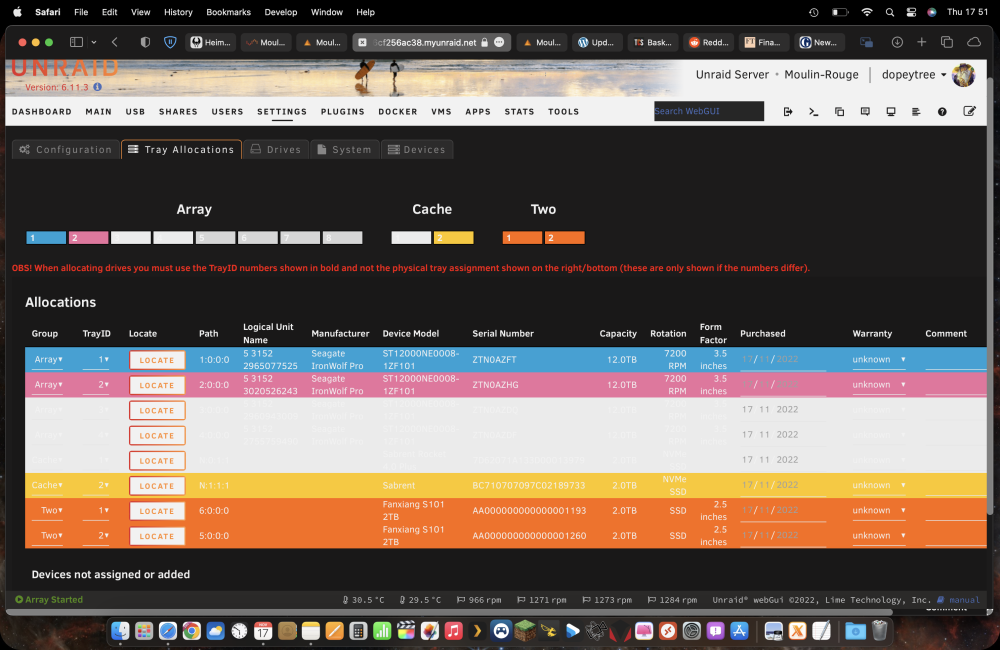
Got a problem with this when I add new drives it showing the 'DRIVE' colour as a light grey / white. but with white text. I have reset the colour to be something else but no luck... As you can see the 'Drive' colour is a pink colour for the other 'Drives' in the array so not sure why these new disk are showing as the grey unallocated colour. Am on latest version & latest unraid 6.11.3