dopeytree
Members
-
Joined
-
Last visited
Everything posted by dopeytree
-
Have been thinking about other mover options. Perhaps the easiest would be to have different schedules for mover per share? That way you could just set the data download share to move every month or 90 days. and other other data to move every day or once a week.
-
Anyone know a way to check on mover progress or log? It's done 2 shares fast 180MB/s+ then slowed down to 1 - 20MB/s.
-
Thought Id post recent PSU findings. Enhance PSU blew up that came with NAS case. Ran system at around 100-120w on the UPS. New replacement is a 80 gold with quiet fan but same brand Enchance psu. System now runs at 78w on the UPS! Definitely worth checking you have the most efficient PSU & also it is not too overcapacity of your system i.e 600w for a 150w system load.
-
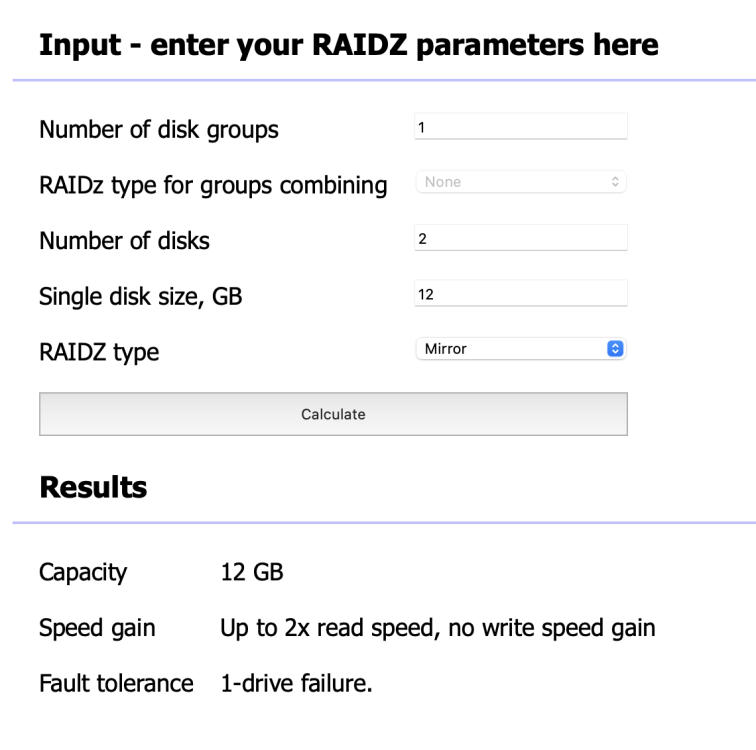
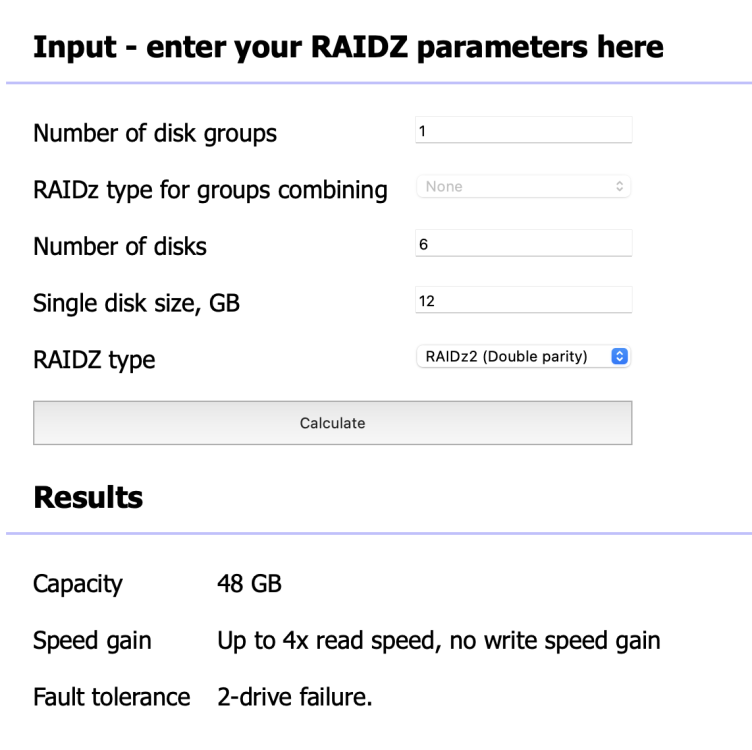
Ah ok so best to backup to another disk (perhaps in array) or other pool. Then wipe the cache pool. Then set up as a new pool with all drives present & ready to go? Then copy data back. Out of interest has anyone done any performance tests of btrfs mirror pool vs zfs mirror pool. 2x nvme ssd's. https://www.raidz-calculator.com/default.aspx Eventually i will migrate some of my array disks to a 6disk ZFS array of video files so can be quickly edited.
-
6.12 - There is another plugin called 'GPU STATISTICS' install that and remove 'GPU Stat'
-
I'm thinking to remove one of the cache pool mirrors (total 2x drives) Then wipe the other one format as ZFS. Copy data back to NEW ZFS cache pool single. Confirm data. Then wipe the other BTrFS cache, then add it to the ZFS pool (requiring a format of the BTrFS drive). Does this sound like the right steps for converting a cache pool (mirror) to ZFS mirror?
-
-... ..- - -..-. ..-. .. .-. ... - -..-. ..- ..-. --- .----. ... -..-. .... .- ...- . -... . . -. -..-. -.. .. ... -.-. --- ...- . .-. . -.. -..-. ... - . .- .-.. .. -. --. -.-- --- ..- .-. ... --- -.-. -.- ... -..-.
-
Release note here explain: https://docs.unraid.net/unraid-os/release-notes/6.12.0 ZFS is essentially another file format like XFS & BTrFS.. The core benefit of ZFS is data integrity & repair built in. The array still exists & you can use ZFS single drives in the array (for data intregiry benefits). You can also use all the old formats too. ZFS speed benefits only exist in a pool much like the current BTFS raid options available in pools. More detailed ZFS article here: https://arstechnica.com/information-technology/2020/05/zfs-101-understanding-zfs-storage-and-performance/
-
Is this all good to use with 6.12? the last update was v2021-04-21
-
6.12 upgrade a breeze. Dying PSU priceless. Only thing I noticed was s3 sleep plugin activated sleep during a parity check but suspect that's a plugin or my config issue. Now to do some copying around to make room for ZFS drives
-
Updated to 6.12 Then my PSU gave up.. it even made that electric zapping noise as some dodgy Chinese component must have finally given up. (it had been randomly rebooting for a while). Have swapped to a temporary MAG PSU while a new 1u flex psu arrives tomorrow. Powered up started a parity check. Then went for lunch. Came back an hour later and s3 sleep had activated during parity check. Have disable sleep until any further comment from others.
-
Thanks for new plugin. I noticed config transfer had picked mnt/cache/appdata & mnt/user/ Is this ok? It wont cause a double backup?
-
Amazing thanks devs
-
The default 50000 memory is that Kb / Mb or MB??
-
Sorry I missed your reply in the bug post. Thanks I still think it's a bug having storage percentages shown under a Memory heading? Anyway it is how the devs have decided it is.
-
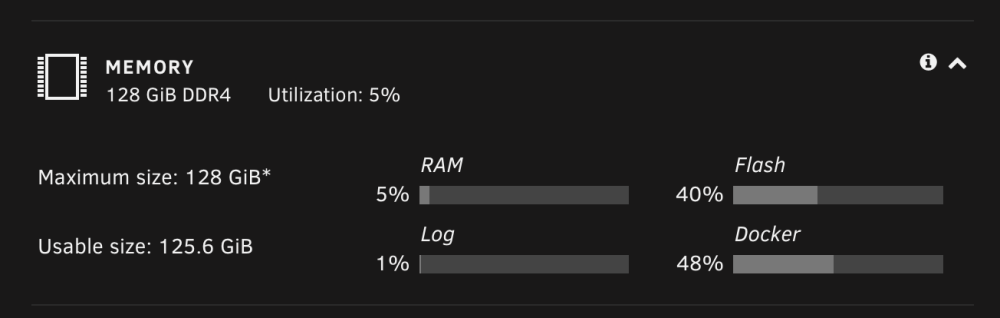
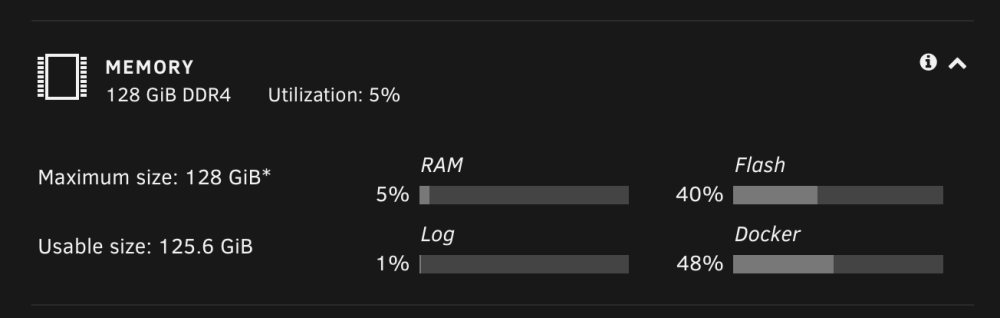
Could someone help me understand what the memory GUI is referencing. A mod said that the docker % isn't to do with ram usage but refers to the amount of space used by docker which has a default of 20GB. It's under a heading Memory so I assumed it was a breakdown of the RAM by usage. Are these subheadings actually Storage % ? Thanks
-
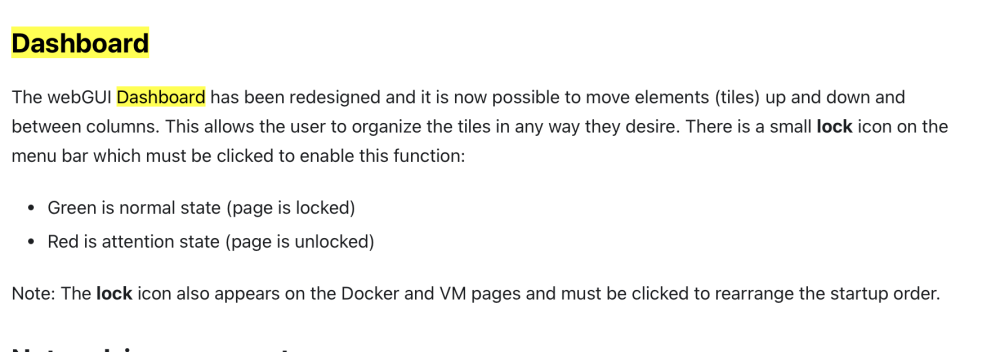
It is under the section heading Memory.. Please can we add your info to the manual? https://docs.unraid.net/unraid-os/release-notes/6.12.0#dashboard
-
in 6.12 - Are we able to display memory usage in GB as-well as percentage? & also maybe explain or simply what RAM, FLASH, LOG & DOCKER numbers correlate to? i.e Docker is not using 44% of 128GB. Docker is using 44% of total usage which is 6%. Double percentages are weird... 🤓 6% of 128 - 7.68 so 44% of 7.68 = 3.3792 so docker is using 3.37GB
-
Never quite understand how the maths works on this... What does RAM, FLASH, LOG & DOCKER denote? Please can we have it simplified for 6.12? Total Memory - Current Usage % and in GB Then breakdown in % & GB - Unraid System - Docker - VMs - ETC
-
See screenshot of unassigned plugin settings

-
I think unassigned disks are under /remote have a little dig around & you'll find it.
-
/plugins/unassigned.devices/UnassignedDevices.php: wrong csrf_token Is this csrf_token of concern? Or is it simply because I have refreshed the page rather than close and open a new window to login? CSRF is to do with login security.
-
Mover would run daily. You'd have to define which is more important (maybe per share.) For the 'data downloads share' priority is to keep 65% (or whatever number you choose) on the SSD. The idea of SSD's should be to use them not to just dump data to them and then move it to the array or another ZFS pool. which then leaves the SSD blank. Mover tuning can do some basic customisations like only move certain files or files over certain days old but there's still nothing on a per share basis. However the author is going to write some custom scripts. ------------------------------ Essentially I am saying I would like 'ALL new folders' to be 'cached on SSD's' (because its fast) then anything that is not my data downloads share to move to the array daily/weekly (insert time point) for parity protection whilst my 'data downloads share' keeps itself around 65% full. Maybe ZFS L2arc could play a part in all this in the future...
-
Extra models can be downloaded here: https://huggingface.co/TheBloke and copied to appdata/serge/weights/
-
It's now in the app store