






dopeytree
Members
-
Joined
-
Last visited
Everything posted by dopeytree
-
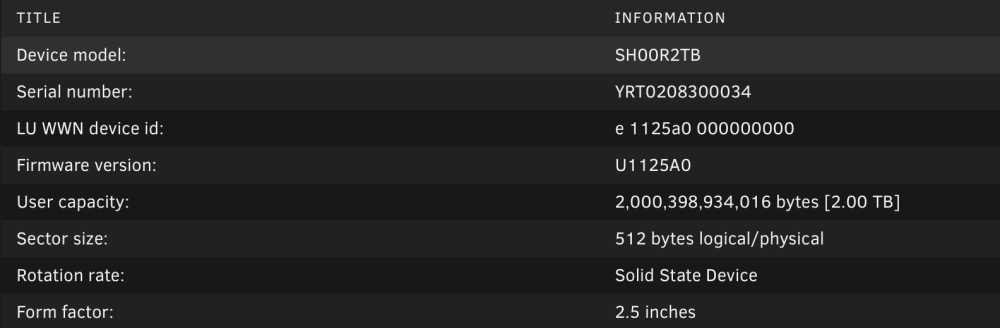
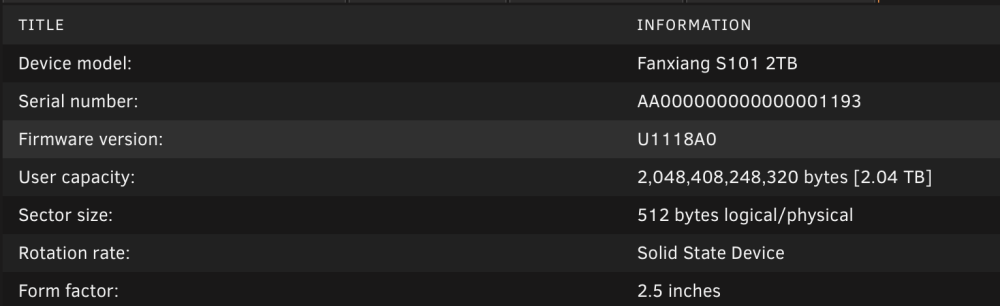
So there's no coding built it to accommodate this scenario... One must buy ALL disks at the same time as there's no real way to avoid this as no shop tells you its 2.04TB they just sell as 2TB SSD. Ok so say I wipe this pool and we take a scenario of building a new Zpool1 using the following drives: 2,000,398,934,016 bytes [2.00 TB] 2,048,408,248,320 bytes [2.04 TB] 2,000,398,934,016 bytes [2.00 TB] 2,048,408,248,320 bytes [2.04 TB] Will it work?
-
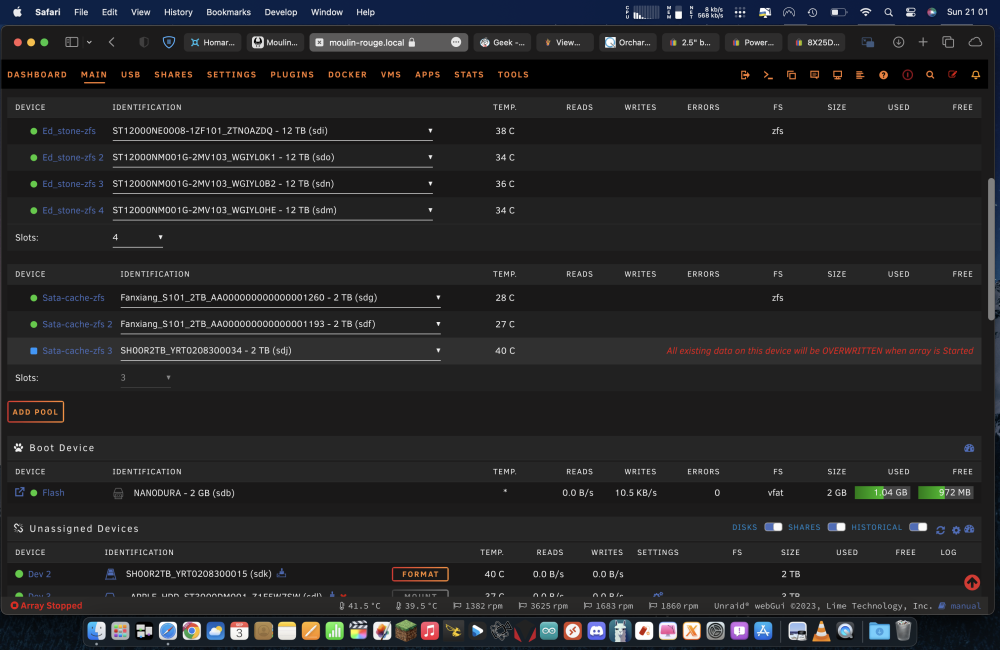
ZFS Pool of 2x drives in a mirror: Sata.cach.zfs - ZFS Mirror - 2.04 TB (Fanxiang) Sata.cach.zfs - ZFS Mirror - 2.04 TB (Fanxiang) The usage is maybe half. so around 1TB. Wanted to experiment with adding a single drive at a time to a ZFS pool. This is listed as a feature of 6.12.. New drive is sold as a 2TB drive but is slightly different size as per screenshots in previous post.. Maybe I can't do what I want to do anyway so have to backup the drives then create a new pool with 4x drives to start with and then make it a zraid1. I still anticipate unraid erroring though and saying the drives are not the same size on a new pool.. Have attached diagnostics incase useful. moulin-rouge-diagnostics-20230903-2156.zip
-
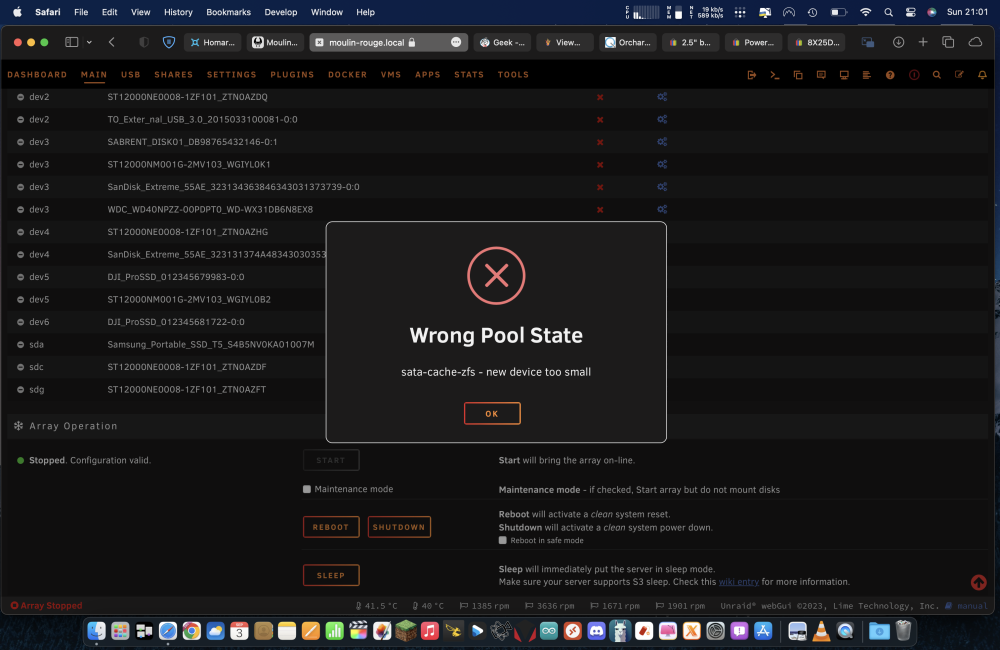
Running 6.12.4 Stop array Click edit pool change from the existing 2 to a 3 disk. then add the new drive. It says 'error drive too small'
-
Bought 2x 2TB drives off amazon to expand my ZFS SSD cache pool. However it won't accept the new ones as they are almost exactly 2TB where as on close inspection the older SSD's are actually 2.04TB... What do I do? Can I not just tell the system to ignore the 48GB?
-
How does parity checks work with ZFS pools? I noticed the other day after a forced shutdown the party check was only the main drives not the ZFS pools.. one of my ZFS pools is 4drives in raid z1. Does it just happen live by the nature of the zfs filesystem? so no need for party checks on zfs?
-
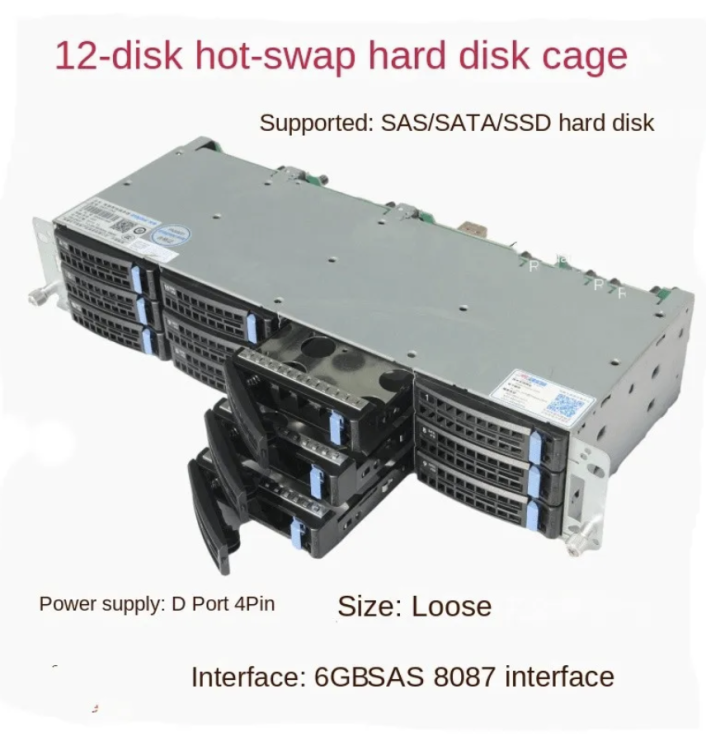
SAS 8087 cable off amazon. Check your lengths prob need at least 5cm but might need 1m depending on your build
-
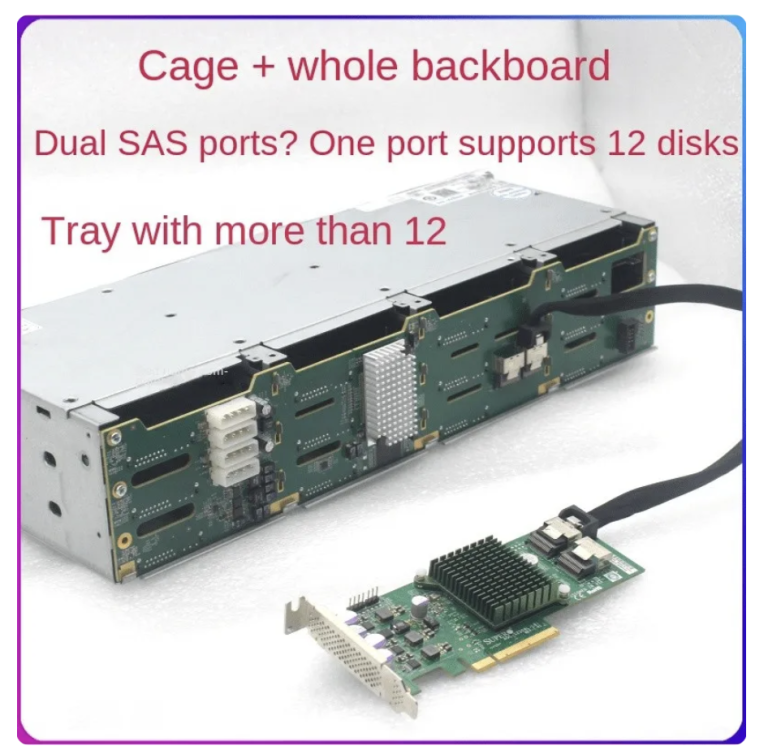
Highly recommend going down the SAS port route instead of sata cards. Once you have a SAS card you can then use SAS expanders too which are sometimes built into backplanes like this, meaning you can daisy chain them together to almost infinity: https://www.aliexpress.com/item/1005005304430974.html?spm=a2g0o.order_list.order_list_main.12.61e21802HqvwoO
-
4K DoVi (HEVC Main 10) content shows like this when doing HDR to SDR. Does anyone else get this? Hardware should be capable of transcoding easily. 11th gen igpu 11-900t I have the device added as device /dev/dri How do I tell it to use all the intel driver capabilities i.e to match the default nvidia variables. Thanks
.thumb.png.28c6b1b32f8d316331838e6c1ea2b5ad.png)
-
Had some problems with a sandisk extreme SSD usb3. Drive is exfat and used with a mac. Was using a usbc extension so that may cause an issue!? In the end I copied over network instead Jul 30 15:03:36 Moulin-rouge usb_manager: Info: rc.usb_manager Autoconnect No Mapping found SanDisk_Extreme_55AE_323134363846343031373739 /dev/bus/usb/002/005 002 005 port 2-1 Jul 30 15:03:38 Moulin-rouge unassigned.devices: Error: Device '/dev/sdl1' mount point 'Drone_Drive' - name is reserved, used in the array or a pool, or by an unassigned device. Jul 30 15:03:38 Moulin-rouge unassigned.devices: Disk with serial 'SanDisk_Extreme_55AE_323134363846343031373739-0:0', mountpoint 'Drone_Drive' cannot be mounted. Jul 30 15:03:55 Moulin-rouge smbd[9315]: [2023/07/30 15:03:55.574493, 0] ../../source3/lib/adouble.c:2363(ad_read_rsrc_adouble) Jul 30 15:03:55 Moulin-rouge smbd[9315]: ad_read_rsrc_adouble: invalid AppleDouble resource 1 TB - Drone Drive SSD - (2023)/Inspire3 tests.fcpbundle Jul 30 15:03:55 Moulin-rouge smbd[9315]: [2023/07/30 15:03:55.577146, 0] ../../source3/lib/adouble.c:2363(ad_read_rsrc_adouble) Jul 30 15:03:55 Moulin-rouge smbd[9315]: ad_read_rsrc_adouble: invalid AppleDouble resource 1 TB - Drone Drive SSD - (2023)/Inspire3 tests.fcpbundle Jul 30 15:04:08 Moulin-rouge mount.exfat: failed to read cluster 0xe0008 Jul 30 15:04:08 Moulin-rouge mount.exfat: failed to open directory '/$RECYCLE.BIN' Jul 30 15:04:08 Moulin-rouge mount.exfat: failed to read cluster 0x7 Jul 30 15:04:08 Moulin-rouge mount.exfat: failed to open directory '/.Spotlight-V100' Jul 30 15:04:08 Moulin-rouge mount.exfat: failed to read cluster 0x3265d Jul 30 15:04:08 Moulin-rouge mount.exfat: failed to open directory '/.Trashes' Jul 30 15:04:08 Moulin-rouge kernel: buffer_io_error: 4 callbacks suppressed Jul 30 15:04:08 Moulin-rouge kernel: Buffer I/O error on dev sdk1, logical block 234883840, async page read Jul 30 15:04:08 Moulin-rouge kernel: Buffer I/O error on dev sdk1, logical block 2560, async page read Jul 30 15:04:08 Moulin-rouge kernel: Buffer I/O error on dev sdk1, logical block 52846592, async page read Jul 30 15:04:08 Moulin-rouge kernel: Buffer I/O error on dev sdk1, logical block 6656, async page read Jul 30 15:04:08 Moulin-rouge mount.exfat: failed to read cluster 0x17 Jul 30 15:04:08 Moulin-rouge mount.exfat: failed to open directory '/.fseventsd' Jul 30 15:04:08 Moulin-rouge mount.exfat: failed to read cluster 0x3ba69 Jul 30 15:04:08 Moulin-rouge mount.exfat: failed to open directory '/Final Cut Original Media' Jul 30 15:04:08 Moulin-rouge mount.exfat: failed to read cluster 0x482b Jul 30 15:04:08 Moulin-rouge mount.exfat: failed to open directory '/Inspire3 tests.fcpbundle' Jul 30 15:04:08 Moulin-rouge mount.exfat: failed to read cluster 0x4d Jul 30 15:04:08 Moulin-rouge mount.exfat: failed to open directory '/Photos - Sony rx100' Jul 30 15:04:08 Moulin-rouge mount.exfat: failed to read cluster 0x92e8 Jul 30 15:04:08 Moulin-rouge mount.exfat: failed to open directory '/Snow' Jul 30 15:04:08 Moulin-rouge mount.exfat: failed to read cluster 0xe0002 Jul 30 15:04:08 Moulin-rouge mount.exfat: failed to open directory '/System Volume Information' Jul 30 15:04:08 Moulin-rouge mount.exfat: failed to read cluster 0x2c424 Jul 30 15:04:08 Moulin-rouge mount.exfat: failed to open directory '/ Sabrent backup' Jul 30 15:04:08 Moulin-rouge mount.exfat: failed to read cluster 0x1b483 Jul 30 15:04:08 Moulin-rouge mount.exfat: failed to open directory '/ Doc Martin Drone 300522 ' Jul 30 15:04:08 Moulin-rouge kernel: Buffer I/O error on dev sdk1, logical block 62548992, async page read Jul 30 15:04:08 Moulin-rouge mount.exfat: failed to read cluster 0x7a07 Jul 30 15:04:08 Moulin-rouge kernel: Buffer I/O error on dev sdk1, logical block 4730368, async page read Jul 30 15:04:08 Moulin-rouge kernel: Buffer I/O error on dev sdk1, logical block 20480, async page read Jul 30 15:04:08 Moulin-rouge kernel: Buffer I/O error on dev sdk1, logical block 9628416, async page read Jul 30 15:04:08 Moulin-rouge kernel: Buffer I/O error on dev sdk1, logical block 234882304, async page read Jul 30 15:04:08 Moulin-rouge kernel: Buffer I/O error on dev sdk1, logical block 46409472, async page read Jul 30 15:04:08 Moulin-rouge mount.exfat: failed to read cluster 0x7a07 Jul 30 15:05:07 Moulin-rouge kernel: buffer_io_error: 3 callbacks suppressed Jul 30 15:05:07 Moulin-rouge kernel: Buffer I/O error on dev sdk1, logical block 62548992, async page read Jul 30 15:05:07 Moulin-rouge mount.exfat: failed to read cluster 0x3ba69 Jul 30 15:05:07 Moulin-rouge mount.exfat: failed to open directory '/Final Cut Original Media' Jul 30 15:05:07 Moulin-rouge mount.exfat: failed to read cluster 0x482b Jul 30 15:05:07 Moulin-rouge mount.exfat: failed to open directory '/Inspire3 tests.fcpbundle' Jul 30 15:05:07 Moulin-rouge mount.exfat: failed to read cluster 0x4d Jul 30 15:05:07 Moulin-rouge mount.exfat: failed to open directory '/Photos - Sony rx100' Jul 30 15:05:07 Moulin-rouge mount.exfat: failed to read cluster 0x92e8 Jul 30 15:05:07 Moulin-rouge mount.exfat: failed to open directory '/Snow' Jul 30 15:05:07 Moulin-rouge mount.exfat: failed to read cluster 0x2c424 Jul 30 15:05:07 Moulin-rouge mount.exfat: failed to open directory '/ Sabrent backup' Jul 30 15:05:07 Moulin-rouge mount.exfat: failed to read cluster 0x1b483 Jul 30 15:05:07 Moulin-rouge mount.exfat: failed to open directory '/ Doc Martin Drone 300522 ' Jul 30 15:05:07 Moulin-rouge mount.exfat: failed to read cluster 0x7a07 Jul 30 15:05:07 Moulin-rouge kernel: Buffer I/O error on dev sdk1, logical block 4730368, async page read Jul 30 15:05:07 Moulin-rouge kernel: Buffer I/O error on dev sdk1, logical block 20480, async page read Jul 30 15:05:07 Moulin-rouge kernel: Buffer I/O error on dev sdk1, logical block 9628416, async page read Jul 30 15:05:07 Moulin-rouge kernel: Buffer I/O error on dev sdk1, logical block 46409472, async page read Jul 30 15:05:07 Moulin-rouge kernel: Buffer I/O error on dev sdk1, logical block 28608000, async page read Jul 30 15:05:07 Moulin-rouge kernel: Buffer I/O error on dev sdk1, logical block 7997952, async page read Jul 30 15:05:07 Moulin-rouge mount.exfat: failed to read cluster 0x7a07 Jul 30 15:05:07 Moulin-rouge kernel: Buffer I/O error on dev sdk1, logical block 7997952, async page read Jul 30 15:05:23 Moulin-rouge emhttpd: read SMART /dev/sdl Jul 30 15:07:01 Moulin-rouge mount.exfat: failed to read cluster 0x7 Jul 30 15:07:01 Moulin-rouge mount.exfat: failed to open directory '/.Spotlight-V100' Jul 30 15:07:01 Moulin-rouge mount.exfat: failed to read cluster 0x7 Jul 30 15:07:01 Moulin-rouge mount.exfat: failed to open directory '/.Spotlight-V100' Jul 30 15:07:01 Moulin-rouge mount.exfat: failed to read cluster 0x17 Jul 30 15:07:01 Moulin-rouge mount.exfat: failed to open directory '/.fseventsd' Jul 30 15:07:01 Moulin-rouge mount.exfat: failed to read cluster 0x17 Jul 30 15:07:01 Moulin-rouge mount.exfat: failed to open directory '/.fseventsd' Jul 30 15:07:01 Moulin-rouge mount.exfat: failed to read cluster 0x4d Jul 30 15:07:01 Moulin-rouge mount.exfat: failed to open directory '/Photos - Sony rx100' Jul 30 15:07:01 Moulin-rouge mount.exfat: failed to read cluster 0x4d Jul 30 15:07:01 Moulin-rouge mount.exfat: failed to open directory '/Photos - Sony rx100' Jul 30 15:07:01 Moulin-rouge mount.exfat: failed to read cluster 0xe0002 Jul 30 15:07:01 Moulin-rouge mount.exfat: failed to open directory '/System Volume Information' Jul 30 15:07:01 Moulin-rouge mount.exfat: failed to read cluster 0xe0002 Jul 30 15:07:01 Moulin-rouge mount.exfat: failed to open directory '/System Volume Information' Jul 30 15:07:01 Moulin-rouge mount.exfat: failed to read cluster 0x2c424 Jul 30 15:07:01 Moulin-rouge mount.exfat: failed to open directory '/ Sabrent backup' Jul 30 15:07:01 Moulin-rouge mount.exfat: failed to read cluster 0x2c424 Jul 30 15:07:01 Moulin-rouge mount.exfat: failed to open directory '/ Sabrent backup' Jul 30 15:07:01 Moulin-rouge mount.exfat: failed to read cluster 0xe0008 Jul 30 15:07:01 Moulin-rouge mount.exfat: failed to open directory '/$RECYCLE.BIN' Jul 30 15:07:01 Moulin-rouge mount.exfat: failed to read cluster 0xe0008 Jul 30 15:07:01 Moulin-rouge mount.exfat: failed to open directory '/$RECYCLE.BIN' Jul 30 15:07:01 Moulin-rouge mount.exfat: failed to read cluster 0x92e8 Jul 30 15:07:01 Moulin-rouge mount.exfat: failed to open directory '/Snow' Jul 30 15:07:01 Moulin-rouge mount.exfat: failed to read cluster 0x92e8 Jul 30 15:07:01 Moulin-rouge mount.exfat: failed to open directory '/Snow' Jul 30 15:07:01 Moulin-rouge mount.exfat: failed to read cluster 0x482b Jul 30 15:07:01 Moulin-rouge mount.exfat: failed to open directory '/Inspire3 tests.fcpbundle' Jul 30 15:07:01 Moulin-rouge mount.exfat: failed to read cluster 0x482b Jul 30 15:07:01 Moulin-rouge mount.exfat: failed to open directory '/Inspire3 tests.fcpbundle' Jul 30 15:07:01 Moulin-rouge mount.exfat: failed to read cluster 0x3ba69 Jul 30 15:07:01 Moulin-rouge mount.exfat: failed to open directory '/Final Cut Original Media' Jul 30 15:07:01 Moulin-rouge kernel: Buffer I/O error on dev sdk1, logical block 2560, async page read Jul 30 15:07:01 Moulin-rouge kernel: Buffer I/O error on dev sdk1, logical block 2560, async page read Jul 30 15:07:01 Moulin-rouge kernel: Buffer I/O error on dev sdk1, logical block 6656, async page read Jul 30 15:07:01 Moulin-rouge kernel: Buffer I/O error on dev sdk1, logical block 6656, async page read Jul 30 15:07:01 Moulin-rouge kernel: Buffer I/O error on dev sdk1, logical block 20480, async page read Jul 30 15:07:01 Moulin-rouge kernel: Buffer I/O error on dev sdk1, logical block 20480, async page read Jul 30 15:07:01 Moulin-rouge kernel: Buffer I/O error on dev sdk1, logical block 234882304, async page read Jul 30 15:07:01 Moulin-rouge kernel: Buffer I/O error on dev sdk1, logical block 234882304, async page read Jul 30 15:07:01 Moulin-rouge kernel: Buffer I/O error on dev sdk1, logical block 46409472, async page read Jul 30 15:07:01 Moulin-rouge kernel: Buffer I/O error on dev sdk1, logical block 46409472, async page read Jul 30 15:07:01 Moulin-rouge mount.exfat: failed to read cluster 0x3ba69 Jul 30 15:07:01 Moulin-rouge mount.exfat: failed to open directory '/Final Cut Original Media' Jul 30 15:07:01 Moulin-rouge mount.exfat: failed to read cluster 0x3265d Jul 30 15:07:01 Moulin-rouge mount.exfat: failed to open directory '/.Trashes' Jul 30 15:07:01 Moulin-rouge mount.exfat: failed to read cluster 0x3265d Jul 30 15:07:01 Moulin-rouge mount.exfat: failed to open directory '/.Trashes' Jul 30 15:07:01 Moulin-rouge mount.exfat: failed to read cluster 0x1b483 Jul 30 15:07:01 Moulin-rouge mount.exfat: failed to open directory '/ Doc Martin Drone 300522 ' Jul 30 15:07:01 Moulin-rouge mount.exfat: failed to read cluster 0x1b483 Jul 30 15:07:01 Moulin-rouge mount.exfat: failed to open directory '/ Doc Martin Drone 300522 ' Jul 30 15:07:01 Moulin-rouge mount.exfat: failed to read cluster 0x7 Jul 30 15:07:01 Moulin-rouge mount.exfat: failed to open directory '/.Spotlight-V100' Jul 30 15:07:01 Moulin-rouge mount.exfat: failed to read cluster 0x7 Jul 30 15:07:01 Moulin-rouge mount.exfat: failed to open directory '/.Spotlight-V100' Jul 30 15:07:01 Moulin-rouge mount.exfat: failed to read cluster 0x17 Jul 30 15:07:01 Moulin-rouge mount.exfat: failed to open directory '/.fseventsd' Jul 30 15:07:01 Moulin-rouge mount.exfat: failed to read cluster 0x17 Jul 30 15:07:01 Moulin-rouge mount.exfat: failed to open directory '/.fseventsd' Jul 30 15:07:01 Moulin-rouge mount.exfat: failed to read cluster 0x4d Jul 30 15:07:01 Moulin-rouge mount.exfat: failed to open directory '/Photos - Sony rx100' Jul 30 15:07:01 Moulin-rouge mount.exfat: failed to read cluster 0x4d Jul 30 15:07:01 Moulin-rouge mount.exfat: failed to open directory '/Photos - Sony rx100' Jul 30 15:07:01 Moulin-rouge mount.exfat: failed to read cluster 0xe0002 Jul 30 15:07:01 Moulin-rouge mount.exfat: failed to open directory '/System Volume Information' Jul 30 15:07:01 Moulin-rouge mount.exfat: failed to read cluster 0xe0002 Jul 30 15:07:01 Moulin-rouge mount.exfat: failed to open directory '/System Volume Information' Jul 30 15:07:01 Moulin-rouge mount.exfat: failed to read cluster 0x2c424 Jul 30 15:07:01 Moulin-rouge mount.exfat: failed to open directory '/ Sabrent backup' Jul 30 15:07:01 Moulin-rouge mount.exfat: failed to read cluster 0x2c424 Jul 30 15:07:01 Moulin-rouge mount.exfat: failed to open directory '/ Sabrent backup' Jul 30 15:07:01 Moulin-rouge mount.exfat: failed to read cluster 0xe0008 Jul 30 15:07:01 Moulin-rouge mount.exfat: failed to open directory '/$RECYCLE.BIN' Jul 30 15:07:01 Moulin-rouge mount.exfat: failed to read cluster 0xe0008 Jul 30 15:07:01 Moulin-rouge mount.exfat: failed to open directory '/$RECYCLE.BIN' Jul 30 15:07:01 Moulin-rouge mount.exfat: failed to read cluster 0x92e8 Jul 30 15:07:01 Moulin-rouge mount.exfat: failed to open directory '/Snow' Jul 30 15:07:01 Moulin-rouge mount.exfat: failed to read cluster 0x92e8 Jul 30 15:07:01 Moulin-rouge mount.exfat: failed to open directory '/Snow' Jul 30 15:07:01 Moulin-rouge mount.exfat: failed to read cluster 0x482b Jul 30 15:07:01 Moulin-rouge mount.exfat: failed to open directory '/Inspire3 tests.fcpbundle' Jul 30 15:07:01 Moulin-rouge mount.exfat: failed to read cluster 0x482b Jul 30 15:07:01 Moulin-rouge mount.exfat: failed to open directory '/Inspire3 tests.fcpbundle' Jul 30 15:07:01 Moulin-rouge mount.exfat: failed to read cluster 0x7a07 Jul 30 15:07:07 Moulin-rouge mount.exfat: failed to read cluster 0x7a07 Jul 30 15:07:07 Moulin-rouge kernel: buffer_io_error: 29 callbacks suppressed Jul 30 15:07:07 Moulin-rouge kernel: Buffer I/O error on dev sdk1, logical block 7997952, async page read Jul 30 15:07:07 Moulin-rouge kernel: Buffer I/O error on dev sdk1, logical block 7997952, async page read
-
Ok think I fixed it. Went to / plex media server / codecs Then deleted the easy audio folder. Then force updated the container. Same video is now 12% cpu instead of 100%
-
Just thought I would update back with my finding for the 'not spinning down array drives'. It was actually caused by the contain 'dash dot' which is a nice dashboard and can be integrated by iframe into homarr. Anyway if you edit it and remove the 'privileged' setting it stops the drives from constantly spinning and allows sleep.
-
Anyone else getting audio transcode errors? [Req#1324d/Transcode/c84211b1-37ac-49d3-917a-254e66ffe394/3ca30f37-f27d-419c-a1ca-a63a7544890a] [eac3_eae @ 0x14a8a494cdc0] EAE timeout! EAE not running, or wrong folder? Could not read '/config/transcode/pms-67d2ab01-5872-4d76-bf65-b0675a05e8a0/EasyAudioEncoder/Convert to WAV (to 8ch or less)/c84211b1-37ac-49d3-917a-254e66ffe394_485-0-324.wav'
-
Anyone got a wyze camera? I've picked up a few and am trying to get them working but I need to change something in the config. I have rtsp working via a 'wyze docker bridge' but I think maybe it need some slightly different camera settings to my other wansview cameras. Any ideas? the wyze camera is the bottom 'garden' camera mqtt: enabled: false host: 192.168.22.212 port: 1883 # Optional: topic prefix (default: shown below) # WARNING: must be unique if you are running multiple instances topic_prefix: frigate # Optional: client id (default: shown below) # WARNING: must be unique if you are running multiple instances client_id: frigate # Optional: user user: homeassistant # Optional: password # NOTE: Environment variables that begin with 'FRIGATE_' may be referenced in {}. # eg. password: '{FRIGATE_MQTT_PASSWORD}' password: x # Optional: interval in seconds for publishing stats (default: shown below) stats_interval: 60 go2rtc: streams: barn_inside: - rtsp://pSrUq7TZ:[email protected]:554/live/ch0 house_front_door: - rtsp://EWLHSHKY:[email protected]:554/live/ch0 barn: - rtsp://MPG7QbYQ:[email protected]:554/live/ch0 ffmpeg: output_args: record: preset-record-generic-audio-aac hwaccel_args: - -hwaccel - qsv - -qsv_device - /dev/dri/renderD128 - -hwaccel_output_format - yuv420p detectors: coral: type: edgetpu device: usb cameras: house_front_door: # cam name snapshots: enabled: true ffmpeg: output_args: record: preset-record-generic-audio-aac hwaccel_args: preset-intel-qsv-h264 inputs: - path: rtsp://EWLHSHKY:[email protected]:554/live/ch1 # SD Link input_args: preset-rtsp-generic roles: - detect - path: rtsp://192.168.22.2:8554/house_front_door?mp4 # HD Link input_args: preset-rtsp-restream roles: - record detect: width: 768 height: 432 fps: 15 stationary: interval: 0 threshold: 40 motion: mask: - 768,432,735,322,655,310,605,308,579,269,548,218,414,233,368,337,257,432 - 141,330,201,432,0,432,0,335,0,282,0,170,55,123,121,195,114,282 - 496,0,528,71,460,107,387,122,332,87,294,47,335,0 objects: track: - person - car - dog - cat - bird - bicycle - motorcycle - cell phone - backpack - suitcase - horse - skateboard - pizza filters: car: threshold: 0.7 min_area: 2000 max_area: 100000 person: threshold: 0.8 min_area: 2000 max_area: 100000 record: enabled: True retain: days: 7 mode: motion events: retain: default: 14 mode: active_objects barn_inside: # cam name snapshots: enabled: true ffmpeg: output_args: record: preset-record-generic-audio-aac hwaccel_args: preset-intel-qsv-h264 inputs: - path: rtsp://pSrUq7TZ:[email protected]:554/live/ch1 # SD Link input_args: preset-rtsp-generic roles: - detect - path: rtsp://192.168.22.2:8554/barn_inside?mp4 # HD Link input_args: preset-rtsp-restream roles: - record detect: width: 768 height: 432 fps: 15 stationary: interval: 0 threshold: 50 objects: track: - person - cat - bird - cell phone - backpack - suitcase - wine glass # masked - cup # masked - plate # masked - fork # masked - knife # masked - spoon # masked - bowl # masked - banana - apple - sandwich filters: # masks sink wine glass: mask: - 768,432,517,432,492,54,634,46 cup: mask: - 768,432,517,432,492,54,634,46 plate: mask: - 768,432,517,432,492,54,634,46 fork: mask: - 768,432,517,432,492,54,634,46 knife: mask: - 768,432,517,432,492,54,634,46 spoon: mask: - 768,432,517,432,492,54,634,46 bowl: mask: - 768,432,517,432,492,54,634,46 record: enabled: True retain: days: 7 mode: motion events: retain: default: 14 mode: active_objects barn: # cam name snapshots: enabled: true ffmpeg: output_args: record: preset-record-generic-audio-aac hwaccel_args: preset-intel-qsv-h264 inputs: - path: rtsp://MPG7QbYQ:[email protected]:554/live/ch1 # SD Link input_args: preset-rtsp-generic roles: - detect - path: rtsp://192.168.22.2:8554/barn?mp4 # HD Link input_args: preset-rtsp-restream roles: - record detect: width: 768 height: 432 fps: 15 stationary: interval: 0 threshold: 50 objects: track: - person - cat - bird - cell phone - backpack - suitcase - wine glass # masked - cup # masked - plate # masked - fork # masked - knife # masked - spoon # masked - bowl # masked - banana - apple - sandwich record: enabled: True retain: days: 7 mode: motion events: retain: default: 14 mode: active_objects garden: # cam name snapshots: enabled: true ffmpeg: input_args: - -avoid_negative_ts - make_zero inputs: - path: rtsp://192.168.22.3:8554/wyze-cam-pan-v3 # SD Link input_args: preset-rtsp roles: - detect - path: rtsp://192.168.22.3:8554/wyze-cam-pan-v3 # HD Link input_args: preset-rtsp roles: - record detect: width: 1920 height: 1088 fps: 20 stationary: interval: 0 threshold: 50 objects: track: - person - cat - bird - cell phone - backpack - suitcase - wine glass # masked - cup # masked - plate # masked - fork # masked - knife # masked - spoon # masked - bowl # masked - banana - apple - sandwich record: enabled: True retain: days: 7 mode: motion events: retain: default: 14 mode: active_objects
-
All my motherboards by default have come with the setting of L0 for PCIE ASPM (pcie power management) Anyway boot into bios then pcie options or similar and it should be there. Usually you have individual choices for about x8 pcie options. Set them to L1 and hit save and reboot. Then also make sure your unraid go file has the pcie setting: # Runtime PM for PCI devices echo auto | tee /sys/bus/pci/devices/????:??:??.?/power/control Here's is my full go file as an example. #!/bin/bash # Start the Management Utility /usr/local/sbin/emhttp & # ------------------------------------------------- # Console Alias # ------------------------------------------------- # show cpu core frequencies echo "alias cpu=\"watch -n3 \\\"cpufreq-info | grep 'current CPU'\\\"\"">>/etc/profile # ------------------------------------------------- # powertop tweaks # ------------------------------------------------- # Enable SATA link power management echo med_power_with_dipm | tee /sys/class/scsi_host/host*/link_power_management_policy # Runtime PM for I2C Adapter (i915 gmbus dpb) echo auto | tee /sys/bus/i2c/devices/i2c-*/device/power/control # Autosuspend for USB device echo auto | tee /sys/bus/usb/devices/*/power/control # Runtime PM for disk echo auto | tee /sys/block/sd*/device/power/control # Runtime PM for PCI devices echo auto | tee /sys/bus/pci/devices/????:??:??.?/power/control # Runtime PM for ATA devices echo auto | tee /sys/bus/pci/devices/????:??:??.?/ata*/power/control # ------------------------------------------------ # Force Nvidia GPU idle # ------------------------------------------------ # nvidia-smi --persistence-mode=1 nvidia-persistenced # fuser -v /dev/nvidia* # ------------------------------------------------ # Force Wake On Lan # ------------------------------------------------ ethtool -s eth0 wol g ethtool -s eth1 wol g # ------------------------------------------------- # Enable power-efficient ethernet # ------------------------------------------------- # enable IEEE 802.3az (Energy Efficient Ethernet): Could be incompatible to LACP bonds! for i in /sys/class/net/eth?; do dev=$(basename $i); [[ $(echo $(ethtool --show-eee $dev 2> /dev/null) | grep -c "Supported EEE link modes: 1") -eq 1 ]] && ethtool --set-eee $dev eee on; done
-
Does your motherboard support ASPM? you want to set to L 1 for max power saving on pcie. L0 – All PCI Express transactions and other operations are enabled. L0s – A low resume latency, energy saving “standby” state. L1 – Higher latency, lower power “standby” state (optional). L0sL1 - Activate both L0s and L1 support. https://www.supermicro.com/support/faqs/faq.cfm?faq=22413#:~:text=L0 – All PCI Express transactions,standby” state (optional).
-
That config seems to block access from a mac to the unraid server.. You end up with a 'do not have permission' message This is a working config I use: server min protocol = SMB3_02 client ipc min protocol = SMB3_11 client signing = mandatory server signing = mandatory client ipc signing = mandatory client NTLMv2 auth = yes smb encrypt = required restrict anonymous = 2 null passwords = no raw NTLMv2 auth = no It works for windows 10 pcs & mac os ventura (13.4.1) My earlier speed tests were resolved by swapping the pcie lane. so now back to full speeds. Encryption on macs is handled by dedicated chip so no bottleneck anymore.
-
Problem: There is some kind of bug in this container that keeps spinning the disks up in the array in 6.12.x It's taken me a while to narrow it down to this container but it is definitely this. Solution: If you edit the container and turn 'privileged' to off it should stop the constant array spinning up.
-
How can I work out what is causing this Jul 24 13:18:46 Moulin-rouge kernel: traps: IPMI[sel][5291] general protection fault ip:7f0960731a70 sp:7f096017f7f0 error:0 in ld-musl-x86_64.so.1[7f0960720000+4c000] Jul 24 13:18:47 Moulin-rouge nginx: 2023/07/24 13:18:47 [error] 9072#9072: *1710385 open() "/usr/local/emhttp/status/format/json" failed (2: No such file or directory), client: 127.0.0.1, server: , request: "GET /status/format/json HTTP/1.1", host: "127.0.0.1" Jul 24 13:18:47 Moulin-rouge nginx: 2023/07/24 13:18:47 [error] 9072#9072: *1710386 open() "/usr/local/emhttp/status" failed (2: No such file or directory), client: 127.0.0.1, server: , request: "GET /status?full&json HTTP/1.1", host: "localhost" Jul 24 13:18:47 Moulin-rouge nginx: 2023/07/24 13:18:47 [error] 9072#9072: *1710387 open() "/usr/local/emhttp/status" failed (2: No such file or directory), client: 127.0.0.1, server: , request: "GET /status?full&json HTTP/1.1", host: "127.0.0.1" Jul 24 13:18:49 Moulin-rouge nginx: 2023/07/24 13:18:49 [error] 9072#9072: *1710399 open() "/usr/local/emhttp/server-status" failed (2: No such file or directory), client: 127.0.0.1, server: , request: "GET /server-status?auto HTTP/1.1", host: "localhost" Jul 24 13:18:49 Moulin-rouge nginx: 2023/07/24 13:18:49 [error] 9072#9072: *1710400 open() "/usr/local/emhttp/server-status" failed (2: No such file or directory), client: 127.0.0.1, server: , request: "GET /server-status?auto HTTP/1.1", host: "127.0.0.1" Jul 24 13:18:49 Moulin-rouge nginx: 2023/07/24 13:18:49 [error] 9072#9072: *1710404 open() "/usr/local/emhttp/server-status" failed (2: No such file or directory), client: 127.0.0.1, server: , request: "GET /server-status?auto HTTP/1.1", host: "localhost" Jul 24 13:18:49 Moulin-rouge nginx: 2023/07/24 13:18:49 [error] 9072#9072: *1710405 open() "/usr/local/emhttp/server-status" failed (2: No such file or directory), client: 127.0.0.1, server: , request: "GET /server-status?auto HTTP/1.1", host: "127.0.0.1" Jul 24 13:18:49 Moulin-rouge nginx: 2023/07/24 13:18:49 [error] 9072#9072: *1710406 FastCGI sent in stderr: "Primary script unknown" while reading response header from upstream, client: 127.0.0.1, server: , request: "GET /admin/api.php?auth=&version=true HTTP/1.1", upstream: "fastcgi://unix:/var/run/php5-fpm.sock:", host: "127.0.0.1" Jul 24 13:18:49 Moulin-rouge nginx: 2023/07/24 13:18:49 [error] 9072#9072: *1710408 FastCGI sent in stderr: "Primary script unknown" while reading response header from upstream, client: 127.0.0.1, server: , request: "GET /admin/api.php?auth=&version=true HTTP/1.1", upstream: "fastcgi://unix:/var/run/php5-fpm.sock:", host: "localhost" Jul 24 13:18:49 Moulin-rouge nginx: 2023/07/24 13:18:49 [error] 9072#9072: *1710410 "/usr/local/emhttp/api/index.html" is not found (2: No such file or directory), client: 127.0.0.1, server: , request: "GET /api/ HTTP/1.1", host: "127.0.0.1" Jul 24 13:18:49 Moulin-rouge nginx: 2023/07/24 13:18:49 [error] 9072#9072: *1710411 open() "/usr/local/emhttp/us" failed (2: No such file or directory), client: 127.0.0.1, server: , request: "GET /us HTTP/1.1", host: "localhost" Jul 24 13:18:49 Moulin-rouge nginx: 2023/07/24 13:18:49 [error] 9072#9072: *1710412 open() "/usr/local/emhttp/us" failed (2: No such file or directory), client: 127.0.0.1, server: , request: "GET /us HTTP/1.1", host: "127.0.0.1" Jul 24 13:18:49 Moulin-rouge nginx: 2023/07/24 13:18:49 [error] 9072#9072: *1710413 open() "/usr/local/emhttp/basic_status" failed (2: No such file or directory), client: 127.0.0.1, server: , request: "GET /basic_status HTTP/1.1", host: "127.0.0.1" Jul 24 13:18:49 Moulin-rouge nginx: 2023/07/24 13:18:49 [error] 9072#9072: *1710414 open() "/usr/local/emhttp/stub_status" failed (2: No such file or directory), client: 127.0.0.1, server: , request: "GET /stub_status HTTP/1.1", host: "localhost" Jul 24 13:18:49 Moulin-rouge nginx: 2023/07/24 13:18:49 [error] 9072#9072: *1710415 open() "/usr/local/emhttp/stub_status" failed (2: No such file or directory), client: 127.0.0.1, server: , request: "GET /stub_status HTTP/1.1", host: "127.0.0.1" Jul 24 13:18:49 Moulin-rouge nginx: 2023/07/24 13:18:49 [error] 9072#9072: *1710416 open() "/usr/local/emhttp/nginx_status" failed (2: No such file or directory), client: 127.0.0.1, server: , request: "GET /nginx_status HTTP/1.1", host: "127.0.0.1" Jul 24 13:18:49 Moulin-rouge nginx: 2023/07/24 13:18:49 [error] 9072#9072: *1710417 open() "/usr/local/emhttp/status" failed (2: No such file or directory), client: 127.0.0.1, server: , request: "GET /status HTTP/1.1", host: "127.0.0.1" moulin-rouge-diagnostics-20230724-1322.zip
-
Get error when rendering timelapse... Rendering timelapse failed Rendering of timelapse Briss fang Ender 3v2 V4.41 + leds _20230720230512 failed with return code 1 More ffmpeg version 4.1.11-0+deb10u1 Copyright (c) 2000-2023 the FFmpeg developers , built with gcc 8 (Debian 8.3.0-6) , configuration: --prefix=/usr --extra-version=0+deb10u1 --toolchain=hardened --libdir=/usr/lib/x86_64-linux-gnu --incdir=/usr/include/x86_64-linux-gnu --arch=amd64 --enable-gpl --disable-stripping --enable-avresample --disable-filter=resample --enable-avisynth --enable-gnutls --enable-ladspa --enable-libaom --enable-libass --enable-libbluray --enable-libbs2b --enable-libcaca --enable-libcdio --enable-libcodec2 --enable-libflite --enable-libfontconfig --enable-libfreetype --enable-libfribidi --enable-libgme --enable-libgsm --enable-libjack --enable-libmp3lame --enable-libmysofa --enable-libopenjpeg --enable-libopenmpt --enable-libopus --enable-libpulse --enable-librsvg --enable-librubberband --enable-libshine --enable-libsnappy --enable-libsoxr --enable-libspeex --enable-libssh --enable-libtheora --enable-libtwolame --enable-libvidstab --enable-libvorbis --enable-libvpx --enable-libwavpack --enable-libwebp --enable-libx265 --enable-libxml2 --enable-libxvid --enable-libzmq --enable-libzvbi --enable-lv2 --enable-omx --enable-openal --enable-opengl --enable-sdl2 --enable-libdc1394 --enable-libdrm --enable-libiec61883 --enable-chromaprint --enable-frei0r --enable-libx264 --enable-shared , libavutil 56. 22.100 / 56. 22.100 , libavcodec 58. 35.100 / 58. 35.100 , libavformat 58. 20.100 / 58. 20.100 , libavdevice 58. 5.100 / 58. 5.100 , libavfilter 7. 40.101 / 7. 40.101 , libavresample, 4. 0. 0 / 4. 0. 0 , libswscale 5. 3.100 / 5. 3.100 , libswresample 3. 3.100 / 3. 3.100 , libpostproc 55. 3.100 / 55. 3.100 ,[mjpeg @ 0x55af0b3a1500] MJPEG packet 0xd8 too big (435721225/435721287), corrupt data? ,[image2 @ 0x55af0b39f900] decoding for stream 0 failed ,[image2 @ 0x55af0b39f900] Could not find codec parameters for stream 0 (Video: mjpeg, none(bt470bg/unknown/unknown)): unspecified size ,Consider increasing the value for the 'analyzeduration' and 'probesize' options ,Input #0, image2, from '/octoprint/octoprint/timelapse/tmp/Briss fang Ender 3v2 V4.41 + leds _20230720230512-%d.jpg': , Duration: 00:00:00.04, start: 0.000000, bitrate: N/A , Stream #0:0: Video: mjpeg, none(bt470bg/unknown/unknown), 25 tbr, 25 tbn, 25 tbc ,Stream mapping: , Stream #0:0 -> #0:0 (mjpeg (native) -> h264 (libx264)) ,Press [q] to stop, [?] for help ,[mjpeg @ 0x55af0b3a83c0] MJPEG packet 0xd8 too big (435721225/435721287), corrupt data? ,Error while decoding stream #0:0: Invalid data found when processing input ,Cannot determine format of input stream 0:0 after EOF ,Error marking filters as finished ,Conversion failed!
-
Ok got it all working.. had to add the info from second post to settings/serial connection Then add in path to mmpeg as usr/bin/ffmpeg I'm using an esp32cam so added a restream link but will likely swap to a usb webcam. Thanks for putting this together
-
Not getting a serial connection.. can anyone advise?
-
I'm getting this error when trying to load after a repair.. 2023-07-19 21:10:55,837 DEBG 'plexmediaserver' stdout output: Error: Unable to set up server: sqlite3_statement_backend::loadOne: attempt to write a readonly database (N4soci10soci_errorE) But have run a permissions fix and now loads ok. Thanks for the script.
-
The spin up is happening with out ZFS master installed so it's something about 6.12.x I also removed any ZFS drives from the main array so now the only ZFS drives are SSD caches. and 1 of those pools spins down (standby for ssd). so it's some but to do with 6.12.x and the main array. Possibly something built into the OS? It's not something that shows up in disk activity or open files. However I do also notice that my hard drive lights are not spinning so perhaps the drives are not spun up but are showing as spun up??
-
Is anyone else's array not staying spun down? Having trouble working out exactly what's causing it other than it didn't happen in 6.11 Array is 3x XFS drives with 1 parity. The 2nd ZFS cache pool (2x SSDs) goes to 'standby sleep' fine. Culprit is not 'Plex' & not 'Disk Cache plugin'.
-
latest update causes network problem meaning no traffic gets to the unraid server. Fixed by manually removing tailscale plugin from usb stick and from networkextra.cfg this is on unraid 6.12.3





.png.84e788d4e9068c0aeed575a2f6880130.png)

