





Mainfrezzer
Members
-
Joined
-
Last visited
Everything posted by Mainfrezzer
-
Ich bin Eli auf den Sack gegangen und er hat netterweise den Bugreport auf der neuen Plattform wiedereröffnet. https://product.unraid.net/p/6-12-6-macvtap-causes-consistent-package-loss Gibt doch noch Hoffnung, diese vhost/macvtap loszuwerden um wieder den "nackten" Netzwerkadapter zu benutzen.
-
Its a weird and very rare quirk of one of the gui check scripts that can ocasionally happen when the array/pool start and it takes a tat too long while the drives are being decrypted. Nothing to worry about. Havent seen that in a couple versions, as it was spoken about in the past so interesting to know its still happening. Edit: I found it! https://forums.unraid.net/topic/195209-unraid-os-version-721-available/#findComment-1591570
-
If you care about it, then yeah it is(this is not an issue thats just limited to Unraid tho). Since its not broken, there is no need to update it^^
-
Im pretty sure its not possible, as wings uses the generated docker uuid
-
because they changed how the panel loads variables a bit 2 patches ago. if you change the address from the ip address to the app url in your template, it should work again. How running the artisan commands circumvented that in the past, no clue.
-
check the app url in the .env file if its really https https://forums.unraid.net/topic/182778-support-mainfrezzer-docker-repo/page/11/#findComment-1602875
-
Ohh Epic, well. That requires some more game parameter you need to set -PublicIPForEpic=The-Public-IP -crossplay -UseVivox in Extra Game Parameters:
-
The log shows that the server has been running for over 1 hour and 45 minutes at that point. You should see it in the LAN section ingame, usually. The online list is, not the best, to put it in the most neutral way. If you wanna make it externally available, you need to setup port forwarding for 7777/udp, 7778/udp, 27015/udp But to "quickly" find them, its easier to use the steam server browser and add them with ServerIP:27015 in that case
-
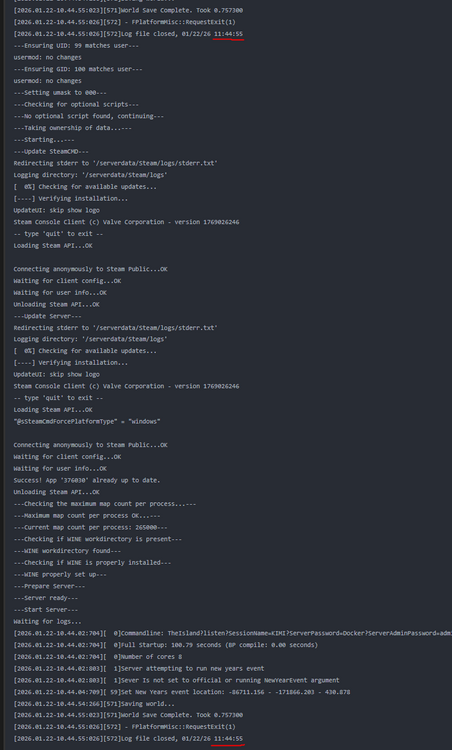
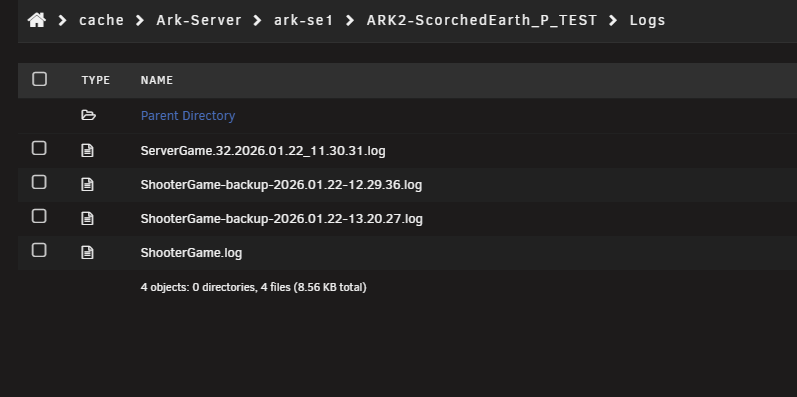
mhmm, boots up fine. But to come back to an earlier mention by you the log youre seeing upon bootup is still an old log, because ark buffers it before it flushes it to a file. As you can see at the timestamps. If you want to see the current log, you have to look at the files themselves. Theyre all timestamped, apart from the current one If you didnt close the server after 50 seconds upon first boot and there wasnt a crashstack file, i really have no clue what would have told the server to turn off.
-
Could you send me your TheIsland.ark file, which is the servers savegame, via dm or here so i can have a look if it fires up here?
-
First, why did you add any docker arguments to the game parameter? Let alone privileged. Second, the container doesnt seem to have an issue, if it crashed, you should have a .crashstack file in the log folder
-
mhmm, thats a good question There are files in there that have been changed by a bit. Im surprised to see that.
-
You really should update to a newer unraid version, also here, i compiled it for you. I have not tested it tho but it installs! The download will be valid for a week. https://clips.magnon.ovh/vUwo7/XUpILAvi10.zip filename: /lib/modules/6.1.126-Unraid/kernel/drivers/video/nvidia.ko import_ns: DMA_BUF alias: char-major-195-* version: 580.126.09 supported: external license: Dual MIT/GPL firmware: nvidia/580.126.09/gsp_tu10x.bin firmware: nvidia/580.126.09/gsp_ga10x.bin srcversion: E0E7373A37DB6AAC4C8D5BF alias: of:N*T*Cnvidia,tegra264-displayC* alias: of:N*T*Cnvidia,tegra264-display alias: of:N*T*Cnvidia,tegra234-displayC* alias: of:N*T*Cnvidia,tegra234-display alias: pci:v000010DEd*sv*sd*bc06sc80i00* alias: pci:v000010DEd*sv*sd*bc03sc02i00* alias: pci:v000010DEd*sv*sd*bc03sc00i00* depends: i2c-core,drm retpoline: Y name: nvidia vermagic: 6.1.126-Unraid SMP preempt mod_unload parm: NvSwitchRegDwords:NvSwitch regkey (charp) parm: NvSwitchBlacklist:NvSwitchBlacklist=uuid[,uuid...] (charp) parm: NVreg_ResmanDebugLevel:int parm: NVreg_RmLogonRC:int parm: NVreg_ModifyDeviceFiles:int parm: NVreg_DeviceFileUID:int parm: NVreg_DeviceFileGID:int parm: NVreg_DeviceFileMode:int parm: NVreg_InitializeSystemMemoryAllocations:int parm: NVreg_UsePageAttributeTable:int parm: NVreg_EnablePCIeGen3:int parm: NVreg_EnableMSI:int parm: NVreg_EnableStreamMemOPs:int parm: NVreg_RestrictProfilingToAdminUsers:int parm: NVreg_PreserveVideoMemoryAllocations:int parm: NVreg_EnableS0ixPowerManagement:int parm: NVreg_S0ixPowerManagementVideoMemoryThreshold:int parm: NVreg_DynamicPowerManagement:int parm: NVreg_DynamicPowerManagementVideoMemoryThreshold:int parm: NVreg_EnableGpuFirmware:int parm: NVreg_EnableGpuFirmwareLogs:int parm: NVreg_OpenRmEnableUnsupportedGpus:int parm: NVreg_EnableUserNUMAManagement:int parm: NVreg_MemoryPoolSize:int parm: NVreg_KMallocHeapMaxSize:int parm: NVreg_VMallocHeapMaxSize:int parm: NVreg_IgnoreMMIOCheck:int parm: NVreg_NvLinkDisable:int parm: NVreg_EnablePCIERelaxedOrderingMode:int parm: NVreg_RegisterPCIDriver:int parm: NVreg_RegisterPlatformDeviceDriver:int parm: NVreg_EnableResizableBar:int parm: NVreg_EnableDbgBreakpoint:int parm: NVreg_EnableNonblockingOpen:int parm: NVreg_CoherentGPUMemoryMode:charp parm: NVreg_RegistryDwords:charp parm: NVreg_RegistryDwordsPerDevice:charp parm: NVreg_RmMsg:charp parm: NVreg_GpuBlacklist:charp parm: NVreg_TemporaryFilePath:charp parm: NVreg_ExcludedGpus:charp parm: NVreg_DmaRemapPeerMmio:int parm: NVreg_RmNvlinkBandwidth:charp parm: NVreg_RmNvlinkBandwidthLinkCount:int parm: NVreg_ImexChannelCount:int parm: NVreg_CreateImexChannel0:int parm: NVreg_GrdmaPciTopoCheckOverride:int parm: rm_firmware_active:charp
-
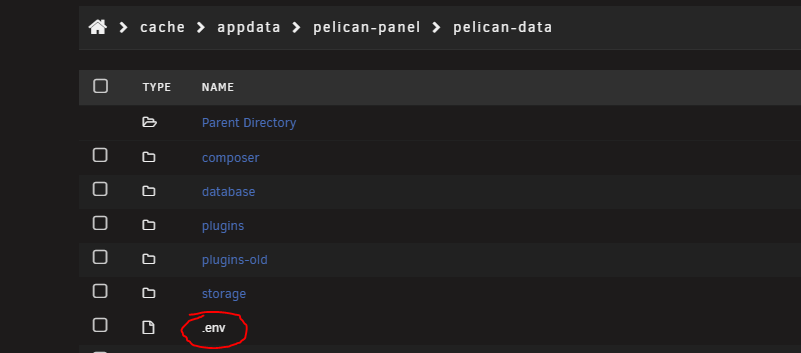
Good that you say that, i've found the issue causing that. Because the .env also contains the app_url after you setup the panel and the way i load the enviroment variables would overwrite that variable from the template. Im gonna have to think about it how im gonna handle that. But for the next time, you can edit it "here"
-
This is a big phat PSA. If you want to install plugins in the pelican panel, make a backup beforehand. Themes will most likely break your panel. The other stuff should maybe work. I only check with the generic oicd provider and the legal pages
-
Es gibt nen Plugin in Community Apps dass das auch macht. (in 2 Tagen seit genau einem Jahr) ^^
-
set the app_url to the proper protocol://domain

-
Nagel mich jetzt nicht fest, aber irgendwas muss mit den neueren Kernel geändert worden sein, also denke der Treiber ist anders. Ich glaube mit 7.2 oder irgend ner 7.1 Version hat sich das Verhalten vom Nic verändert gehabt (irgendwo ist da noch nen Bugreport von mir) Von dem her kann das ganz gut sein das die Anzeigen deswegen unterschiedlich sind. Das mit dem EEE sollte vom Switch/Router abhängig sein, ja. Z.b die Fritzbox ist da sehr selektiv mit wem die EEE betreibt, nur meinem PC (weils bei Unraid ja aus ist) Bei meinem Win-PC gehts auch nur bei 1 Gbit, bei 2,5 hat der Windows Intel Treiber auch EEE aus weils kaputt ist xD
-
ich hab keine ca treiber, hatten das vorher kurz erwähnt, deshalb ja die go file modifikation. ich benutze den aus dem Kernel (Der Grund warum ich den 8125 Treiber nicht nutze ist, der limitiert das System auf c8 aus irgend einem Grund. Mit dem r8169 Kernel Treiber gehts bis c10)
-
Sehr sehr mysteriös, das sollte sofort und schlagartig das Problem gelöst haben. (wie man hier sehen kann) EEEE.mp4 Ich würde es mal mit dem Treiber für den 8125 auf dem "Appstore" versuchen mit den Einstellungen für aspm und eee wie hier https://forums.unraid.net/topic/141349-plugin-realtek-r8125-r8126-r8168-and-r815267-drivers/page/14/#findComment-1513138.

-
Was spuckt denn "ethtool --show-eee eth0" aus beim Ausführen im Terminal?
-
Das aktiviert sich erst beim neustart. Um das > jetzt < zu aktivieren müsste mal einmal "for i in /sys/class/net/eth?; do dev=$(basename $i); [[ $(echo $(ethtool --show-eee $dev 2> /dev/null) | grep -c "Supported EEE link modes: 1") -eq 1 ]] && ethtool --set-eee $dev eee off; done" bzw, wenn es nur den NIC gibt "ethtool --set-eee eth0 eee off", via terminal ausführen und dann ASPM wieder anschließen anschalten. Wie gesagt, das schaltet den NIC kurz aus und der verliert die Verbindung fürn paar Sekündchen
-
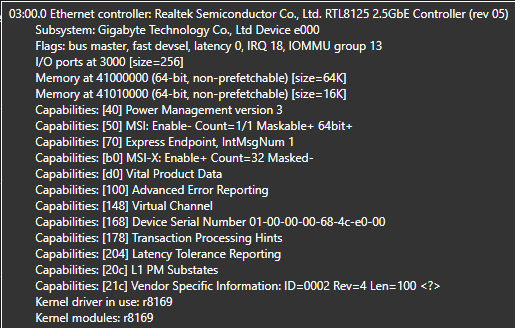
ich benutze den aspm helper jetzt nicht, deshalb wird das jetzt wahrscheinlich doppelt gemoppelt sein. Ich hab aber folgendes in der go Datei um aspm zu aktivieren und eee zu deaktivieren. # disable IEEE 802.3az (Energy Efficient Ethernet): for i in /sys/class/net/eth?; do dev=$(basename $i); [[ $(echo $(ethtool --show-eee $dev 2> /dev/null) | grep -c "Supported EEE link modes: 1") -eq 1 ]] && ethtool --set-eee $dev eee off; done sleep 10 # ASPM Realtek echo 1 | sudo tee -a /sys/bus/pci/devices/0000:03:00.0/link/l1_aspm die 3:00.0 muss selbstverständlich angepasst werden zu der Nummer am eigenen Board. 3:00.0 ist es bei mir in diesem Fall und so wie es aussieht auf den Screenshots oben, würde es 4:00.0 sein. Und das kann sich auch ändern je nach PCIe Bestückung des Boards Aber mit dem Helper kann man das eventuell weglassen. Obwohl das wahrscheinlich dazwischen funkten würde. Ich muss die Befehle in genau der Reihenfolge ausführen weil ich festgestellt hatte, dass wenn man ASPM vor dem EEE deaktivieren angeschaltet hatte, dieser durch den Link Reset wieder rückgängig gemacht wird. Deshalb hab ich auch den sleep Befehl drin, um sicher zu gehen, das Ding ist wieder "wach" ist. Da Plugins vor der go file ausgeführt werden, müsste man da nochmal hinterher rennen.
-
Der NIC hat Probleme mit dem EEE bei 2,5gbit (welches standardmäßig an ist), wird man auch sehr fündig hier im Forum zu (Im Treiber Thema für den 8125), abschalten und dann gehts auch. Hatte das auch mal bei nem Board ins Thema geschrieben gehabt, weil der Treiber schlechter ist als der in-Kernel Treiber aus irgendwelchen Gründen.
-
What happens if you visit your wings domain ? I.e. what response do you get? How is your wings unraid template looking? Given that you picked 8002, i hope you did add a new port mapping as it expects by default to be at 8080 inside the container




