





Mainfrezzer
Members
-
Joined
-
Last visited
Everything posted by Mainfrezzer
-
This is a big phat PSA. If you want to install plugins in the pelican panel, make a backup beforehand. Themes will most likely break your panel. The other stuff should maybe work. I only check with the generic oicd provider and the legal pages
-
Es gibt nen Plugin in Community Apps dass das auch macht. (in 2 Tagen seit genau einem Jahr) ^^
-
set the app_url to the proper protocol://domain

-
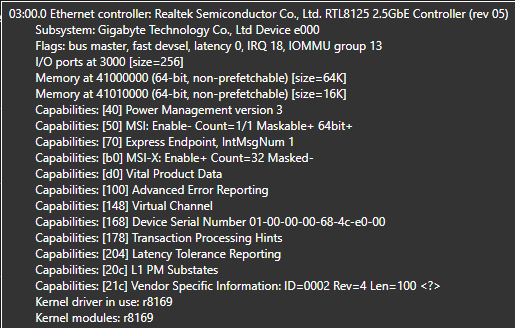
Nagel mich jetzt nicht fest, aber irgendwas muss mit den neueren Kernel geändert worden sein, also denke der Treiber ist anders. Ich glaube mit 7.2 oder irgend ner 7.1 Version hat sich das Verhalten vom Nic verändert gehabt (irgendwo ist da noch nen Bugreport von mir) Von dem her kann das ganz gut sein das die Anzeigen deswegen unterschiedlich sind. Das mit dem EEE sollte vom Switch/Router abhängig sein, ja. Z.b die Fritzbox ist da sehr selektiv mit wem die EEE betreibt, nur meinem PC (weils bei Unraid ja aus ist) Bei meinem Win-PC gehts auch nur bei 1 Gbit, bei 2,5 hat der Windows Intel Treiber auch EEE aus weils kaputt ist xD
-
ich hab keine ca treiber, hatten das vorher kurz erwähnt, deshalb ja die go file modifikation. ich benutze den aus dem Kernel (Der Grund warum ich den 8125 Treiber nicht nutze ist, der limitiert das System auf c8 aus irgend einem Grund. Mit dem r8169 Kernel Treiber gehts bis c10)
-
Sehr sehr mysteriös, das sollte sofort und schlagartig das Problem gelöst haben. (wie man hier sehen kann) EEEE.mp4 Ich würde es mal mit dem Treiber für den 8125 auf dem "Appstore" versuchen mit den Einstellungen für aspm und eee wie hier https://forums.unraid.net/topic/141349-plugin-realtek-r8125-r8126-r8168-and-r815267-drivers/page/14/#findComment-1513138.

-
Was spuckt denn "ethtool --show-eee eth0" aus beim Ausführen im Terminal?
-
Das aktiviert sich erst beim neustart. Um das > jetzt < zu aktivieren müsste mal einmal "for i in /sys/class/net/eth?; do dev=$(basename $i); [[ $(echo $(ethtool --show-eee $dev 2> /dev/null) | grep -c "Supported EEE link modes: 1") -eq 1 ]] && ethtool --set-eee $dev eee off; done" bzw, wenn es nur den NIC gibt "ethtool --set-eee eth0 eee off", via terminal ausführen und dann ASPM wieder anschließen anschalten. Wie gesagt, das schaltet den NIC kurz aus und der verliert die Verbindung fürn paar Sekündchen
-
ich benutze den aspm helper jetzt nicht, deshalb wird das jetzt wahrscheinlich doppelt gemoppelt sein. Ich hab aber folgendes in der go Datei um aspm zu aktivieren und eee zu deaktivieren. # disable IEEE 802.3az (Energy Efficient Ethernet): for i in /sys/class/net/eth?; do dev=$(basename $i); [[ $(echo $(ethtool --show-eee $dev 2> /dev/null) | grep -c "Supported EEE link modes: 1") -eq 1 ]] && ethtool --set-eee $dev eee off; done sleep 10 # ASPM Realtek echo 1 | sudo tee -a /sys/bus/pci/devices/0000:03:00.0/link/l1_aspm die 3:00.0 muss selbstverständlich angepasst werden zu der Nummer am eigenen Board. 3:00.0 ist es bei mir in diesem Fall und so wie es aussieht auf den Screenshots oben, würde es 4:00.0 sein. Und das kann sich auch ändern je nach PCIe Bestückung des Boards Aber mit dem Helper kann man das eventuell weglassen. Obwohl das wahrscheinlich dazwischen funkten würde. Ich muss die Befehle in genau der Reihenfolge ausführen weil ich festgestellt hatte, dass wenn man ASPM vor dem EEE deaktivieren angeschaltet hatte, dieser durch den Link Reset wieder rückgängig gemacht wird. Deshalb hab ich auch den sleep Befehl drin, um sicher zu gehen, das Ding ist wieder "wach" ist. Da Plugins vor der go file ausgeführt werden, müsste man da nochmal hinterher rennen.
-
Der NIC hat Probleme mit dem EEE bei 2,5gbit (welches standardmäßig an ist), wird man auch sehr fündig hier im Forum zu (Im Treiber Thema für den 8125), abschalten und dann gehts auch. Hatte das auch mal bei nem Board ins Thema geschrieben gehabt, weil der Treiber schlechter ist als der in-Kernel Treiber aus irgendwelchen Gründen.
-
What happens if you visit your wings domain ? I.e. what response do you get? How is your wings unraid template looking? Given that you picked 8002, i hope you did add a new port mapping as it expects by default to be at 8080 inside the container
-
Update your server, 66.47 doesnt contain ragnarok, ragnarok got added in version 67, and the current version is something with 70, 76 or 77
-
what nic is your windows pc using?
-
No the files are just being kept in sync. they do not increase forever or get appended or something. with or without the plugin, the max log size for each container is based on this setting So if you have an extremly spammy container, the log might be 3 hours before it rotates, if its a quiet container, you could look at weeks.
-
you need to disable EEE which is on by default with the plugin, you set something like options r8125 aspm=1 options r8125 eee_enable=0 with the kernel driver you can use the reverse command from the powertop post for i in /sys/class/net/eth?; do dev=$(basename $i); [[ $(echo $(ethtool --show-eee $dev 2> /dev/null) | grep -c "Supported EEE link modes: 1") -eq 1 ]] && ethtool --set-eee $dev eee off; done
-
its already possible, you just put it in extra parameter (toggle the advanced view)

-
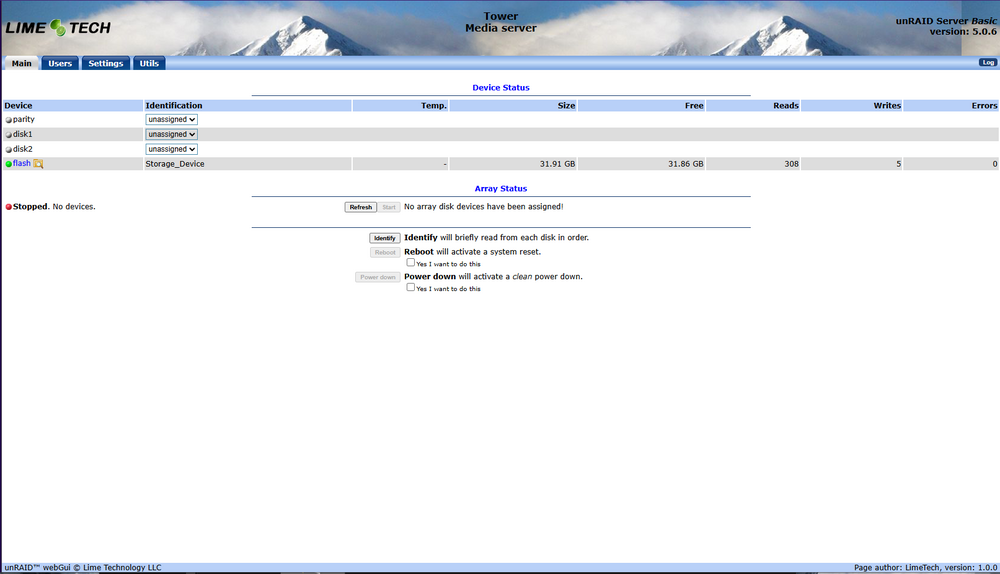
given that the titel says basic, are you sure about that? i did try to fire up 4.7 but all my old pcs are too new, 5.0.6 says basic without key

-
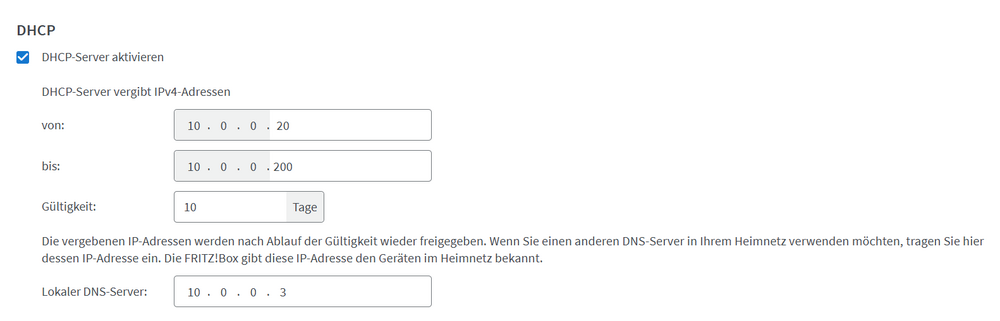
Ja, allerdings wäre es sinnvoller die IP(s) von dem Adguard via DHCP zu verteilen statt die Fritzbox das erledigen zu lassen. Sonst taucht nur die Fritzbox als Klient auf. Wenn du Keepalived benutzt, musst auch nichts an den Interneteinstellungen im Container etwas ändern, weil das eh über die Virtuelle IP läuft, nicht über die eigene von dem Container. Somit hat sich das dann erledigt. Selbst in dem Fall das man da gerne eine statische IP hätte, würde ich eher via Fritzbox einstellen, dass der Container immer die gleiche IP zugewiesen bekommt.
-
while this already got added as an option and its no longer an "problem", i do wanna add my 2 cents to it. Having the open events in the past helped me to figure out that windows defender keeps scanning the same files and causing the disks to spin up, since then i no longer mount the shares in windows by default.
-
it works for them as theyre using the build in APC UPS daemon.
-
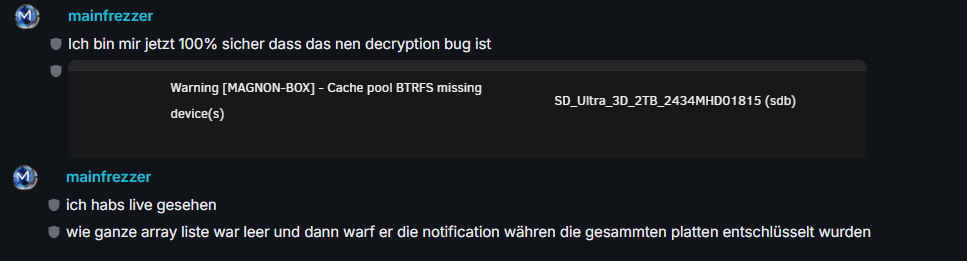
Thats been happening for ages now, at least the whole 7 version. Happens during mounting the disks and it being still busy with mounting the array or something (all my drives are encrypted so who knows if that affects the speed with it) then it pops that message without anything else having any info about it. you can ignore that. Edit: checked my char history, this is from the 9th of april. But it already happened before that Text says, im sure that its a decryption bug, i saw it live, the whole array list was empty and then popped the notification while it was still decrypting the drives.
-
Ive observes something that should certainly be brought up. Im currently putting some finishing touches on something similar to this, but with more data points and also OS agnostic. While working on the export feature, i noticed that a lot of files, which were processed by the plugins have their extended attributs not set, they all had their user.$HASH set, but the others like filedate, scandate were absent. So its basically useless for those files as there is no info about the mdate(as the export doesnt save it). It does like an issue with spacing in the filepath/name (not even special characters, but its too many files affected that i can say for sure) So you should absolutely check whatever files you have summed with it if theyre actually still good. Edit: I did a retest, because of a youtube video i saw. It seems to work at least now the biggest issue is, even the current version failed to update the files. I do gonna add a screenshot of what i discovered and this just a tiny tiny tiny bit Edit 2 This is what the getfattr should have returned

-
ark itself removes everything that is set wrong/invalid https://forums.unraid.net/topic/182778-support-mainfrezzer-docker-repo/page/10/#findComment-1574198
-
Sorry for answering a bit late. You have to enter that for/on Unraid, not inside the container console. Or was it the console of Unraid that gave you that message?
-
Yeah mainly because of that. Docker started messing with the firewall rules with version 27.1.2 i think (it was 27.0.3) and finally fixed that with 28.0.1. Ich777 wrote a fix for it, but there are cases where it doesnt work, as you can see the 7.0.0 issue. Since then it was just for features, like declaring gateways which they added which is not that big. But that messing with the firewall was absolutely infuriating. Regadless, given 28.5.2 addresses some breakout vurnabilities, thats certainly one main concern.





