





Mainfrezzer
Members
-
Joined
-
Last visited
Everything posted by Mainfrezzer
-
I dont want to blame anyone but docker for that and i did give them shit for that on github when it occured, cause 7 year prior to it, they fumbled the exact same thing the exact same way and learned nothing. I do hope that this solution is an update to docker to solve the underlying root cause (and the breakout cve's) which was introduced with the jump to 27.5.1 and not another temporary solution that becomes permanent. Its a bit baffling that ive to compile my own docker engines for unraid and distribute them when its simply solved with an update to it.
-
Just found https://forums.unraid.net/bug-reports/stable-releases/720-ipv6-networking-to-vms-no-longer-functional-r4136/ I do wanna mention, while i havent poked into it directly, i do believe that this is to 99% caused by docker and that we still havent gotten any update to a release in the 28 series (https://docs.docker.com/engine/release-notes/28/#port-publishing-in-bridge-networks), which finally fixes their shenanigans is amusing To especially note, 28.5.2, which has come out on the 5th has 3 CVE fixes Edit: Theres also still this report open https://forums.unraid.net/bug-reports/stable-releases/700-vms-no-longer-receive-an-ipv6-address-since-upgrade-to-v700-r3620/#findComment-36030 which is also caused by docker
-
You have to go to settings and change something about the screen width to fix it. Panel layout overflowing onto navigation side bar, this is due to using Screen for the display width, change it in the panel settings to fix it.,
-
Ich möchte kurz etwas erweitern dabei. Der Nic hat ja bekannterweise ein paar Problemchen mit 2,5 Gbit und so wie ich im Forum lesen konnte haben die meisten das Treiber Plugin mit Optionen am laufen. Hab den NIC oben ja schon die ganze Zeit so mit ASPM laufen, mit dem Kerneltreiber, allerdings macht ja EEE Probleme und dies scheint kernelseitig aktiv zu sein. Das kann man ja bequem via go-file ausschalten und lustigerweise erreicht das board dann sogar c10 statt c8.
-
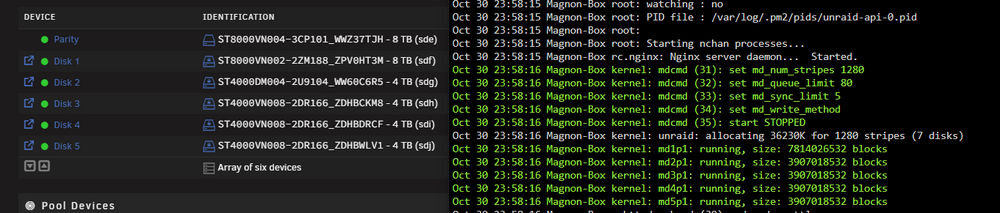
Quick question, since i noticed it only by chance now, does this message "1280 stripes (7 disks)" include the not-assigned 2nd parity disk? Otherwise it seems like the math doesnt math
-
We do know that theyre sleeping together these days but im certain an intel igpu does not use the nvidia plugin :D
-
/mnt/user is all array disks + pools. /mnt/user0/ (although depricated) is just the array disks, no pools
-
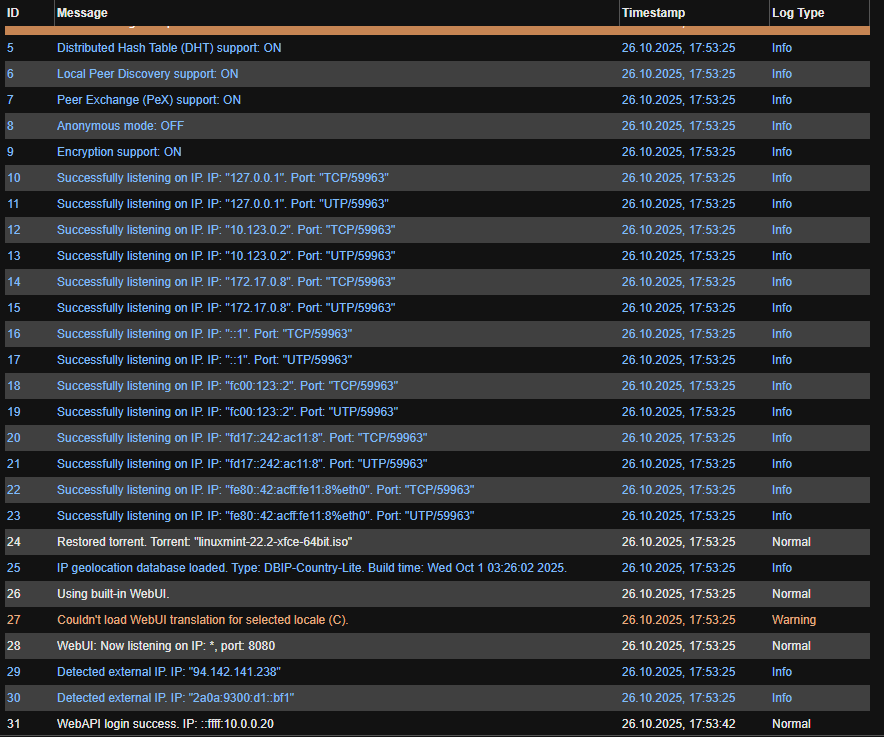
You might have to set the variable in the qBittorrent template for the incoming port Torrenting isnt my strong expertise but it should work absolutely fine from the logs as its binding properly to the wireguard interface ip (10.123.0.2 and fc00:123::2), as long as your provider does forward it to your client.

-
they share the same "interface", every port that you map to the wireguard container goes also to the qbittorent container. So if you run something on 5023/tcp, you map that to the wireguard client and it will reach the attached qbittorrent container, same with 38282/udp for example, for lan that is. Same for the vpn connection, everything that hits the wireguard ip of the container, hits qbittorrent aswell, if its listening on that port, no template modification needed
-
dont nail me down on it, should be unraid 7. Although the old header should work fine if applied to the md*p1 devices, but im not absolutely sure on that. Doesnt hurt to create a new backup just to have it Edit: should mention that this is only for array devices, the pools are still the "old way"
-
wrong devices, you backup the md*p1 devices
-
i see why, 8080 is "blocked/already used" by privoxy and the gui runs on 8080. You can change the privoxy port by changing this variable Edit: if you get the "unauthorized" message in the browser, add WebUI\HostHeaderValidation=false to the qBittorrent.conf under [Preferences]

-
Theres no such thing for sata, the nvme drive "reports" it itself
-
Which container is it, where the gui isnt working?
-
did you add the ip range of your lan/the network youre trying to access the container gui from, to the template of the wireguard container?
-
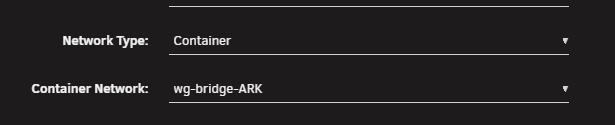
Depends what you want to do. If you want other container to go through the VPN, you just select their network to be the vpn container like this the privoxy http proxy and mircosocks socks5 proxy are more for like things hosted outside of unraid. Smarttube on a firetv stick (i dont know if libretube supports proxy) or just a seperate firefox browser that goes through there on your pc.
-
Yeah, the build in wireguard implementation doesnt support ipv6 at all atm. I still havent come around to attempt to fix it but if you need ipv6, ive a container in CA you can use for it.
-
Ive seen the post in discord just gonna ask here again what i asked over there. Are you absolutely sure that your "remote" address is actually the Panel Address? The "could not unmarshal response: invalid character '<' looking for beginning of value" is a sign that youre trying to hit something else than the panel, i.e. the Unraid WebGui or something.
-
Ich war nicht derjenige der auf Opensense umgestellt hat, ich hab immer noch die Fritzbox am laufen. Hab damals einfach 6.11.5 weiterbenutzt, bis das behoben war und hab dann wieder die bridge angeworfen
-
Ive a simpel script running that pings the peer ip and if it fails multiple time in a row just runs wg-quick down wg2 and wg-quick up wg2 rinse and repeat. Edit: I currently can't get the file from the server cause the web terminal/log is broken on mobile chrome, but it's similar to the fix I use in my docker container https://github.com/Mainfrezzer/wireguard-bridge/blob/main/additions/healthcheck.sh
-
Never heard of that behavior or setting before, where did you get that from? Ark does generally do statis and some hibernation by default, but there isnt any "no players hibernation" for the server, its all for creatures etc. Edit: The closest thing to that behavior only exists in ASE afaik and that has only to do with tickrate and was a test command
-
in docker there isnt a real "auto-rebuild", its just what the gui sells you it as, its a full recreation of the container, i.e removing and deploying it.
-
seems like the appfeed has been snoozing for the last 2 days. Gotta wait.
-
Ive been bothering the Htop people for a bit now and i still think this is an issue with htop, to a certain degree as btop works fine and older htop version works to 50%, the sensors work fine too, although it could be a package that was updated but im only 1 person with 2 intel machines. On the 2 systems ive tested it on, htop displayed the issue differently. My actual unraid server displays NA temperature readings, while my PC will display bogus temperature infos for all cores. Thats being said, within certain containers, htop is actually able to read the temperature correctly with the same version as unraid ships. The odd part is, it started being broken with kernel 6.12.40 (beta.1) also at the same time, the thor kernel 6.16 showed this behavior. Then came i think beta.2 with kernel 6.12.42, which actually fixed the issue and it worked as intended.(for thors 6.16.1, it was working again as well, last time i checked that kernel out) So that led me to think it was just an issue with the kernel itself. Then came Kernel 6.12.47(could have reappeared earlier but i wouldnt know) which absolutely broke it again and is still broken until now (6.12.53). But given that i can get proper readings from within containers, makes me believe it must be something else. 6.12.40 - Htop 3.4.1 i3-14100 6.12.40 - Htop 3.3.0 i3-14100 6.12.47 - Htop 3.4.1 i5-14600k *bogus readouts as they all just read the same sensor of coretemp 6.12.53 - Htop 3.4.1 i3-14100 6.12.53 - Htop 3.4.1 i3-14100 inside Container *the only way to get a proper and correct read out 6.12.53 - Btop 1.4.5 i3-14100 In all versions sensors hands out information correctly. Would be handy we could get more eyes on and figure out what the hell is happening. I attach the compiled version of btop btop-1.4.5-x86_64-1_Unraid.txz
-
Ist ja nicht mehr notwendig, schon lange nicht mehr, da es ein paar Kernelversionen vor dem 6.12.11 (Unraid Version) Kernel gefixt wurde. Aber so ist es nun mal mit temporären Hilfsmittel, die bleiben permanent. Glaube der einzige positive Grund der da erwähnenswert ist, fürs beibehalten, hat was mit VMs zu tun und deren Anbindung. Die hätten schon damals, als dieser "fix" kam, die Option zum deaktivieren des macvtap/vhost hinzufügen sollen. Die Option sind da zurzeit limitiert ohne groß da selbst mit den Systemdateien rumzufummeln. Ich hab mich schon damals geärgert deswegen [6.12.6] Macvtap causes consistent package loss - Stable Releases




