kizer
Moderators
-
Joined
-
Last visited
Everything posted by kizer
-
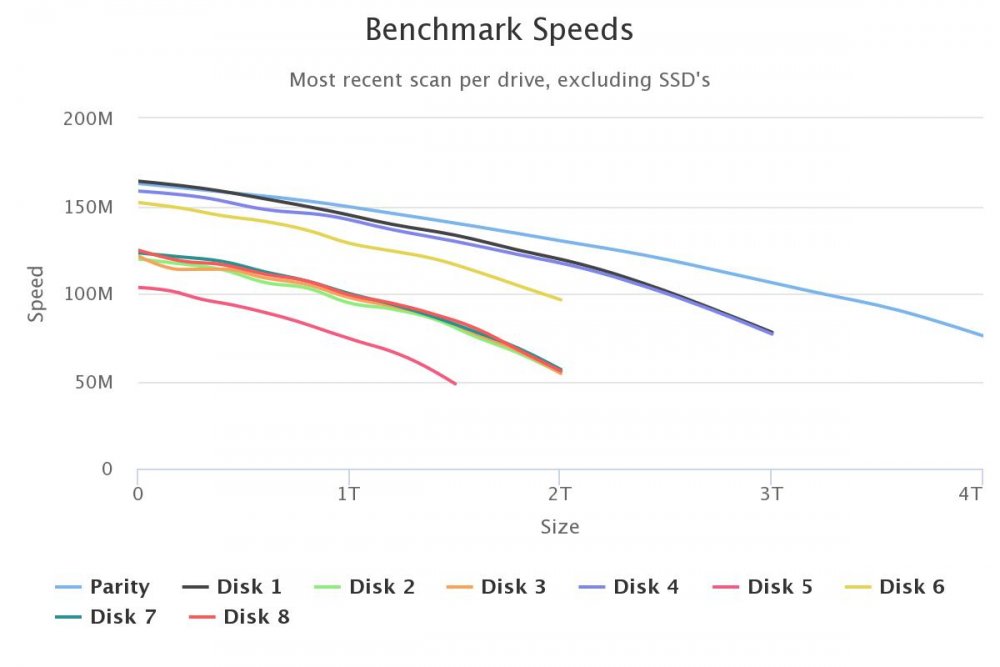
Seattle Cat Picks Huh? I don't have Cat Pick Issues here in Marysville WA. I did notice something odd. I just installed this today and started a test. It said spinning up drives, but well nothing really spun up. I aborted and things appeared to work after I manually spun up my drives. Did show me some interesting things. My older/smaller drives are slower than my newer drives, which I knew, but its eye opening to know how much faster. Also I didn't realize I had some 3 Gb/s drives installed too. Lol Is there a way to run a Test on a Single Drive?
-
I do believe what @johnnie.black suggested up above is a decent and cheap alternative until wifi support if ever is built into unRAID. Its basically giving you a Ethernet into a wireless device that can bridge the connection from wired to wireless. I used to use something similar for the longest time because I had a printer I couldn't connect to wired and it worked very well.
-
Are you using the Recycle Bin Plugin? If so it should have settings to delete files after a specified length of time. If not you could use the find command Check this out to give you a little bit of an idea to get you started. https://askubuntu.com/questions/589210/removing-files-older-than-7-days https://stackoverflow.com/questions/13868821/shell-script-to-delete-directories-older-than-n-days
-
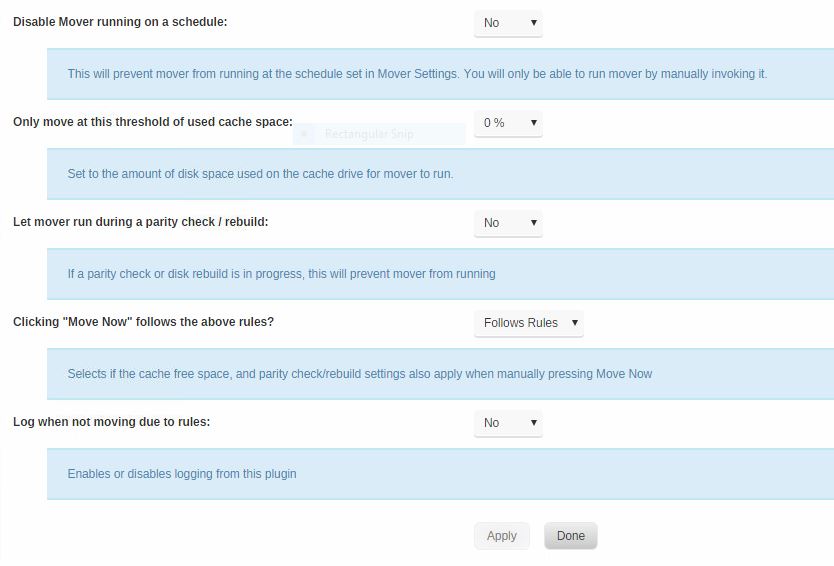
Nice Job Squid. I really like your plugins and I like how this is/was a User.Plugin morphed into an actual Plugin that makes it really easy to click a few buttons and be done with it, but at the same time we can simply disable the mover without having to hack some code to change the cron. Here's a little screen shot with the Help menu enabled so others can check it out.
-
@Squid Started up my Tester Script before the Parity Check. Let it alert me every 5 minutes for 10 or 15 minutes and then I started up the Parity Check and I relieved another message, but I'm guessing like you said it wasn't fully running. After the first message I no longer received any messages for at least 15 minutes. Stopped the parity check and I started getting messages again. #!/bin/bash #noParity=true /usr/local/emhttp/plugins/dynamix/scripts/notify -e "Testing the Message System 1" -d "$(date +%D-%H:%I) Testing the Message System 2" -i "normal" So looks like we have a winner.
-
Lol Awesome. I'm glad I could be of some service. I'll have to wait on the Check for Updates. Last time I tried to check the plugins well it took forever and I gave up. As soon as that all stabilizes I'll give this a look see again. I'll follow up with what I find out again. Plugins/Apps appear to be working again.
-
Tried something else. I set it to run Every 5 Minutes and well, while running a parity check I received a Test message Every 5 Minutes when I was expecting absolute silence via email and Prowl which I both have setup as Notifications. #!/bin/bash #noParity=true /usr/local/emhttp/plugins/dynamix/scripts/notify -e "Testing the Message System 1" -d "$(date +%D-%H:%I) Testing the Message System 2" -i "normal" Not trying to be that guy, but I'm just trying to make sure I understand what is supposed to work and what isn't. Lol
-
True, I was attempting to insure if it works or doesn't work that's all. Thanks for the confirmation.
-
Easy. Create a Share and use the Use cache disk: Only Files will be written to Cache only and the mover will not move them.
-
Ok I added the #noParity=true Set to be try if the script is not allowed to run when a parity check / rebuild is in progress To the top of my file. I ran it from User.Scripts and it appeared to run while I'm doing a Test parity Check. Does this Variable only work if its running from a Background or scheduled run? Or is it simply I'm not doing it correctly? Lol Random Test Code for the fun of it. #!/bin/bash #noParity=true echo "locking down Tv Shows"
-
I'd also start looking deeper into your reason your docker is crashing. Could be a memory issue or many other reasons.
-
Sorry didn't catch that. I was looking for a Check Box or something. Lol This will work just the same. I'll give it a try soon. Thanks like usual.
-
I updated to the newest Plug-In via the updater and I don't see anything different in the Plug-in. Updating to the Latest Release of unRAID just in case there is a glitch there. *****Nope no incline check box or anything. I even added a new script just incase.****
-
Lol, Wasn't expecting any action out of it today/tomarrow or the next day. Just figured you know how I like to suggest things just to make more work for you.
-
However if we are talking requests or even Far out there requests for Improvements I'd like the following: 1. Ability to Re-arrange Scripts via screen. 2. Ability to check a box that says. "Disable if Parity Check/Rebuild running" for each individual script. Or have them all Disabled by Default and you check a box to allow during Parity/Rebuild 3. Ability to group scripts. Utilities, Media, Security or whatever else we'd like to tag a group. Basically a Label over a few scripts so they are easy to find in a big list.
-
Polite way of saying it sucks I have to do it this way, but it serves my lazy needs and it'll have to do until you get off your butt. Lol Nah if you made some changes it would be nice, but your saving us all so much work with this script anything you do is gravy.
-
Ok, now we are on to something. Found the name file and I'm tinkering with it some more. This is a rough way of doing it, but I think this will work. Thanks @Squid
-
I don't mind Renaming or digging around to find the files to rename. I was just trying to figure out how to do it even if I have to manually do it.
-
I did rename some of the folders, but when I visit User.Plugins the name shown in the script list is still the old name. Is there a way to refresh the listing?
-
@Squid I know at one time you mentioned how to do this, but I figured I'd ask since I can't find it. Currently I have several scripts that I have sitting in my User.Script folder and I'm purging a bunch that I don't use any more and of course I'm saving them else where so I can review the code I wrote. What I want to do is rename my scripts so I can find them easier in the User.Script section, but I don't remember where you rename them since User.Scripts is not listing them by Alpha more or less just listing them, but however means it does. I know you can rename them from the Web Interface, but I want them to be sort-able or group-able by name so I don't have to look thru a bunch of scripts. I could of sworn you said to use SSH and find the files and rename them there and they would re-appear in User.Scripts by the new name or something of that sort. Advice, Concerns or Comments?
-
Worst case if it did you could always run two instances of the Docker one preset for Movies and the other instance for Phones/Tablets.
-
Exactly what I'm using. Believe me when I say this. I tried and tried and tried to love FileBot over the years, but I could never get it to work and constantly used other things and once I stumbled on that script and a couple hours of patience things started working the way I needed them. Ok now we have something here. Sent you a PM with a bit more explanation.
-
Yes. I use currently and I just tweak the filebot.sh file and Its been pretty handy because I'm rather picky on my folder/file formats. As well tweaking the filebot.conf file for how often it auto runs is pretty nice too. I restart the docker and it checks every few minutes or whatever I tweak it to be. I haven't tried yours yet, but I can honestly say I've used many of your dockers because I like how light and efficient they are. Plus I really appreciate the fact that you are willing to tweak to make things work for us all.
-
In the Current FileBot Container I'm using it has a file and you can customize which will give you an output of your folder/file when you run it via command line. Does this container support such as thing? I like to do a lot of things via command line or automated and this is a rather important feature for me.
-
Odd. When I Transcode to Ram ITs only using up a few 1.8Mb at a time of my Ram until its viewed and then Plex drops in another couple of Meg. I'm viewing a 1080p File with AC3 Audio at 5Mbs. I'm only using 16Meg of Ram on my Setup and viewing it via the Plex App on my Windows machine. I haven't tried tracking the Ram usage on my AppleTV. I'll try it sometime. I also just tried a Full BluRay rip of Transformers at 30Mbs. I viewed it the same way as mentioned above. I didn't see more than 5megs of Space taken up in my Ram.