kizer
Moderators
-
Joined
-
Last visited
Everything posted by kizer
-
Unless your wanting it to run during a Parity check I would change the yes to no on Lines 3 and 6 Otherwise it looks like your having it run no matter what when it hits 80% of Capacity and as well every day at 23:55. If that's your plan I don't honestly see any mistakes.
-
Ah there you go. I must of miss understood. Nice Choice of Cache too.
-
SSD Array?
-
Personally I’d use the User.Scripts Plugin. You can use the option for when array starts or when stray stops. For instsnce I have one that creates a text file of all my drives every time I stop my array. Just Incase I do something stupid I can refer to what my drive assignments are. Lol
-
I'm assuming since its a docker on github we have to create all of the fields via the properties page. I attempted to install and didn't see any of the fields listed above.
-
I have all mine goto a Cache/SSD drive. No spin ups required. 😃 I have a few shares (Uploads) ../incoming ../outgoing (Movies) (Tv) When ever I rip a movie or tv show I always send it to my (Upload) share. Then unraid via user scripts checks that upload folder and rips thru handbrake and a few other processes and then it places it in outgoing folder which FileBot looks at and then renames things and places it either in a (TV) or (Movie) share. Mover runs in the AM when my Plex Docker spools up to check my drives for new stuff moves the files onto the Protected Array off the SSD drive. My scripts run every 30 minutes so I don't have to Babysit, but the final drop to my Array/Spinner drives are at 6AM along with Plex.
-
Nice Job. Works perfectly.
-
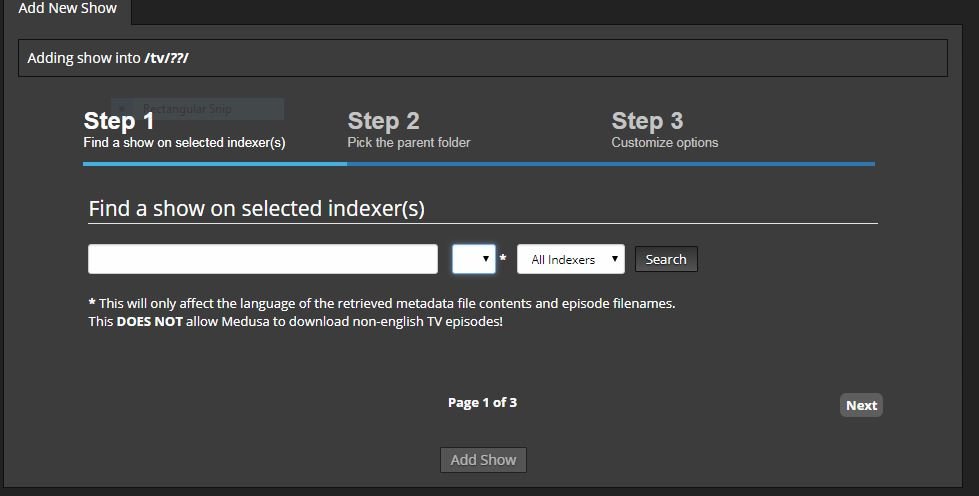
Not sure why, but after I updated my server to a newer version of OS and updated Medusa when I goto add a new show the drop down for Language isn't available right when your attempting to do a search and I'm not able to search for a new show. Anybody else seeing this and is there a way to fix this? I have no intentions of changing the Language, but it seems to be missing and when I click next or Add Show it acts as if there is nothing to search for since it never performed a search. I oringinally deleted the Docker and re-installed it which appeared to fix it, but I had to go thru the task of adding back shows, which takes forever. Now all of the sudden its doing it again. The only thing I changed was enabling the Post Processing, but I've restarted the docker, and lord knows what else attempting to figure out why I can't add more shows. ******************************************update************************************ I switched to Safari and it works just fine. Now I'm really confused. I tried to use Chrome and IE 11 and it wouldn't allow me to search/add new shows.
-
I had to switch from Chrome to my whatever version of IE was installed to make this work. At least there is a work around. =) IE 11 to be exact. Old machine I'm using.
-
Exactly what it was. Found the SSL="auto" in my ident.conf file. Set it to "no" and it works just fine.
-
Weird. I changed it to https:// and Chrome threw up a bunch are you sure warnings, but it seems to work. IE basically said. Page not found. So weird. I had zero issues running this a couple of weeks ago. At least there is a work around for now, but this is kinda odd.
-
No its not working for us two. Lol
-
I was having issues on 6.5.2-rc2 before I even updated to 6.5.3-rc2 I just happened to need it today and figured it might of needed a system reboot or an update to the plugin did it. Not a 100%, but figured I'd mention it.
-
I'm getting a Page not Found all of the sudden when I click on the link Open Web UI ( v5.2.1 ) Mine points to http://192.168.7.127:6237/ which is my servers IP and the port defaulted in the settings. I don't see anything odd in the system log. ******************** Updating to the latest OS release then I'll follow up just in case I needed a Reboot or something. *********************** 6.5.3-rc2 and I'm still seeing the can not connect message. Basically Page not found
-
Totally get it. I personally just use my PiHole Docker to serve everything else on my Network. Aka all of my other devices. My unRAID machine just routes straight thru and I did that to insure if any list ever gets changed that anything running on my unRAID machine never gets blocked. I thought at one time that docker updates was being blocked until I remembered I'm not using PiHole for DNS routing for my unRAID machine.
-
Yep I however do not have my unRAID using my pilhole for its DNS. Just in case you are.
-
I got a message stating that my Parity Check started this AM and I thought well I better shut off my regularly scheduled scripts. I double checked my scripts and realized they are not running and realized I used #noParity=true on all of them and never had a chance to really tested it. Well Test complete and everything seems to be delayed like I wanted them to be. Thanks @Squid
-
Edit the files in your FileBot folder. filebot.conf # Run the UI in addition to the normal non-interactive behavior. The UI uses about 460MB of RAM, as opposed to about # 20MB of RAM. On my machine it uses .33% CPU instead of .03% CPU. RUN_UI=no <------- change this to yes if you want to use the GUI. I personally don't. I just drop my files in the watcher folder and forget about them. filebot.sh To change the way your files are outputted when they are moved to your outgoing folder Just in case you get confused to where these files are mine are in the following location. /mnt/cache/system/appdata/FileBot/
-
Or your could simply move them from where ever they are to a folder. I do that to my cache drive so I can browse and delete. find /mnt/disk1 -name "@eaDir" -exec mv {} /mnt/cache/destination \; Yes I do that to each disk at a time often just to have more control.
-
I"m running the Offical Plex Docker. I just changed the /transcode location in my Docker Template from /mnt/cache/system/appdata/transcode to /tmp
-
I was hoping somebody could lend me a hand with a little code. I currently drop all my files into a folder and let a script move them around. However I want to put a little logic into it and came up with two things, but I'm having issues combining them. for instance I want to have it search for files/folders that are older than a specific time and move which I figured out. find /Source/* -maxdepth 1 -mmin +5 -exec mv {} /Destination/ \; I also want to search for folders with this particular string in it. Because typing out the same code for each Season 1 by one can get really long mv /Source/*S{01..50}* /Destination/ I attempted to do some Hair Brained combining but it doesn't work. Always results in an empty search find /SOURCE/* -iname "*s{01..50}*" -maxdepth 1 -type d -mmin +5 -exec mv {} /Destination/ \; Basically what I'm attempting to accomplish is moving TV shows I have in folders from one folder to another, but I'm trying to make sure they are at least 5minutes old so there is no confusion to the script I wrote so its not moving files that are in progress of being written from one location to another before performing some other steps. I also want to make sure they are TV Shows and since things like Plex and XBMC aka Kodi use Some.Show-S01E01.mp4 for their naming convention which I've adhered to. I can get things to work if I use the following, but honestly I was hoping for a work around. find /mnt/user/uploads/blah/* -iname "*s01*e*" -maxdepth 1 -type d -mmin +5 mv {} /Destination/ \; find /mnt/user/uploads/blah/* -iname "*s02*e*" -maxdepth 1 -type d -mmin +5 mv {} /Destination/ \; . . . . . . . find /mnt/user/uploads/blah/* -iname "*s99*e*" -maxdepth 1 -type d -mmin +5 mv {} /Destination/ \; **************************************************Update************************************************* I think I found a little work around using FileBot to achieve what I'm trying to do.
-
I'm new to this docker. However when I add something to the black list I'm still able to view it on a client. Is there any other steps beyond adding the domain you want to block? Figured it out. Had to refresh the list and walla it worked.
-
You guys should talk. Lol
-
I kept finding multiple drives spun up and between the share GUI and this Plugin this totally saved my insanity. Thanks for this.
-
Tis funny you say that. We brought home a Kitten and didn't realize she was pregnant. Magically we have 6 cats 2years ago this very day. I call them Brat Pack. Luckly we have some land and they are indoor/outdoor or I'd go insane.