kizer
Moderators
-
Joined
-
Last visited
Everything posted by kizer
-
Seeing the Apps online is sick!!!!!!!! thanks Squid!!!!
-
Yes its a pain, but if you remember the unRAID 4.7 days we had to run Pre-Clear on drives that took days simply because there was no mechanism to put in a disk and have unRAID do it for us and if we did skip the Preclear our array would be unavailable to us for many many hours. All we can do is put in requests and work towards the solution and in the end new users or if we stay around long enough will benefit from the new addons.
-
So if we are running 6.9-beta35 and upgrade to 6.9-RC1 and have the Nvidia plugin set to auto update in the Plugin do we just update to RC1 and the plugin update takes care of the rest or do we have to do anything else? I'm running a GTX1050TI just for the record.
-
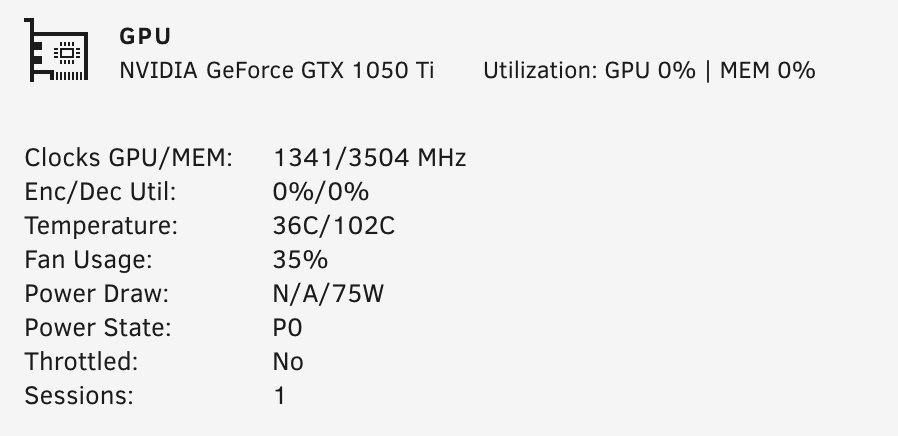
So bizarre too. I'm watching the nvidia-smi and I can see the P State change from P8 to P0 while Transcoding, but my fan always reports as spinning 35%. I think the only thing that changes is the state and the Temp, but the Speed never does. I'll just chalk this up as a problem to solve another day. Then again 35% isn't to bad.
-
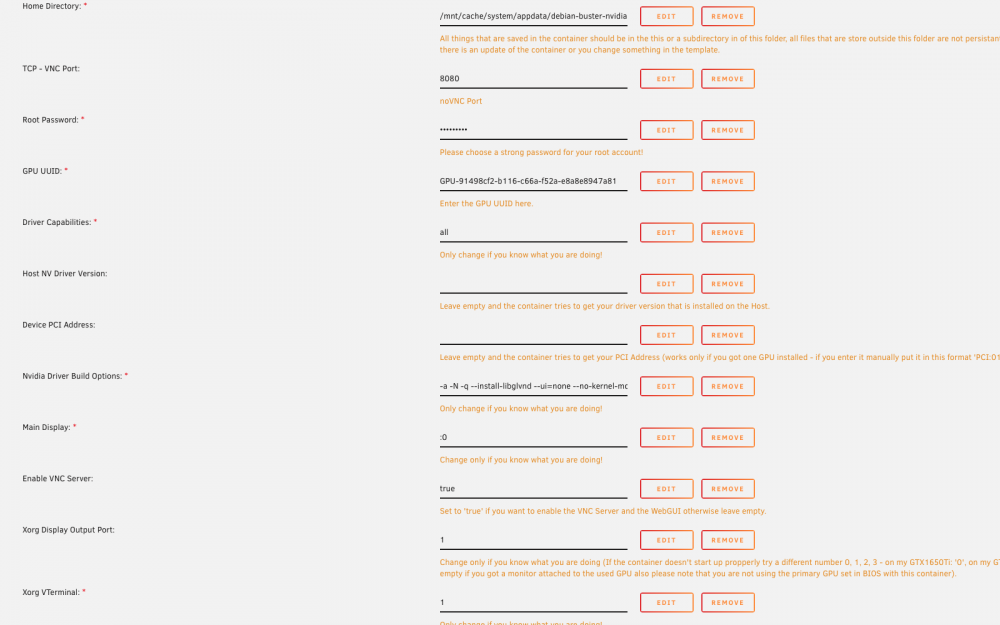
In my Bios I have my on board Video card set as the primary no I've not connected to the GPUcard its self. I know it works because it used to be in another computer. I've changed the variable and the Xorg in so many different combinations. lol
-
Ran it again after changing Xorg Display Output to 0 --Checking if UID: 99 matches user--- ---Checking if GID: 100 matches user--- ---Setting umask to 000--- ---Checking for optional scripts--- ---No optional script found, continuing--- ---Trying to get Nvidia device address--- ---Successfully got device ID: 02:00:0--- ---Trying to get Nvidia driver version--- ---Successfully got driver version: 455.38--- ---Checking Xwrapper.config--- ---Configuring Xwrapper.config--- ---Downloading and installing Nvidia Driver v455.38--- ---Configuring Locales to: en_US.UTF-8 UTF-8--- Generating locales (this might take a while)... en_US.UTF-8... done en_US.UTF-8... done Generation complete. ---Starting...--- ---Preparing Server--- ---Checking for old logfiles--- ---Checking for old lock files--- ---Starting dbus service--- ---dbus service started--- ---Starting Xfce4--- ---Starting x11vnc server--- ---Starting noVNC server--- WebSocket server settings: - Listen on :8080 - Flash security policy server - Web server. Web root: /usr/share/novnc - No SSL/TLS support (no cert file) - Backgrounding (daemon) WebSocket server settings: - Listen on :8080 - Flash security policy server - Web server. Web root: /usr/share/novnc - No SSL/TLS support (no cert file) - Backgrounding (daemon) ---Starting Pulseaudio server--- E: [pulseaudio] client-conf-x11.c: xcb_connection_has_error() returned true Can't open display :0 ---------------------------------------------------------------------------------------------------- Listing possible outputs and screen modes: '' ---------------------------------------------------------------------------------------------------- Can't open display :0 Can't open display :0 ---Looks like your highest possible output on: '' is: ''--- Can't open display :0 Can't open display :0 ---Trying to set the resolution to: '' on output: ''--- Can't open display :0 Can't open display :0 Can't open display :0 ------------------------------------------------------------------------------- --------If you want to set the resolution manually please create a file-------- ---------in /debian/.config/container.cfg with the following contents:--------- ------------------------------------------------------------------------------- Resolution: 1920x1080 Output: HDMI-0 -------------------------------------------------------------------------------- ---Change the resolution and output to your specific configuration/preference--- -------------------------------------------------------------------------------- ---Starting Pulseaudio server--- E: [pulseaudio] client-conf-x11.c: xcb_connection_has_error() returned true Can't open display :0 ---------------------------------------------------------------------------------------------------- Listing possible outputs and screen modes: '' ---------------------------------------------------------------------------------------------------- Can't open display :0 Can't open display :0 ---Looks like your highest possible output on: '' is: ''--- Can't open display :0 Can't open display :0 ---Trying to set the resolution to: '' on output: ''--- Can't open display :0 Can't open display :0 Can't open display :0 ------------------------------------------------------------------------------- --------If you want to set the resolution manually please create a file-------- ---------in /debian/.config/container.cfg with the following contents:--------- ------------------------------------------------------------------------------- Resolution: 1920x1080 Output: HDMI-0 -------------------------------------------------------------------------------- ---Change the resolution and output to your specific configuration/preference--- -------------------------------------------------------------------------------- (EE) Fatal server error: (EE) no screens found(EE) (EE) Please consult the The X.Org Foundation support at http://wiki.x.org for help. (EE) Please also check the log file at "/var/log/Xorg.0.log" for additional information. (EE) (EE) Server terminated with error (1). Closing log file.
-
This is the last start simply by starting the Docker X.Org X Server 1.20.4 X Protocol Version 11, Revision 0 Build Operating System: Linux 4.19.0-10-amd64 x86_64 Debian Current Operating System: Linux b3593d02d304 5.8.18-Unraid #1 SMP Mon Nov 2 07:15:12 PST 2020 x86_64 Kernel command line: BOOT_IMAGE=/bzimage initrd=/bzroot Build Date: 27 August 2020 08:51:48AM xorg-server 2:1.20.4-1+deb10u1 (https://www.debian.org/support) Current version of pixman: 0.36.0 Before reporting problems, check http://wiki.x.org to make sure that you have the latest version. Markers: (--) probed, (**) from config file, (==) default setting, (++) from command line, (!!) notice, (II) informational, (WW) warning, (EE) error, (NI) not implemented, (??) unknown. (==) Log file: "/var/log/Xorg.0.log", Time: Tue Nov 24 09:22:30 2020 (==) Using config file: "/etc/X11/xorg.conf" (==) Using system config directory "/usr/share/X11/xorg.conf.d" (EE) Fatal server error: (EE) no screens found(EE) (EE) Please consult the The X.Org Foundation support at http://wiki.x.org for help. (EE) Please also check the log file at "/var/log/Xorg.0.log" for additional information. (EE) (EE) Server terminated with error (1). Closing log file. This is my current stat of my GPU while Transcoding an old AVI file. Plex says (hw) next to it so I can only assume its doing its thing. On my attached file below I recall it saying P8 earlier and I thought it was louder.
-
Clicked on Docker, Clicked on Console and typed startx
-
I gave it an install and had an issue. I posted up the issue in your support forum just to keep this one from getting really messy. I told it to startx and got some errors unless that isn't the intent.
-
I gave DebianBuster-Nvidia an install. Seems to install just fine, but when I run startx i'm presented with. hostname: Temporary failure in name resolution xauth: file /root/.Xauthority does not exist xauth: (stdin):1: bad display name "58e8ee56adca:0" in "add" command X.Org X Server 1.20.4 X Protocol Version 11, Revision 0 Build Operating System: Linux 4.19.0-10-amd64 x86_64 Debian Current Operating System: Linux 58e8ee56adca 5.8.18-Unraid #1 SMP Mon Nov 2 07:15:12 PST 2020 x86_64 Kernel command line: BOOT_IMAGE=/bzimage initrd=/bzroot,/bzroot-gui Build Date: 27 August 2020 08:51:48AM xorg-server 2:1.20.4-1+deb10u1 (https://www.debian.org/support) Current version of pixman: 0.36.0 Before reporting problems, check http://wiki.x.org to make sure that you have the latest version. Markers: (--) probed, (**) from config file, (==) default setting, (++) from command line, (!!) notice, (II) informational, (WW) warning, (EE) error, (NI) not implemented, (??) unknown. (==) Log file: "/var/log/Xorg.0.log", Time: Mon Nov 23 23:02:02 2020 (==) Using config file: "/etc/X11/xorg.conf" (==) Using system config directory "/usr/share/X11/xorg.conf.d" (EE) Fatal server error: (EE) xf86OpenConsole: Cannot open virtual console 8 (No such file or directory) (EE) (EE) Please consult the The X.Org Foundation support at http://wiki.x.org for help. (EE) Please also check the log file at "/var/log/Xorg.0.log" for additional information. (EE) (EE) Server terminated with error (1). Closing log file.
-
I just wish my GTX 1050TI was in idle it would spool down the fan. It’s literally the loudest thing in my case. Lol. I spent lots of time buying Nactua fans and a Giant CPU Cooler to run practically silent and the humming of the GPU cooler drives me a little batty. Oh well. At least the Driver works perfectly in Beta-35 so far. 😃
-
It was removed by choice of the creator.
-
The code for this project is in the first few posts to this thread. I wouldn't mind just me because I'm selfish too Lol. However if would could cover all users it would round out the code very nicely.
-
That would be neat to have too. Any consideration if you have multiple users on your Plex Server unless Plex just sees all on deck files?
-
No problem. I can honestly say I use User.Scripts nearly every day automating my system. I'm glad it helped you out.I hope this helpsSimply uninstall the current and then look for it in the app section and reinstall it. That’s all I did.I checked the file listing and it shows the Modified date as 2018 vs 2038. I’m basically changing the attributes not the actual file name. I’ll do my thing and report back. Or actually I’ll test it again and see if the priority has shifted first before doing more. update******** Every file I’ve changed the modified date is not being scanned. So it’s doing exactly what I hoped it would accomplish. Just have to do some house cleaning on my end. Thanks so much for this script. I can verify it does work on 6.9 RC-30.I have found a Bulk renamer and have begun changing the messed up files from 2038 to 2018. Not sure what happened, but I think I have a plan of attack. Thank you for the offer/idea. It’s only a 100-200 or so files and I’m 1/4 of the way done.I know it's working now. I did a little test for fun. I upped the amount it caches to 300MB and had some low quality shows that it appears to completely cache. Watched nearly half of an episode before I got bored and moved on and the drive never spun up. It was kinda cool actually. I did notice a strange thing thou. It was caching some really old stuff and I couldn't figure out why. Their date was changed to 2038-01-18 for some odd reason. Not the scripts fault, but something I have to figure out because it'll always cache those files that are really old not new. LOL Is there a code change that you could recommend that says to skip those or ignore them? If so it would really really make my experience better. Other wise I have to dig and I do mean dig to change them all. I think I was trying to test files that was on my IronWolf. Maybe thats why it never appeared to work from the start. By increasing the amount it Cache I think I really saw the power because it gave me a lot more room to work with. Obviously I'm not going to keep the amount at 200. I put it back down to 60 and I might tweak it some, but so far so good.
 Ok increased my Ram to 32GB and gave this a try. I'm getting the following .. Script location: /tmp/user.scripts/tmpScripts/zzzzzzz-test-zzzzzzzz/script Note that closing this window will abort the execution of this script Available RAM in Bytes: 7500920825 Amount of Videos that can be preloaded: 122 Preload /mnt/user/Movies/All/Roald.Dahl's.The.Witches.(2020)(1080p)(AC3)/Roald.Dahl's.The.Witches.(2020)(1080p).mkv (0.480s) Preload /mnt/user/Movies/All/Unhinged.(2020)(1080p)(AC3)/Unhinged.(2020)(1080p).mkv (0.496s) Preload /mnt/user/Movies/All/My.Spy.(2020)(720p)(DTS)/My.Spy.(2020)(720p).mkv (0.488s) Preload /mnt/user/Movies/All/The.Banana.Splits.Movie.(2019)(720p)(AC3)/The.Banana.Splits.Movie.(2019)(720p).avi (0.507s) ~ ~ ~ tr: write error: Broken pipe tr: write error cut: write error: Broken pipe I'm still getting drive spin ups right away. So I'm trying to adjust the parameters. Maybe something is right. Can you see the cached files in /tmp? I've looked and didn't see anything so I'm just curious to where the files are being stored. I think setting it to the first 100meg I might see something working here using Plex on AppleTV. I'll keep tinkering with it and let you know. Its a little excessive, but It's all work in progress right. 😃However if I remove the /mnt/user/TV/ from the line it seems to process just fine. I chose only to use 20% RAM. However when I look at files being accessed it shows a movie playing, but unraid isn't indicating a drive being spun up even well into the movie. Its like unraid doesn't know a drive is spun up or is simply failing to indicate it. when I get a chance I’ll fire up my other machine running 6.8.Updated my script to exactly like yours up above and then just changed the one line you asked me to change. It scanned TV shows, but ignored the movies. Keep in mind my script is just like yours with Paths. You think it would of included the movies since most of my content movies are newer and in this case alot of these are really old. Script location: /tmp/user.scripts/tmpScripts/zzzzzzz-test-zzzzzzzz/script Note that closing this window will abort the execution of this script Available RAM in Bytes: 2507377040 Amount of Videos that can be preloaded: 41 /mnt/user/TV/Shows/NCIS/Season 3/NCIS.-.S03E13.avi has a size of 367577088 /mnt/user/TV/Shows/NCIS/Season 3/NCIS.-.S03E14.avi has a size of 367546368 /mnt/user/TV/Shows/NCIS/Season 3/NCIS.-.S03E15.avi has a size of 367622144 /mnt/user/TV/Shows/NCIS/Season 3/NCIS.-.S03E16.avi has a size of 367663104 /mnt/user/TV/Shows/NCIS/Season 3/NCIS.-.S03E17.avi has a size of 367724544 /mnt/user/TV/Shows/NCIS/Season 3/NCIS.-.S03E18.avi has a size of 367560704 /mnt/user/TV/Shows/NCIS/Season 3/NCIS.-.S03E19.avi has a size of 367579136 /mnt/user/TV/Shows/NCIS/Season 3/NCIS.-.S03E20.avi has a size of 367570944 /mnt/user/TV/Shows/NCIS/Season 3/NCIS.-.S03E21.avi has a size of 367587328 /mnt/user/TV/Shows/NCIS/Season 3/NCIS.-.S03E22.avi has a size of 367566848 /mnt/user/TV/Shows/NCIS/Season 3/NCIS.-.S03E23.avi has a size of 367665152 /mnt/user/TV/Shows/NCIS/Season 3/NCIS.-.S03E24.avi has a size of 364546048 /mnt/user/TV/Shows/The Big Bang Theory/Season 1/The.Big.Bang.Theory.-.S01E01.avi has a size of 183793664 /mnt/user/TV/Shows/The Big Bang Theory/Season 1/The.Big.Bang.Theory.-.S01E02.avi has a size of 183742464 /mnt/user/TV/Shows/The Big Bang Theory/Season 1/The.Big.Bang.Theory.-.S01E03.avi has a size of 183769088 /mnt/user/TV/Shows/The Big Bang Theory/Season 1/The.Big.Bang.Theory.-.S01E04.avi has a size of 183756800 /mnt/user/TV/Shows/The Big Bang Theory/Season 1/The.Big.Bang.Theory.-.S01E05.avi has a size of 183732224 /mnt/user/TV/Shows/The Big Bang Theory/Season 1/The.Big.Bang.Theory.-.S01E06.avi has a size of 183709696 /mnt/user/TV/Shows/The Big Bang Theory/Season 1/The.Big.Bang.Theory.-.S01E07.avi has a size of 183732224 /mnt/user/TV/Shows/The Big Bang Theory/Season 1/The.Big.Bang.Theory.-.S01E08.avi has a size of 183703552 /mnt/user/TV/Shows/The Big Bang Theory/Season 1/The.Big.Bang.Theory.-.S01E09.avi has a size of 183711744 /mnt/user/TV/Shows/The Big Bang Theory/Season 1/The.Big.Bang.Theory.-.S01E10.avi has a size of 183672832 /mnt/user/TV/Shows/The Big Bang Theory/Season 1/The.Big.Bang.Theory.-.S01E11.avi has a size of 183674880 /mnt/user/TV/Shows/The Big Bang Theory/Season 1/The.Big.Bang.Theory.-.S01E12.avi has a size of 183674880 /mnt/user/TV/Shows/The Big Bang Theory/Season 1/The.Big.Bang.Theory.-.S01E13.avi has a size of 183746560 /mnt/user/TV/Shows/The Big Bang Theory/Season 1/The.Big.Bang.Theory.-.S01E14.avi has a size of 183701504 /mnt/user/TV/Shows/The Big Bang Theory/Season 1/The.Big.Bang.Theory.-.S01E15.avi has a size of 183732224 /mnt/user/TV/Shows/The Big Bang Theory/Season 1/The.Big.Bang.Theory.-.S01E16.avi has a size of 183719936 /mnt/user/TV/Shows/The Big Bang Theory/Season 1/The.Big.Bang.Theory.-.S01E17.avi has a size of 183703552 /mnt/user/TV/Shows/The Big Bang Theory/Season 2/The.Big.Bang.Theory.-.S02E07.avi has a size of 183415570 /mnt/user/TV/Shows/The Big Bang Theory/Season 2/The.Big.Bang.Theory.-.S02E08.avi has a size of 182377724 /mnt/user/TV/Shows/The Big Bang Theory/Season 2/The.Big.Bang.Theory.-.S02E09.avi has a size of 182779678 /mnt/user/TV/Shows/Torchwood/Season 1/Torchwood.-.S01E06.avi has a size of 367685632 /mnt/user/TV/Shows/Torchwood/Season 1/Torchwood.-.S01E07.avi has a size of 367747072 /mnt/user/TV/Shows/Torchwood/Season 1/Torchwood.-.S01E08.avi has a size of 367767552 /mnt/user/TV/Shows/Torchwood/Season 1/Torchwood.-.S01E09.avi has a size of 367720448 /mnt/user/TV/Shows/Torchwood/Season 3/Torchwood.-.S03E01.avi has a size of 577108990 /mnt/user/TV/Shows/Torchwood/Season 3/Torchwood.-.S03E02.avi has a size of 577187912 /mnt/user/TV/Shows/Torchwood/Season 3/Torchwood.-.S03E03.avi has a size of 577134280 /mnt/user/TV/Shows/Torchwood/Season 3/Torchwood.-.S03E04.avi has a size of 577226288 /mnt/user/TV/Shows/Torchwood/Season 3/Torchwood.-.S03E05.avi has a size of 576900174 Preload /mnt/user/Movies/All/Rush.Hour.3.(2007)(720p)(DTS)/Rush.Hour.3.(2007)(720p).srt Preload /mnt/user/Movies/All/Waiting.(2005)(720p)(AC3)/Waiting.(2005)(720p).srt Preload /mnt/user/Movies/All/Rush.Hour.2.(2001)(720p)(AC3)/Rush.Hour.2.(2001)(720p).srt Preload /mnt/user/Movies/All/The.Librarian.The.Curse.Of.The.Judas.Chalice.(2008)(720p)(AC3)/The.Librarian.The.Curse.Of.The.Judas.Chalice.(2008)(720p).srt Preload /mnt/user/Movies/1080-Bray-Rips/Avatar/Avatar.srt Preload /mnt/user/TV/Shows/Adventure Time/Season 7/Adventure.Time.-.S07E35_eng.srt Preload /mnt/user/TV/Shows/Adventure Time/Season 7/Adventure.Time.-.S07E34_eng.srt Preload /mnt/user/TV/Shows/Adventure Time/Season 7/Adventure.Time.-.S07E33_eng.srt Preload /mnt/user/TV/Shows/Adventure Time/Season 7/Adventure.Time.-.S07E32_eng.srt Preload /mnt/user/TV/Shows/Adventure Time/Season 7/Adventure.Time.-.S07E31_eng.srt Preload /mnt/user/TV/Shows/Adventure Time/Season 8/Adventure.Time.-.S08E03_eng.srt Preload /mnt/user/TV/Shows/Adventure Time/Season 8/Adventure.Time.-.S08E01E01_eng.srt Preload /mnt/user/TV/Shows/Top Secret Recipe/Season 1/Top.Secret.Recipe.-.S01E08.srt Preload /mnt/user/TV/Shows/Dexter/Season 4/Dexter.-.S04E01.srt It also gave me a popup error message saying No video file has been proloaded (wrong path?)How does this deal with Parity Sync?