kizer
Moderators
-
Joined
-
Last visited
Everything posted by kizer
-
I uninstalled, but I’ll reinstall soon. No problem on the letting you know. Problems arise and we are all in this together in the end.
-
I knew you guys would figure it out. I figured a little *poke*poke*poke* would help. Removed plugin and now my drives are sleeping and refresh isn't spinning them back up. So its very related and thank you for reaching out to me. Well all of us.
-
Hmmm, another odd thing. My drives was all spun down until I hit refresh on the Main page then I heard all my drives spin up. Uninstalled plugin and now my drives are not starting up from the refresh and are not spinning up on their own all of the sudden.
-
Ah Ahhhh, Thanks.. Here I am shutting down all my dockers so I can do some testing. Lol Thanks for the heads up. Can we get a roll back to stop that? I shut off auto Flash backup and used a script to turn it on and off daily, but I can't live with my drives spinning up and down all day for no reason at all. My OCD will drive me crazy. I suppose I could temporarily uninstall the plugin and re-install it later when its updated.
-
So I just updated to the newest Plugin and all my drives spin up? Whats up with that? Jun 10 14:42:32 Tower flash_backup: adding task: /usr/local/emhttp/plugins/dynamix.my.servers/scripts/UpdateFlashBackup.php update Jun 10 14:42:33 Tower root: No PID found in cache for unraid-api Jun 10 14:42:34 Tower root: Loading state paths Jun 10 14:42:34 Tower root: Daemonizing process. Jun 10 14:42:34 Tower root: Daemonized successfully! Jun 10 14:43:19 Tower emhttpd: read SMART /dev/sdb Jun 10 14:43:26 Tower emhttpd: read SMART /dev/sdc Jun 10 14:43:33 Tower emhttpd: read SMART /dev/sdd Jun 10 14:43:41 Tower emhttpd: read SMART /dev/sde Jun 10 14:43:49 Tower emhttpd: read SMART /dev/sdf Jun 10 14:43:56 Tower emhttpd: read SMART /dev/sdg Ok weird now my drives keep spinning up for no reason. Nobody is even at my house. My drives have been sleeping for hours. I don't want to blame this plugin, but something is going on all of the sudden after I've installed this Update.
-
Not to coin a phrase I've heard before, but............. It'll be released when its ready.
-
Totally fair. I was just going to manually rename my chattr file from what it is now and set the new name in the script so it could function and change to whatever I set it to. I knew you couldn't be held accountable for every name change simply because you can't read our minds. I honestly didn't expect you to enable a name change via command line. I just figured we would plug it in via the script.
-
@Opawesome Actually looks like there already is. lol readonly defaultSecureChattrRename="rttahc" Looks like he's updated the script from v1.0.2 to v1.0.3 and included it. Yahoo Thanks for the add binhex.
-
I didn't want to clog up his Support Thread, but anyways this is what I suggested. ************************************************************************ One idea I just had. Currently your renaming chattr and changing its permission. Absolutely brilliant, however maybe include a variable so the user could change the rename so everybody has a totally different binary and really screw up bots/script kiddies? Say default is "rchatt" and everybody that uses it will have that as their default. Anybody who knows unraid and knows how to beat it will just bake that into their code and target unraid looking to rename rchatt to chattr or will simply run Chmod +x on rchatt. So I'm proposing something like the following #Edit below to set your Binary name default is rchatt Set your Binary name ="rchatt" It might be one more added thing that might be borderline paranoid, but really getting obscure should really confuse somebody.
-
My Brain hurts trying to figure this out. Lol I'll just leave it to Daily for now. 😃
-
I do see my drives being read at 682k, which is typically Plex looking for Drive changes. I can't look at Plex from work because I know I have it set to periodically check for changes, but I know it looks for changes when the drives are spun up. I'll disable that. Heck I'll shut down Plex all together for the heck of it and try it again.
-
This is what a Typical log looks like for me. Why it does its thing and then at the end it always does a read Smart is beyond me. I'm guessing thats what is trigger the drive spin up or its reading it after its spun up. I'm not 100% sure. I just know its annoying. May 25 11:34:26 Tower root: mvlogger: Adding Age May 25 11:34:26 Tower root: mvlogger: Age 15 May 25 11:34:26 Tower root: mvlogger: Skipfiletypes string: find "/mnt/cache/Plex-Photos-Hunters" -depth -mtime +15 May 25 11:34:26 Tower root: mvlogger: Not in Test mode May 25 11:34:26 Tower root: mvlogger: Complete Mover Command: find "/mnt/cache/Plex-Photos-Hunters" -depth -mtime +15 May 25 11:34:26 Tower root: find: '/mnt/cache/Plex-Photos-Hunters': No such file or directory May 25 11:34:26 Tower root: mvlogger: Share Name Only: PlexOptimized May 25 11:34:26 Tower root: mvlogger: Cache Pool Name: cache May 25 11:34:26 Tower root: mvlogger: cache Threshold Pct: May 25 11:34:26 Tower root: mvlogger: OVERALL Threshold: 5 May 25 11:34:26 Tower root: mvlogger: Share Path: /mnt/cache/PlexOptimized May 25 11:34:26 Tower root: mvlogger: Pool Pct Used: 14 % May 25 11:34:26 Tower root: mvlogger: DFTPCT LIMIT USED FOR SETTING: 5 May 25 11:34:26 Tower root: mvlogger: Threshold Used: 5 May 25 11:34:26 Tower root: mvlogger: Adding Age May 25 11:34:26 Tower root: mvlogger: Age 15 May 25 11:34:26 Tower root: mvlogger: Skipfiletypes string: find "/mnt/cache/PlexOptimized" -depth -mtime +15 May 25 11:34:26 Tower root: mvlogger: Not in Test mode May 25 11:34:26 Tower root: mvlogger: Complete Mover Command: find "/mnt/cache/PlexOptimized" -depth -mtime +15 May 25 11:34:26 Tower root: mvlogger: Share Name Only: TV May 25 11:34:26 Tower root: mvlogger: Cache Pool Name: cache May 25 11:34:26 Tower root: mvlogger: cache Threshold Pct: May 25 11:34:26 Tower root: mvlogger: OVERALL Threshold: 5 May 25 11:34:26 Tower root: mvlogger: Share Path: /mnt/cache/TV May 25 11:34:26 Tower root: mvlogger: Pool Pct Used: 14 % May 25 11:34:26 Tower root: mvlogger: DFTPCT LIMIT USED FOR SETTING: 5 May 25 11:34:26 Tower root: mvlogger: Threshold Used: 5 May 25 11:34:26 Tower root: mvlogger: Adding Age May 25 11:34:26 Tower root: mvlogger: Age 15 May 25 11:34:26 Tower root: mvlogger: Skipfiletypes string: find "/mnt/cache/TV" -depth -mtime +15 May 25 11:34:26 Tower root: mvlogger: Not in Test mode May 25 11:34:26 Tower root: mvlogger: Complete Mover Command: find "/mnt/cache/TV" -depth -mtime +15 May 25 11:34:27 Tower root: mover: finished May 25 11:34:27 Tower root: mvlogger: No After Script to Run. May 25 11:34:55 Tower emhttpd: read SMART /dev/sdg May 25 11:34:55 Tower emhttpd: read SMART /dev/sdd May 25 11:34:55 Tower emhttpd: read SMART /dev/sdf May 25 11:34:55 Tower emhttpd: read SMART /dev/sdc
-
-
I don't know if I'm the only one, but I'll ask anyways. When this Mover Script runs it spins up every drive that has a potential share that can be moved from the Cache to its place on the array including my Parity Drive. To make due with this anomaly I currently have my mover script set to run Daily at 5:45 which is 15minutes before Plex Docker scans my media looking for changes. I was considering changing my mover to hourly, but notice it still spins up every drive and for me there is no reason to spin up any drives if nothing is move on an hourly basis. Kinda defeats the purpose of letting my drives spin down if they aren't needed at all. I'm trying to figure out if its something I'm doing, setting? Or are others simply not noticing or don't care? If its just what it is I'll keep my daily set to the time it is and be done with it.
-
For the flash backup I created a User.Script and scheduled it to use the Daily cron settings and then shuts off. Utility-Backup-Flash #!/bin/bash echo "Start Flash Backup" /etc/rc.d/rc.flash_backup start sleep 10m echo "Stop Flash Backup" /etc/rc.d/rc.flash_backup stop So basically it starts the Flash Backup and tries to connect. If it connects then fine it connects. If it fails it tries every minute on my machine, but I'm giving it 10minutes of trying then it shuts off.
-
Its appearing more and more to be a system wide problem not a per server problem. Limetech is investigating this.
-
@ljm42 Same issue Unable to connect to backup.unraid.net:22
-
Updated and couldn't connect. The realized it defaulted to "NO on allow remote connection" Up and running again.
-
Updated at lunch from Unraid.net to Myserver and I came back to work and I don't have access. Lol I'll investigate when I get home.
-
Binhex Sent you another idea via PM if your wanting tinker more.
-
Nice!!!!!! I was kinda wondering if there was a better way of insuring somebody couldn't just run chattr and remove the protection. Thank you for having the insight and willingness to do this. Just ran it across my media and seemed to work just fine. Was cool seeing the chattr binary in the logs being locked and unlocked too.
-
Now that test mode is nice!!! I've been bumping up my days just to see if it'll move something and then restoring it to the days I want them to remain after I watched it move files. Meaning in English, thanks for the add. I wish I had it earlier, but now we have it.
-
Personally I do mean personally. I think Podcasts should be a mixed bag of topics. Possibly reviews of Plugins, dockers, future content on and on. I think if you stick with one particular subject you might entertain some and bore others.
-
To be honest. I used to use Time Machine with unraid and then decided it didn't make sense overall for me. When my iMac 2011-2012 model had an issue it was looking for a USB drive of sorts and I couldn't get it to connect to the network to do a rebuild. Not blaming unraid because maybe I did it wrong when I was trying to restore and just opted for a fresh restore. So now I just use a USB drive and backup now and then and shelf the drive.
-
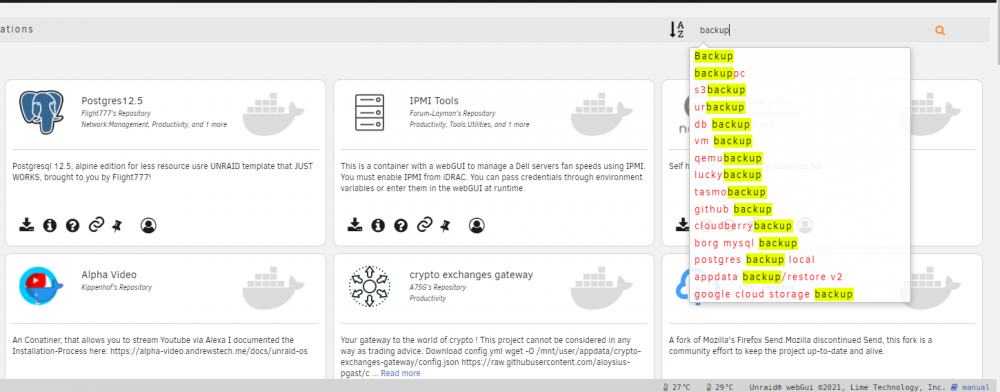
I just remoted into my machine using Chrome Version 90.0.4430.85 (Official Build) (64-bit) and it worked just fine. Did 4 back to back searches. The below is the last one I searched for. Is there a possibility your running some adware or something that might be blocking the popup results?