





bluecat
Members
-
Joined
-
Last visited
-
It would be great if the metube will get back to the community apps.
-
Thank you for your quick support and looking at the diagnostic log. I rebooted everything and suddenly, it's working again. Very wired. I will monitor and see if it will stay stable. Thank you again!
-
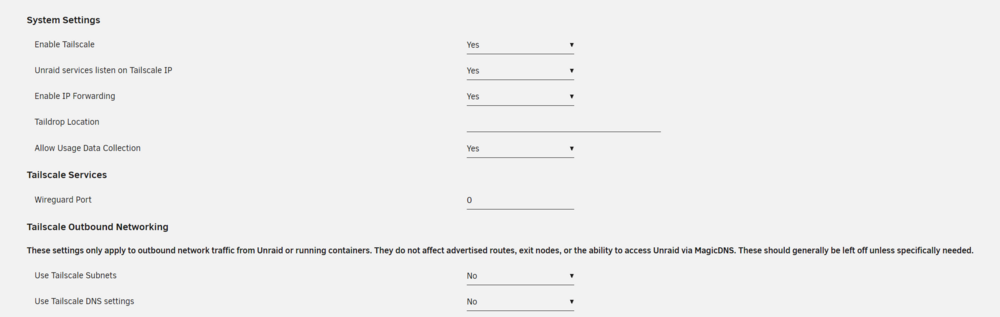
Recently, Tailscale stopped working for me after I could use it for some months. I just can't connect to the unraid dashboard via Tailscale anymore. Using the latest version Tailscale 1.70.0-t0e0a21241-g26f80df92 Unraid 6.12.11 I'm not aware of any changes I made, but it came to my mind, that it's maybe related to my ISP change. With the new ISP, I seem not go to get a public ip4 address (on the modem, the ipv4 is different from the one at a website like https://browserleaks.com/ip). Is this not supported by Tailscale? After I found out, that I couldn't connect anymore, I looked at the Unraid settings again. Tailscale plug-in shows this warning on the "Viewbing Button": Cannot access this device’s Tailscale IP. Make sure you are connected to your tailnet, and that your policy file allows access. I used the feature "Erase Tailscale Configuration" and logged in again. All settings are standard. On the admin console at login.tailscale.com the unraid server shows as online. But still, I can't open with my phone or WinPC the unraid admin page (with connected Tailscale). I tried using the direct ip and machine name. It didn't work. I have also created a Tailscale diagnostic log. Is it safe to post it public?
-
Hallo, ich bräuchte Eure Unterstützung für das Verständnis der "Pool Devices", da mich ein anderer Beitrag zu meinem aktuellen Vorhaben etwas durcheinander gebracht hat. Aktuell habe ich in den Pool devices zwei SSDs (1x. für VMs, Docker und 1x als "Zwischenspeicher" von wo aus die Daten dann ins Array gehen). Jetzt möchte ich eine neue Festplatte anschließen, die komplett für die Aufnahmen (DVR) für Überwachungskameras dienen soll. Die Daten dort sollen nicht ins Array. Nach meinem Verständnis kann ich die Festplatte in die "Pool Devices" aufnehmen. Dann einen neuen Share erstellen, nur die neue Festplatte zuweisen und keine zweite Festplatte zuweisen. Dann sollte doch nichts in Array geschoben werden und die Festplatte wäre sozusagen "Standalone", oder? Ich hatte die Empfehlung bekommen, die neue Festplatte als "Unassigned Device" zulassen ... vielleicht ist das auch eine Variante., aber hat mich zweifeln lassen, ob meine Idee korrekt ist. Danke für Eure Aufklärung oder auch nur kurze Bestätigung 🙂
-
Ich nutze Wireguard (Anleitung hier im Forum) mit Mullvad VPN. Damit kann ich für beliebige Docker das Netzwerk auswählen, falls sie über den VPN laufen sollen. Läuft sehr zuverlässig und einfach einzurichten. Vielleicht wäre das eine Idee für Dich.
-
Plug-In works perfectly in my local lan. Thank you for making this plugin! When I'm away, I connect with my phone via tailscale to my unraid server and I would like to wake up a Win10-VM. On unraid I'm using the "Tailscale Plugin". Is there a way this can work together? I assume it's maybe difficult because of the different network interfaces ... with the tailscale plugin, unraid has br0 and tailscale1 as network interfaces in the settings. But i'm too much a beginner to understand it. If someone has it running, I would be happy to hear about it 🙂
-
🤭🤯 das 4343 war das Problem ... hatte den Beispiel-Befehl von der Webseite des Tools probiert. Jetzt startet er. Yipii. Vielen Dank.
-
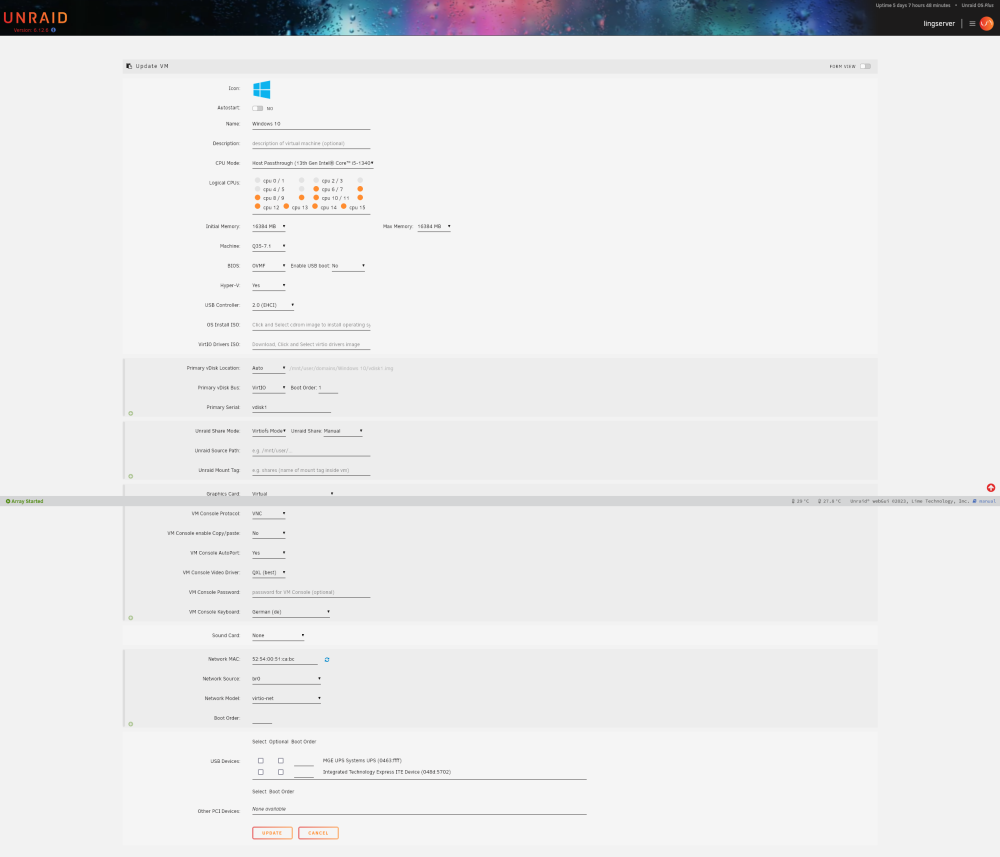
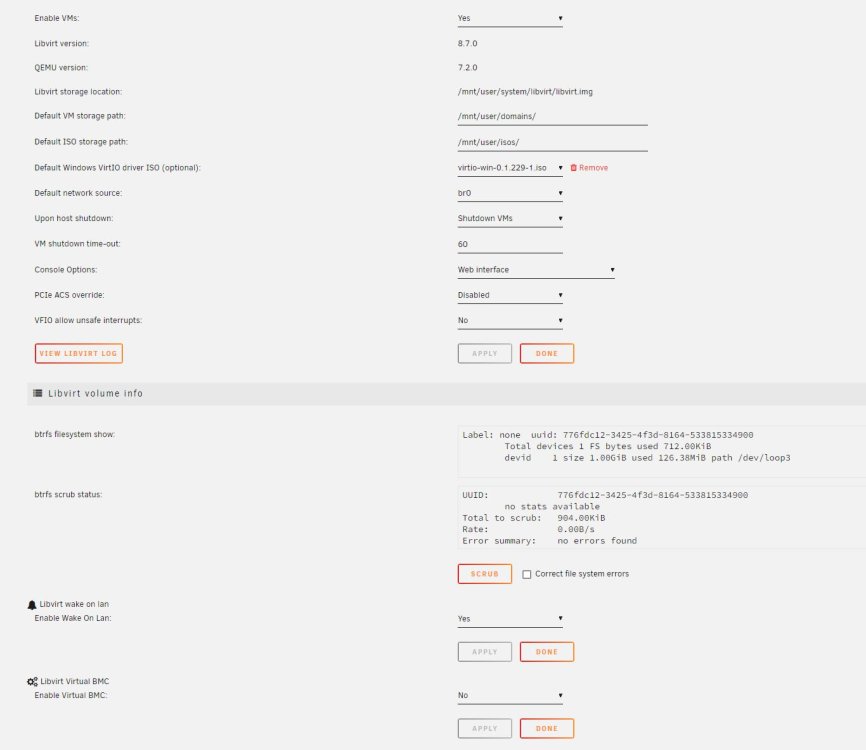
Ich bekomme das nicht zum laufen. - Habe das "Virtual Machine Wake On Lan Pugin" installiert und unter Einstellungen / VM aktiviert - In Unraid bei dem VMs die MAC Adresse der Win10-VM kopiert - das wolcmd tool installiert und eine .bat Datei erstellt: wolcmd.exe 52540051cabc 192.168.1.10 255.255.255.0 4343 52:54:00:51:ca:bc ist die MAC der VM 192.168.1.10 ist die IP vom Unraid Server Auch habe ich das Gui Tool von der gleichen Seite probiert - ohne Erfolg. Egal, ob die VM im Status Pause oder Stopped ist, bekomme ich sie nicht mehr gestartet. Muss ich noch an einer anderen Stelle eine Einstellung setzen? (habe zwei Screenshots von meinen Einstellungen angehängt).
-
Recently I had the problem that a Mullvad VPN Server went offline. Is it possible, for these cases, that it automatically chooses another server? For e.g., have multiple servers added in one configuration and selects the next one, if one server goes down?
-
die VPN Verbindung ist ausgehend über einen kommerziellen Anbieter.
-
Vielen Dank für die Hilfe! Die Fritzbox nutze ich als DSL Modem und für die IP Telefonie. Der Rest läuft über den Asus-Router im 192.168.1.X Subnetz. Der Asus Router benötige ich wegen den VPN Möglichkeiten und kann, zumindest aktuell, nicht darauf verzichten. Habe aber nun Unraid auch an den Asus-Router gesteckt und die Geräte werden nun in HA angezeigt. Mal schauen, wie es weiter geht. Externer Zugriff habe ich momentan weder auf Unraid noch auf HA .. vielleicht ist das was für die Zukunft.
-
Danke, dann habe ich wohl den Grund, warum es nicht so funktioniert. Ich überlege, ob ich Unraid evtl. dann in das gleiche Subnetz ziehe.
-
Im Subnetz nutze ich einen Asus Router mit Merlin SW, um bestimmte Geräte generell nur über VPN ins Netz zu lassen (das klappt recht zuverlässig mit Killswitch). Das geht mit der Fritzbox so nicht. Unraid habe ich bewusst an die FritzBox gehängt, um später ggf. auch von außen auf Unraid über VPN zugreifen zu können (aktuell nutze ich Unraid nur lokal). Hätte ich sie auch an dem Asus-Router, wäre das für mich noch komplizierter mit VPN und Freigabe. Bisher hatte ich noch keine Einschränkungen und konnte auch auf die Docker usw. zugreifen. Nur den Home Assistant macht jetzt etwas Probleme. Naja ich wolte es mal versuchen, wenn es zu komplex ist, lasse ich es wohl erstmal sein.
-
Hallo, ich möchte den Home Assistant Docker zum laufen bringen, scheitere aber an den Basics: Der Docker startet, aber ich bekomme keine Verbindung zu meinen Geräten hin wie Adguard Home oder Hue Bridge. Verbindung scheitert immer. Denke, es ist ein Netzwerkproblem in meinem Setup. Unraid hängt an der Fritz!Box 192.168.55.23 Adguard Home + Hue Bridge sind in einem anderen Subnetz: 192.168.1.22 Den Home Assistant Docker habe ich mit Network Host und br0 probiert. Bei beiden finde ich die Geräte im 192.168.1.X Netzwerk nicht. Hat vielleicht jemand eine vereinfachte Erklärung für mich? Ist nicht mein Fachgebiet und ich wollte anfangen etwas damit zu spielen
-
Ich habe mich für deine erste geplante Variante entschieden. 1x SSD für Cache und 1x SSD für Docker. Ist für mich in Ordnung, da ich auf dem Cache keine kritischen Daten habe bzw. sie immer am gleichen Tag noch auf einem Host-PC sind und ich einen Ausfall verschmerzen könnte. Die Docker Daten sichere ich täglich nachts einmal auf das Array. Da kommen bei mir jetzt auch nicht täglich neue dazu und das Risiko von einem Verlust ist für mich gering und am nächsten Tag sind sie ja wieder sicher auf dem Array. Wenn du kritische Daten auf dem Cache hast, würde ich auch mehr auf Datensicherheit gehen. Kommt auf deinen Anwendungsfall an.




