





Lecso
Members
-
Joined
-
Last visited
Everything posted by Lecso
-
Hi! Is there a way to stop and start specific docker container with pre and post job hooks?
-
Hi, I’m experiencing a reproducible issue and I’m trying to determine whether this is a configuration problem on my side or a potential bug. SetupLocal Unraid server WireGuard tunnel configured via Unraid VPN Manager Remote Unraid server SMB share mounted from the remote server using the Unassigned Devices plugin The remote share is accessed over the WireGuard tunnel I use borgmatic to send daily backups to this SMB share What happensI connect to the remote Unraid via WireGuard. I mount the remote SMB share using Unassigned Devices. Borgmatic runs daily backups to that mounted share. If the WireGuard tunnel drops (or is disconnected) while the SMB share is mounted, the local Unraid WebGUI becomes completely unresponsive. At that point: The WebGUI hangs. The system appears stuck. SSH may still respond. If I manually run: wg-quick up wg0 the WireGuard tunnel comes back up and the WebGUI immediately becomes responsive again. ObservationsThe issue only occurs if the SMB share is mounted. It appears the system blocks while waiting on the unreachable network mount. As soon as the tunnel is restored, everything resumes instantly. There doesn’t seem to be graceful handling of the broken network mount. I discovered this specifically because borgmatic uses this mounted SMB share as a backup repository. QuestionsIs this expected behavior when a network mount disappears while in use? Should a dead SMB mount be able to block the entire WebGUI? Are there recommended mount options (soft mount, timeouts, etc.) to prevent this? Is this something specific to Unassigned Devices? Is mounting a backup target over WireGuard in this way considered bad practice on Unraid? My expectation would be that losing a VPN connection should not cause the entire WebGUI to become unresponsive. I’d appreciate any clarification on whether this is normal Linux network mount behavior or something specific to Unraid. Thanks.
-
What solution would you suggest?
-
Hey! I'm using the option "Copy the flash backup to a custom destination" with a destination to an exact same type of flash drive as my boot drive. It is only a 16Gb pendrive and it got a notification that it filled up. Is there and option to keep this cleaned up too? It looks like the "Delete backups if older than x days:" setting does not apply on this. Edit: I just saw the solution on the previous posts. So it is not managed by the plugin.
-
.30 is my PC that I used to reach the webgui. There was some issue with the remote indeed, the VPN did not connect. Can that cause such an unresponsive webgui?
-
Today morning I got a ping from healthchecks.io, that my borgmatic backup did not run successfully. When I looked at the logs of the backup, it only had 2 lines: /etc/borgmatic.d/immich_config.yaml: Pinging Healthchecks start /mnt/immich-repo: Pruning archives /etc/borgmatic.d/immich_config.yaml: Pinging Healthchecks log /etc/borgmatic.d/immich_config.yaml: Pinging Healthchecks fail When I tried to run it manually, it stopped at this point again, and made the whole webgui slow, then unsresponsive, then unreachable. I could reach the server through SSH. I tried to restart nginx, which made the webgui reachable, but parts of the UI were missing. I have no idea what would cause this, i see no connection. Can someone help me and look at my diagnostics? naspolya-diagnostics-20251031-1229.zip
-
Hi! What is the way to create a backup of a SSH source? I want to save some directories of a raspberry pi that I can access via SSH. I created the ssh keys in the container and copied them to the pi. What is the correct way to write the config.yaml for this? Edit: I solved it by creating a samba share of the directory on the Pi and adding it to Unraid as a remote share, then mounting that to the docker container as a path.
-
Hi @sdub ! The check was scheduled for today at 2am, and I got a healthchecks ping that it ran okay. However, the backup creation at 5:30 did not run again. Healthchecks ping I ran the validator now. borgmatic config validate -s I had a failed (the initial) backup, but after the fail I stopped the container, wiped the repo and re-initiated it with the init command. I ran the backup creation right now with: borgmatic prune create -v 1 --stats Does it look good? I couldn't notice any errors, but I did not get the healthchecks ping. ps -a I can't see any borg command running if I'm not mistaken. I ran the borg break-lock /mnt/borg-repositorycommand now. borgmatic prune create -v 2 --stats --log-file /mnt/borg-repository/logs/backup.log I can see files modified in the repo after running this but I did not get a ping again. Thanks for you help so far. I can't see why it is not working... Edit: On healthchecks.io i see the last ping was 7 minutes ago, when I ran the create command. I just did not get the ping. But I got the check one this night. I don't get it. Edit2: I think I get it. I didn't know that there is a schedule for the pings. I created the correct schedule now. backup.log
-
Hi! I set up borgmatic yesterday, and ran the initial backup manually as you advised in your reddit post. After that it should run every day at 05:30, but it did not. Do you have any idea why? I did not get any ping either from healthchecks. Container log snippet after starting the container: [custom-init] Docker CLI variable not set, skipping... [custom-init] No custom packages found, skipping... ----------------------------------- Software Versions: ----------------------------------- apprise 1.9.4 borg 1.4.1 borgmatic 2.0.7 dockercli not installed composecli not installed python 3.13.3 ----------------------------------- Time Zone: Europe/Budapest ----------------------------------- Applying crontab.txt Cron job set as: 30 05 * * * borgmatic prune create -v 1 --stats 2>&1 00 02 * * 3 borgmatic check -v 1 2>&1 crond: crond (busybox 1.37.0) started, log level 8crontab.txt config.yaml
-
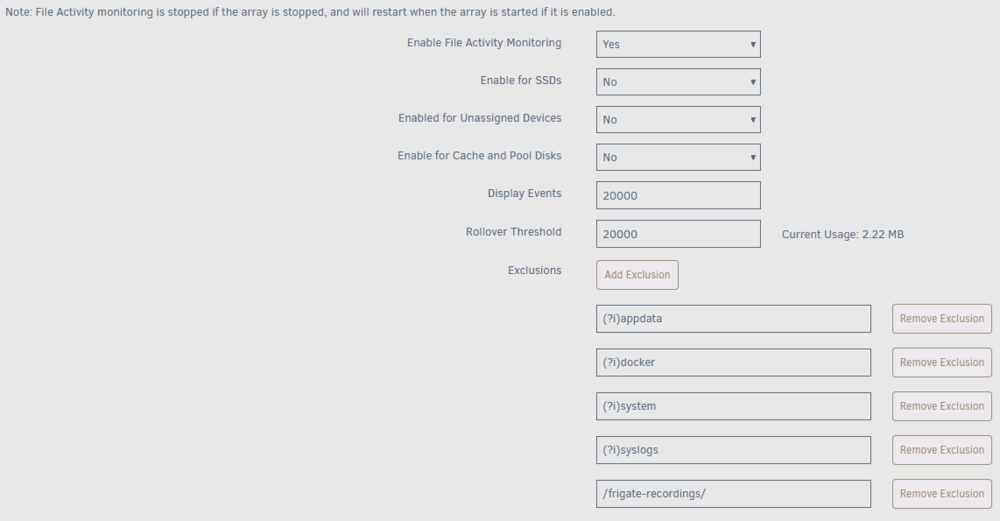
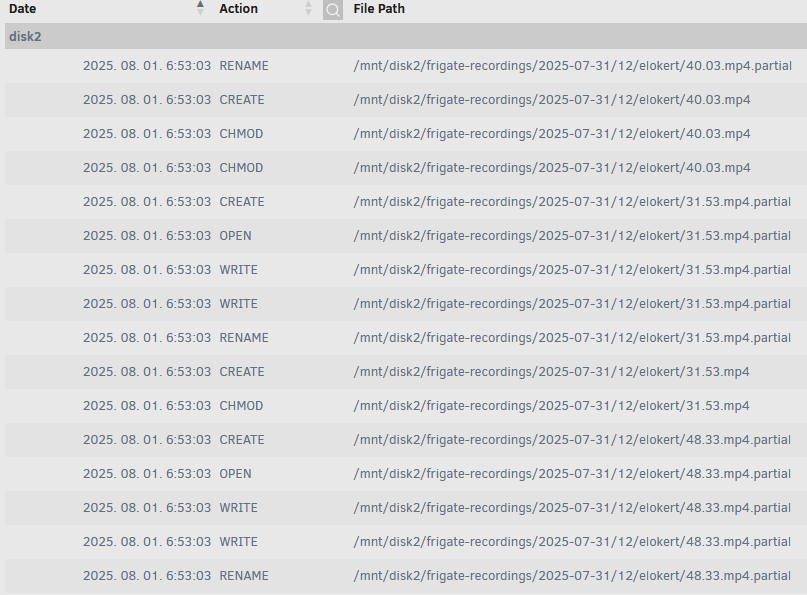
I tried it, but it picked up the folder that was excluded:
-
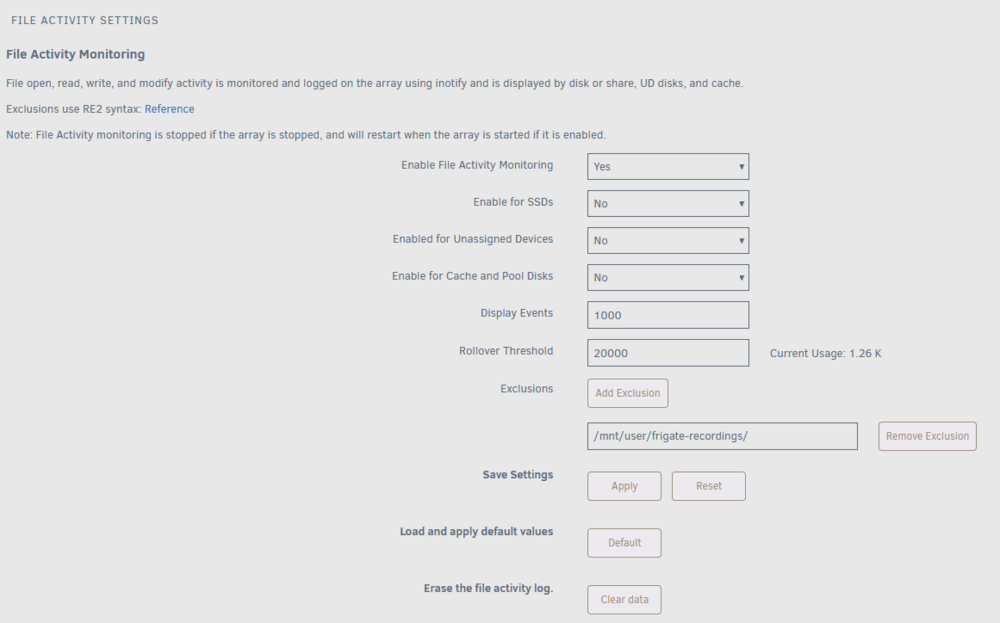
Hi! I'm trying to add a share as exception, but it does not seem to work. Am I doing it wrong?
-
I decided to start completely from scratch again. Disabled PCIe ACS override, unbound VFIO, deleted the VM, deleted the nvidia drivers, restarted the server. Now I could finally dump the vbios from the card using spaceinvaderone's script. Rebound the GPU and sound card to VFIO, restarted the server. Created a new VM, fresh windows 10 install, and then passed the GPU with the dumped vbios, and now I can see the GTX960 in device manager.
-
I have tried following every guide I could find and still did not succeed with GPU pass through. Asus GTX 960 GPU is not in primary PCIe x16, because that one is damaged, it is in a PCIe x1 slot I have IOMMU enabled GPU bound to VFIO "PCIe ACS override" set to "both" in Settings>VM manager Display plugged into the GPU does have a picture when starting the VM, but I cannot see the Nvidia GPU in Device Manager Downloaded vbios from Techpowerup, deleted the header as per Spaceinvaderone's video I attached the VM's xml config, the dowloaded and edited rom and diagnostics. I don't know where to look for the issue anymore, please guide me! Win10VM.xml naspolya-diagnostics-20250702-2251.zip AsusGTX960vbios.rom
-
I might have found the culprit: I had this ha-unraid-connect custom integration on Home Assistant, which is still in beta, together with the GraphQL API. After I removed the integration, I could spin down my disks and they are spun down for 15 minutes as of now.
-
Let me attach my syslog again, with the VM manager start and then you can see the manual spin down and then spin up in a minute. syslog.txt
-
I already did. What I noticed however, if I completely disabled VM manager, my disks did not spin up in minutes. Enabling it started my Home Assistant VM, which accessed its backups on startup, it was logged in file activity plugin. I then let the HA VM run, and spun my disks down. They were spun up in a minute, but no file access in the plugin for this spin up. So it is probably my HA VM, but how do I find out what it does?
-
I had my spin down set to 2 hours and it worked nicely for a while. I needed to change both my parity and disk1 HDD in the system and also moved the machine to another case. After the parity rebuild and disk1 data rebuild on the new drives, I noticed that I cannot keep my disks spun down. They always spin up after a few seconds/minutes. I don't know if the issue was present before the HDD changes sadly. File activity plugin does not show any file access, it happens with VMs stopped and Docker disabled also. I installed Dynamix Cache Directories plugin too. I cannot find what is causing it. Can someone point me in a direction with troubleshooting this? naspolya-diagnostics-20250623-1624.zip
-
Yes I did install ich's drivers. The I think the m.2 is sata only... This is the difference between sata and nvme SSD's then, now I've learnt my lesson hehe My board has a ton of PCIe Gen2 X1 Interface, I will buy an adapter card and try with that.
-
I bought a Coral TPU M.2 B+M in a Gigabyte GA-H110-D3A motherboard, but the TPU is not detected. Is it possible that the motherboard is not compatible with the Coral? Or this M.2 slot is not compatible? According to the manual the m.2: If this slot is not compatible, can I put it in a PCI to m.2 adapter card into a PCi slot? In the x16 slot I have a GPU, is x1 PCI enough?
-
Hey! I updated the docker and lost my database. I read what you found out, but I can't really see if there is a solution or not. Is there a way to restore my old database? If not, how should I proceed to not lose it again when updating?
-
Hi! I encountered a problem where the world just ends when going away a fair bit from the spawn point. Sometimes I can go further, but on the way back to my base that part of the world ended, disappeared. If I restart the server, it fixes it. What could cause this?
-
Hi! I'm trying to set up Sonarr and qBitorrent for downloading shows. I only download from one site, and I start the torrent manually by adding the .torrent in qBittorrent. I want to use Sonarr for renaming the downloaded media and to copy it from the download folder to the media folder, and after the seeding is done, delete it from the download folder. Sonarr's data folder points to the download/tvshows folder and media points to my media/jellyfin/tvshows folder. After downloading a show, Sonarr did not do anything. I could only import my existing shows from the media folder, it renamed it alright. Does this auto rename-copy-delete process work even if I add the torrent manually to qbittorrent? Edit: I can see it under Activity/Queue but there is an error: Series title mismatch; automatic import is not possible. When I click the little man icon to import it says: No video files were found in the selected folder. There is proper mkv videos there if I go into the folder.
-
I will try to explain it better! I tried two android phones with mobile data, their settings are Remote Connect to LAN. Both worked as they should, I reached everything like I was on my home network. I could reach my 3D printer, Unraid, my router, everything on their usual address. However, the Ipad, connected to one of these android phone's hotspot could only reach my router on its default 192.168.1.1 address and my Unraid server login page via this address (in Remote connect to LAN mode too): (but not on the 192.168.1.121, Unraid's address on my home network)

-
My laptop was on a wifi hotspot created on my phone. On the phone that works. I also have problem with an ipad. Remote access to server and remote access to LAN has internet, I can reach the Unraid login page and my routers login page, but nothing else on my local network. I tested this on the hotspot shared from my phone too.
-
Hey. I have set up the VPN in Settings>VPN Manager. It works on my android phone but not on my other Windows laptop. Has anybody encounter this problem? When I connect to the VPN from my phone and ping it from Unraid it replies, but the windows laptop does not.



