DevanteWeary
Members
-
Joined
-
Last visited
Everything posted by DevanteWeary
-
Hey maybe I'm missing it but is there a dark mode option using this container? Also a second question... I set my /data container folder to /mnt/usr host so that I could access all my shares in owncloud. I loaded it up and watched the logs and it sat at "Correction permissions /data" so I got scared and stopped it. Is this safe? Should I let it do this?
-
Just updated Unraid Connect plugin finally and got the same issue. I uninstalled / reinstalled Theme Engine, then re-imported my custom theme, and it worked.
-
Guys I'm having trouble understanding this vs. MariaDB. I'm not expert but I have a fundamental understanding on MySQL and MariaDB. I also use Adminer to admin MariaDB. The thing I don't understand is in MariaDB, I create different databases for different things such as Fireflly3 and SpeedtestTracker. Each one gets their own database within the MariaDB container. I can also create users, etc. But with my initial look into MondoDB, I'm not really seeing that it works the same way. Do you not "log into" MondoDB and then create different databses (with their own unique names)? I tried to get into MondoDB from Adminer but it told me None Of The Supported PHP Extensions (Mongo, Mongodb) Are Available. I have Graylog installed and I believe that's using MongoDB, I'm just not exactly sure how haha Thanks for any info guys! Ultimately I wanna get in there and create separate databases so it's nice and clean.
-
Hey there. Saw another update today and just wondered if there's a changelog. On the github, I don't even see any update since June (or maybe July?) and no changelog in this thread. Thank you and thanks for your hard work! By the way, this is the one I'm using in Unraid: qmcgaw/ddns-updater
-
Guys sorry to ask but there seem to be a couple install methods in this thread now. What's the current way to install this for the first time? And should I install and run the auto-tune while a parity is going?
-
Yes it's working. However I think I have it figured out and all that typing was for nothing ha. Pretty sure it's because it was Chrome mainly being used to test. Everything else worked fine; apps, phone apps, Firefox (probably because it's forced transcoding), and anything that basically wasn't Chrome. tldr; Chrome sucks for Direct Play of HEVC 10. Transcoding still worked fine in Chrome though.
-
Hey everyone, Last week upgraded everything but my hard drives. Now all of a sudden many of my movies stutter like crazy. Entirely unwatchable. The sound is fine but the video is constant stutter. This is either remotely or on the same network. I've tested several and all have the same or similar issues. Several MP4s BluRay-1080p x265 continuous stutter. Only one the the MP4 BluRay-1080p x265's worked. However this one wouldn't load in Jellyfin. Pretty much any MKV BluRay-1080p x265 works fine. For the ones that don't work correctly, if I play them and manually select a quality... the only qualities that work are either automatically convert or anything 480p or below. Another thing is if I play via the web app on my laptop, this is where I can most definitely recreate the issue. However, playing on my TCL Roku TV has no issues no matter what mix of quality and direct play I select. The main movie I am using as a test... if I select any quality from original to any of the 720p options, it shows Direct play and stutters. If I select 480p or below, it shows that it's transcoding and works fine. If I select convert automatically, it works fine. I'm more or less having the same issues in Jellyfin as well, although instead of stuttering, they just don't start. I'm killing myself trying to figure out why I have all upgraded hardware and getting far worse performance. Everything was running perfectly on my much older tower. Please see my specs below and thank you for any advice!! --- Using the official Plex container on Unraid. Here's what I now have: https://pcpartpicker.com/b/JsfPxr Old CPU is an i7-8700 with Intel® UHD Graphics 630 and the new one is i5-12500 with Intel® UHD Graphics 770. (this one has the dual codec engine) In my Plex container settings, I have /dev/dri set as device and I have also tried /dev/dri/card0 and /dev/dri/renderD128. I have uninstalled and reinstalled Intel GPU TOP plugin as well as the GPU Statistics plugin for Unraid.
-
Thank you! I guess the main thing I get is how does it work with the percentage full filter? The settings is called "Only move at this threshold of used cache space:" If I set that to 75%, and have the preference to Array > Cache, it seems to me that if the CACHE drive gets fill up to 75%, it'll move files from the array TO the cache drive thereby filling the cache even more.
-
Guys still trying to get a handle on this awesome plugin which seems to have a lot of work put into it so thank you! So am I understanding this correctly? This plugin (and Mover itself?) only moves OFF of the cache drive? Or does it follow the Array > Cache preference too? Basically I have some shares set as Array > Cache and at the end of the day, if the space becomes available on the cache, I want the files moved FROM the array (HDD ) to the cache (SSD). Basically I want the drives to be used as overflow but those files to eventually end up on the cache automatically. Is this possible?
-
By the way, I found the culprit using the QDirStat container. I had set radarr to recycle and all those "recycle" movies were being stored in the appdata folder!
-
Oh that's so weird. I just checked and all of those are set to 97.7 GB minimum free space but I never set that. Pretty sure I set everything to like 100 GB. (or maybe 5 GB, I can't remember) I just tried to change it and it just set back to 97.7 GB on its own. Any idea why this would happen? Of the top of my head - I'm purely guessing - I have a file on there that was below 100 GB and grew over that? But then again, I've had my VM on there that is 500 GB for months and never had this happen so maybe I'm off base.
-
Hey everyone. I have the SHFS share cache full message in my syslogs. I've looked through the diagnostics and my graylog but can't figure it out. Hoping maybe somewhere here could tell me the culprit. I've attached my diagnostic and let me explain what may have led up to this. A few weeks ago, I turned an share (cache > array) into a cache only share. Two nights ago, I turned it back into (cache > array) and ran mover. Yesterday I woke up to a million of the SHFS errors. I tried rebooting the server, it wouldn't reboot via interface. I pressed the button on my tower (not hold) to see if that would initiate a shutdown and it did (I don't have a monitor hooked up). I boot it back up and one of my drives (Seagate) has a SMART error of "188 Command timeout 1" which I read isn't a big deal. Running an extended SMART check as of this morning. Now I check my Graylog and it looks like the error never went away. I clicked told Mover to move about 30 minutes ago and the button is grayed out but looking at my free space, it seems like it isn't doing anything. What could be causing this? Thank you for any insight! See below for the amount of the SHFS errors I've been getting. It's filtered out to just those. devante-nas-diagnostics-20231214-0041.zip

-
Hey everyone. Right now I have notifications > plugins/docker updates set to disabled. Yet I still get them in my Discord (and in browser). If I go to Notification Bell > Notices , this is where they show up and if I disable notices, they stop. However, notices also show me stuff like drive temperature warning and docker image utilization going back to normal. That's stuff I need but I don't need to know the near-daily updates of some containers. In the Discord notifications, it also shows "Notice" next to the container update notifications with a big green letter i for info. I'd like to request to separate the two types of notices! Thank you!
-
Hey @ZappyZap, wanted to ask where do you prefer feature suggestions? Here or github? Was gonna suggest Under Results, have a filter for "Doesn't meet threshhold" Highlight any line that doesn't meet threshhold. Export as .CSV Thank you for such a great app!
-
Loving the plugin!! Got a quest: what's the purpose of the CSS stuff? What exactly can I customize with it? Also, with it would it be possible to put a colored background circle around containers that are running or need updates? Thank you so much!
-
Thank you for adding that event limiter! Definitely makes it so much easier. I was checking my file activity and it kept telling me Disk 1 was opening a file (an icon used by FolderView I set). However, when I check the Dashboard, Disk 1 was asleep/spundown. It definitely was spun down because when I checked the disk itself, sure enough that's where the file is stored. When I loaded previews for all images in the same folder using Krusader, sure enough all of them showed up in File Activity > Disk Activity > Disk 1. So long story short, File Activity showed the image was being opened, but the drive wasn't actually being spun up. Oh by the way, the thing that triggered its entry in File Activity was me going to the Docker tab (which has FolderView folders set up), waiting a few seconds for it to load, and then going back to File Activity and refreshing. Just thought you should know!
-
Hey everyone! Confused about the custom branding thing. Should I be able to change the file icon right above the login username field and should I be able to change the file icon to the upper-left of the page once logged in? If so, what files are those? I have /branding/ set as my branding folder. I have /branding/img/logo.svg and /branding/img/icons/favicon.ico My favicon works but if those other two logos are supposed to be changed, they aren't on my setup. Thank you!
-
I have a syslog server as well... How do you send the log to the syslog server?
-
Hey I'm with you. I tried going over the wiki/guide but it's confusing to say the least. Went from working right out of the box to complicated to get running again.
-
Worked like a charm. You're the best. 😆 Just throwing the steps here for anyone looking for a definitive order: Use UD Preclear on drive. (could take days) Stop Array Increase drive number by one. Select new drive to fill new slot. Start Array. Format drive through Array Operations > Format Done!
-
Hmmm I don't have any buttons at the bottom of Unraid > Main > Array Devices I do have a button under Unraid > Main > Array Operation called Format that says "will create a file system in all Unmountable disks" and when I click it, gives me the following warning: Format Unmountable disks Create an empty file system on the disks shown as Unmountable discarding all data currently on the disks and update parity to reflect this. This is typically done when a new disk is added to the array to get it ready for files to be written to it. **WARNING** A format is NEVER part of a data recovery or disk rebuild process and if done in such circumstances will normally lead to loss of all data on the disks being formatted. Think I should go ahead and do that one? Sorry, just trying to avoid another 4 day clearing.
-
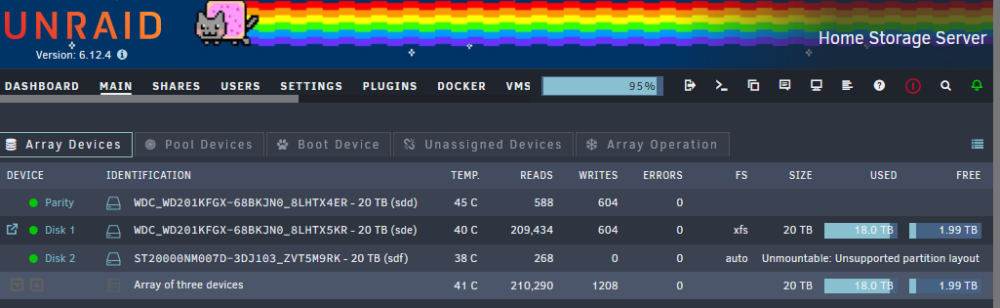
Guys, I'm just supremely confused here. I just finished using UD Preclear and everything finished with no errors. So I stopped the array, added the drive, and started the array. I get the "Unmountable: Unsupoorted partition layout" message next to the drive and my storage has no increased. The instructions say no need to format, and several posts here give conflicting information. If I click the red X next to the drive, it tells me it'll remove the pre-clear signature and Unraid will start the lengthy preclear all over again. I've tried rebooting as well. I thought it was as simple as Preclear > Add to Array but seems I'm missing a step. What am I missing guys? Thank you!
-
Hey everyone, I'm having an issue where once in a while, I'll set a torrent to download and see that it'll complete within a short time so go to bed. Then wake up and the torrent isn't in the list and the files are in my incomplete or complete folder. For instance, I had a 260GB torrent set last night, it was due to be done in an hour went to be when it was at 16%. Woke up this morning and it's just gone. I don't know what the culprit is so let me list what I'm using. * binhex-qbittorrentvpn * Plex * Jellyfin * Jellyseer * Radarr * Sonarr * Prowlarr * Bazarr I use the recycle bin Unraid plugin so I check that recipe in and don't see anything. I use FileActivity plugin and it doesn't list anything related. I use the recycle bin function in each of the *arr apps and nothing there. I check both the download and the import locations and nothing. I make sure the "remove from download client" option is uncheck in each *arr. The only thing I can think but haven't tested is are any of them NOT monitored by the *arrs. But I'll try to pay attention to that from now on. I'm at a loss. It's not every torrent, but if say 1 out of 5 just... disappears. Both the files and out of qbittorrent. What could I be missing people? I don't know what else to check. Thanks for any advice! Driving me crazy ha. Sent from my Pixel 6 Pro using Tapatalk
-
Options are always nice. For instance, I looked into this plugin because I wanted to know what was deleting the movies out of my completed torrents folder sporadically. Since I can't predict WHEN the movies will get deleted, by the time I wake up and notice the movie is gone, this plugin's momentary log is filled with other stuff. If I'm being honest, while I am eternally grateful that people put the hard work in to make these things, I don't see how having a plugin whose purpose is to track down file activity... not log file activity. That's just me! Not negativity intended. I love this community and am grateful for this plugin.
-
I'm such an idiot I swear I read! Well more like skimmed ha.... big failed on my part. I wouldn't mind the option of having an external log running and maybe a setting to prune it however you want. Such as size or life of log. Well anyway just glad such a good plugin was made! Thank you!