bonienl
Community Developer
-
Joined
-
Last visited
Everything posted by bonienl
-
Ok, I found the issue and made an update. Please install version 2023.04.03 Thanks. Ps. For those experiencing the issue, you need to wait until the background task is completed, after that the GUI is restored and you can update the plugin.
-
Do you have javascript errors? Open the console of the browser (usually CTRL + SHIFT + i) I can not reproduce this situation, so far Found the issue
-
This works fine for me. Can you open the browser console, this is usually CTRL+SHIFT+i Are there any javascript error messages when you try to open a GUI page?
-
If you don't run Docker and VM then bridging is not needed.
-
Latest version is 2023.04.02. Works fine for me on Unraid 6.11 and 6.12 Do you use this version?
-
The file manager does not allow to create shares, this is only possible using the GUI. When a share is created, the associated allocation method will place the files accordingly and create folders on different disks as needed.
-
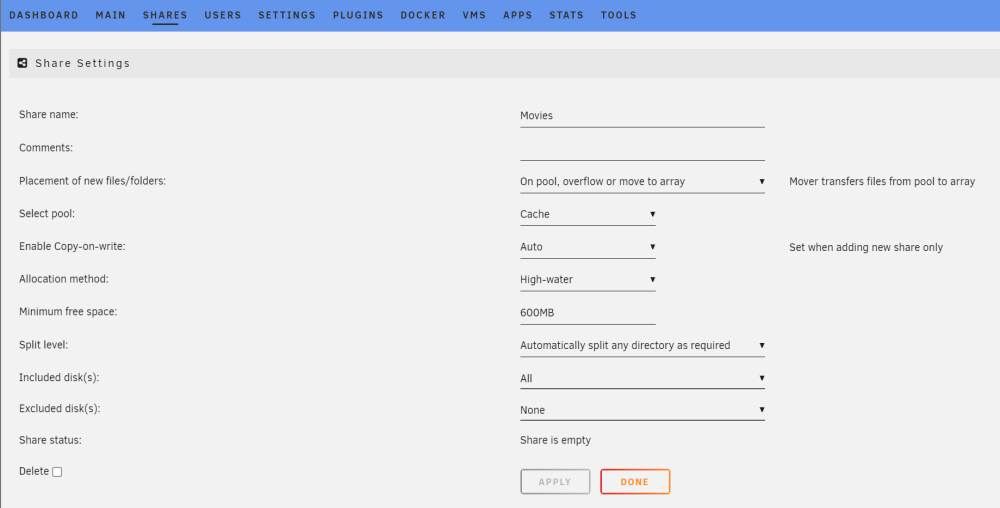
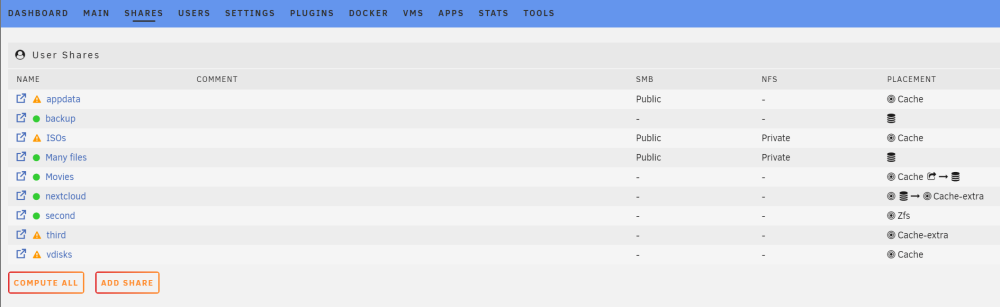
Instead of "Location" we can use "Placement", I think it is the more appropriate term?
-
To make it more visual == Pool == Array == Pool, Overflow, Mover, Array == Pool present, Array, Mover, Pool Hovering with your mouse over the "locations" shows the above explanations. Perhaps better wording is needed
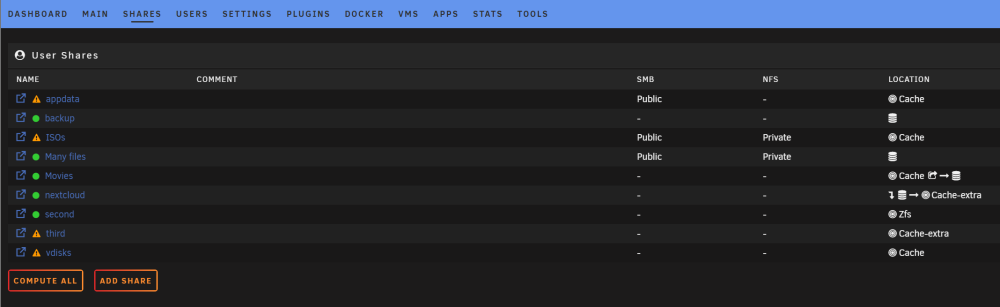



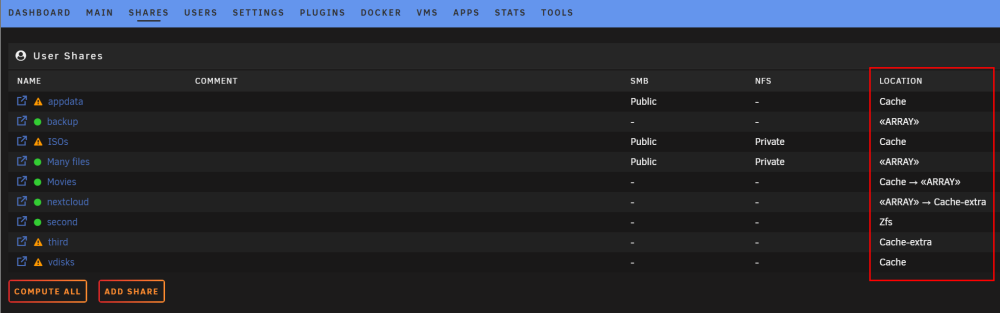
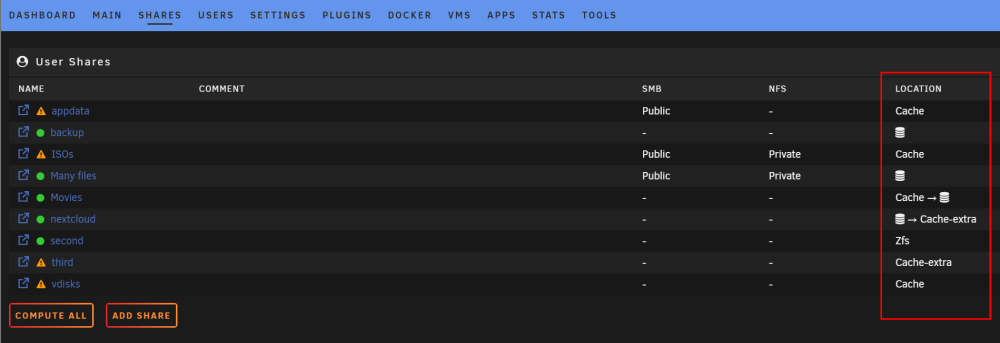
 "No" and "Only" are very straightforward: on array or on pool. "Yes" works with overflow Content is written to the "cache" (pool), but may overflow to the array when insufficient space is left on "cache" (pool). Mover will move content from "cache" (pool) to the array (its designated operation) "Prefer" is a special case. When the user does not have a "cache" (pool) then content is written to the array. Once the user adds a "cache" (pool) and runs mover, this will move the content from array to "cache" (pool) (its designated operation) Now the share exists on "cache" (pool) and any new content will go there, mover is not involved anymore.These are the names of the pools on my system, in other words location refers to the pool name or array.Here is my proposal When a new share is added, it will have the settings "Share location" and "Select pool" For "Share location" there are four choices, see picture below On the Shares page the column "Cache" is replaced by "Location" and it shows where the share is located and can be moved to. or Any thoughts?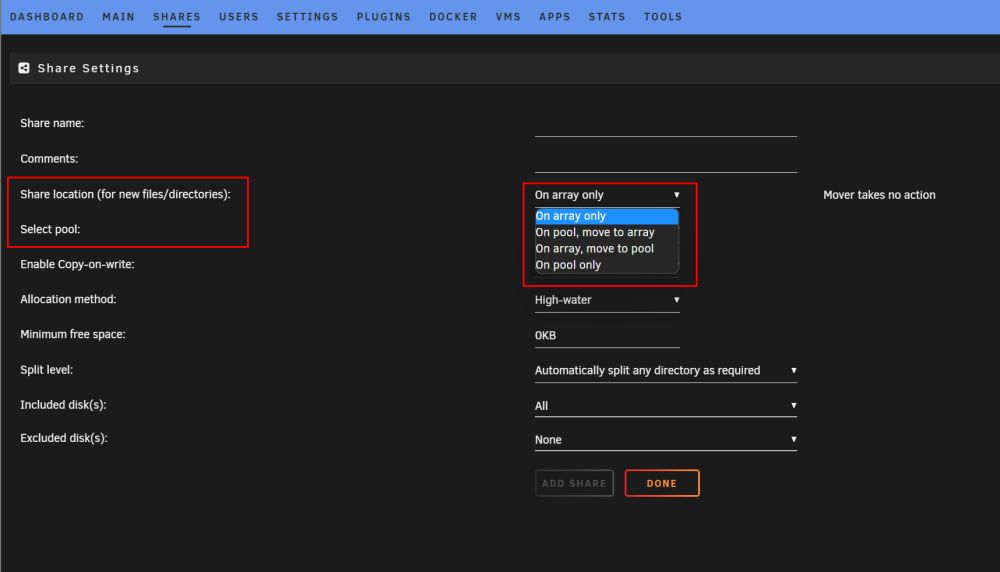
 Sorry, I made a syntax mistake for Unraid versions 6.11 or lower, which causes javascript to stop and results in an empty screen. Version 2013.03.31a has the correction.I need to investigate, I updated two systems without issue.This sounds like I/O latency, your hard disks take proccessing away, or better said your cpu is waiting/slowdowned by your hard disks. Try to find out which hard disk is causing this, e.g by copying from different sources to different destinations.The macvlan issues occur on the shared interface br0. If no containers make use of this interface then disable it in the docker settings, this should help.Perhaps @dorgan can make an update to his plugin?The GUI has a function to automatically load updated versions of a file and eliminate the need to refresh the browser because of cached versions. Change <script src="/plugins/plexstreams/js/plex.js"></script> Into <script src="<?autov('/plugins/plexstreams/js/plex.js')?>"></script> This will load automatically the latest version of "plex.js" bypassing the browser's cache.Some routers do not support hairpin NAT at all, some routers do this automatically out-of-the-box and some routers need to be configured to enable hairpin NAT. Check what is required for your router.Did you try to clear the browser's cache and delete cookies?I tested on the same combination and don't have the issue. Do you have any adblockers or anti-virus plugins running?Are you using Safari on an iPad? In the above case Safari tries constantly to translate the page, hence the constant refreshes. This doesn’t happen with Safari on macOS, and the problem is solved when updating the iPad to version 16.4I made a guide how to set up a dedicated connection for Docker containers on a custom network. This solution solves the issues some users are having with macvlan or ipvlan. See>>> Updated Aug 31, 2023 to advise upgrading to Unraid 6.12.4 rather than following this guide If you are getting call traces related to macvlan, as a first step we recommend navigating to Settings > Docker, switch to advanced view, and change the "Docker custom network type" from macvlan to ipvlan. This is the default configuration that Unraid has shipped with since version 6.11.5 and should work for most systems. However, some users have reported issues with port forwarding from certain routers (Fritzbox) and reduced functionality with advanced network management tools (Ubiquity) when in ipvlan mode. For those users, we have a new method that reworks networking to avoid this. Upgrade to Unraid 6.12.4: and follow the guide in the Release Notes to avoid macvlan call traces and crashes: https://docs.unraid.net/unraid-os/release-notes/6.12.4/ ---------------------------- For historical purposes, below are details on the 2-nic Docker segmentation method for avoiding macvlan call traces. If you choose to follow these instructions, do not mix and match solutions. Either use the method below OR the new method available in 6.12.4 USE A DEDICATED ETHERNET PORT FOR DOCKER ONLY >>> Updated Aug 8, 2023 to advise that bridging should be disabled on the dedicated interface You will need an additional ethernet port of your server to make this solution work. This additional port is connected to your local router or switch just like the main port. No network modifications are required for your main connection eth0/br0 unless it is configured as bond or bridge interface with multiple ports and you need to free up one port from the bond or bridge interface and turn it into a dedicated port for docker connections. 1. Stop the array and navigate to Settings -> Network Settings and configure the dedicated interface - This guide assumes eth1 will be the dedicated interface, adjust for the appropriate ethX device as needed - Disable bonding and bridging for this interface (important!) - Use IPv4 only or IPv4 and IPv6 as per your case - No IP addresses are assigned to this interface 2. Navigate to Settings -> Docker and configure Docker to use this dedicated interface - Set "Docker custom network type" to "macvlan" - Scroll down and disable the IP assignment(s) of eth0 / br0 which is going to be replaced - Assign manually the "old" assignments to the new dedicated interface (use eth1, not br1 as shown in the image) 3. Start the array and configure the Docker containers with the new custom network - Any containers that previously had "Custom: br0" should be changed to "Custom: eth1" (not br1 as shown in the image) - IP addresses may be fixed (as in the example below) or dynamic using DHCP (configured in the previous step) THAT'S IT - NOW YOUR DOCKER CONTAINER(S) OPERATE ON A DEDICATED CUSTOM NETWORK