





bonienl
Community Developer
-
Joined
-
Last visited
Everything posted by bonienl
-
Switch to “advanced view” for tunnel WG1
-
Dit is iets wat je moet instellen op je router en heet "hairpin NAT". Deze functie zorgt ervoor dat je router het externe (publieke) IP adres vertaalt naar het interne (private) adres, zodat aanvragen binnen je locale netwerk niet naar buiten gaan, maar lokaal worden afgehandeld.
-
When no explicit gateway address is given for the subnet, then docker will assign the first address as gateway address. This is the conflict you see. Under docker settings you need to set the specific subnet assignment for each VLAN, see example below

-
No, it can copy/move existing links but not create.
-
Names highlighted in red mean they exist more than once. The location column shows on which disks the same name exists. This might be a copy of the same file or a different file with the same name.
-
Are you sure your PSU is up to the task? A parity operation involves all disks and drains a lot more power than average usage.
-
You deleted the interface section (and perhaps more) in the XML file. I suggest you start fresh with a new VM.
-
What does the Main page show, a green icon (active disk) or grey icon (inactive disk)? Do you have any scheduled tasks created which may access disks? The only thing I can think of is to completely move the content of the disk to another disk (i.e. make the disk completely empty). Also make sure that your general include/exclude rules (see Settings -> Global Share Settings) and per share include/exclude rules (see Shares -> <share name>) do not force to use the disk in question.
-
My first Unraid server was with version 4.7 and 2x 2TB data drives + parity, giving a whopping 4TB storage. I thought I had endless storage
-
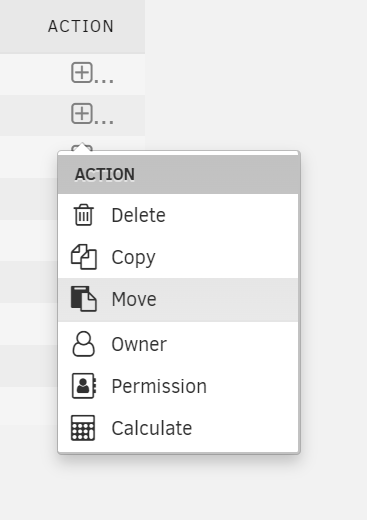
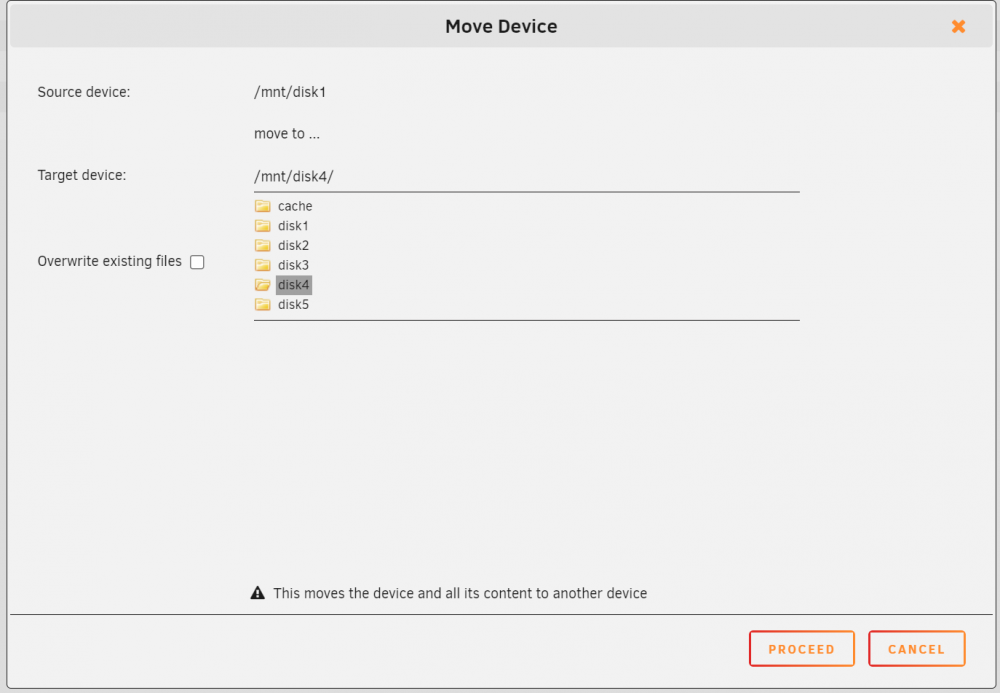
The Dynamix file manager has an easy way built-in to move content from one disk to another disk (provided there is enough space on the destination disk) 1. Open the file manager from the top-right icon 2. Select the Move operation from the source disk (e.g. disk1) 3. Select the target disk to move to (e.g. disk4) 4. Select PROCEED and all content of disk1 will be moved to disk4 (existing files will not be overwritten unless explicitly selected) 5. You can follow the progress in the opened window or close it (X in top-right) and let it run in the background.

-
webUI access to containers won't work with user defined custom networks. You can use bridge (e.g. br0) custom networks to put a container on a dedicated IP address. I run my own DNS server on my LAN network, which allows me to create names with associated IP addresses.
-
S3 sleep detects there is activity (not thinking). When read/write counters change it means something is happening. I have seen situations when a SATA controller card is used, counters are incorrectly updated, in that case you can try the other detection method which is to monitor the reported state of the disk.
-
Successful detection is outside the scope of the plugin. Your milage may vary depending on your hardware. The Network stats plugin works fine with all Unraid versions, including latest beta release 6.11.0-rc4 It is impossible for Limetech (or anyone else) to test all possible hardware combinations out there and ensure TEMp and FANS all work. It is a deliberate decision to make this optional plugin, as success can't be guaranteed. Don't know what the concern is, but development is still in place. Though most of my time I spend on developing Unraid itself.
-
Test with docker and vm services disabled, and see if that makes a difference.
-
Select inside the list and press the END button ...
-
The Dynamix File Manager plugin uses jqueryUI dialogs and filetree to open a popup window with file selection. You may want to look into this combination.
-
Just tested your time zone and it works properly for me. Try to set a different time zone and then change it back to your own time zone, see if that makes a difference.
-
Add the .sh extension to the list defined in /config/editor.cfg located on your usb drive. Note: you can use the file manager to edit the above file
-
You should make eth1 a bridge member of eth0 (br0). Change the eth0 configuration and make both eth0 and eth1 a bridge member.
-
How exactly did you configure eth0 and eth1 on Unraid?
-
I made an update for the file manager, which allows you to right-click on any of the items in the browse header and it will show the full path, which you can copy / paste as needed.
-
When using Unraid 6.10, you can simply use the following Start array #!/bin/bash emcmd cmdStart=Start Stop array #!/bin/bash emcmd cmdStop=Stop
-
Do you use DHCP or a static IP assignment for your server, use static.
-
Jul 2 00:47:27 Unraid kernel: Hypervisor detected: VMware Can you run Unraid natively. In this setup the network interfaces are not being detected by udev and hence no rules file is created, this results in random selection each time the system is started.
-
I made a fix in uploading binary files using Dynamix File Manager, please update.





