





sonofdbn
Members
-
Joined
-
Last visited
Everything posted by sonofdbn
-
My bad. I found that the SSD cache drive with the VM was full (thanks to a Fix Common Problems notification - I'd been ignoring the disk utilisation messages). Once I cleared some space the VM worked fine again (although the error message still appears in the log).
-
Any update on this? While I can't be sure that this issue is the cause, I'm now unable to Remote Desktop in to my Win11 VM. The VM tab in the GUI claims the VM is running, but the error log has many lines with that error message, and the (isolated) VM CPUs show 0% activity on the GUI Dashboard. So it seems to me that the VM is not actually running.
-
I have a Windows VM on my unRAID server with the GPU passed through to it. I access the VM via Remote Desktop from my desktop PC running Win10. I'm trying out Stable Diffusion (Comfyui) on the VM, and am giving the VM two monitors via Remote Desktop. Anyone who tries out GPUs and Stable Diffusion knows that GPU processing power is a key factor. So my question is which GPU does the heavy lifting in the display processing when RDP is in use? While clearly the local desktop GPU must drive the monitors, does the GPU in the VM affect this in any way? Essentially I'm wondering whether using one monitor for RDP instead of two would "save" some of the GPU processing power in the VM for use by the VM.
-
I have the same error message (qemu-system-x86_64: VFIO_MAP_DMA failed: Invalid argument) on my Win11 VM with Nvidia 4070 passthrough. Nothing else passed through. I'm on 6.12.6. However, the VM seems fine, except that recently (and I don't think I changed anything) it pauses (sleeps?) soon after I disconnect my Remote Desktop and today I woke it up but couldn't get back into it from Remote Desktop except via Force Stop and then Start.
-
I'm trying to replace Swag (for a convoluted reason - it was working fine) with NPM. I have two unRAID servers, and Swag (which is no longer running) and NPM are on Server1, which also has a Nextcloud container. Both NPM and Nextcloud are on a custom network called proxynet. I'm using DuckDNS, and previously had nextcloud.mydomain.duckdns.org pointing to my Nextcloud container and everything was fine with Swag. Now I have set up NPM on proxynet, and learned that instead of using container.mydomain.duckdns.org, it was more convenient for running NPM to use container.npmdomain.mydomain.duckdns.org because then I could use *.npmdomain.mydomain.duckdns.org for the SSL certificates. So I deleted nextcloud.mydomain.duckdns.org (and removed it from my duckdns container on Server1), and set up npmdomain.mydomain.duckdns.org. So far NPM works fine for connecting to itself (I think I was following a YouTube tutorial). It also works fine connecting to Jellyfin, which is running on Server2 and is named jellyfin.npmdomain.mydomain.duckdns.org. But I can't connect to nextcloud.npmdomain.mydomain.duckdns.org. I checked connectivity using the curl command in the NPM console and the nextcloud container is reachable. But I can't reach Nextcloud using nextcloud.npmdomain.mydomain.duckdns.org. In the Nextcloud container, let's say I map port 1443 to 443 in the container. I'm not sure what to enter as the destination in the Proxy Host entry for Nextcloud. If I use https://nextcloud:1443 I get 502 Bad Gateway. If I use https://Server1 IP address:1443, I get "This site can't be reached." And the odd thing is that it's somehow still picking up the old nextcloud.mydomain.duckdns.org name. (Deleted days ago, so shouldn't be a propagation issue.) The browser address bar shows nextcloud.mydomain.duckdns.org, not nextcloud.npmdomain.mydomain.duckdns.org. What am I doing wrong?
-
I'm also trying out Immich, and have it working, but can't say I have a good grasp of what it's doing and where everything is. But I did find out (somewhere on Reddit) that photos from your phone are uploaded to the upload folder, where they are processed and then moved to the library folder. So after the processing, there's nothing in the upload folder (other than an empty folder with a long random character name that I assume corresponds to a particular user). Your phone photos end up (untouched I believe) in the library folder. In my case, I have a share called immichphotos and in there immich has created these subfolders: encoded-video, library, thumbs and upload. Under library I have an admin subfolder and under that, subfolders of various years (2021, 2022, 2023) and my phone photos are in those subfolders. I'm using the immich docker container from Community Apps and for Path: /photos I set /mnt/user/immichphotos/. (FWIW, I also reverted to ghcr.io/imagegenius/immich:version-v1.90.1 because the latest updates broke my setup - something to do with vectors and the postgresql database. Will update the container when I know what needs to be done on my side.)
-
I just upgraded one server from 6.11.5 to 6.12.6, after following the steps listed by @ConnerVT. Everything went fine, although I had a small scare with my NUT plugin. It was removed automatically because it wasn't compatible with the new OS version. Fortunately there is a new compatible version, although it's a slightly different name: Network UPS Tools (NUT) for UNRAID. I was worried that I'd have to input all the NUT parameters again, because it had been a bit of a struggle the first time, but the new plug-in seems to have picked up everything fine and I have the reassuring UPS details in my GUI footer as before. I don't know if there's a way to turn off docker containers or VMs starting automatically at a global level, so I turned off each one manually. For this server it was simple, but when I get round to my other server, I will definitely record which ones are set to start automatically because I'm not sure I would remember which ones I had set to start automatically.
-
I'm trying to use Borg to backup from unRAID to a Synology DS414. I attached the DS414 as an SMB share using Unassigned Devices. (Had some problems, but don't think they're relevant to this issue.) When I try to create the repo using borg init --encryption=none /mnt/borg-repository I get an error message: / # borg init --encryption=none /mnt/borg-repository Local Exception OSError: [Errno 28] No space left on device During handling of the above exception, another exception occurred: Traceback (most recent call last): File "/usr/local/lib/python3.11/site-packages/borg/archiver.py", line 5324, in main exit_code = archiver.run(args) ^^^^^^^^^^^^^^^^^^ File "/usr/local/lib/python3.11/site-packages/borg/archiver.py", line 5255, in run return set_ec(func(args)) ^^^^^^^^^^ File "/usr/local/lib/python3.11/site-packages/borg/archiver.py", line 183, in wrapper return method(self, args, repository=repository, **kwargs) ^^^^^^^^^^^^^^^^^^^^^^^^^^^^^^^^^^^^^^^^^^^^^^^^^^^ File "/usr/local/lib/python3.11/site-packages/borg/archiver.py", line 290, in do_init with Cache(repository, key, manifest, warn_if_unencrypted=False): ^^^^^^^^^^^^^^^^^^^^^^^^^^^^^^^^^^^^^^^^^^^^^^^^^^^^^^^^^^^ File "/usr/local/lib/python3.11/site-packages/borg/cache.py", line 387, in __new__ return local() ^^^^^^^ File "/usr/local/lib/python3.11/site-packages/borg/cache.py", line 378, in local return LocalCache(repository=repository, key=key, manifest=manifest, path=path, sync=sync, ^^^^^^^^^^^^^^^^^^^^^^^^^^^^^^^^^^^^^^^^^^^^^^^^^^^^^^^^^^^^^^^^^^^^^^^^^^^^^^^^^^^ File "/usr/local/lib/python3.11/site-packages/borg/cache.py", line 485, in __init__ self.create() File "/usr/local/lib/python3.11/site-packages/borg/cache.py", line 513, in create with open(os.path.join(self.path, 'README'), 'w') as fd: OSError: [Errno 28] No space left on device From googling around, it seems like the "No space" error might be caused by the Borg cache being full. I had left it at the default of /mnt/disks/borg_backup/cache, and there's plenty of space on the array. If I run df -h I get this: / # df -h Filesystem Size Used Available Use% Mounted on .... tmpfs 1.0M 1.0M 0 100% /root/.cache/borg shfs 931.1G 48.4G 882.6G 5% /root/.config/borg .... What can I do to fix this?
-
Thanks so much; I was going crazy trying to work out what was wrong. The nice thing is that mounting using the IP is just a one-time thing and I can rename the mount point to something more user-friendly afterwards.
-
This is perhaps not really a question about the plug-in directly, but I'm hoping I can get some assistance or some pointers here. (I'm using version 2023.11.18 of the plug-in and unRAID 6.11.5.) A couple of days ago I installed Tailscale on my Synology DS414 as well as my unRAID server (using the plug-in). Both currently sit on my local network (plain vanilla - no sublans, no VLANS). My plan is eventually to move the DS414 to an offsite location for backup over TS, so I wanted to test it out. When I first tried to attach the DS414 as an Unassigned Device, the UD dialogue box showed two DS414 entries. (DS414 is the name I use on my local network). Guessing that one entry was for the device via the LAN and one entry was for the same device via TS, I used the TS admin console to rename the device to DS414-ts. When I used UD again, it found this entry in the list of servers and I successfully attached and mounted the device. But the next day (server not turned off) I found that the device was unmounted and greyed out, so I was unable to mount it from the unRAID GUI. When I tried mounting DS414-ts again as a new device, UD didn't find the device. I was able to attach it via the 100.x.x.x IP address, but not when I used the DS414-ts name or the *.ts.net name. From the unRAID terminal I can ping the IP address, but not the two names. Both return "Name or service not known" errors. From my very limited networking knowledge it looks like a problem with DNS resolution. I'm using MagicDNS and haven't changed anything on the default DNS settings in TS admin console. I thought that TS would/should resolve the TS names, but it doesn't seem to be happening. I should add that I can browse to DS414-ts from both my tablet and my Windows PC (both have TS installed). So I'm wondering if there is an issue specific to unRAID.
-
I had a similar problem. This might help:
-
I have a Supermicro X10SDV-TLN4F which has two 10GbE ports for one of my unRAID servers. I bought it many years ago when 1GbE was considered fast, thinking that networking speeds would go up quickly and costs would come down even faster. Things didn't work out that way and now it seems that for consumer level hardware, 2.5GbE is the norm, and that's what I have on my second server. Right now, all my switches are 1GbE, and I've never used the 10GbE capabilities of the server. So I'm thinking of upgrading the switches and thought I could just get a switch with 2.5GbE ports and the 10GbE would just slow down to 2.5GbE. But after some reading, it seems that given when the X10SDV-TLN4F was built, 2.5GbE didn't exist, the 10GbE ports won't be able to adjust to 2.5GbE and will run only at 1GbE through a 2.5GbE port on a switch. Looking around at switches (4-6 ports should be enough for me), getting an all 10GbE one would be very expensive and overkill. An all 2.5GbE would not speed up the X10SDV-TLN4F because of its inability to recognise 2.5GbE. There are some interesting switches (QNAP QSW-2104-2T-A and TRENDnet TEG-S762) that have two 10GbE ports and four 2.5GbE ports. Then I found that there's a new type of connector, SFP and SFP+. Of course the X10SDV-TLN4F only has RJ45 ports. The switches that have SFP or SFP+ ports (for 10GbE) combined with 2.5GbE RJ45 ports seem to be significantly cheaper, but not so much so that getting some RJ45 to SFP adapter would be worthwhile. I've also read that these adapters are not always reliable. (The sole PCIe slot on the X10SDV-TLN4F is filled with an HBA card, so no PCIe card solution for me.) If 2.5GbE going to be the mainstream standard for a while? How prevalent is SFP in consumer grade hardware? Don't recall ever seeing it other than on a switch. Should I plan for SFP in the future? Is my best bet to go for the all RJ45 10GbE and 2.5GbE switch?
-
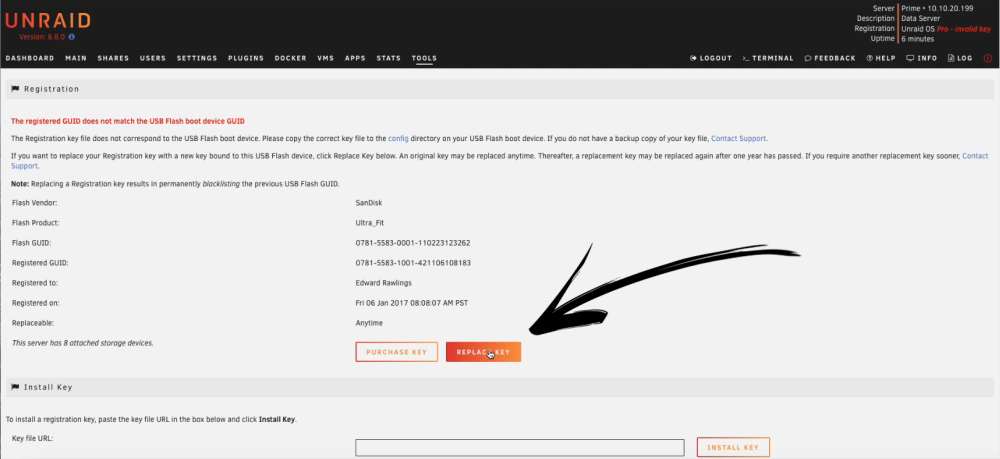
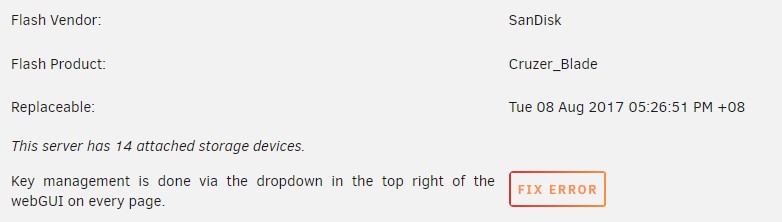
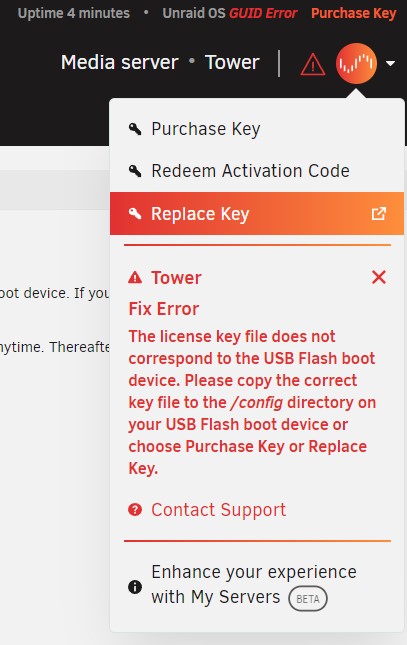
Yes, it is indeed. What I should have stated more clearly is that Unraid Connect is not mentioned in the page Changing the flash device (other than as an alternative way of backing up - more on this below). Anyway, I'm happy to report that using the new zip file on the new flash drive worked, eventually, and now I have the server up and running again. But some things worth noting: 1. Before I swapped the flash drives, of course I shut down the server, which had no error messages. But when I restarted with the new flash drive, the GUI told me an unclean shutdown had been detected, and the array therefore didn't start. Not a big problem, but this meant that when the server eventually restarted with the new flash drive it started a parity check. I was too scared to cancel it, so it's going to trundle along for a while (16TB dual parity). 2. I had previously installed Unraid Connect in order to get to the Replace Key process, but it didn't show up during this replacement process, and I had to install it again. Previously I had logged on to Unraid.net via Unraid Connect, but I didn't "sign up" for Management Access. It looks like when I rebooted, perhaps because of not signing up, Unraid Connect didn't "stick" so the server acted as if Unraid Connect wasn't there. This causes various problems for the unsuspecting (I'm on 6.11.5): If I click on the Registration Key link as shown in the manual I don't get the screen below (from the manual): Instead I get: When I go to the to right I see: When I click on Replace Key I get a pop-up: So this eventually got me to the right place, but setting this out here for anyone who doesn't have Unraid Connect. That said, I thought I might as well make use of Unraid Connect, so I went to its Settings and got the certificates done, and everything looked OK. Then I saw the Flash backup option, and of course I wanted to use that. But I got "Failed to sync flash backup": How do I backup the flash drive?


-
Can the Manual Install method be used with a flash drive backup zip file (and not just downloaded OS zip files)? For those wondering, the use case is when you need to replace a failing flash drive.
-
A bit more background: the original flash drive (Sandisk Cruzer Blade) has been in use from about 2016, and over the last couple of months I've had problems with the flash drive not being found, but rebooting or moving to another USB port solved the problem. This time, unRAID said it couldn't find the GUID and after shutting down the server and trying to read the drive on my Win 10 PC, I couldn't read the drive at all. And of course, after upgrading a few disks, I didn't have a recent copy of the drive assignments, or a recent backup of the flash drive. After panicking just a little, I tried another USB port and was able to read the drive. The first thing I did was copy the contents to the PC, then I tried it on the server, which booted into the GUI but said there had been an unclean shutdown and the array didn't start. Weirdly, the GUI also showed a missing drive but after a minute or so the drive showed up (although the array still didn't start). So that was when I made the zip backup of the flash drive and that's the zip I used for the new flash drive (also Sandisk Cruzer Blade). Then I started wondering if there might have been a problem reading the original drive, because previously it did work after just moving it or rebooting, and maybe that's why it reported an unclean shutdown. So I shut down the server (which had the new flash drive where I couldn't replace the key) and changed back to the original key and rebooted. Now the server is running fine and there was no message about an unclean shutdown. So I've made another zip backup and overwrote the new flash drive with the new backup, in case the previous zip had some corrupted files. I'll test it tomorrow, because things will get very frosty at home if I interrupt someone's already delayed Plex watching tonight. If that fails, I'll contact support. I did have a bit of a connection issue because the manual (https://docs.unraid.net/unraid-os/manual/changing-the-flash-device/) doesn't mention unRAID Connect, which I didn't realise is more or less mandatory now and hadn't installed. Then I had a problem because I had three unRAID entries in my authorisation app from the time the unRAID.net accounts were re-done. Eventually got there, and it wasn't too difficult.
-
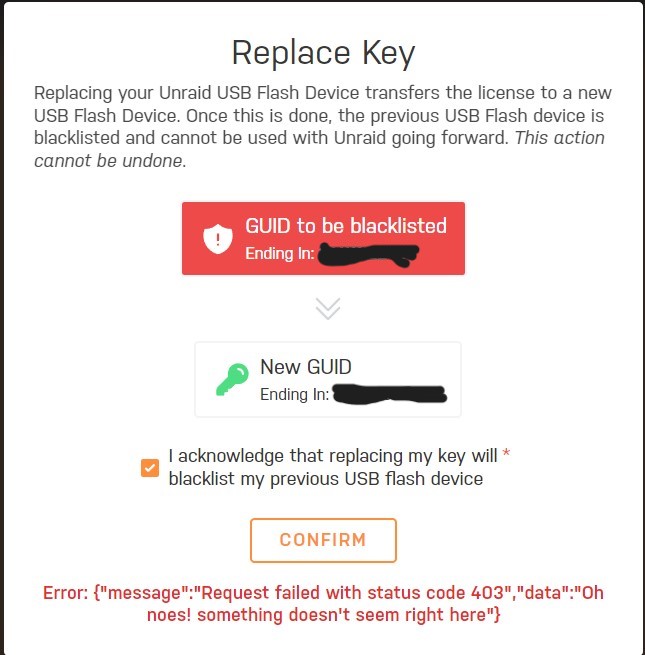
I've been having problems with my unRAID flash drive and tried to replace it. I followed the manual: made a backup to my Win10 PC via the WebGUI, then used USB Flash Creator with the zip backup to make a new unRAID flash drive. Then I shutdown the server and replaced the original flash drive with the new one. After restarting the server I got the expected message about the registration key and navigated to the Replace Key button (manual is a bit out of date here) and selected it. Then I got the following error message after clicking confirm in this window: What do I do now?
-
For all those following this avidly, I finally solved this by contacting Supermicro support, who were very helpful. In the end it just required updating the BMC. After that I was able to connect to the server via the Web GUI (using the IPMI IP address) and use iKVM/HTML5. This avoided various Java complications which kicked out certificate errors.
-
I often take a look at what's going on in my VMs using the VM Console option in the unRAID GUI, which uses noVNC. But I'm wondering how unRAID is able to do this when I never knowingly set up a VNC server in the VMs. Is unRAID doing something special/different? For example, I was able to use the VM Console to play around with a new Linux VM. But when I tried to VNC into the same VM using TightVNC on my Win 10 PC, I couldn't connect. I tried both the standard 5900 port and a few 57xx ports, which the VM Console seems to use. I don't know if using noVNC on the PC would have worked, but couldn't find any reasonably simple way of using noVNC on Windows.
-
I'm trying to run Roon Bridge on a Linux Mint VM and play music via a DAC that is connected to the server via USB. No problem with connecting to the DAC, which shows up as a USB Device in the VM Setup page, but the sound is very poor - a bit like bad reception on a radio. I don't know if I might be able to improve things by passing through the entire USB controller, but unfortunately the motherboard has only one USB controller, and the unRAID flash drive is obviously sitting on it. This is the IOMMU grouping: IOMMU group 3: [8086:7ae0] 00:14.0 USB controller: Intel Corporation Alder Lake-S PCH USB 3.2 Gen 2x2 XHCI Controller (rev 11) Bus 001 Device 001 Port 1-0 ID 1d6b:0002 Linux Foundation 2.0 root hub Bus 001 Device 002 Port 1-4 ID 0665:5161 Cypress Semiconductor USB to Serial Bus 001 Device 003 Port 1-6 ID 174c:2074 ASMedia Technology Inc. ASM1074 High-Speed hub Bus 001 Device 004 Port 1-13 ID 26ce:01a2 ASRock LED Controller Bus 001 Device 005 Port 1-6.2 ID 0781:5591 SanDisk Corp. Ultra Flair Bus 001 Device 006 Port 1-7 ID 0644:8043 TEAC Corp. TEAC UD-501 Bus 002 Device 001 Port 2-0 ID 1d6b:0003 Linux Foundation 3.0 root hub [8086:7aa7] 00:14.2 RAM memory: Intel Corporation Alder Lake-S PCH Shared SRAM (rev 11) Is there anything that can be done? The DAC is the TEAC device. (I appreciate that this is not the best way to get music to the DAC, and I am using other alternatives, like Ropieee on a Raspberry Pi, but if I can get this VM approach to work, it would be a nice solution for my use case.)
-
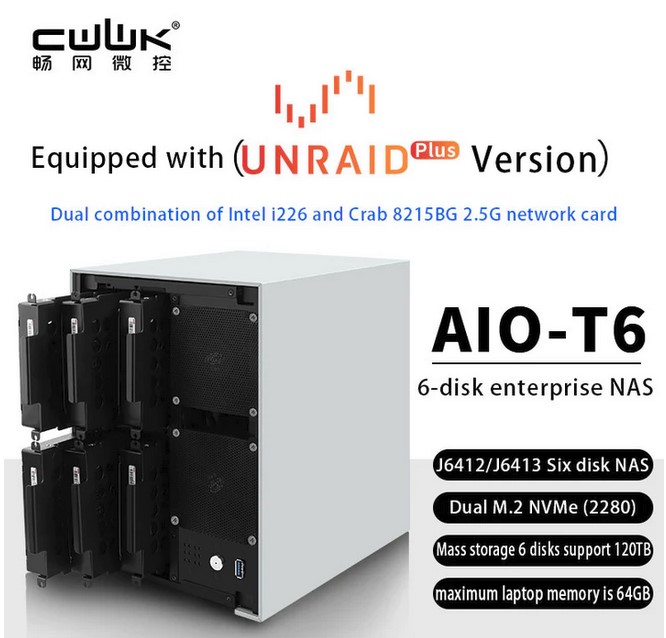
I was going down an Internet rabbit hole looking at server motherboards and ended up at the CWWK website. (CWWK seems to manufacture most of the Topton and other brand mini-pcs and routers that you see on Aliexpress.) I saw this: Link is https://cwwk.net/products/j6412-j6413-nas-6-sata-dual-m-2-itx-i226-v-network-card. Cheapest option is $376.70 with no RAM or SSD. It seems that you get an unRAID Plus licence with this, although I couldn't see any details about how this is delivered and how you choose it, or what the cost is. I don't suppose anyone has one of these? Looks interesting, and I think not too bad cost-wise, especially if it includes a real unRAID licence.
-
Thanks; deleting the nested folder has solved the problem. (Just to add a data point: some shares with the Recycle Bin have these nested folders, others don't.)
-
I'm on 6.11.5. I was trying to empty out the Recycle Bin for some shares and found that somehow there were lots of nested .Recycle.Bin folders within the first level .Recycle.Bin folder. For example, I get \\TOWER\Movies\.Recycle.Bin\.Recycle.Bin\.Recycle.Bin\.Recycle.Bin\.Recycle.Bin\.Recycle.Bin\.Recycle.Bin\.Recycle.Bin\ I wasn't sure if clicking on each .Recycle.Bin folder created another nested one, so I stopped. If I try deleting the folder, Windows says items are being deleted (perhaps files within the folder), but I can't delete the nested folder - or any of the nested .Recycle.Bin sub-folders. I get a Windows error message saying "cannot find the path specified". But that's when I look on my Win10 PC. When I go to the Web GUI and look at the Movies share, I have only one nested .Recycle.Bin folder. If I click on the blue .Recycle.Bin text, I just get the same page. I haven't tried deleting that nested folder yet, in case there's something I might inadvertently damage. Don't know if it's happening on every share where Recycle Bin is applied, but I see the nested folders on all shares that I've looked at so far. Any idea what happened and how I can fix this? tower-diagnostics-20230924-1746.zip

-
No. The drive that is added is cleared (written as all zeroes) if not pre-cleared before adding it. A drive that is all zeroes can then be added without affecting parity so no parity update is required. Sorry, didn't think that one through properly! Yes it does. And to your original question, I have wondered the same. It seems reasonable to think a parity check only needs to go as far as the largest data drive. There must be a sound reason. Can a rogue parity bit mysteriously flip from 0 to 1? 🤷♂️ So what happens when I add a new parity drive that has surplus capacity? Does unRAID clear the entire drive? Because if it does, there's a case to be made that pre-clearing a drive that is to be used for parity could be helpful beyond just being a stress test, since it will be writing zeroes to the whole disk. Admittedly there is the other issue of whether unRAID recognises the pre-clear signature and acts accordingly when a parity drive is added. (Whereas I believe that with a new data drive, unRAID will indeed check if there's a signature and if there is, will assume the disk is clear.) There seems to be a common view that a drive that is going to be used for parity doesn't have to be cleared (stress-testing it by pre-clearing is a separate consideration). But if that view is correct, then it implies that unRAID doesn't care what is on the drive because the required parity bits are going to overwrite whatever is already there. Following on from that, wouldn't this mean that doing a parity check on the "surplus" part is unnecessary? Whether there are zeroes or something else is immaterial if it's going to be overwritten anyway when larger data disks get added. Should our understanding be: If we are replacing a parity drive that is as large as the largest data drive with a drive of the same size, then we don't have to care what is on the new drive; but if we replace that parity drive with a larger one, then pre-clearing might (will?) reduce the time that unRAID takes to add the new drive to the array. The pre-clearing will also address the bad sectors concerns.
-
I'm obviously confused about parity. I had read that a parity drive doesn't have to be pre-cleared because parity is calculated, and then written to the parity drive. In which case, it doesn't matter what was on the parity drive in the first place. And it also means that if I had added a non-pre-cleared drive as parity, there would almost certainly not be zeroes in the rest of the drive. Or does adding the larger (than necessary) parity drive involve writing zeroes to the "unused" part of the drive? If I add a larger data drive later (assuming that I increase the size of my second parity drive as well), won't parity be calculated for the new drive and then written to the parity drive, overwriting whatever was in the corresponding position?
-
I recently had to shutdown my array and when I rebooted found there had been an unclean shutdown, so the server (6.11.5) started a parity check. I have dual parity drives, 16TB (very recently installed) and 8TB. Most of my eight data drives are 8TB, and none is bigger than that. Now I'm more than 50% of the way through the parity check (8.44 TB read), and looking at the Main tab on the GUI only the 16TB drive is being read from. There's no other read/write activity that I can see, and in fact currently only two of the other drives are still spun up. So I'm wondering what the parity check is doing. Simplistically, if the first 8TB of data/parity on the drives has been read and checked, I would have thought that there's no more parity to be checked. Isn't the extra 8TB of the larger parity drive immaterial to the parity integrity of the array? Asking this partly out of curiosity and partly hoping that I can just cancel the parity check now.



