





jortan
Members
-
Joined
-
Last visited
Everything posted by jortan
-
Unfortunately this didn't seem to work, but thanks for trying!
-
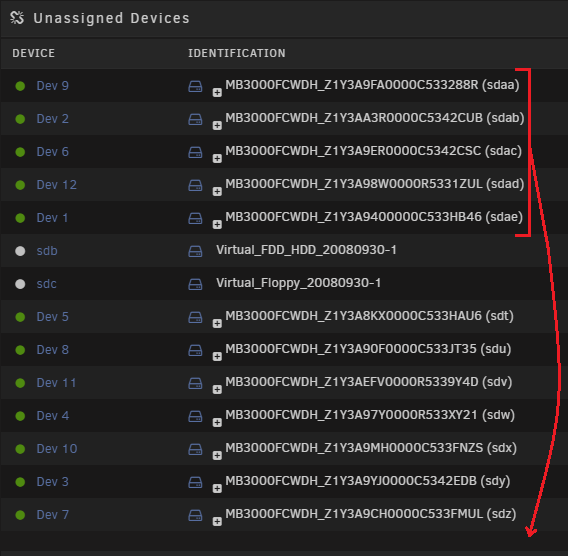
Not a big deal but I figured it might be a one-liner to order these so sdaa comes after sdz. This becomes more of an issue on another system where I have a lot of "unassigned devices" that are used in ZFS pools. Disks plugged in to that system drop in to the middle of a long list of unassigned devices instead of the bottom of the list.
-
Very minor thing, but on systems with many disks, unassigned devices will show disks "out of order" when sdz rolls over to sdaa, sdab, etc. Is there some logic that could be added to show disks in the "correct" order?
-
This should be all you need: #!/bin/bash docker restart binhex-nzbget To restart this at 2am each night, set a custom schedule with: 0 2 * * * https://crontab.guru/#0_2_*_*_*
-
Nice, that will probably fix @Deep Insights issue (as he's passing through a block device in XML) but not mine (as I'm passing through a USB controller) I'll do some playing around and see if I can get this to work though.
-
I was able to boot the VM with the alternative OVMF code/vars files, but the problem remains. Very frustrating!
-
I've recreated the VM multiple times, so multiple fresh vars files have shown the issue. Perhaps an alternative OVMF version might help - though messing around with the OVMS paths in my VM XML is what stopped me from starting the unraid VM service yesterday.
-
What I mean is we're talking about devices passed through to the guest. In my case it's an entire USB controller, so the boot device isn't listed at all in the XML file. In that sense QEMU isn't aware of the boot device when it's starting the VM (even though the guest definitely sees it) Maybe the OVMF settings are being ignored/reset for that reason? I will try to post my XML soon but I've messed up my libvirt service by poking at things and can't start it currently - will try restarting unraid later when it's not being relied on.
-
Appreciate the feedback - but I had already tried configuring EFI boot using bcfg. Still not persistent. Seems like this is related to passthrough specifically - perhaps because qemu can't see the device when the machine is starting?
-
I'm also having this problem. In my case I'm passing through a PCIE usb controller with a separate unraid USB drive. I can boot from this if I select manually. I can change the boot order and save. "Continue" will boot correctly, but upon restarting the VM it boots back to EFI shell. I can see that nvram file is being updated at /etc/libvirt/qemu/nvram so it seems to be saving the settings, but why not applying them? Anyone else found a solution to this?
-
Seems like the "dd" processes are running niceness of 0 which can slow things down considerably on slower systems and/or when preclearing multiple disks at the same time. Running this on the dd processes seems to make a big difference in system responsiveness: renice -n 20 -p <pid> Would it be possible to have the plugin launch the dd processes using nice? Apologies if this has been suggested before. edit: Here's a one-liner to set niceness 20 (low cpu priority) on all currently running preclear jobs renice -n 20 -p $(ps aux | grep 'dd if=/dev/' | grep -v grep | awk '{print $2}') edit2: modified to catch preclear read operations too
-
edit: misread the issue, never mind
-
read-only filesystem is often just caused by an unclean shutdown. If you shutdown your server and put the USB stick in a Windows machine it should offer to repair the filesystem. edit: backup the unraid files before you do a repair
-
The DTSE9 model is still available though? Few USB 2.0 drive models would still be manufactured these days. For various reasons USB 3.0 thumb drives seem to be less reliable on average, which is another reason why you might want to have a few good quality spare USB 2.0 drives.
-
I just replaced my original USB drive from 2008, the only reason I did is because my 1GB drive needed manual intervention each upgrade due to space issues (need to remove the previous backup) If nothing else it may be worth having a quality spare on-hand. The Kingston DTSE9 is well regarded (not the G2 version).
-
Just adding another vote for this feature
-
Any chance the iSCSI Target plugin could be modified to create thin-provisioned qcow2 files instead of raw? qemu-img create -f qcow2 file-path -o size=Size-in-MB,preallocation=metadata https://www.geekpills.com/operating-system/debian/ubuntu18-04/how-to-setup-iscsi-storage-server-on-ubuntu-18-04-lts
-
Settings | Profiles | Release Profiles. "Must not contain" A blank "tags" field will make it apply to all series.
-
I'm going to be setting up something very similar soon. I'm going to be using sanoid/syncoid, but in "pull" mode: Pull mode - The backup "pulls" snapshots from the primary server Push mode - The primary server "pushes" snapshots to the backup server. Sanoid has a configuration template for "backup" mode, meaning that it won't be generating any snapshots, but will prune old snapshots as required. This should be applied to your backup server datasets. You're much more likely to get help with sanoid/syncoid as they are much more widely used.
-
It's a long-shot but you may want to try WinOF v5.50.54000 (the one that's allegedly for Server2019 only) Worked fine with Win10 LTSC (1809) and ConnectX-2
-
Try using mlxconfig to confirm SR-IOV is properly enabled on the card - step 3 here: https://mymellanox.force.com/mellanoxcommunity/s/article/howto-configure-sr-iov-for-connectx-3-with-kvm--infiniband-x Edit: You could probably follow the firmware update instructions in my post, but replace fw-ConnectX2-rel.mlx with fw-ConnectX3-rel.mlx I'm not sure if the format of the ini file is the same for ConnectX-3 though, ie this part: num_pfs = 1 total_vfs = 64 sriov_en = true Maybe export what's in the current config mstflint -d mtxxxxx_pci_cr0 dc > backup.ini What's in the [HCA] section? I did all this on a Windows machine, but there are Mellanox tools in unRAID Apps: Mellanox-Firmware-Tools Edit2: Some more bed-time reading for you! https://forums.servethehome.com/index.php?threads/how-to-enable-sr-iov-on-connectx-3.24321/
-
unraid - Tools / Diagnostics Download diagnostics file and upload here. https://wiki.unraid.net/Troubleshooting#Capturing_Diagnostic_Information
-
I should have been a dentist... ls -al /boot/config/plugins/unRAID6-ZFS/packages/unRAID6-ZFS/raw/bce53432ab6891f33cd2fd16a4621b66a0c9c2dd/packages/zfs-2.0.0-unRAID-6.9.1.x86_64.tgz do you have a file here now? If so, reboot. zfs Does this command work now?
-
Your answers aren't very clear Are you saying it was already correct or you updated the time and it's correct now? You keep asking what to do next, but without being specific about exactly what your current problem is or what you are trying to achieve.
-
Great, you should be able to installl/update other plugins now including unRAID itself, which I assume wasn't working previously. You might want to go to Settings / Date and Time and enable/set NTP server to keep your unRAID server time correct. 0.pool.ntp.org 1.pool.ntp.org

