






TexasDave
Members
-
Joined
-
Last visited
Everything posted by TexasDave
-
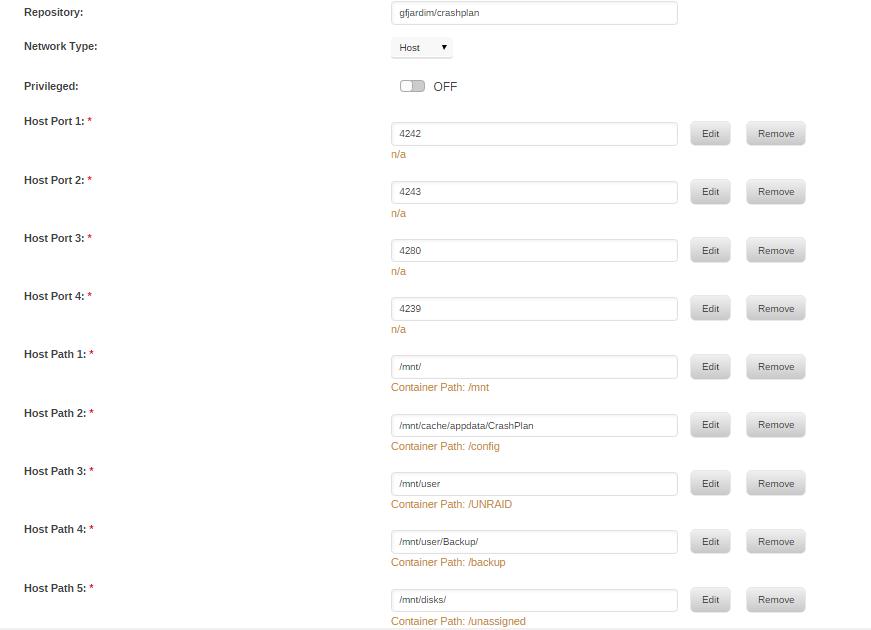
Hi Squid - thanks for helping me. I do not understand what you mean by "UD Path". I attach a screenshot of the docker setup. Can you advise which path to change please? Thanks!
-
In 6.2, you can modify volume mountings to use the new "slave" option. What is this and how do you do it? I am getting warning from the "fix common plug ins" for CrashPlan and cannot figure out what to do. "Docker application CrashPlan has volumes being passed that are mounted by Unassigned Devices, but they are not mounted with the slave option" "To help with a trouble free experience with this application, you need to pass any volumes mounted with Unassigned Devices using the slave option. Fix it here: Docker" "Fix it here" takes me to the Docker section but I do not know what to do? Thanks!
-
First - thanks for making this available. Much appreciated. I have been trying to get it working and am getting close. I am trying to solve two issues. Issue ONE I get the following message in the Mylar Log: 2016-05-07 17:06:29 ERROR Could not change permissions : /config/mylar/cache. Exiting... I am not sure how serious it is as the targeted comic is still snatched. Obviously some kind of permission issue but as far as I can see, all my permissions are good? All my main dockers are Linuxserver.io dockers and all are working fine? Issue TWO I get the following message in the NZBGET log (I am running the Linuxserver.io docker): info Sun May 08 2016 11:34:44 Collection New.Suicide.Squad.Vol.01.018.2016.HD.Digital.Thornn-Empire added to history error Sun May 08 2016 11:34:44 Post-process-script ComicRN.py for New.Suicide.Squad.Vol.01.018.2016.HD.Digital.Thornn-Empire failed (terminated with unknown status) info Sun May 08 2016 11:34:44 ComicRN: Unable to open URL: [Errno socket error] [Errno 97] Address family not supported by protocol info Sun May 08 2016 11:34:44 ComicRN: Opening URL: http://localhost:8090/post_process?nzb_ ... rnn-Empire info Sun May 08 2016 11:34:44 ComicRN: Loading config from /downloads/scripts/autoProcessComics.cfg info Sun May 08 2016 11:34:44 Executing post-process-script ComicRN.py for New.Suicide.Squad.Vol.01.018.2016.HD.Digital.Thornn-Empire info Sun May 08 2016 11:34:44 Move for New.Suicide.Squad.Vol.01.018.2016.HD.Digital.Thornn-Empire successful info Sun May 08 2016 11:34:44 Moving file New Suicide Squad Vol 01 018 (2016) (HD) (Digital) (Thornn-Empire).cbr to /downloads/completed/New.Suicide.Squad.Vol.01.018.2016.HD.Digital.Thornn-Empire Any ideas? I read some posts in the mylar forums and I think the above may have something to do with SSL? But I have looked at my .cfg files and ssl=0 so not sure if that is an issue or not. Happy to provide more information and I will keep messing around trying to fix it. Thanks!
-
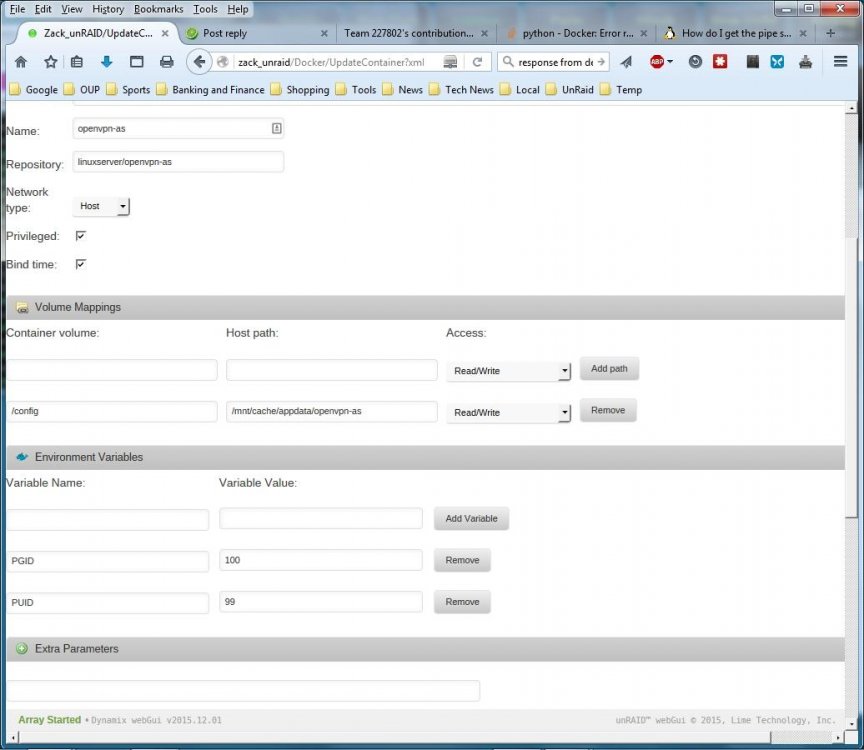
I am having two issues: (1) When I configure the docker to use "host" (versus bridge) I cannot access the tool via the Web GUI. It works fine when using "bridge" but in reading the instructions, this is not correct. Screen shot attached. (2) When trying to change the admin password via the instructions at the docker hub("docker exec -it openvpnas passwd admin ") I get "Error response from daemon: no such id: openvpnas Any ideas would be most appreciated - Thanks!
-
Any ideas why the web GUI does not work with Firefox browser (43.0.2)? Works fine with Chrome (47.0.2526.106 ) , IE (11.0.9600.18124)), Opera (34.0)? Not a big deal - just wondering. Love the program by the way - Thanks!
-
@ljm42 - Many, Many thanks! Your fix sorted this out for me. There is some good karma coming your way - Thanks! DZ
-
I am currently traveling but am getting the same error messages. This just started happening after updating several plugins and dockers (including unRAID Server OS (6.1.3)). I am getting emails that say: "Docker image disk utilization of 70%" Then a few minute later I get an email that says: "Docker image disk utilization returned to normal level" I called home and it may be linked to my son watching movies via Plex? I am running: linuxserver/couchpotato linuxserver/nzbget linuxserver/plex linuxserver/sonarr gfjardim/crashplan gfjardim/dropbox sparklyballs/krusader These dockers installed but not running: linuxserver/headphones gfjardim/crashplan-desktop In my situation the docker size drops back down. I am happy to provide any information if it will help debug this issue if people think it is related. Thanks! DZ
-
Many thanks to "Danilo_Thann69" for this tip earlier to help me get Dropbox working. I could not get Dropbox to connect. The trick is to set an environment variable and then then activate the unRAID server on Dropbox. [*]In the docker settings, make sure you click the Advanced View, and scroll down to the Environment Variables. [*]Add a variable of ACCOUNT with a value of the email address you use for the Dropbox account. [*]Once you do that save and start the docker, then go to the Dashboard and click Dropbox and view the Logs. [*]There will be a URL in the logs that you need to cut and paste into a browser, which will let you login to your Dropbox account. [*]Once your logged in Dropbox should be functional now. Is there anyway this can be added to the install or instructions so that others do not struggle? Just a thought - thanks for building this docker. Thanks again to "Danilo_Thann69" for the help. And thanks to "CHBMB" for the workaround above...
-
I am having the exact same issue as Ockingshay.... I cannot start Dropbox via the docker GUI by clicking on start. If I edit it, save (no changes), it fires up with no issue. Happy to provide data as needed once I return from holidays. Thanks!
-
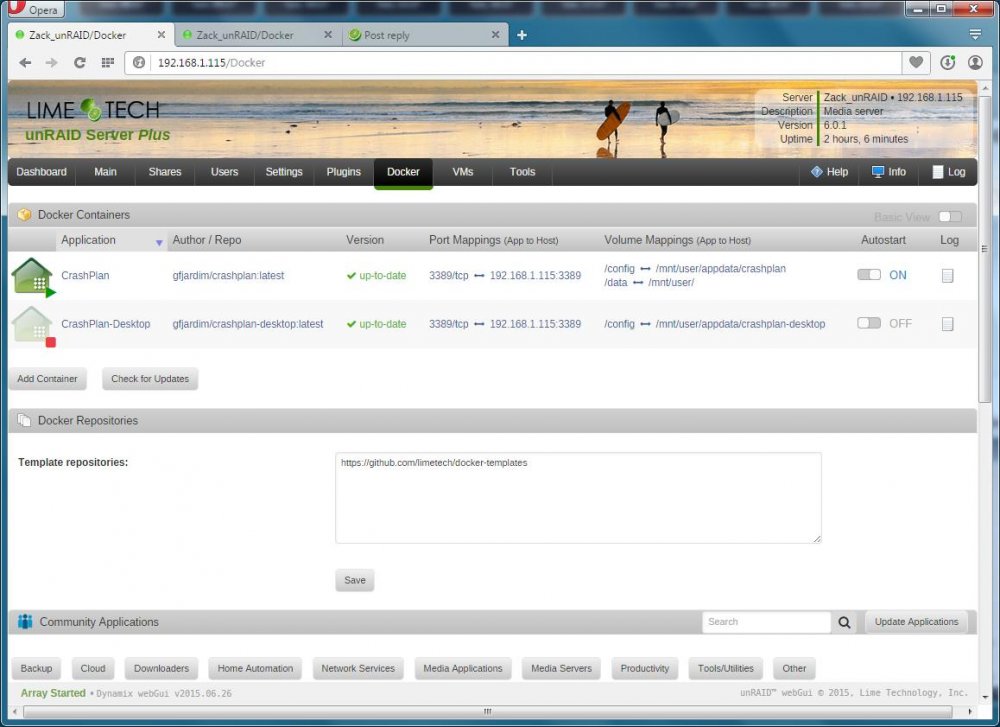
Hi folks - my server is built and seems to be running fine. I started down the unRAID path as my Synology NAS died and I wanted to roll my own. And unRAID looked to have good Crashplan support. I think I have the base docker installed and running ok. But I am struggling to get the Crashplan-desktop docker to work. I attach a screen shot of that shows the settings I have used (which may be wrong). The error message I am getting is the following: root@localhost:# /usr/bin/docker run -d --name="CrashPlan-Desktop" --net="bridge" -e TZ="Europe/London" -p 3389:3389/tcp -v "/mnt/user/appdata/crashplan-desktop":"/config":rw --volumes-from CrashPlan gfjardim/crashplan-desktop 161be646078a3c9eb9d7a6771e4ce94325f81361670b378b36ea80d4ca249492 time="2015-07-26T16:20:45+01:00" level=fatal msg="Error response from daemon: Cannot start container 161be646078a3c9eb9d7a6771e4ce94325f81361670b378b36ea80d4ca249492: Bind for 0.0.0.0:3389 failed: port is already allocated" It looks to me like there may be a configuration file that needs updated with my unRAID server IP? Another question: can you access the unRAID crashplan server via the windows app? If so, how? Many thanks!
-
Kode/Squid, Thanks for the help. I appear to be getting ahead of myself as I am still setting up my unRAID server so do not have the docker tab (and understand why). Thanks for creating this utility - I look forward to using it when I get a bit further along. Thanks!
-
OK - I am sure I am being really dumb. But I have installed this and cannot figure out how to use it. It installed fine, and I see the icon in the settings area of the GUI. When I click on that, I can adjust the settings. But how do I get to the actual tool? I have tried on Chrome, Opera and Firefox...popup's are allowed. Liek I said, I am sure I am doing something silly... Do I need to install anything else? Or enable anything else? Thanks!


