






TexasDave
Members
-
Joined
-
Last visited
Everything posted by TexasDave
-
@itimpi - that looks to be the one! Thanks!! It was not obvious so I do not feel a total idiot! 🙂 @Squid - I have that but could not find the above in the choicses? I am wondering what the actual "health check" does? Does it run something or just report latest status?
-
I do not think it is the full parity check - I run that once a month on the second day of the month. This is a "quick check" (I think)? Note last parity check is on March 2 which ties into my monthly schedule. Event: Unraid Status Subject: Notice [ZACK-UNRAID] - array health report [PASS] Description: Array has 7 disks (including parity & cache) Importance: normal Parity - WDC_WD60EFRX-68MYMN1_WD-WX51DA47619X (sdf) - active 79 F [OK] Disk 1 - WDC_WD60EFRX-68L0BN1_WD-WX61D88RE7RT (sdh) - active 88 F [OK] Disk 2 - WDC_WD30EFRX-68EUZN0_WD-WCC4N0CNYXPC (sdg) - active 82 F [OK] Disk 3 - WDC_WD60EFRX-68L0BN1_WD-WX61DC896552 (sdd) - active 86 F [OK] Disk 4 - WDC_WD60EFRX-68MYMN1_WD-WX21D65NV0T0 (sde) - active 84 F [OK] Cache - Samsung_SSD_850_EVO_500GB_S21JNXBG430473F (sdb) - active 73 F [OK] Cache 2 - Samsung_SSD_850_EVO_500GB_S21JNXAG541010H (sdc) - active 73 F [OK] Parity is valid Last checked on Monday, 2020-03-02, 17:49 (21 days ago), finding 0 errors. Duration: 14 hours, 49 minutes, 13 seconds. Average speed: 112.5 MB/s
-
I have been googling and searching and cannot seem to find where to set the time / frequency of the "Array Health Check". Can someone point me to the setting please? Many thanks!
-
@Cpt. Chaz you say: Can you tell me where this is happening? Want to check (and clean) on my system as needed. Thanks!
-
Doowp! Many thanks and super easy....
-
I used this handy site (check-your-website.server-daten.de) to check and yes, the certs were expiring. In the docker I deleted one of my domains, then added it back, and now I am back on the 90 day window (cheating, I know). I suspect that it relates to a restore I had to do a few months ago and it is now just manifesting itself. But now sorted... Two side questions - how do you access certbot or ssl-cert from the command line in unRAID? Or how can I check cert status directly from unRAID rather than using a 3rd party site? Just curious. Thanks!
-
Log from starting earkier today....deleted email and domains. ------------------------------------- _ () | | ___ _ __ | | / __| | | / \ | | \__ \ | | | () | |_| |___/ |_| \__/ Brought to you by linuxserver.io We gratefully accept donations at: https://www.linuxserver.io/donate/ ------------------------------------- GID/UID ------------------------------------- User uid: 99 User gid: 100 ------------------------------------- [cont-init.d] 10-adduser: exited 0. [cont-init.d] 20-config: executing... [cont-init.d] 20-config: exited 0. [cont-init.d] 30-keygen: executing... using keys found in /config/keys [cont-init.d] 30-keygen: exited 0. [cont-init.d] 50-config: executing... Variables set: PUID=99 PGID=100 TZ=Europe/London URL=duckdns.org SUBDOMAINS=aaa,bbb,ccc EXTRA_DOMAINS= ONLY_SUBDOMAINS=true DHLEVEL=2048 VALIDATION=http DNSPLUGIN= [email protected] STAGING= 2048 bit DH parameters present SUBDOMAINS entered, processing SUBDOMAINS entered, processing Only subdomains, no URL in cert Sub-domains processed are: -d aaa -d bbbb -d cccc E-mail address entered: [email protected] http validation is selected Certificate exists; parameters unchanged; starting nginx [cont-init.d] 50-config: exited 0. [cont-init.d] 99-custom-files: executing... [custom-init] no custom files found exiting... [cont-init.d] 99-custom-files: exited 0. [cont-init.d] done. [services.d] starting services [services.d] done. nginx: [alert] detected a LuaJIT version which is not OpenResty's; many optimizations will be disabled and performance will be compromised (see https://github.com/openresty/luajit2 for OpenResty's LuaJIT or, even better, consider using the OpenResty releases from https://openresty.org/en/download.html) nginx: [error] lua_load_resty_core failed to load the resty.core module from https://github.com/openresty/lua-resty-core; ensure you are using an OpenResty release from https://openresty.org/en/download.html (rc: 2, reason: module 'resty.core' not found: no field package.preload['resty.core'] no file './resty/core.lua' no file '/usr/share/luajit-2.1.0-beta3/resty/core.lua' no file '/usr/local/share/lua/5.1/resty/core.lua' no file '/usr/local/share/lua/5.1/resty/core/init.lua' no file '/usr/share/lua/5.1/resty/core.lua' no file '/usr/share/lua/5.1/resty/core/init.lua' no file '/usr/share/lua/common/resty/core.lua' no file '/usr/share/lua/common/resty/core/init.lua' no file './resty/core.so' no file '/usr/local/lib/lua/5.1/resty/core.so' no file '/usr/lib/lua/5.1/resty/core.so' no file '/usr/local/lib/lua/5.1/loadall.so' no file './resty.so' no file '/usr/local/lib/lua/5.1/resty.so' no file '/usr/lib/lua/5.1/resty.so' no file '/usr/local/lib/lua/5.1/loadall.so') Server ready
-
Getting "Let's Encrypt certificate expiration notice". I had thought, in the past, certs where automatically renewed? Or you could force renewal by stopping and starting LE? I can delete and start again but this just started happening in the past few weeks. All was good previously. Just wondering as in the notes above others are having some weirdness. I can submit logs if that helps?
-
Looking for some help. I have had this working for a long time. This morning, I had to shutdown my server to replace the battery in my UPS. When I came back up, I was getting the "Welcome to our server" message when trying to access ubooquity externally.... Internal access works fine (both user (port 2022) and admin (port 2023)). Ombi (which is also reversed proxy'd) is working fine internally and externally. Router ports are fine Nginx ubooquity conf files is fine and has not changed (attaced). Using the one provided and just chnaged to my subdomain (dz-comics) Deleted ubooquity appdata and docker and this has not fixed it No errors in Letsencrypy or ubooquity logs.... Letsencrypt, ombi and ubooquity on "proxynet" This is the URL that has always worked until this morning: https://dz-comics.duckdns.org/ubooquity/ I think the "Welcome" message usually means your nginx conf file has an error? Before flooding the support thread with logs - what are the most common causes for the "Welcome to our server" message? As ombi is working, I lean to an error on ubooquity but am paranoid on a "typo" being an issue after I reinstalled everything. Happy to post anything to get another pair of eyes to sort this...Thanks! [EDIT: Fixed this by restoring an older version of the ubooquity appdata using CABackup. Over the weekend, I am going to try to do a diff and see what the issue was. I have had more issues with Ubooquity than all other services combined. I want to understand why...] ubooquity.subdomain.conf
-
I was having an issue with getting "Load Qualities" and "Load Folders" in the Sonarr and "Get Quality Profiles" and "Get Root Folders" in Radarr. I pushed the button and they would just spin. @casperse posted a fix (thanks) and this fixed it for me. Just posting in case others run into the issue. I was also getting this error: Do NOT fill in your Base URL...or at least in my situation, this fixed my issue. Just hoping this helps others in fixing the issue. Thanks @casperse!
-
I did know about that and its very helpful. For my case, I will click on a parent, lets say there are 200 items. If I want to pick 30, it would be good to be able to do this easier if that makes sense. But it is a "nice to have". Something like the SHIFT / CTL options to select in Windows. Just a suggestion, thanks again for this awesome tool.
-
Hello - Great Plugin - many thanks for making and supporting it. Is there a way to select multiple items via holding SHIFT or CTL so one does not have to select items one at a time? Thanks again for your continues support!!
-
I trying to get rid of the "ComicRN: Requests module not found on system. I'll revert so this will work, but you probably should install" message by doing the "pip install requests" that has been suggested but get the following. What is the best way to upgrade python (if needed) and if requests is already installed, ideas why I get the error message? Thanks! root@Zack-unRAID:~# docker exec -it mylar bash root@2269a8929bc0:/# pip install requests DEPRECATION: Python 2.7 will reach the end of its life on January 1st, 2020. Please upgrade your Python as Python 2.7 won't be maintained after that date. A future version of pip will drop support for Python 2.7. Requirement already satisfied: requests in /usr/lib/python2.7/site-packages (2.22.0) Requirement already satisfied: chardet<3.1.0,>=3.0.2 in /usr/lib/python2.7/site-packages (from requests) (3.0.4) Requirement already satisfied: idna<2.9,>=2.5 in /usr/lib/python2.7/site-packages (from requests) (2.8) Requirement already satisfied: urllib3!=1.25.0,!=1.25.1,<1.26,>=1.21.1 in /usr/lib/python2.7/site-packages (from requests) (1.25.3) Requirement already satisfied: certifi>=2017.4.17 in /usr/lib/python2.7/site-packages (from requests) (2019.3.9)
-
@saarg - thanks for your comment above. I had a really dumb mistake in my setup and I would not have noticed it without your help. Thanks! I will correct my post above and I attach a version of my "ubooquity.subdomain.conf" file as it may be useful for others. I do not think one comes with the LetsEncrypt docker from the fine folks at LinuxServer? @CHBMB - hope you are well! Is there a conf file for Ubooquity with the Let's Encrypt docker? Last I looked there was not. It was easy enough to create my own (attached) but would be great to get someone who knows what they are doing to add this to the conf library? ubooquity.subdomain.conf
-
I just had to swap a drive on unRAID and am seeing a weird issue with Plex. I am running the latest unRAID and PLEX docker. I typically use a Shield TV Client but am seeing the issue on web browsers and Plex Media player too. A small number of TV shows will no longer play - when I start them - they just spin - nothing plays. The same shows play fine on KODI. Any ideas on what could be wrong or how I can debug to narrow down the issue? Thanks!
-
First, big thanks for this docker, I find it super useful (as do my kids). 😀 In case anyone is looking for a solid Android reader for ubooquity, KUBOO is nice. I am using it with LetsEncrypt/DuckDNS so I can use it outside the house (and so my son up at university can use it). Just make sure you open port 2202 on your router, that got me at first. WRONG!! It is also easy to test your feed by just pointing your browser to the address and you should, if all is working, see the XML feed.: This works in your browser (https://XXXX.duckdns.org/) This is what you put in KUBOO (https://XXXX.duckdns.org/opds-comics/) (you can put this in your browser and you will see XML) Replace XXXX with your duckdns subdoman Thanks!!
-
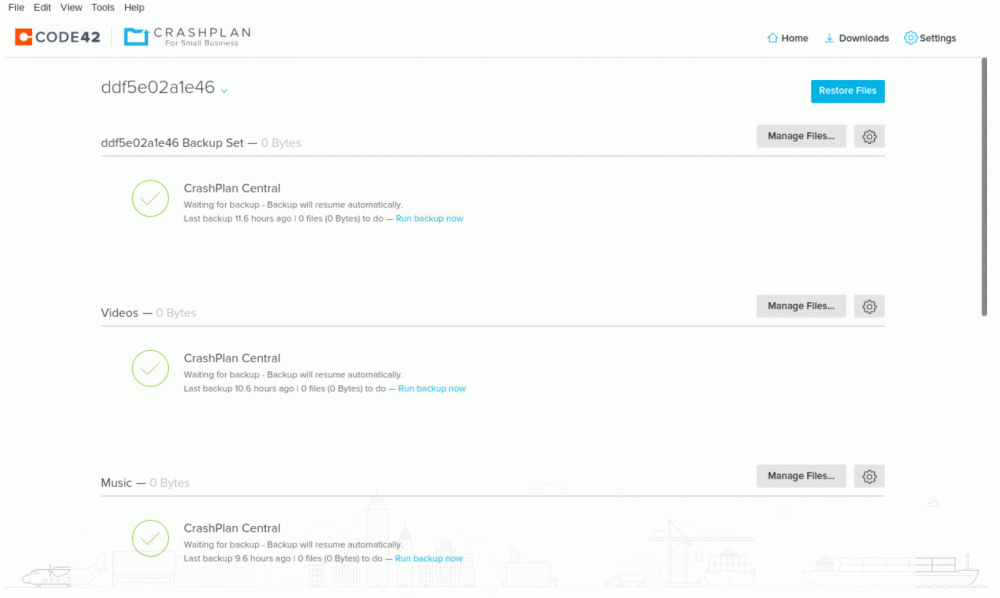
@Djoss - all good. The "random string" backup set was actually all my photos. Just renamed it "Photos". All good on my side now - many thanks!!
-
@Djoss - no, I did not. Will do that. Was is the first set in the above screen shot. That is an "additional" set that I did not setup...
-
Thanks for making this docker. I had previously been on the "other" docker and had migrated to Pro. All has been fine but I am finally moving to this docker as it is supported. I have installed the docker and followed the instructions to "Take over exisiting device.". I think all has gone well but I am a bit lost as what to do next? I do not care about versions. Do I: Run backups? Or delete the "ddfe02...." entry and run backups? See screenshot. Sorry to be dense but I think all is good and I just want to do the right thing without having to upload my files again. Thanks!
-
That would work 🙂 We have some iPads and iPhones. But mostly PC and Android. How will that affect the iPhone and iPad? No one on those devices use unRAID so assume it is not an issue. What is the purpose of that deamon? EDIT: Stopped being lazy https://linux.die.net/man/8/avahi-daemon Still curious why this happens.... Thanks!
-
I have been looking at this issue off and on for several months now. There are two fixes / issues that can cause this. See these threads: CAN NOT WRITE TO ARRAY - INTERMITTENTLY (SOLVED) LOG FILLING WITH "HOST NAME CONFLICT" MESSAGES I had the first issues and corrected it (Shrink the IP range owned by the DHCP server.). I monitored my logs and all seemed well. Then a few weeks later I noticed the issue was back. As it is not a critical issue, I have been messing with it off and on. I believe one of my dockers is triggering this issue in my setup. I attach my logs and diagnostics. The interesting bit is below (I think). I rebooted my server and things ran fine for several days as I had all dockers off. I then turned on Plex (as this is the one I thought might be triggering the issue (but we wanted to watch a movie)) but nothing happened in the log. All was still good. But when the auto-updater ran, and restarted my dockers, the issue manifested itself again. Just curious if anyone can help me narrow this down. Many thanks! Aug 30 09:36:39 Zack-unRAID kernel: microcode: microcode updated early to revision 0x24, date = 2018-01-21 Aug 30 09:36:39 Zack-unRAID kernel: Linux version 4.14.35-unRAID (root@develop64) (gcc version 7.3.0 (GCC)) #1 SMP PREEMPT Thu Apr 19 14:06:21 PDT 2018 Aug 30 09:36:39 Zack-unRAID kernel: Command line: BOOT_IMAGE=/bzimage initrd=/bzroot nomodeset Aug 30 09:36:39 Zack-unRAID kernel: x86/fpu: Supporting XSAVE feature 0x001: 'x87 floating point registers' Aug 30 09:36:39 Zack-unRAID kernel: x86/fpu: Supporting XSAVE feature 0x002: 'SSE registers' Aug 30 09:36:39 Zack-unRAID kernel: x86/fpu: Supporting XSAVE feature 0x004: 'AVX registers' Aug 30 09:36:39 Zack-unRAID kernel: x86/fpu: xstate_offset[2]: 576, xstate_sizes[2]: 256 Aug 30 09:36:39 Zack-unRAID kernel: x86/fpu: Enabled xstate features 0x7, context size is 832 bytes, using 'standard' format. Aug 30 09:36:39 Zack-unRAID kernel: e820: BIOS-provided physical RAM map: Aug 30 09:36:39 Zack-unRAID kernel: BIOS-e820: [mem 0x0000000000000000-0x0000000000098bff] usable Aug 30 09:36:39 Zack-unRAID kernel: BIOS-e820: [mem 0x0000000000098c00-0x000000000009ffff] reserved Aug 30 09:36:39 Zack-unRAID kernel: BIOS-e820: [mem 0x00000000000e0000-0x00000000000fffff] reserved Aug 30 09:36:39 Zack-unRAID kernel: BIOS-e820: [mem 0x0000000000100000-0x00000000cd536fff] usable Aug 30 09:36:39 Zack-unRAID kernel: BIOS-e820: [mem 0x00000000cd537000-0x00000000cd53dfff] ACPI NVS . . . . . . Aug 30 12:35:18 Zack-unRAID kernel: IPv6: ADDRCONF(NETDEV_UP): veth1119267: link is not ready Aug 30 12:35:18 Zack-unRAID kernel: docker0: port 13(veth1119267) entered blocking state Aug 30 12:35:18 Zack-unRAID kernel: docker0: port 13(veth1119267) entered forwarding state Aug 30 12:35:18 Zack-unRAID kernel: docker0: port 13(veth1119267) entered disabled state Aug 30 12:35:18 Zack-unRAID kernel: eth0: renamed from veth6f8d175 Aug 30 12:35:18 Zack-unRAID kernel: IPv6: ADDRCONF(NETDEV_CHANGE): veth1119267: link becomes ready Aug 30 12:35:18 Zack-unRAID kernel: docker0: port 13(veth1119267) entered blocking state Aug 30 12:35:18 Zack-unRAID kernel: docker0: port 13(veth1119267) entered forwarding state Aug 30 12:35:20 Zack-unRAID avahi-daemon[7109]: Joining mDNS multicast group on interface veth1119267.IPv6 with address fe80::ccc8:7bff:fe12:a8c1. Aug 30 12:35:20 Zack-unRAID avahi-daemon[7109]: New relevant interface veth1119267.IPv6 for mDNS. Aug 30 12:35:20 Zack-unRAID avahi-daemon[7109]: Registering new address record for fe80::ccc8:7bff:fe12:a8c1 on veth1119267.*. Aug 30 14:46:09 Zack-unRAID kernel: mdcmd (42): spindown 0 Aug 30 16:26:15 Zack-unRAID kernel: mdcmd (43): spindown 2 Aug 30 16:26:17 Zack-unRAID kernel: mdcmd (44): spindown 3 Aug 30 16:26:17 Zack-unRAID kernel: mdcmd (45): spindown 4 Aug 30 16:26:17 Zack-unRAID kernel: mdcmd (46): spindown 5 Aug 30 20:41:44 Zack-unRAID kernel: mdcmd (47): spindown 0 Aug 30 20:41:45 Zack-unRAID kernel: mdcmd (48): spindown 3 Aug 30 20:41:45 Zack-unRAID kernel: mdcmd (49): spindown 4 Aug 30 21:00:17 Zack-unRAID kernel: mdcmd (50): spindown 1 Aug 30 22:20:57 Zack-unRAID kernel: mdcmd (51): spindown 5 Aug 30 23:32:56 Zack-unRAID kernel: mdcmd (52): spindown 2 Aug 30 23:36:36 Zack-unRAID kernel: mdcmd (53): spindown 1 Aug 31 00:00:01 Zack-unRAID Docker Auto Update: Community Applications Docker Autoupdate running Aug 31 00:00:01 Zack-unRAID Plugin Auto Update: Checking for available plugin updates Aug 31 00:00:01 Zack-unRAID Docker Auto Update: Checking for available updates Aug 31 00:00:05 Zack-unRAID Plugin Auto Update: dynamix.system.stats.plg version 2018.08.29a does not meet age requirements to update Aug 31 00:00:05 Zack-unRAID Plugin Auto Update: Community Applications Plugin Auto Update finished Aug 31 00:00:19 Zack-unRAID sSMTP[18184]: Creating SSL connection to host Aug 31 00:00:19 Zack-unRAID sSMTP[18184]: SSL connection using ECDHE-RSA-AES128-GCM-SHA256 Aug 31 00:00:21 Zack-unRAID sSMTP[18184]: Sent mail for [email protected] (221 2.0.0 closing connection q21-v6sm3543595wmq.3 - gsmtp) uid=0 username=root outbytes=693 Aug 31 00:00:22 Zack-unRAID Docker Auto Update: Stopping CalibreWeb Aug 31 00:00:22 Zack-unRAID Docker Auto Update: docker stop -t 10 CalibreWeb Aug 31 00:00:32 Zack-unRAID kernel: docker0: port 1(veth14d836d) entered disabled state Aug 31 00:00:32 Zack-unRAID kernel: vethafdcedb: renamed from eth0 Aug 31 00:00:32 Zack-unRAID avahi-daemon[7109]: Interface veth14d836d.IPv6 no longer relevant for mDNS. Aug 31 00:00:32 Zack-unRAID avahi-daemon[7109]: Leaving mDNS multicast group on interface veth14d836d.IPv6 with address fe80::3c8c:cff:fe3b:e5cc. Aug 31 00:00:32 Zack-unRAID kernel: docker0: port 1(veth14d836d) entered disabled state Aug 31 00:00:32 Zack-unRAID kernel: device veth14d836d left promiscuous mode Aug 31 00:00:32 Zack-unRAID kernel: docker0: port 1(veth14d836d) entered disabled state Aug 31 00:00:32 Zack-unRAID avahi-daemon[7109]: Withdrawing address record for fe80::3c8c:cff:fe3b:e5cc on veth14d836d. Aug 31 00:00:32 Zack-unRAID Docker Auto Update: Installing Updates for CalibreWeb Aug 31 00:02:09 Zack-unRAID Docker Auto Update: Restarting CalibreWeb Aug 31 00:02:09 Zack-unRAID kernel: docker0: port 1(veth069ef4d) entered blocking state Aug 31 00:02:09 Zack-unRAID kernel: docker0: port 1(veth069ef4d) entered disabled state Aug 31 00:02:09 Zack-unRAID kernel: device veth069ef4d entered promiscuous mode Aug 31 00:02:09 Zack-unRAID kernel: IPv6: ADDRCONF(NETDEV_UP): veth069ef4d: link is not ready Aug 31 00:02:09 Zack-unRAID kernel: eth0: renamed from vetha5a479d Aug 31 00:02:09 Zack-unRAID kernel: IPv6: ADDRCONF(NETDEV_CHANGE): veth069ef4d: link becomes ready Aug 31 00:02:09 Zack-unRAID kernel: docker0: port 1(veth069ef4d) entered blocking state Aug 31 00:02:09 Zack-unRAID kernel: docker0: port 1(veth069ef4d) entered forwarding state Aug 31 00:02:09 Zack-unRAID sSMTP[18651]: Creating SSL connection to host Aug 31 00:02:09 Zack-unRAID sSMTP[18651]: SSL connection using ECDHE-RSA-AES128-GCM-SHA256 Aug 31 00:02:10 Zack-unRAID avahi-daemon[7109]: Joining mDNS multicast group on interface veth069ef4d.IPv6 with address fe80::a013:afff:fe71:1fc5. Aug 31 00:02:10 Zack-unRAID avahi-daemon[7109]: New relevant interface veth069ef4d.IPv6 for mDNS. Aug 31 00:02:10 Zack-unRAID avahi-daemon[7109]: Registering new address record for fe80::a013:afff:fe71:1fc5 on veth069ef4d.*. Aug 31 00:02:10 Zack-unRAID avahi-daemon[7109]: Withdrawing address record for fe80::ccc8:7bff:fe12:a8c1 on veth1119267. Aug 31 00:02:10 Zack-unRAID avahi-daemon[7109]: Withdrawing address record for fe80::64c4:5fff:fe8c:2ea2 on vethd2d6e3a. Aug 31 00:02:10 Zack-unRAID avahi-daemon[7109]: Withdrawing address record for fe80::60e0:42ff:fe7b:80dd on vethf61ec24. Aug 31 00:02:10 Zack-unRAID avahi-daemon[7109]: Withdrawing address record for fe80::7868:58ff:febb:d786 on vetha52000d. Aug 31 00:02:10 Zack-unRAID avahi-daemon[7109]: Withdrawing address record for fe80::2884:93ff:fe00:83e6 on veth75d2346. Aug 31 00:02:10 Zack-unRAID avahi-daemon[7109]: Withdrawing address record for fe80::1859:fff:fefc:b7c1 on veth3e43557. Aug 31 00:02:10 Zack-unRAID avahi-daemon[7109]: Withdrawing address record for fe80::6c63:eaff:fe7c:2782 on veth685b816. Aug 31 00:02:10 Zack-unRAID avahi-daemon[7109]: Withdrawing address record for fe80::30c2:abff:feb4:1491 on veth5e4de85. Aug 31 00:02:10 Zack-unRAID avahi-daemon[7109]: Withdrawing address record for fe80::8c9e:d4ff:feb5:5a4d on veth5e3645e. Aug 31 00:02:10 Zack-unRAID avahi-daemon[7109]: Withdrawing address record for fe80::a8ad:abff:fe0a:537b on veth832ce0f. Aug 31 00:02:10 Zack-unRAID avahi-daemon[7109]: Withdrawing address record for fe80::f81a:a5ff:fe8b:4745 on vethd949b2a. Aug 31 00:02:10 Zack-unRAID avahi-daemon[7109]: Withdrawing address record for fe80::a411:aeff:fe19:7cfa on veth2bab9f2. Aug 31 00:02:10 Zack-unRAID avahi-daemon[7109]: Withdrawing address record for 192.168.122.1 on virbr0. Aug 31 00:02:10 Zack-unRAID avahi-daemon[7109]: Withdrawing address record for fe80::42:4eff:fe01:7855 on docker0. Aug 31 00:02:10 Zack-unRAID avahi-daemon[7109]: Withdrawing address record for 172.17.0.1 on docker0. Aug 31 00:02:10 Zack-unRAID avahi-daemon[7109]: Withdrawing address record for fe80::587d:17ff:fe4d:7827 on br1. Aug 31 00:02:10 Zack-unRAID avahi-daemon[7109]: Withdrawing address record for fe80::ac56:eff:fe8a:f6a6 on br0. Aug 31 00:02:10 Zack-unRAID avahi-daemon[7109]: Withdrawing address record for 192.168.1.115 on br0. Aug 31 00:02:10 Zack-unRAID avahi-daemon[7109]: Withdrawing address record for fe80::ec4:7aff:fe32:b928 on eth0. Aug 31 00:02:10 Zack-unRAID avahi-daemon[7109]: Host name conflict, retrying with Zack-unRAID-2 Aug 31 00:02:10 Zack-unRAID avahi-daemon[7109]: Registering new address record for fe80::a013:afff:fe71:1fc5 on veth069ef4d.*. Aug 31 00:02:10 Zack-unRAID avahi-daemon[7109]: Registering new address record for fe80::ccc8:7bff:fe12:a8c1 on veth1119267.*. Aug 31 00:02:10 Zack-unRAID avahi-daemon[7109]: Registering new address record for fe80::64c4:5fff:fe8c:2ea2 on vethd2d6e3a.*. Aug 31 00:02:10 Zack-unRAID avahi-daemon[7109]: Registering new address record for fe80::60e0:42ff:fe7b:80dd on vethf61ec24.*. Aug 31 00:02:10 Zack-unRAID avahi-daemon[7109]: Registering new address record for fe80::7868:58ff:febb:d786 on vetha52000d.*. Aug 31 00:02:10 Zack-unRAID avahi-daemon[7109]: Registering new address record for fe80::2884:93ff:fe00:83e6 on veth75d2346.*. Aug 31 00:02:10 Zack-unRAID avahi-daemon[7109]: Registering new address record for fe80::1859:fff:fefc:b7c1 on veth3e43557.*. Aug 31 00:02:10 Zack-unRAID avahi-daemon[7109]: Registering new address record for fe80::6c63:eaff:fe7c:2782 on veth685b816.*. Aug 31 00:02:10 Zack-unRAID avahi-daemon[7109]: Registering new address record for fe80::30c2:abff:feb4:1491 on veth5e4de85.*. Aug 31 00:02:10 Zack-unRAID avahi-daemon[7109]: Registering new address record for fe80::8c9e:d4ff:feb5:5a4d on veth5e3645e.*. Aug 31 00:02:10 Zack-unRAID avahi-daemon[7109]: Registering new address record for fe80::a8ad:abff:fe0a:537b on veth832ce0f.*. Aug 31 00:02:10 Zack-unRAID avahi-daemon[7109]: Registering new address record for fe80::f81a:a5ff:fe8b:4745 on vethd949b2a.*. Aug 31 00:02:10 Zack-unRAID avahi-daemon[7109]: Registering new address record for fe80::a411:aeff:fe19:7cfa on veth2bab9f2.*. Aug 31 00:02:10 Zack-unRAID avahi-daemon[7109]: Registering new address record for 192.168.122.1 on virbr0.IPv4. Aug 31 00:02:10 Zack-unRAID avahi-daemon[7109]: Registering new address record for fe80::42:4eff:fe01:7855 on docker0.*. Aug 31 00:02:10 Zack-unRAID avahi-daemon[7109]: Registering new address record for 172.17.0.1 on docker0.IPv4. Aug 31 00:02:10 Zack-unRAID avahi-daemon[7109]: Registering new address record for fe80::587d:17ff:fe4d:7827 on br1.*. Aug 31 00:02:10 Zack-unRAID avahi-daemon[7109]: Registering new address record for fe80::ac56:eff:fe8a:f6a6 on br0.*. Aug 31 00:02:10 Zack-unRAID avahi-daemon[7109]: Registering new address record for 192.168.1.115 on br0.IPv4. Aug 31 00:02:10 Zack-unRAID avahi-daemon[7109]: Registering new address record for fe80::ec4:7aff:fe32:b928 on eth0.*. Aug 31 00:02:12 Zack-unRAID sSMTP[18651]: Sent mail for [email protected] (221 2.0.0 closing connection 34-v6sm13553632wra.20 - gsmtp) uid=0 username=root outbytes=617 zack-unraid-diagnostics-20180901-1115.zip
-
@CHBMB - Thanks! I hope all is well for you? Been awhile.... @saarg - Many thanks as well. Both - I have "seen the light" and it is now sorted. I misunderstood what you were trying to say. A bit slower as I get older...Thanks again!
-
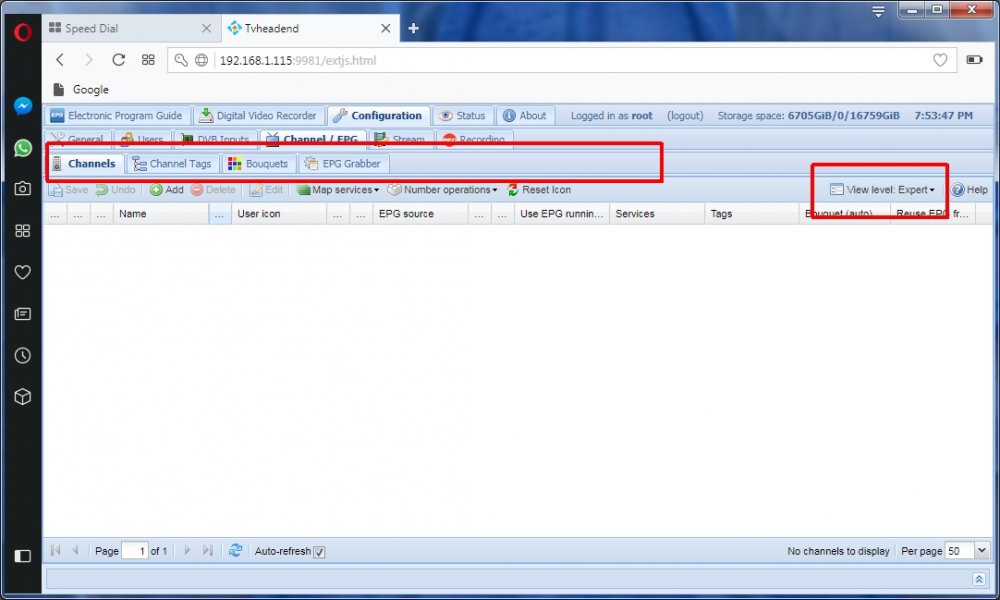
I have tried clearing cache and even installed FireFox and Opera (from scratch) but still do not see that tab.... Not an emergency by any stretch of the imagination.... :-)
-
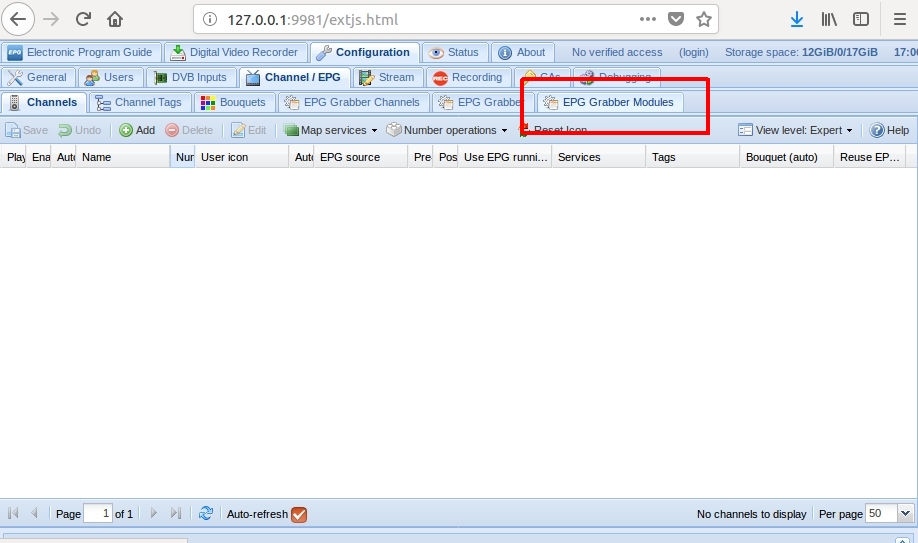
When I run TVHeadend on Linux, I see "EPG Grabber Modules" - see attached screenshot. Can I confirm I should be seeing this in the docker? Thanks!!
-
I am trying to get TVHeadend to work with a couple of other dockers. There is supposed to be an ability to access "EPG Grabber Modules" as follows: Configuration -> Channel / EPG -> EPG Grabber Modules I just see "EPG Grabber" (not "EPG Grabber Modules"). Is this the same thing? I have tried basic and expert settings. If I was installing this not though a docker, I would do: "apt-get install xmltv-util" Is this built into this docker? Thanks!


