





stor44
Members
-
Joined
-
Last visited
Everything posted by stor44
-
Great, thanks for the help!
-
Thanks Jorge, here is the output: root@Tower:~# btrfs dev stats /mnt/cache [/dev/sdj1].write_io_errs 0 [/dev/sdj1].read_io_errs 0 [/dev/sdj1].flush_io_errs 0 [/dev/sdj1].corruption_errs 0 [/dev/sdj1].generation_errs 0 [/dev/sdi1].write_io_errs 0 [/dev/sdi1].read_io_errs 2 [/dev/sdi1].flush_io_errs 0 [/dev/sdi1].corruption_errs 0 [/dev/sdi1].generation_errs 0
-
Hi there. I upgraded today to 7.3, and upon reboot it showed 2 Read Errors on SSD cache Device 2. Diagnostics attached, and a SMART report of that drive. I guess I'm just looking for opinions on how serious this is? Thanks for any help or recommendations. tower-diagnostics-20260513-1736.zip
-
UPDATE: I was able to solve the problem. I used the unRAID USB Creator app on macOS to create a new USB stick using the zipped backup from my old stick, as per these instuctions: Changing the flash device | Unraid DocsThe USB flash device is critical to your Unraid server as it stores the operating system, configuration files, and license. If this device fails or becomes unreliable, prompt replacement is essential I shutdown my unRAID server, swapped the failed USB stick with this new one and booted it up. I set the password, then confirmed the drive assignments were still correct and started the array. Seems back to normal now.
-
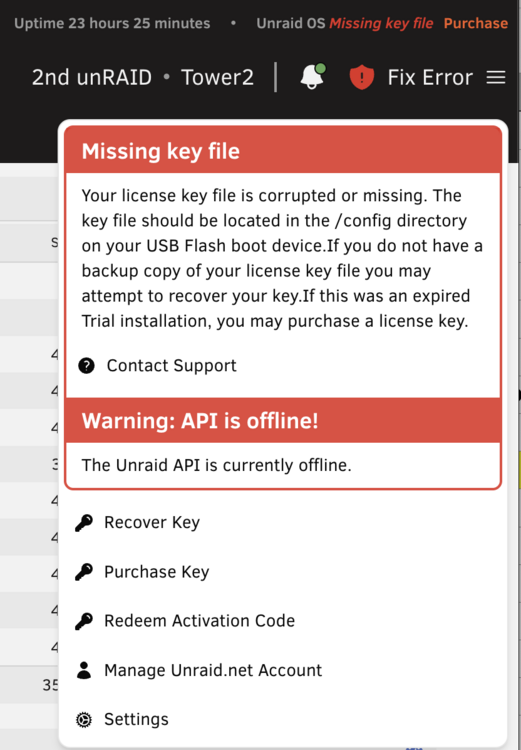
Hello. This morning I'm seeing this error on my second unRAID server: "Missing key file. Your license key file is corrupted or missing. The key file should be located in the /config directory on your USB Flash boot device. If you do not have a backup copy of your license key file you may attempt to recover your key. If this was an expired Trial installation, you may purchase a license key." I was organizing some cables behind the computer, so it is possible that I bumped the unRAID USB stick. I can create a new one if needed. The Dashboard tab is blank when I click on it. And I clicked on the Apps tab and got this error: Fatal Boot Device Error This usually means your Boot Device is corrupted or has dropped offline. The rest of the Unraid GUI will also be affected. Post a new thread in the Unraid forums if this error continues. I was able to download a Flash backup from unRAID Connect dated yesterday. What are the next steps? Thanks. Diagnostics attached. tower2-diagnostics-20250914-0626.zip

-
Step 3 worked for me, using Google Chrome browser, thanks! I had made a fresh unRAID USB stick for a new server and couldn't register it in the Connect plugin for the life of me. Up and running now.
-
It’ll be ten years this November. Originally got it to store my media library, with some redundancy. Now I’ve added lots of Docker apps and scripts. I only wish I had more free time to spend on it!
-
That worked perfect, thanks!
-
Stupid question time: I'm not seeing that path anywhere...could you be more specific? 🤓 /opt/freefilesync/Resources/ Is that supposed to be in appdata? I only see a "Logs" folder in mine. Thanks.
-
Easy upgrade from 6.12.14 to 7 this weekend. Only a single issue, my ActualServer docker refused to start afterwards, but there are some suggested fixes on GitHub, which worked without too much hassle. Now learning about Tailscale (thanks for all the tutorial videos) and will explore the VM improvements at some point. Many thanks to all who make unRAID happen!
-
Welcome Nick!
-
Thanks for this template! Usually these apps require a separate database docker etc, so it's nice having this all setup automatically.
-
Thanks for this. A few of my docker containers were failing with the same error as in the first post. Turns out I had several orphaned docker images. I've deleted those, and did "Force Update" on each docker app that still wouldn't start, and now they're up and running again.
-
Thanks for the reply, will do.
-
Hello. Noticed this morning that I couldn't mount any unRAID shares. Had a look at the unRAID screen and turns out it had a kernel panic. Diagnostics are attached. I'm just wondering if something obvious (and bad?) had happened? I had to do a hard shutdown and restart, now it's running a parity check (which is a drag because I just did one on Thursday, plus it's gonna be 30 Celsius today, but oh well). Thanks for your time. tower-diagnostics-20230814-0807.zip
-
Seeing the same error here.
-
Bah, missed the survey by one day. Hope you folks made good decisions!
-
Thanks for this. I haven't used MakeMKV for a long time, and had removed the container. Today I realized my optical drive had a bad SATA cable, so I replaced it but still couldn't see the drive even though I could see it in unRAID and my BIOS menu. Setting those two values to 0 worked! Cheers.
-
Hi @ljm42, I can confirm that solution. I have the UD Preclear plugin, and had the same issue as Koenig (the MyServers window was telling me to update the plugin, after I had already updated it). A reboot this morning has solved it. I didn't need to run any commands. Cheers!
-
Just to note, it is documented correctly here: https://wiki.unraid.net/Manual/Security#Https_with_Unraid.net_certificate_-_with_no_fallback_URL "Set Use SSL/TLS to Strict (this was previously called "Auto", but "Strict" is more descriptive)".
-
Not sure where to post this. On this wiki page for MyServers plugin: https://wiki.unraid.net/My_Servers#Optional_step_for_Unraid_6.10 It says: "In the CA-signed certificate area, if there are no warnings about DNS Rebinding then go ahead and set Use SSL/TLS to Auto." On my server, that option is called "Strict", there is no Auto. But it does the same thing. So just a small error. Thanks.
-
That's exactly what it was, excellent! Set to Public, now the shares instantly show again. Will do, didn't realize it was UD causing the issue. Good to know, will keep in mind for next time. Thanks for all the help, very appreciated.
-
Hello. I have two drives in Unassigned Devices (not part of the array) that are supposed to be shared over the network. If I go to the Main page in the unRAID GUI, click on Edit Settings on each drive, AUTOMOUNT and SHARE are both checked on each drive, always have been. I can also click on the share name of each drive and see the data is still there in the unRAID GUI. I'm not sure when this changed, but it's only in the past week. But I also upgraded to 6.10.3 in that time. One drive is a 4TB I use to backup my Windows PCs with. None of the PCs can see that drive listed on the network now, so the backups fail. The other is a 10TB drive I store my older security camera footage from Blue Iris in a Windows 10 VM, and record TV from the Channels DVR docker app. The Channels apps on iOS and Apple TV still play all my recordings and is working normally. So I know the drives are still there and working, they just aren't shared liked they were before? Is this a bug or did I do something wrong? I've shut down unRAID a couple times (unrelated) and rebooted, no difference. Thanks for your time. Diagnostics attached. tower-diagnostics-20220624-0534.zip
-
Update. I'm up and running with the new power supply and have completed a parity-sync rebuilding Drive 3 to itself, and things seem back to normal. I found a solution in ASUS's help pages here, in Step 1 C. Turns out my motherboard has 3 power connections. The 24 pin, an 8 pin and an extra 4 pin. I didn't have the 4 pin connected! Fortunately the new PSU came with a two cables that have 8 pin connectors which split into 2 x 4 pins on one end. The AX860i does not seem to have those, but maybe I lost them at some point. The parity sync completed without errors, and hopefully I've seen my last Red X for a while. Thanks as always for your patience and advice, I really appreciate it.
-
No, the CPU cooler fans spin for a split second then switch off, and the PC stays off, it’s not even POSTing. I might have to contact Corsair, make sure this PSU isn’t a dud.


