





isvein
Members
-
Joined
-
Last visited
Everything posted by isvein
-
We sadly dont have Amazon here in Norway (or are we lucky?) but i have found some Sata 5pin splitter (1in 4out). So far its going good but if I need I plan to get one or two of them, just not sure how many dives its safe to run on one cable
-
So how does people get the backblaze docker to work? After 1st boot here it asks to install mono, ok, and after that the VNC connection is just ether an black or white screen only Edit: Found the answer: https://github.com/JonathanTreffler/backblaze-personal-wine-container#installation
-
So I moved my unraid box over to the define7XL but even though I bough an new Seasonic PSU (needed more sata power anyway and it was one of the few PSU I could find specs on how long the cables are) I still have problems reaching the top and still be able to use all ports. I looked into extensions like CableMod but fast found out they dont make power extensions. All I could find was like 1 to 1 sata extension cables, that sounds a bit messy.
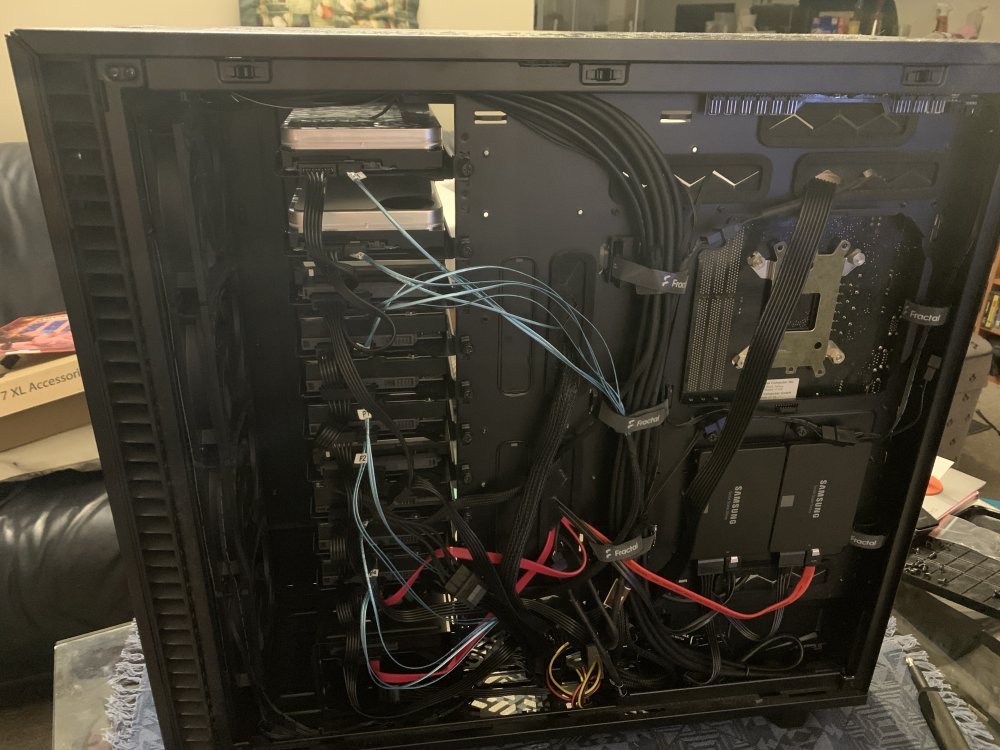
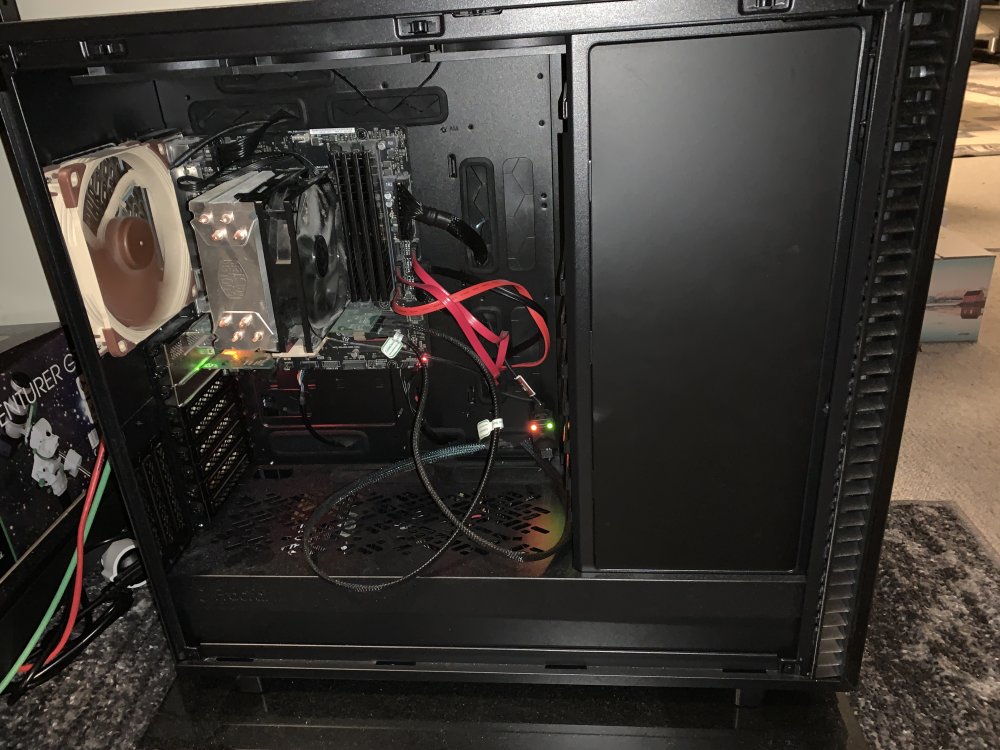
-
Will this be updated to 21.2?
-
I knew about the other drive was hoping no one else would have problems before I got it replaced 😮 I just changed the PSU so I now have all drives directly on PSU with sata power, but gonna check the cable and the port its connected to
-
The one with the problems is Disk6. oneroom-diagnostics-20231120-1947.zip
-
Hello 🙂 I guess this drive is ether proofing soon or connection is bad, but one of my oldest drives (2TB WD green, over 11 years run time) works fine and I can read data from it after an reboot, but after some time it get a handfull of errors and I cant access the data on it, just says "path unavible", but unraid does not put it as disabled 🤔 My guess is that I need to copy the data off it asap.
-
Did an forced update now with the :latest tag, an now its 10.8.12 Thanks
-
I used 10.8.10 due to an bug in 10.8.11 but now that 10.8.12 is out it wont update to other than 10.8.11 even if I change the tag to :latest or to :10.8.12-1-01
-
I got this one yesterday, I guess this is a kind of file that should be excluded as it changes often? Is there a list of filetypes that should be excluded? Tried to search but no luck

-
I got this today, but I guess that kind of file is one of the kinds you should NOT hash since it gets changed a lot. Is there an list of common extensions you should exclude?

-
I think it was connected to the HBA all the time, not sure if I ever tried directly to mobo. Its an Dell H310 6Gbps SAS HBA. Edit: My bad, I tried the drive also on my desktop with an X570 board, same problems there, the drive shut down every minute before I turned off the EPC and power balance.
-
Model ST20000NM007D Sata, none SED
-
Hello So this is ether something everyone know about, or very few has experienced, because when I got problems with a brand new Seagate Exos X20 20TB, the information on how to get them to work on an none-hardware-server (as most of us uses at home) was not easy to find, so I put down my experience here, just in case someone else may get the same problems as I did. This does not happen on all configs, and are my experience. It all seems to boil down to if the mobo, HBA, sata-controller supports EPC or not as far as I understand. If you don`t experience any of this things with your setup, no need to do ANYTHING! This information is for them who experience the same as me. My drive is an Model ST20000NM007D sata, none-SED ----------------------------------------- Problem 1: Power This drive does NOT like molex to sata power adapters. While I did get it to work, if connected to an adapter, in Unraid, it spits out a lot of read errors. When connected directly to psu power (sata 15pin power) this does not happen. Same seems to happens with my WD Red 10TB drives. As far as I understand, none of these drives uses the 3.3v, so I don`t get why this happens with converters, but it does. Problem2: Backplane: I tried to use the exos in my Chieftec Backplane CMR-2131, this did not work at all, tried with different bays and an 2nd one as I have 2, same happens. Once again I think this has something to do with power as this backplane, 2*5 1/4" to 3*3.5" bay uses 2 molex as power. My recommendation is not to use this backplane with exos drives, may be the same with other consumer backplanes that uses molex as power. Problem3: Drive shuts down/parks head every minute: This was the hardest one to figure out but I found the answer over at r/datahorder. Enterprise drives have certain features I did not know about when it comes to power balance and the Seagates has a feature called EPC that I`m not sure what does, but as far as I understand it parks the read/write head very often. Real server hardware works with those features, but an desktop/workstation board does not, so for us we need to turn those features off in the drives firmware. (yes, I guess this is over simplified but I don`t know how this really works in a real server, and the post over at r/datahorder recomended to turn both of them off for home-use) Once you know how to turn it off, its not that hard I will tell how to do this on Unraid, but you can also do this from Windows. I assume you download on an windows or linux desktop -First we need to download SeaChestUtilities from Seagate -Unzip the folder and go to Linux-->Non-RAID-->x86_64 -Here we need 2 files: "SeaChest_SMART_x86_64-alpine-linux-musl_static" and "SeaChest_PowerControl_x86_64-alpine-linux-musl_static" -Make an new folder on the Unraid USB, I named it "seagate" and copy the files there (this can be done from unraid with the Dynamix File Manager plugin) -Open an Unraid terminal and we need to edit the "go" file -"sudo nano /boot/config/go" -add the following lines to the end of the file: cp -r /boot/seagate/ /usr/local/sbin/seagate chmod -R +x /usr/local/sbin/seagate This copy the files from the usb to an location on the unraid ram drive and makes the files executeable. Files on the usb cant be executeable. -Reboot Unraid -After reboot, open an terminal and "cd /usr/local/sbin/seagate" You should see the files in here now. -First we need to find the exos drive by running: ./SeaChest_SMART_x86_64-alpine-linux-musl_static --scan -Find the right drive by serial number and take an note of its number "/dev/sgX" -then run the two commands: ./SeaChest_PowerControl_x86_64-alpine-linux-musl_static -d /dev/sgX --powerBalanceFeature disable ./SeaChest_PowerControl_x86_64-alpine-linux-musl_static -d /dev/sgX --EPCfeature disable -This should turn both features off and it should be remembered though reboots. -The following commands can be used to check if EPC is turned off: ./SeaChest_PowerControl_x86_64-alpine-linux-musl_static -d /dev/sgX -i Down under "Features Supported" it should say ETC and nothing next to it, that means its turned off. ------------------------------------ After I plugged it in directly to psu and turned off said features, it been working fine with no random read errors I be doing this if I get more exos drives in the future. (and yes, this took some weeks to figure out for me. Ran a lot of smart tests, even forgot the power thing, connected working drive into molex adapter after moving case and parity got ruined because the read errors so had to rebuild after using correct power connector) (hopefully someone else can explain to me WHY some drives just don't like molex adapters. I also don`t know if this is specific to the X20 drives or all exos drives)
-
As someone who have used both Synology, Unraid, OSX-Server (when that was its own OS) and OSX-Server after it just became an "app" (before Apple just cut server all together), I dont think the Unraid gui is hard to get at all. True, DSM is nice looking, everything feels like an "app", just like on any smartphone, but the Unraid gui is way more simple and things you need to know is way more "in your face" Yes, what is an setting and what is a tool is a bit messy, but you dont need to be an linux expert to understand the Unraid GUI (Im not) I for one does not want an Unraid gui that looks like an iPad.
-
Im not sure if this is a bug or not, but I get the "error" "macvlan call traces found" even if I have ipvlan on my docker config
-
Used Notepad++ to find and replace all 5 instances of "md${d:9}" with "md${d:9}p1" in the script and it looks to work just fine now on 6.12.4 (just need to wait and see when it finishes to make sure it actually worked)
-
aha! Would that be as simple as adding 2 lines that says "cp *location on usb/file1 /usr/local/sbin" "chmod +x "/usr/local/sbin/*filename*" for each file?
-
Hello I have some linux executable files (SeaChestUtilities) that I want to put on the usb so I can use them without starting the array, but where on the usb should something like this go?
-
ops, I forgot that and I have restarted after this Now I have tried to connect the drive directly to MB with an molex to sata power, fingers crossed, no errors past 23min. If this is working now, I think I know what the problem is. I started off having the drive in my Chieftec 2*5.4" to 3*2.5" bay, that bay used 2*4pin molex to power the backplane. For some reason, it looks like enterprise drives does NOT like that power delivery/backplane, even if I made sure EPC and power-control was disabled. My older CoolerMaster PSU in the Unraid box has 5pins on the sata power cables, that should mean 3.3v lines are connected, I wonder if it will work if I use those or if I have to use 3pin sata power/molex adapter for this drives.....need to test. When I figure all this out, I may write a post about this complete story so others in my situation can read my experiences Thanks for the input edit: According to the manual for this drive, it needs only 5v and 12v, so it must be something else with that backplane thise enterprise drives does NOT like.....Since they dont have the middle screws, looks like I need a new case for my unraid box soon.....
-
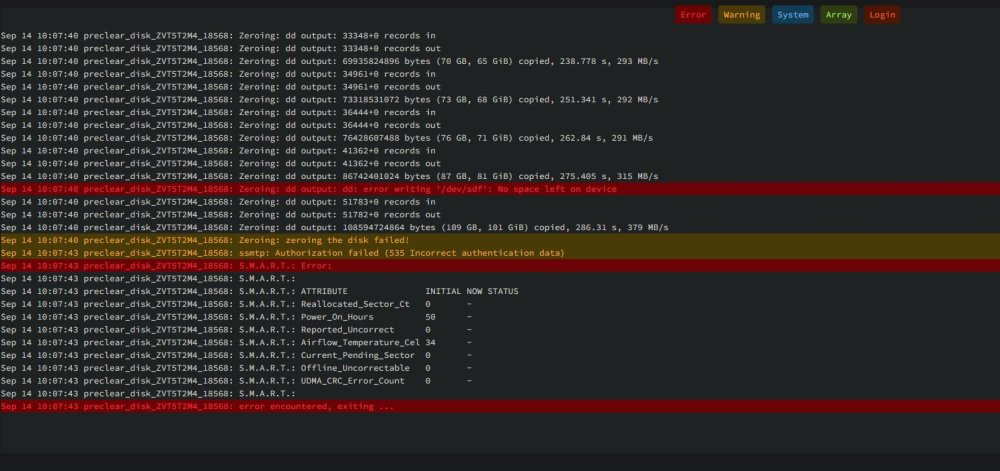
Hello I thought I had got this drive to finally work after disabling EPC and power-controll (before that the head parket every minute and the drive shut down randomly), but during preclear it seems to fail because no space left on disk? I dont get what is going on now preclear_disk_ZVT5T2M4_18568.txt ST20000NM007D-3DJ103_ZVT5T2M4-20230914-1022.txt
-
So this happened -during preclear disk suddenly failed. -tried again but this time with pre-read turned on, after 24hours read failed with errors that Unraid no longer can find the disk. -connected the disk to my w10-pc to check with SeaTools, quick test passed. -Checked with long test, after 10min, the disk just disappears from SeaTools, and from windows, just like it powered off. -Just to be sure if the problem was with my sata/molex power and/or sata cable, I did the same tests, long and short with my Segate Ironwolf 8TB, all test pass and no problems. -Tested with Seatools 2min test the day after, the disk disappears/power off after 10sec Looks like I got another dud after the problems with the Ultrastar
-
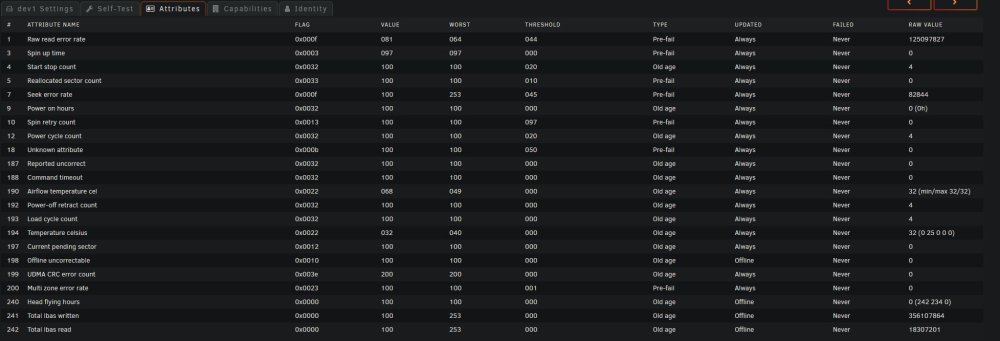
Im giving up soon Got an brand new Segate X20 20TB and as soon as I start to precleare it it starts to throw smart errors and after a while preclear failed The numbers just keep going up when I try to do stuff too. Edit: according to this post on reddit, this is normal for segate disks, Im confused
-
Good advice 🙂 The store was not the problem, bought from one of the 5 biggest computer stores here in Norway.
-
I contacted seller and got an rma on it and today I got it refunded First time in years I got a bad disk, but it had to happen sooner or later I guess. Now I look at the Seagate Exos X20 20TB instead. In the specs power disable is not mentioned at all on the sata version. Also looks as a good disk and it is a bit cheaper than the Ultrastar





