






xthursdayx
Community Developer
-
Joined
-
Last visited
Everything posted by xthursdayx
-
Hi folks, I'm finally getting around to setting up beets and organizinga my music collection. I installed this container, set up my config file and added a local musicbrainz database mirror, and everything seemed to work fine at first. However, after the first few albums that were matched and moved I started getting this log in my terminal for every track being scanned (at least up until I exited): chroma: fingerprinting of '/downloads/[artist]/[album/[track].mp3' failed: audio could not be decoded I'm not sure why beets is using Chromaprint rather than continuing to match to the Musicbrainz database. If it was just one album I would assume that it was because there was no match, however before I exited, beets had given me this same reply for at least 6 different albums worth of tracks - most of which weren't from particularly obscure albums or anything. I may just disable chroma for the time being, but I was wondering if you all had any idea why this might be happening? Are there additional dependencies (such as those specified in the Chromaprint/Acoustid Plugin documentation on the beets website) that aren't already installed in this container? Has anyone else run into this issue? Thanks for the help!
-
Just to follow up, I installed Python3 through NerdPack and have been able to run jobs with it. The issue now is that I can’t figure out how to get Python to access (and write into) the dockerized Influxdb database. Any ideas?
-
Hi folks, I'm trying to pull my Plex data into my Grafana dashboard (via InfluxDB). I found this script which looks promising (https://github.com/barrycarey/Plex-Data-Collector-For-InfluxDB), however I can't figure out if there is a way to use it. I tried installing it in MyScripts only to realize that unRAID doesn't have Python3 built in. I then tried to use this dockerized version, but I can't figure out how to make it work as the docker container can't seem to find the script (though I've mapped it as the error messages suggest). Any ideas how I can accomplish this, or other ideas about pulling Plex data into Grafana? Many thanks!
-
Hi, yep, I just updated to the latest bios and bmc, and I am using two 4pin pwm fans.
-
Hi, I've installed this plugin on my server which has an Asrock C2750D4I mobo. For some reason, the only available sensor shown is HDD temperature, and when I try to configure fan control I get this: Checking IPMI fan Locations... Location 0-1: none Location 0-2: none Location 0-3: none Location 0-4: none Location 0-5: none Location 0-6: none Location 0-7: none Location 0-8: none Saving board configuration... Any idea how I can fix this?
-
Yes, it still doesn't appear to be working.... neither via browser or RDP. Any ideas? Should the network type be Bridge or br0?
-
Hi, i just installed this, but for some reason am unable to access the UI via HostIP:8282 (remapped from 8080) or HostIP:3389, nor am I able to access it via RDP, at HostIP, HostIP:8282 or HostIP:3389. I also tried setting my network for the container to br0 and assigning a static IP (192.168.1.112), and attempted to connect via 192.168.1.112:8080 and 192.168.1.112:3389 (in the browser) and 192.168.1.112, 192.168.1.112:8282 and 192.168.1.112:3389 via RDP - none of these worked either. Finally, I tried setting my container network to host, but this too failed. Any ideas what is wrong? The FileBot container's logs look fine.
-
Same here too...
-
Thank you for taking the time to read through it all! I patiently await any insights you might have. Just in case this helps at all, I will share some additional observations re; https I have OpenVPN-as set to allow access and management to my Unraid server when I'm outside my home network. Whenever I try to access the OpenVPN-as admin/connect UI (from inside my home network) I'm only able to access it via http, as https always fails to connect. I always thought that this was just a quirk of that particular container, but now that I'm also unable to access the nextcloud setup UI via https, and nextcloud.mydomain.com also fails (either because it times out and says 502 Bad Gateway - with https://nextcloud.mydomain.com, or because it says that I'm trying to access an https port with http - with http://nextcloud.mydomain.com). I'm now starting to wonder if the root of my problem setting up Nextcloud, or at least accessing it once it is set up, has to do with security certificates and being unable to access containers on my server via https.... This is way outside my knowledge base, so I'm not sure how to fix this or even further diagnose if this is the case, but this is what I've been observing at least.
-
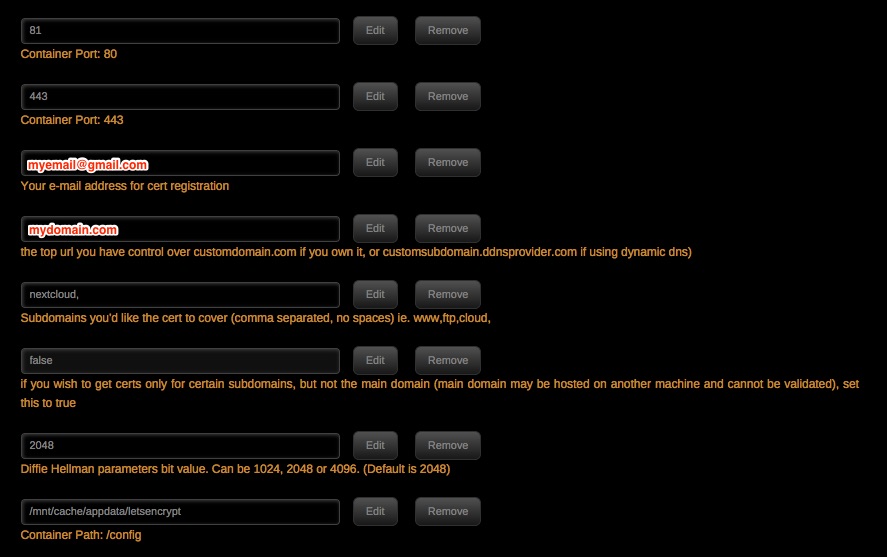
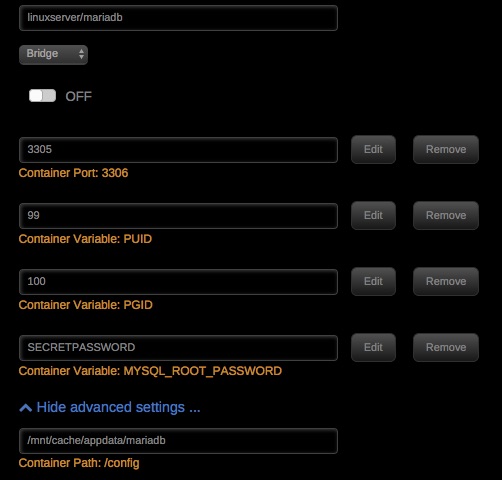
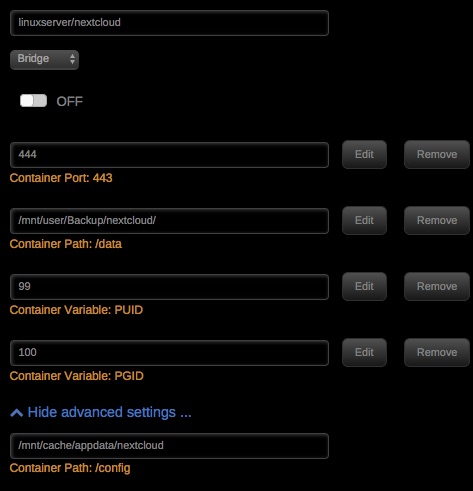
Okay here goes the new install from scratch... Again, everything works as expected until the final step of actually accessing my Nextcloud container via https://nextcloud.mydomain.com. I have a sense that this might be because of a problem accessing my server via https (I noticed this with OpenVPN-as also, but thought it was just something to do with that container), but I'm not sure. I've detailed every step of my process below (basically repeating the LinuxServer guide). Any help would be very much appreciated. I'm at a total roadblock with this. 1. I first installed mace's DDclient container, and used it to point my namecheap domain at my unraid server via an a name dynamic DNS record. 2. I then installed LetsEncrypt from community apps with these settings: And forwarded ports 80 > 81 and 443 > 443 in my router. 3. I then installed the LS MariaDB container from community apps using these settings: I removed the # from line 124 of my mariadb custom.conf file, so that it read "bind-address=0.0.0.0" and restarted mariadb. I then created my Nextcloud database using these commands: docker exec -it mariadb-nextcloud bash mysql -uroot -p CREATE USER 'admin' IDENTIFIED by 'password'; CREATE DATABASE IF NOT EXISTS nextcloud; GRANT ALL PRIVILEGES ON nextcloud.* TO 'admin' IDENTIFIED BY 'password'; 4. I then added Nextcloud from community apps using these settings: At this point, after the container installs, when I try to access the Nextcloud webui at https://192.168.1.107:444/ I receive a privacy error (NET::ERR_CERT_AUTHORITY_INVALID) and have to allow the webui to load "not secure" (non-https) in order to access it. I continue and set up nextcloud via the webui by: Adding an admin username and an admin password. Adding the information for my MariaDB user, password, and nextcloud database name (nextcloud), and replacing localhost with my Unraid ip address and MariaDB port (192.168.1.107:3306). After finalizing the setup I am able to access the Nextcloud webui, though the connection is still 'not secure' (meaning, I assume, http rather than https). 5. I then setup my letsencrypt reverse proxy to allow access to nextcloud via https://nextcloud.mydomain.com by first going to mnt/cache/appdata/letsencrypt/nginx/site-confs and creating a file called nextcloud with the code: server { listen 443 ssl; server_name nextcloud.mydomain.com; root /config/www; index index.html index.htm index.php; ###SSL Certificates ssl_certificate /config/keys/letsencrypt/fullchain.pem; ssl_certificate_key /config/keys/letsencrypt/privkey.pem; ###Diffie–Hellman key exchange ### ssl_dhparam /config/nginx/dhparams.pem; ###SSL Ciphers ssl_ciphers 'ECDHE-RSA-AES128-GCM-SHA256:ECDHE-ECDSA-AES128-GCM-SHA256:ECDHE-RSA-AES256-GCM-SHA384:ECDHE-ECDSA-AES256-GCM-SHA384:DHE-RSA-AES128-GCM-SHA256:DHE-DSS-AES128-GCM-SHA256:kEDH+AESGCM:ECDHE-RSA-AES128-SHA256:ECDHE-ECDSA-AES128-SHA256:ECDHE-RSA-AES128-SHA:ECDHE-ECDSA-AES128-SHA:ECDHE-RSA-AES256-SHA384:ECDHE-ECDSA-AES256-SHA384:ECDHE-RSA-AES256-SHA:ECDHE-ECDSA-AES256-SHA:DHE-RSA-AES128-SHA256:DHE-RSA-AES128-SHA:DHE-DSS-AES128-SHA256:DHE-RSA-AES256-SHA256:DHE-DSS-AES256-SHA:DHE-RSA-AES256-SHA:AES128-GCM-SHA256:AES256-GCM-SHA384:AES128-SHA256:AES256-SHA256:AES128-SHA:AES256-SHA:AES:CAMELLIA:DES-CBC3-SHA:!aNULL:!eNULL:!EXPORT:!DES:!RC4:!MD5:!PSK:!aECDH:!EDH-DSS-DES-CBC3-SHA:!EDH-RSA-DES-CBC3-SHA:!KRB5-DES-CBC3-SHA'; ###Extra Settings### ssl_prefer_server_ciphers on; ssl_session_cache shared:SSL:10m; ### Add HTTP Strict Transport Security ### add_header Strict-Transport-Security "max-age=63072000; includeSubdomains"; add_header Front-End-Https on; client_max_body_size 0; location / { proxy_pass https://192.168.0.1:444/; proxy_max_temp_file_size 2048m; include /config/nginx/proxy.conf; } } I then edited the file mnt/cache/appdata/nextcloud/www/nextcloud/config/config.php to say: <?php $CONFIG = array ( 'memcache.local' => '\\OC\\Memcache\\APCu', 'datadirectory' => '/data', 'instanceid' => 'xxxxxxxxxxxx', 'passwordsalt' => 'xxxxxxxxxxxxxxxxxxxxxxxxxxxxxx', 'secret' => 'xxxxxxxxxxxxxxxxxxxxxxxxxxxxxxxxxxxxxxxxxxxxxxxx', 'trusted_domains' => array ( 0 => '192.168.0.1:444', 1 => 'nextcloud.mydomain.com', ), 'overwrite.cli.url' => 'https://nextcloud.mydomain.com', 'overwritehost' => 'nextcloud.mydomain.com', 'overwriteprotocol' => 'https', 'dbtype' => 'mysql', 'version' => '11.0.1.2', 'dbname' => 'nextcloud', 'dbhost' => '192.168.0.1:3305', 'dbport' => '', 'dbtableprefix' => 'oc_', 'dbuser' => 'admin', 'dbpassword' => 'xxxxxxxxxxxxxxxxxxxx', 'logtimezone' => 'UTC', 'installed' => true, ); 6. Finally, I restarted both the letsencrypt and nextcloud containers and try to access Nextcloud via https://nextcloud.mydomain.com. The page tried to load for a long time before eventually displaying the message "502 Bad Gateway", and the same thing happens if I try to select "webui' from my Unraid dashboard. If I try to access Nexcloud via 192.168.1.107:444 I get the message "400 Bad Request - The plain HTTP request was sent to HTTPS port", and if I try https://192.168.1.107:444 I get the same 502 Bad Gateway timeout.
-
This container has been working great for me with PIA for downloading, but for some reason once downloading is complete and I try to seed I get an error that says "cannot assign requested address". Any ideas how I can fix this? I'm mostly downloading from private trackers.
-
Okay, I tried installing three times following all of the steps, but I may have messed something up. I will try again this weekend when I have more time and document each step along the way and share my process to see if I'm missing anything.
-
Just bumping this to see if anyone has an idea. Thanks.
-
Also, after I setsetup my nextcloud via http and set up a letsencrypt reverse proxy (following the LS guide), when I try to access my nextcloud Webui I just get the default index page instead of the nextcloud Webui: Welcome to our server The website is currently being setup under this address. For help and support, please contact: [email protected] or, if I get rid of my default letsencrypt ngix site-conf and just leave the nextcloud conf, when I try to open my nextcloud WebUI (via my Unraid dashboard), I get a https version of my nextcloud.server.com page that times out ERR_TIMED_OUT. Do I need to change anything in my default site-conf file to be able to access my nextcloud ui or is this a problem with https access on my server perhaps?
-
So, I've followed the linuxsever install guide, and have letsencrypt working, as well as my mariadb nextcloud db. However when I install the nextcloud container and open the ui for the first time I'm unable to access via https and can only get to the login page by normal http. Any idea why this is?
-
Thanks for the help; got this bit sorted, with my subdomain routing to my unraid server. Still having issues with nextcloud however, so I scrapped my installs of letsencrypt and nextcloud to start again with fresh configs. I have some questions about the nextcloud install, but I'll ask in that thread instead.
-
in the server config per http://www.tecmint.com/password-protect-web-directories-in-nginx/ Sorry if this is a dumb question, does anyone know why I'm getting a 403 Forbidden after adding .htpasswd access (using these instructions) while I wasn't before? I get the login box and my username/pw is recognized but then I get a 403 Forbidden page.
-
Okay, thanks, I'll try to do that. The only reason I followed the cyanlabs guide is because the LinuxSever guide assumed that the reader already had a Letsencrypt container installed (and a DuckDNS container pointing a domain to their server), and so didn't provide any instructions for installing it. I didn't have Letsencrypt installed yet, so needed instructions for installing it as a prerequisite for installing nextcloud. I followed every part of the LS guide after installing Letsencrypt though, and both the configs I used were from the LS guide. When you say 'add nextcloud to your nameprovider', do you mean as a cname or url redirect? I'm using namecheap and have tried to figure out what I need to do to point DNS queries to my server, but this step wasn't in either guide I followed, and I'm not sure exactly what to do. As I mentioned, Letsencrypt works with other services such as sonarr, radarr and deluge, but not with nextcloud.
-
hi guys, thanks for the great containers. I've followed the cyanlabs guide and was able to get sonarr and radarr working through my domain name and letsencrypt. I had previously followed your tutorial on installing nextcloud on unraid with letsencrypt proxy up until the point that says "Setting Up A Letsencrypt Reverse Proxy". At this point I was able to access nextcloud from my serverip:444 and was able to configure nextcloud with my mariadb info. I then followed cyanlabs' guide to set up letsencrypt. However after following this guide, while everything else I set up (sonarr, radarr, deluge) works through my domain/location (ex: http://domain/sonarr), nextcloud is inaccessible through /nextcloud. This wasn't a big concern for me because at this point I planned to continue following your tutorial which would cause me to access next cloud at nextcloud.domain.com instead of /nextcloud anyway, however I found that I was also unable to access nextcloud on my local network through serverip:444... I tried following the rest of your tutorial anyway, and I still get ERR_CONNECTION_CLOSED when I try to connect to serverip:444 and my log file shows nginx: [emerg] open() "/config/nginx/proxy.conf" failed (2: No such file or directory) in /config/nginx/site-confs/nextcloud:31 There is no proxy.conf file in my site-confs directory, and I didn't see a step in either tutorial to create this file (or where I should edit my default.config to reflect nextcloud.conf rather than a generic proxy.conf) My nextcloud site-conf is: server { listen 443 ssl; server_name nextcloud.vulf.stream; root /config/www; index index.html index.htm index.php; ###SSL Certificates ssl_certificate /config/keys/letsencrypt/fullchain.pem; ssl_certificate_key /config/keys/letsencrypt/privkey.pem; ###Diffie–Hellman key exchange ### ssl_dhparam /config/nginx/dhparams.pem; ###SSL Ciphers ssl_ciphers 'ECDHE-RSA-AES128-GCM-SHA256:ECDHE-ECDSA-AES128-GCM-SHA256:ECDHE-RSA-AES256-GCM-SHA384:ECDHE-ECDSA-AES256-GCM-SHA384:DHE-RSA-AES128-GCM-SHA256:DHE-DSS-AES128-GCM-SHA256:kEDH+AESGCM:ECDHE-RSA-AES128-SHA256:ECDHE-ECDSA-AES128-SHA256:ECDHE-RSA-AES128-SHA:ECDHE-ECDSA-AES128-SHA:ECDHE-RSA-AES256-SHA384:ECDHE-ECDSA-AES256-SHA384:ECDHE-RSA-AES256-SHA:ECDHE-ECDSA-AES256-SHA:DHE-RSA-AES128-SHA256:DHE-RSA-AES128-SHA:DHE-DSS-AES128-SHA256:DHE-RSA-AES256-SHA256:DHE-DSS-AES256-SHA:DHE-RSA-AES256-SHA:AES128-GCM-SHA256:AES256-GCM-SHA384:AES128-SHA256:AES256-SHA256:AES128-SHA:AES256-SHA:AES:CAMELLIA:DES-CBC3-SHA:!aNULL:!eNULL:!EXPORT:!DES:!RC4:!MD5:!PSK:!aECDH:!EDH-DSS-DES-CBC3-SHA:!EDH-RSA-DES-CBC3-SHA:!KRB5-DES-CBC3-SHA'; ###Extra Settings### ssl_prefer_server_ciphers on; ssl_session_cache shared:SSL:10m; ### Add HTTP Strict Transport Security ### add_header Strict-Transport-Security "max-age=63072000; includeSubdomains"; add_header Front-End-Https on; client_max_body_size 0; location / { proxy_pass https://192.168.1.107:444/; proxy_max_temp_file_size 4096m; include /config/nginx/proxy.conf; } } And my /config/www/nextcloud/config/config.php looks like this: <?php $CONFIG = array ( 'memcache.local' => '\\OC\\Memcache\\APCu', 'datadirectory' => '/data', 'instanceid' => 'xxxxxxxxxx', 'passwordsalt' => 'xxxxxxxxxxxxxxxxxxxxxxxx', 'secret' => 'xxxxxxxxxxxxxxxxxxxxxxxxxxxxxxxxxxxx', 'trusted_domains' => array ( 0 => '192.168.1.107:444', 1 => 'nextcloud.vulf.stream', ), 'overwrite.cli.url' => 'https://nextcloud.vulf.stream', 'overwritehost' => 'nextcloud.vulf.stream' 'overwriteprotocol' => 'https', 'dbtype' => 'mysql', 'version' => '12.0.0.29', 'dbname' => 'nextcloud', 'dbhost' => '192.168.1.107:3306', 'dbport' => '', 'dbtableprefix' => 'oc_', 'dbuser' => 'zandrsn', 'dbpassword' => 'xxxxxxxxxxxxxxxxxxxxx', 'installed' => true, ); Any ideas? I was also just wanted to make sure that I don't need to add the nextcloud subdomain on my domain nameprovider's web console right? I'm assuming that this will redirect automatically on the server end.
-
Hi folks, I've installed this docker in the hope of being able to to stream my large music collection from my unRAID machine directly to my stereo via an airport express controlled by Apple Remote on an iPhone or iPad, rather than having to rely on Plex or Emby. I used the Linuxserver.io template when I installed and updated my /music directory to the correct path (/mnt/user/Media/Music) and the set my /config to my appdata folder (/mnt/cache/appdata/daapd). I then also edited the forked-daapd.conf file in order to update to the correct UID (default 99) and add my Airport Express name and password where required. Despite following these steps nothing seems to work, ddaapd can't search for the remote, and I'm getting all sorts of warnings and errors in my log. See below. Any ideas? Thanks! ------------------------------------- _ _ _ | |___| (_) ___ | / __| | |/ _ \ | \__ \ | | (_) | |_|___/ |_|\___/ |_| Brought to you by linuxserver.io We gratefully accept donations at: https://www.linuxserver.io/donations/ ------------------------------------- GID/UID ------------------------------------- User uid: 99 User gid: 100 ------------------------------------- [cont-init.d] 10-adduser: exited 0. [cont-init.d] 30-dbus: executing... [cont-init.d] 30-dbus: exited 0. [cont-init.d] 40-config: executing... [cont-init.d] 40-config: exited 0. [cont-init.d] done. [services.d] starting services Found user 'avahi' (UID 86) and group 'avahi' (GID 86). Successfully dropped root privileges. avahi-daemon 0.6.32 starting up. WARNING: No NSS support for mDNS detected, consider installing nss-mdns! dbus_bus_get_private(): Failed to connect to socket /var/run/dbus/system_bus_socket: Connection refused WARNING: Failed to contact D-Bus daemon. avahi-daemon 0.6.32 exiting. dbus[238]: [system] org.freedesktop.DBus.Error.AccessDenied: Failed to set fd limit to 65536: Operation not permitted [services.d] done. Failed to set ownership on logfile: Operation not permitted [ LOG] main: Forked Media Server Version 24.2 taking off [ LOG] main: Built 2017-02-06 with: --enable-itunes --enable-lastfm --enable-chromecast --enable-mpd --with-alsa [ LOG] main: mDNS init [ LOG] mdns: Avahi state change: Client connecting [ LOG] db: Now vacuuming database, this may take some time... Found user 'avahi' (UID 86) and group 'avahi' (GID 86). Successfully dropped root privileges. avahi-daemon 0.6.32 starting up. WARNING: No NSS support for mDNS detected, consider installing nss-mdns! Loading service file /etc/avahi/services/sftp-ssh.service. Loading service file /etc/avahi/services/ssh.service. *** WARNING: Detected another IPv4 mDNS stack running on this host. This makes mDNS unreliable and is thus not recommended. *** socket() failed: Address family not supported by protocol Failed to create IPv6 socket, proceeding in IPv4 only mode socket() failed: Address family not supported by protocol Joining mDNS multicast group on interface virbr0.IPv4 with address 192.168.122.1. New relevant interface virbr0.IPv4 for mDNS. Joining mDNS multicast group on interface docker0.IPv4 with address 172.17.0.1. New relevant interface docker0.IPv4 for mDNS. Joining mDNS multicast group on interface br0.IPv4 with address 192.168.1.107. New relevant interface br0.IPv4 for mDNS. Network interface enumeration completed. Registering new address record for 192.168.122.1 on virbr0.IPv4. Registering new address record for 172.17.0.1 on docker0.IPv4. Registering new address record for 192.168.1.107 on br0.IPv4. [ LOG] db: Database OK with 199 active files and 6 active playlists [ LOG] mdns: Failed to create service browser: Bad state [ LOG] raop: Could not add mDNS browser for AirPlay devices [ LOG] mdns: Failed to create service browser: Bad state [ LOG] cast: Could not add mDNS browser for Chromecast devices [ LOG] mdns: Failed to create service browser: Bad state [FATAL] remote: Could not browse for Remote services [FATAL] main: Remote pairing service failed to start [ LOG] main: MPD deinit [ LOG] main: HTTPd deinit Server startup complete. Host name is vulfTower.local. Local service cookie is 3790120478. [ LOG] main: Player deinit [ LOG] main: File scanner deinit Service "vulfTower" (/etc/avahi/services/ssh.service) successfully established. Service "vulfTower" (/etc/avahi/services/sftp-ssh.service) successfully established.
-
Hey everyone. I've been using this docker to manage my server remotely (when I am at work or out of town) for the last 9 months with no problems. As has been noted with the most recent update to unRAID I had to reset my admin password and re-add my secondary 'guest' user. But for some reason now a problem has arisen. After updating the passwords and re-adding the second user I tried to connect using my previous .ovpn client configs. This didn't work, so I logged in through the web interface and downloaded new .ovpn files for both users. Using them from my phone or computer I can now connect to my server through OpenVPN, and can load web pages etc, BUT for some reason I can no longer access my server unRAID GUI page (from 192.168.1.x)... THis has never happened before and I'm not sure what would have changed to cause this. All of my permissions etc seem to be the same as they were previously. Any ideas? Thanks!
-
Hi all, I've had this docker set up and working well for a couple of months now, but due to a change in my network infrastructure I had to reinstall OpenVPN-AS. Now that I've done this I am able to connect to the VPN and it seems to be working - for example if I join the VPN on my iPad I am able to see my Plex Server in the Plex app and play media. However for some reason I am unable to connect to my server management webUI... When I go to my normal internal IP address it will never load. Any idea why this would happen? As I said, i am able to connect to the VPN and do other tasks, but not manage the server, which is one of the key reasons I wanted to install OpenVPN-AS to begin with.
-
The strange thing is that the only log I see changing sizes when I use this command is the log from Mylar. Yet the only way I am able to reduce my docker image usage is by resetting crash plan...
-
I've already tried this, but Crashplan's logs aren't particularly large. And as I said in my post there don't seem to be any logs internal to crashplan that I can clear or limit the size of.
-
So, I'm having the same problem (docker image filling up), and unfortunately CAdvisor hasn't been any help as my container sizes don't seem to be changing. I have however been able to isolate the source of the problem by going through all my containers that seem to have high memory usage and larger container sizes and updating them (edit > save) and waiting until my docker utilization goes back to normal. It seems that my problem is coming from gfjardim's Crashplan docker. I am using crashplan to backup my entire server (unlimited account), so it is moving a lot of data, but it doesn't seem to keep logs, so I'm unsure what could be causing the docker image to fill up. Any ideas?

