





mbc0
Members
-
Joined
-
Last visited
Everything posted by mbc0
-
OK, I will try that but I would need to find the CLI for my preset I guess?
-
Hi, I am having an issue with aspect ratio using this docker which I only get using the watch folders, if I use the GUI it is fine! For example I use the same custom preset I created for HEVC 720P and if I use the same preset on this docker or any of my machines via GUI I input the same file 1920 x 800 and get 1280 X 534 out due to the width being set to 1280 & the keep aspect ratio being ticked with Anamorphic disabled. However if I use the same preset, same input file via the watch folder I get 1280 X 720p out which obviously looks horribly distorted. I do not want to waste your time as this does not seem to be docker specific as I get the same on this docker that I use on my Ubuntu installation (https://github.com/jlesage/docker-handbrake/issues/12) so it seems to be a handbrake issue/bug? Many Thanks
-
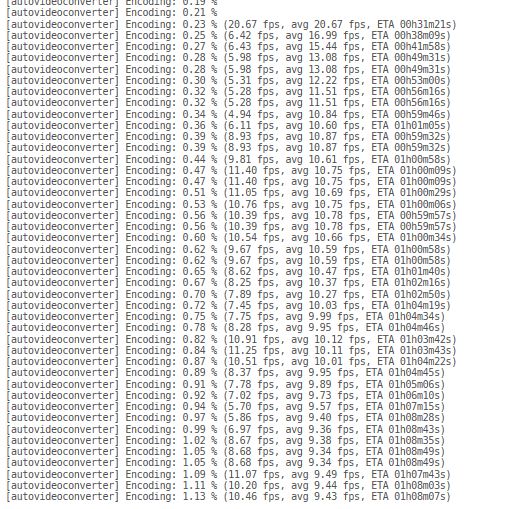
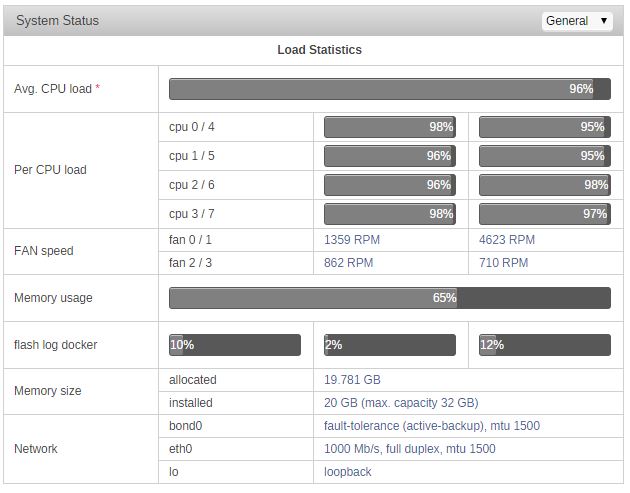
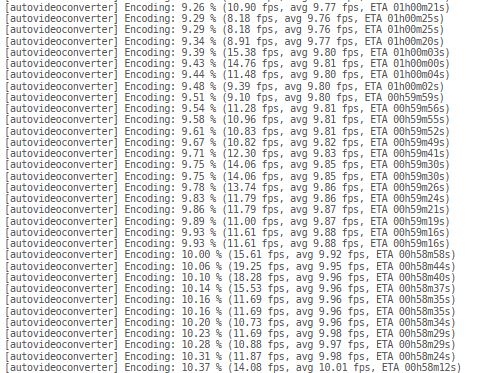
Hi, fps is not as consistent with this version but the net result is the same unfortunately. it is fluctuating between 3fps - 20fps. any ideas what could be causing the slow processing? looking at the log you would think it would be slow disk speed but all my tests have been from the same 500mb file on the same disk.
-
Hi, Yes just with HEVC X264 seems fine! Will change version now :-)
-
Just been doing some testing using the same HEVC Presets, everything is on the same machine with the same amount of cores available and no GPU Passthrough, Windows 10 VM Handbrake 38fps Linux Mint VM Handbrake 41fps Linux Mint VM FFMPEG 39fps Handbrake Docker 9fps Any ideas?
-
No, nothing passed through on the VM I just use X2go Remote Connection, I only use CPU encoding not GPU
-
Thanks for that! I am having performance issues with the docker as encoding X265 I am only getting approx 9fps but if I use the same profile on a Windows VM (on the same unraid server) I get 40+ fps any ideas? my CPU has all cores maxed out and no other processes running...

-
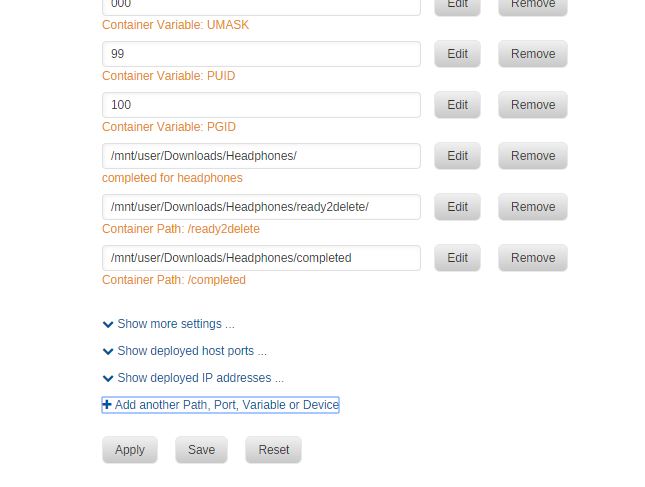
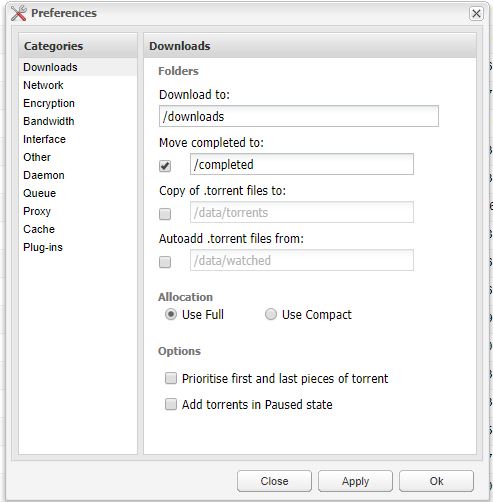
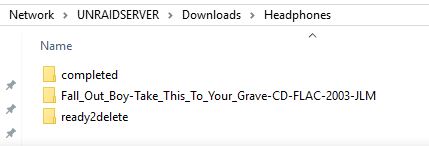
Hi, Can anyone point me in the right direction as to why deluge might not be moving completed downloads the completed downloads just sit in the downloads directory As far as I can see there is no problem with my config, I cannot find a logfile to tell me any different? Many Thanks!

-
aha thank you, set to 10 so hopefully that will not affect Plex, just out of interest will it always run at priority 10 no matter what or will it know if another process is using cpu? I guess being a docker it will not be able to know if something else is calling on the CPU? Thanks again :-)
-
This really is a great docker! Thank you so much for your hard work!! This is going to save me a lot of time and is very convenient compared to my current but soon to be old setup! As my server is also running Plex is there a way to handle CPU usage as I would need Plex to have priority over Handbrake. Again.. Thanks this is brilliant!
-
FFS! I was in Chrome (As Always) tried Edge & all is working as expected! Sorry to have been wasting your time!
-
I just reinstalled, only values entered where the folders (watch, output etc) Same problem, no errors in log? What do you mean docker command it ran? Thanks for your time!
-
ok, I will delete it and reinstall again
-
Hi, I cannot really see any errors in the log? would you mind taking a look please? hbrake.txt
-
Hi, thanks for the quick reply! Here is the log but it's just telling me I cannot connect? 2018/02/16 18:34:18 [error] 784#784: *7 recv() failed (104: Connection reset by peer) while reading response header from upstream, client: 192.168.0.2, server: , request: "GET /websockify HTTP/1.1", upstream: "http://127.0.0.1:5900/websockify", host: "192.168.0.33:7803" 2018/02/16 18:34:25 [error] 784#784: *9 recv() failed (104: Connection reset by peer) while reading response header from upstream, client: 192.168.0.2, server: , request: "GET /websockify HTTP/1.1", upstream: "http://127.0.0.1:5900/websockify", host: "192.168.0.33:7803" 2018/02/16 18:34:28 [error] 784#784: *11 recv() failed (104: Connection reset by peer) while reading response header from upstream, client: 192.168.0.2, server: , request: "GET /websockify HTTP/1.1", upstream: "http://127.0.0.1:5900/websockify", host: "192.168.0.33:7803" 2018/02/16 18:34:55 [error] 784#784: *13 recv() failed (104: Connection reset by peer) while reading response header from upstream, client: 192.168.0.2, server: , request: "GET /websockify HTTP/1.1", upstream: "http://127.0.0.1:5900/websockify", host: "192.168.0.33:7803" 2018/02/16 18:35:00 [error] 784#784: *15 recv() failed (104: Connection reset by peer) while reading response header from upstream, client: 192.168.0.2, server: , request: "GET /websockify HTTP/1.1", upstream: "http://127.0.0.1:5900/websockify", host: "192.168.0.33:7803" 2018/02/16 18:36:09 [error] 784#784: *18 recv() failed (104: Connection reset by peer) while reading response header from upstream, client: 192.168.0.2, server: , request: "GET /websockify HTTP/1.1", upstream: "http://127.0.0.1:5900/websockify", host: "192.168.0.33:7803" 2018/02/16 21:00:58 [error] 784#784: *26 recv() failed (104: Connection reset by peer) while reading response header from upstream, client: 192.168.0.2, server: , request: "GET /websockify HTTP/1.1", upstream: "http://127.0.0.1:5900/websockify", host: "192.168.0.33:7803" 2018/02/17 00:19:53 [error] 784#784: *34 recv() failed (104: Connection reset by peer) while reading response header from upstream, client: 192.168.0.2, server: , request: "GET /websockify HTTP/1.1", upstream: "http://127.0.0.1:5900/websockify", host: "192.168.0.33:7803" 2018/02/17 01:19:44 [error] 784#784: *42 recv() failed (104: Connection reset by peer) while reading response header from upstream, client: 192.168.0.2, server: , request: "GET /websockify HTTP/1.1", upstream: "http://127.0.0.1:5900/websockify", host: "192.168.0.33:7803"
-
Hi, This is exactly what I am after but even though everything installs ok I get server disconnected 1006 on the gui?
-
Thank you very Much!!!!
-
here is my DVBOS screen https://1drv.ms/i/s!AjnJhtmhYMJlhqQtTy5oDChRQ2GcwA
-
Hi, yes the VM is off, here is the template (default except for my recorded tv location) Cheers! https://1drv.ms/i/s!AjnJhtmhYMJlhqQsdN9B0SgTssL0mQ
-
Hi, Thanks for your help earlier, I can confirm that the IPTV is again working after installing 4.2 but I have just noticed that my DVB tuners are no longer detected in TVheadend? I thought it maybe because I installed tvheadend on a VM so I uninstalled that and rebooted, still nothing, installed the latest Crazycat DVB OS (they are showing as detected on the DVB Plugin page) but still nothing in tvheadend, installed openelec DVB OS, again detected in the OS but not tvheadend, uninstalled tvheadend docker and deleted tvheadend folder from my appdata, reinstalled still nothing, rebooted, still nothing in tvheadend although they are both detected in the DVB OS ? Any ideas? Many Thanks
-
Thank you Saarg, I guess something broke it in 4.3 Good info on how to try a different release, didn't know you could do that! Many Thanks
-
Hi all, I had been using this docker successufully with Plex DVR and tvhproxy up until approx 6 weeks or so ago when I noticed that none of my IPTV channels would work any more (DVB-S2 Is fine) To be honest I mainly use the IPTV for Motorsport and because it is off season and not had much time I have only got around to looking at it now. Basically none of my IPTV channels scan any more they all fail with authentication errors/no data stream etc.. and despite uninstalling, re-adding the m3u link nothing will make it work so I decided to install tvheadend on one of my Linux VM's and using exactly the same setup it works perfectly! What has changed since? is it the unraid OS? tvheadend? there have been loads of tvheadend docker updates but none ever work. The version I installed on my VM is HTS Tvheadend 4.2.5-18~g951777a51~xenial and the version on my docker is HTS Tvheadend 4.3-1028~g7de759e83 Is anyone suffering with the same issues? Thanks in advance!
-
Perfect! Thank you trurl :-)
-
Many Thanks for the reply, I understood that it creates checksum's what I don't understand is does it auto-correct or alert you to corrupt files? Thanks again!
-

