





mbc0
Members
-
Joined
-
Last visited
Everything posted by mbc0
-
Yes, Unfortunately Duplicati is quite buggy (see the forums) also mainly it does not have the ability to resume files uploading to G Suite so if it stops halfway or 99% through a file it restarts from the beginning plus even worse the stop after upload is for the job not the file so if you want to pause/stop the job of 5-6TB it is an impossibly long wait.
-
I upload to encrypted to Google (G Suite, 8TB & Counting!) Syncthing cannot handle that
-
I currently use Goodsync to backup my server to Google via a Windows 10VM although it all works great I would love to have a docker with GUI for this and would also contribute to the dev that could do it 🙂
-
Many Thanks!!
-
Hi, Thanks for this! it is (hopefully) what I am looking for 🙂 I am currently using DelugeVPN using my credentials file & login, can I use the same credentials file & login similtaneously with this docker as well? After looking at the log it seems to be logged in via VPN, cannot find a way of testing or wether or not dual logins are allowed with PIA? Great Work!
-
I have the same issue, restart the docker and all is well again for 12 hours or so..
-
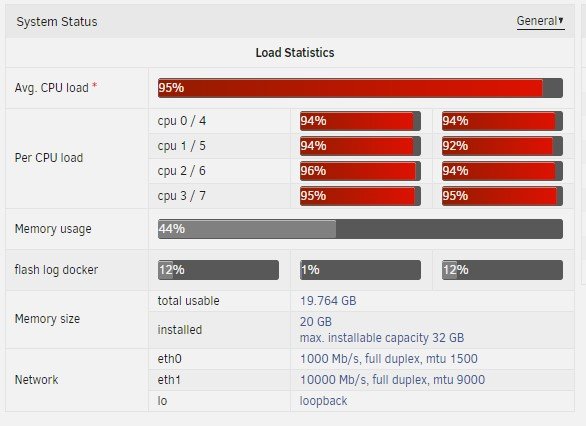
Hi, I am revisiting this docker again and just have a question regarding the cpu priority. I have an i7-3770K overclocked to 4.2Ghz and would like Handbrake to use all of it unless something else calls for the CPU power (Windows 10 VM, Plex, etc) It says in the documentation that 19 is the lowest priority, does anyone have any real world expierience with this or would it be better to use CPU pinning? Another option but I cannot find it is to encode during the middle of the night.
-
Just wanted to add a thanks for this as it has brought my write speed up from 45mb/s to 240mb/s! Many Many Thanks! 🙂 Hopefully this will be built into unRAID in the future!
-
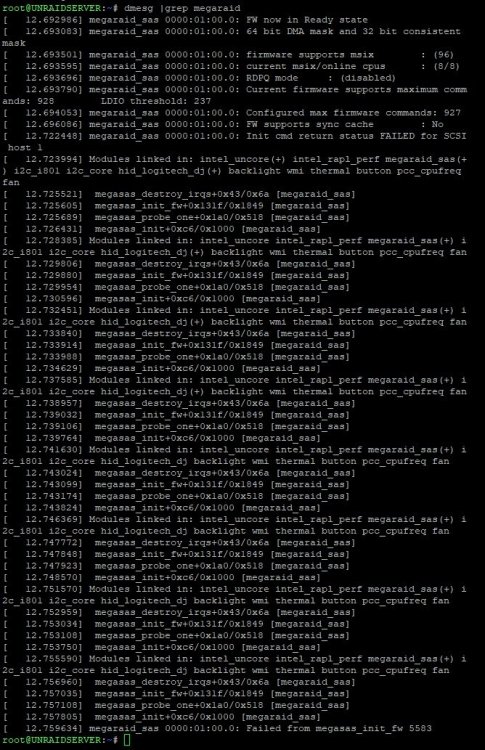
Hi, I have a Dell PERC H330 on the latest bios from DELL (May 2018) which I put into HBA Mode via CTRL-R in the card's bios The Card detects 8 drives (1 SAS & 7 SATA) perfectly. unRAID detects the card as expected but not any of the drives attached to it here are some screens from investigations so far, can anyone help? Does this need to be flashed into IT mode? Many Thanks in advance!

-
This is really frustrating I have to admit, I am trying to run 3 tuners (1, FTA 2, Freesat & 3, IPTV) I personally select Sky HD and it covers almost all channels in 1 EPG so that should work for you. I have a different issue where Plex is remembering an old tuner and is trying to tune a channel on that one instead of the new one, even deleting the DVR and recreating it, it still tries to use an old tuner! However, if you select the Sky EPG you will only need one instance of the docker for both tuners. I wish Plex would acknowledge this and allow multiple DVR's as it is quite a common issue!
-
What client are you using to connect to the VM?
-
Yeah, sorry it was a pretty useless un-informative post! I was just generally asking if anyone else was having problems with 6.6.* I am afraid I was being an idiot and forgot to load the DVB OS 😞
-
Not sure what this means but I forgot I use the DVB edition of unRAID and after loading that Deluge works perfectly again!
-
Hi, I just updated to unRAID 6.6.1 and cannot start Delugevpn any more? (Server Error When Trying To Start) I have removed the docker and reinstalled to be presented with the error below, any ideas? not sure why 58946 would be in use (rebooted twice) root@localhost:# /usr/local/emhttp/plugins/dynamix.docker.manager/scripts/docker run -d --name='binhex-delugevpn' --net='bridge' --privileged=true -e TZ="Europe/London" -e HOST_OS="Unraid" -e 'VPN_ENABLED'='yes' -e 'VPN_USER'='*********' -e 'VPN_PASS'=**********' -e 'VPN_PROV'='pia' -e 'VPN_OPTIONS'='' -e 'STRICT_PORT_FORWARD'='yes' -e 'ENABLE_PRIVOXY'='no' -e 'LAN_NETWORK'='192.168.0.0/24' -e 'NAME_SERVERS'='209.222.18.222,37.235.1.174,8.8.8.8,209.222.18.218,37.235.1.177,8.8.4.4' -e 'DEBUG'='false' -e 'UMASK'='000' -e 'PUID'='99' -e 'PGID'='100' -p '8112:8112/tcp' -p '58846:58846/tcp' -p '58946:58946/tcp' -p '58946:58946/udp' -p '8118:8118/tcp' -v '/mnt/cache/appdata/data':'/data':'rw' -v '/mnt/user/Downloads/Deluge/':'/downloads':'rw' -v '/mnt/user/Downloads/Deluge/ready2delete/':'/ready2delete':'rw' -v '/mnt/user/Downloads/Deluge/completed/':'/delugedcompleted':'rw' -v '/mnt/cache/appdata/binhex-delugevpn':'/config':'rw' 'binhex/arch-delugevpn' 853f1506f528f771b2f301acd4be840af900d9c9fc94948eda7a38bf90e1647d /usr/bin/docker: Error response from daemon: driver failed programming external connectivity on endpoint binhex-delugevpn (7288e143d9ec020c51a146126b85ffb0930cb6c49623f46c6d2e83046384a1b8): Error starting userland proxy: listen udp 0.0.0.0:58946: bind: address already in use.
-
You are a star! Thank you so much!!
-
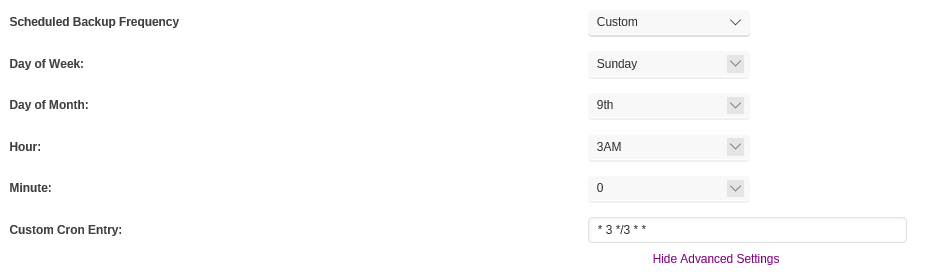
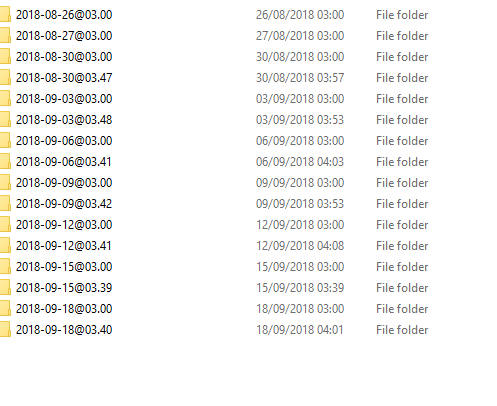
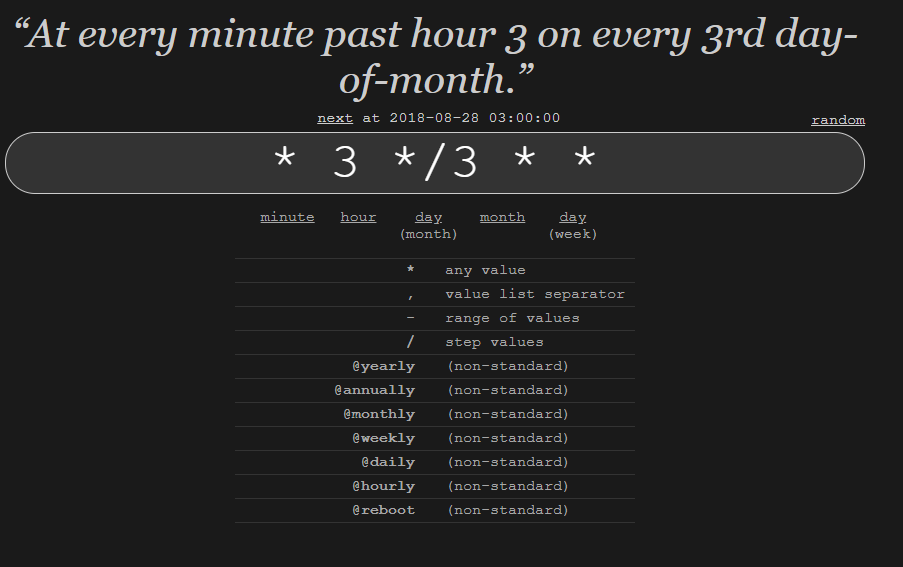
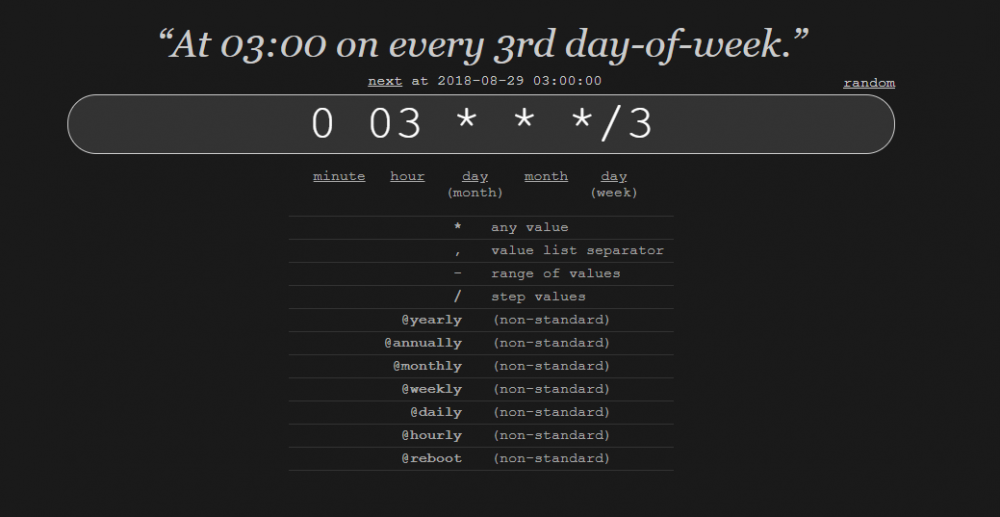
Hi, Can anyone see why I should get 2 backups within 45 mins of each other every 3 days please? I cannot work this out? I just want a backup every 3 days.
-
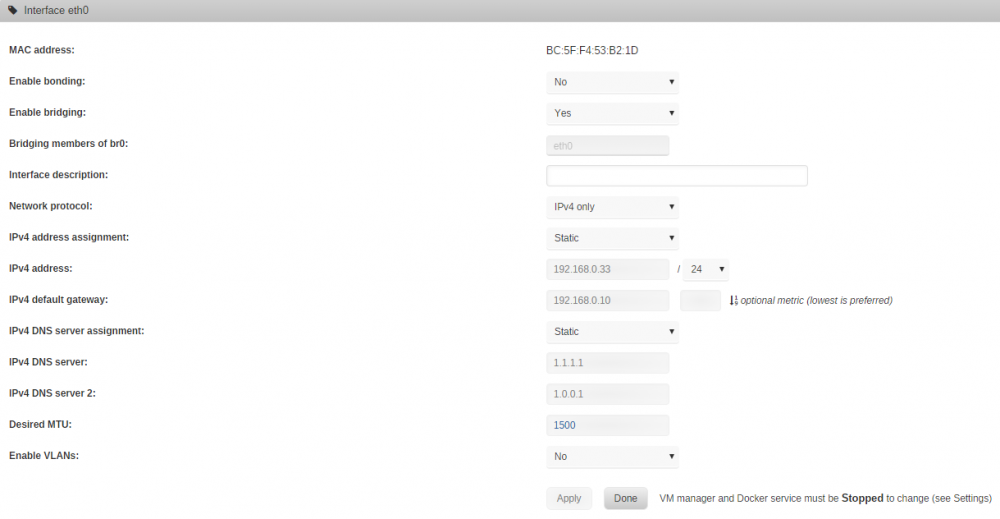
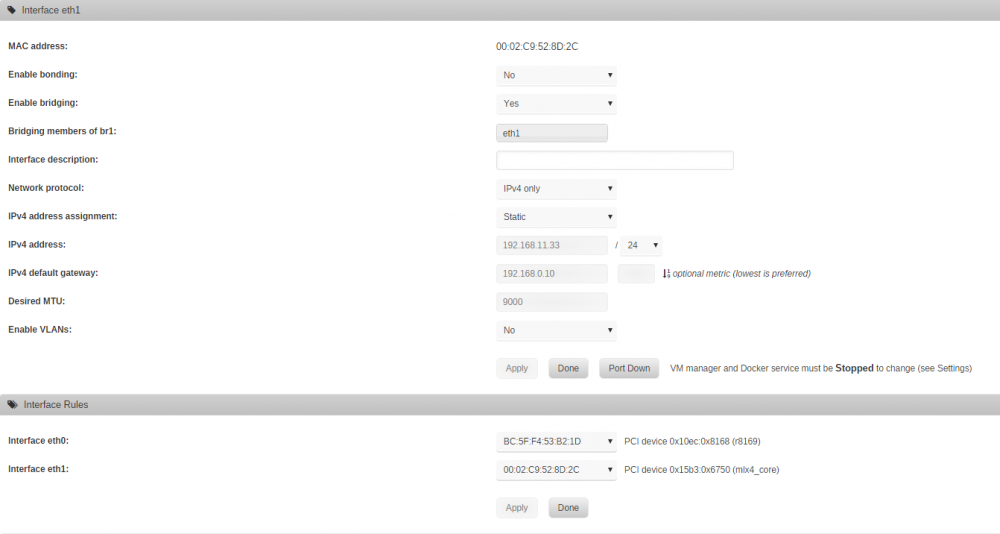
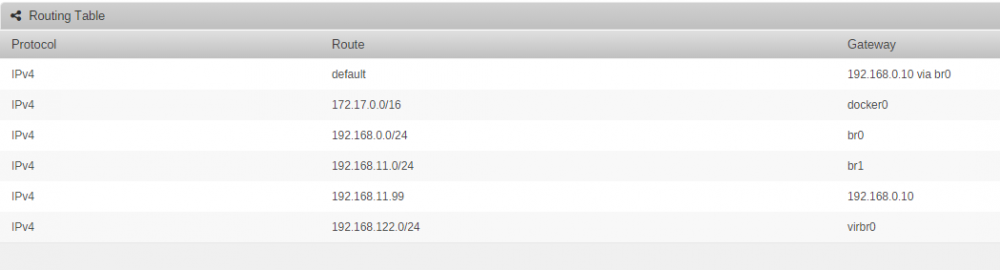
Hi, I am hoping someone in here can help me please as I am having a nightmare getting Plex back up and running. Firstly although I am using linuxserver docker I have tried going to binhex and official with the same result so not specific to this docker but it's what I have been using since the beginning and trying to get back running! The issue I have is that the docker is taking anything up to an hour to be accessable.. from starting the docker after about 20-30 minutes the library starts populating but I will not be able to access the server settings for about an hour with connection timeouts Processing triggers for systemd (229-4ubuntu21.4) ...[cont-init.d] 50-plex-update: exited 0.[cont-init.d] done.[services.d] starting services[services.d] done.Starting Plex Media Server.connect: Connection timed outconnect: Connection timed outconnect: Connection timed outconnect: Connection timed outconnect: Connection timed outconnect: Connection timed outconnect: Connection timed outconnect: Connection timed outconnect: Connection timed out If I do a fresh installation with no library the server starts up immediately. Now, I found half a fix by changing the docker from host mode to br1 and with that the docker starts immediately and is instantly accessable (as it always used to be) but the problem is that br1 has no internet access (it is a 10gbe card I have installed between my desktop & unRAIDserver) I tried adding my pfsense router as the gateway for br1 but still no internet. if I try br0 I still have the same slow issues as mentioned before if I try bridge the problems are resolved as well but I cannot work out how to add a port mapping to Plex so, in short there is something wrong with my network but after 3 days I really could do with some help! Any guidance would be gratefully received! I have also attached my Plex Media Server log as well. Many Thanks Plex Media Server.log
-
I understand, but it will still be more frequent than one a week and I don't want a daily/bi-daily backup so this should be perfect! Thank you for all yor help! ?
-
ah.. I think I got it now Thank You ?
-
Ah Really? I was using this calculator
-
Ah, not too intuiative that! Thank you! hopefully this entry will run at 3am every 3 days! ?

-
All fixed! I cannot explain it but restarting the entire server resolved the issue! would love to know why it only effected plex?
-
Hi, Thanks for your reply but I cannot find anywhere to do this? as soon as you select custom it is not possible to use any pull down box or enter a cron entry?
-
Aha! I cannot tell you how much I appreciate you just commenting! I hope you have now forgotten my issue and are enjoying many more Sanria's! Have a great time! ?
-
I am presuming there is an issue with this docker as I have renamed my /mnt/cache/appdata/binhex-plexpass directory to /mnt/cache/appdata/binhex-plexpassold and removed the docker & image & reinstalled, so effectively this is a fresh install and I still have the errors.. surely someone else would be having issues if it was the docker? Created by...___. .__ .__\_ |__ |__| ____ | |__ ____ ___ ___| __ \| |/ \| | \_/ __ \\ \/ /| \_\ \ | | \ Y \ ___/ > <|___ /__|___| /___| /\___ >__/\_ \\/ \/ \/ \/ \/https://hub.docker.com/u/binhex/2018-08-26 16:26:19.337263 [info] Host is running unRAID2018-08-26 16:26:19.366682 [info] System information Linux UNRAIDSERVER 4.14.49-unRAID #1 SMP Wed Jun 13 23:15:13 BST 2018 x86_64 GNU/Linux2018-08-26 16:26:19.395915 [info] PUID defined as '99'2018-08-26 16:26:19.438146 [info] PGID defined as '100'2018-08-26 16:26:19.475080 [info] UMASK defined as '000'2018-08-26 16:26:19.507320 [info] Setting permissions recursively on volume mappings...2018-08-26 16:26:19.543004 [info] TRANS_DIR defined as '/config/tmp'2018-08-26 16:26:19.625282 [info] Starting Supervisor...2018-08-26 16:26:20,020 INFO Included extra file "/etc/supervisor/conf.d/plexmediaserver.conf" during parsing2018-08-26 16:26:20,020 INFO Set uid to user 0 succeeded2018-08-26 16:26:20,022 INFO supervisord started with pid 72018-08-26 16:26:21,026 INFO spawned: 'plexmediaserver' with pid 572018-08-26 16:26:21,026 INFO reaped unknown pid 82018-08-26 16:26:22,027 INFO success: plexmediaserver entered RUNNING state, process has stayed up for > than 1 seconds (startsecs)2018-08-26 16:26:23,267 DEBG 'plexmediaserver' stderr output:Error in command line:the argument for option '--serverUuid' should follow immediately after the equal signCrash Uploader options (all are required):--directory arg Directory to scan for crash reports--serverUuid arg UUID of the server that crashed--userId arg2018-08-26 16:26:23,267 DEBG 'plexmediaserver' stderr output:User that owns this product--platform arg Platform string--url arg URL to upload to--help show help message--version arg Version of the product2018-08-26 16:26:23,538 DEBG fd 8 closed, stopped monitoring <POutputDispatcher at 22428397642528 for <Subprocess at 22428397643176 with name plexmediaserver in state RUNNING> (stdout)>2018-08-26 16:26:23,538 DEBG fd 10 closed, stopped monitoring <POutputDispatcher at 22428397643608 for <Subprocess at 22428397643176 with name plexmediaserver in state RUNNING> (stderr)>2018-08-26 16:26:23,538 INFO exited: plexmediaserver (exit status 255; not expected)2018-08-26 16:26:23,539 DEBG received SIGCLD indicating a child quit2018-08-26 16:26:24,541 INFO spawned: 'plexmediaserver' with pid 672018-08-26 16:26:24,772 DEBG fd 8 closed, stopped monitoring <POutputDispatcher at 22428397642528 for <Subprocess at 22428397643176 with name plexmediaserver in state STARTING> (stdout)>2018-08-26 16:26:24,772 DEBG fd 10 closed, stopped monitoring <POutputDispatcher at 22428397882688 for <Subprocess at 22428397643176 with name plexmediaserver in state STARTING> (stderr)>2018-08-26 16:26:24,772 INFO exited: plexmediaserver (exit status 255; not expected)2018-08-26 16:26:24,772 DEBG received SIGCLD indicating a child quit2018-08-26 16:26:25,775 INFO spawned: 'plexmediaserver' with pid 742018-08-26 16:26:25,990 DEBG fd 8 closed, stopped monitoring <POutputDispatcher at 22428397880744 for <Subprocess at 22428397643176 with name plexmediaserver in state STARTING> (stdout)>2018-08-26 16:26:25,990 DEBG fd 10 closed, stopped monitoring <POutputDispatcher at 22428397643608 for <Subprocess at 22428397643176 with name plexmediaserver in state STARTING> (stderr)>2018-08-26 16:26:25,990 INFO exited: plexmediaserver (exit status 255; not expected)2018-08-26 16:26:25,990 DEBG received SIGCLD indicating a child quit2018-08-26 16:26:27,993 INFO spawned: 'plexmediaserver' with pid 812018-08-26 16:26:28,207 DEBG fd 8 closed, stopped monitoring <POutputDispatcher at 22428397574192 for <Subprocess at 22428397643176 with name plexmediaserver in state STARTING> (stdout)>2018-08-26 16:26:28,207 DEBG fd 10 closed, stopped monitoring <POutputDispatcher at 22428397880744 for <Subprocess at 22428397643176 with name plexmediaserver in state STARTING> (stderr)>2018-08-26 16:26:28,207 INFO exited: plexmediaserver (exit status 255; not expected)2018-08-26 16:26:28,207 DEBG received SIGCLD indicating a child quit2018-08-26 16:26:31,211 INFO spawned: 'plexmediaserver' with pid 882018-08-26 16:26:31,418 DEBG fd 8 closed, stopped monitoring <POutputDispatcher at 22428397574192 for <Subprocess at 22428397643176 with name plexmediaserver in state STARTING> (stdout)>2018-08-26 16:26:31,418 DEBG fd 10 closed, stopped monitoring <POutputDispatcher at 22428397641808 for <Subprocess at 22428397643176 with name plexmediaserver in state STARTING> (stderr)>2018-08-26 16:26:31,418 INFO exited: plexmediaserver (exit status 255; not expected)2018-08-26 16:26:31,418 DEBG received SIGCLD indicating a child quit2018-08-26 16:26:32,418 INFO gave up: plexmediaserver entered FATAL state, too many start retries too quickly


