mbc0
Members
-
Joined
-
Last visited
Everything posted by mbc0
-
Hi, Sorry to be a complete noob but I have been reading though and wondering if somebody can explain in a nutshell what this tool actually does? Thanks and again sorry :-(
-
-
How do you get the stats tab?
-
With this new interface, I cannot find any way of watching the progress? I can see the current summary but it does not show which exact file is currently being backed up and neither the current upload speed? is there no way to do this anymore? also I modified the line to change dedup to increase the backup speed on the previous verson, is this also not possible any more? Thanks for your work on this DJOSS
-
I can confirm that switching to @Djoss container has resolved the issue, many thanks for this @Djoss
-
any way to stop it upgrading? or should I use another container?
-
Nobody else has this problem?
-
I guess it updated to 6.6? it was released on 28th November which is around the time I have not been able to use it anymore... Refreshed CrashPlan for Small Business app user interface November 28, 2017 Version 6.6.0 of the CrashPlan for Small Business app simplifies life for administrators and users with an overhauled user interface, which makes it even easier to manage and use CrashPlan for Small Business for backup and recovery. The release began on November 28, 2017, and the new app will automatically become available to all customers and trial users over the next few months. See Changes to the Code42 app in version 6 for complete details, including the new and improved replace device wizard and additional resources.
-
Hi, Crashplan updated today and since then I get a black screen.. I reinstalled the docker and all is well again until I see at the top of the screen that Crashplan is updating, as soon as it autoinstalls I am back to a black screen again? Anyone else got this? I have plenty of memory allocated, this is not the issue and cannot tell which version it has upgraded to as I just have a black screen...
-
Anyone? haven't been able to backup since Tuesday now :-(
-
Hi, Crashplan updated today and since then I get a black screen.. I reinstalled the docker and all is well again until I see at the top of the screen that Crashplan is updating, as soon as it autoinstalls I am back to a black screen again? Anyone else got this?
-
Hi, will hardware transoding come to this docker or will I have to switch to another? Many thanks
-
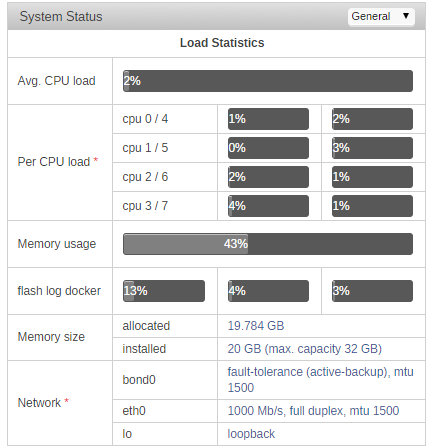
Barely Anything....
-
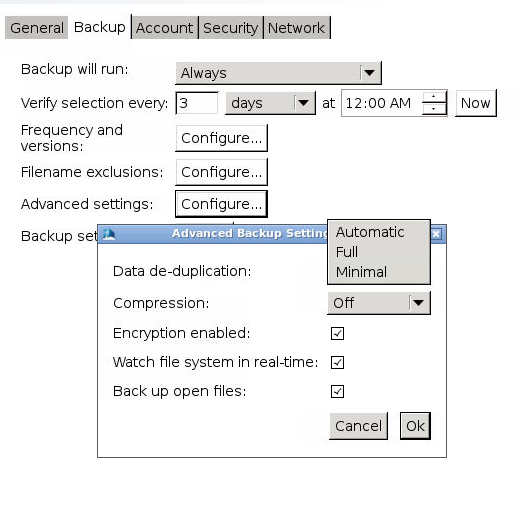
Off is not an available option Shonky
-
I cannot find a way to disable deduplication? I have some TV Shows that are incredibly difficult/impossible to find :-)
-
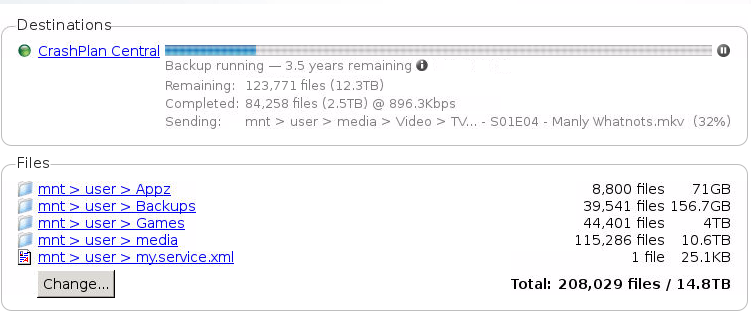
Hi, I noticed that last night and this is now my xml file. <dataDeDupAutoMaxFileSize>1073741824</dataDeDupAutoMaxFileSize> <dataDeDupAutoMaxFileSizeForWan>1</dataDeDupAutoMaxFileSizeForWan> <dataDeDuplication>MINIMAL</dataDeDuplication> But after restarting and allocating some more RAM (4GB) and CPU (Now 100%) this is what speed I get I don't know what else to try as this used to work perfectly at 18MB/s
-
Nope, nothing at all! My speedtest shows 20mb upload but crashplan uploading at 800kbp/s :-( have restarted everything but been like this for a week now... does my xml look the same as yours? Cheers
-
Any idea why it is not working then? I am getting 1mb/s upload instead of the usual 18? does my xml look ok? cheers
-
Have Crashplan done something to prevent the fast upload we could achieve by editing the my.service.xml? I used to get 18mb/s upload when changing the AutoMaxFileSizeForWan from 0 to 1 but I am now getting 1mb/s upload on Crashplan Pro which will take 3 years to complete instead of a month! I also notice the <dataDeDupAutoMaxFileSize>1073741824</dataDeDupAutoMaxFileSize> line? I do not remember this, can anyone else here still take advantage of higher upload speeds with Crashplan Pro like they did on Crashplan home? <dataDeDupAutoMaxFileSize>1073741824</dataDeDupAutoMaxFileSize> <dataDeDupAutoMaxFileSizeForWan>1</dataDeDupAutoMaxFileSizeForWan> <dataDeDuplication>MINIMAL</dataDeDuplication>
-
Perfect! Many Thanks! :-)
-
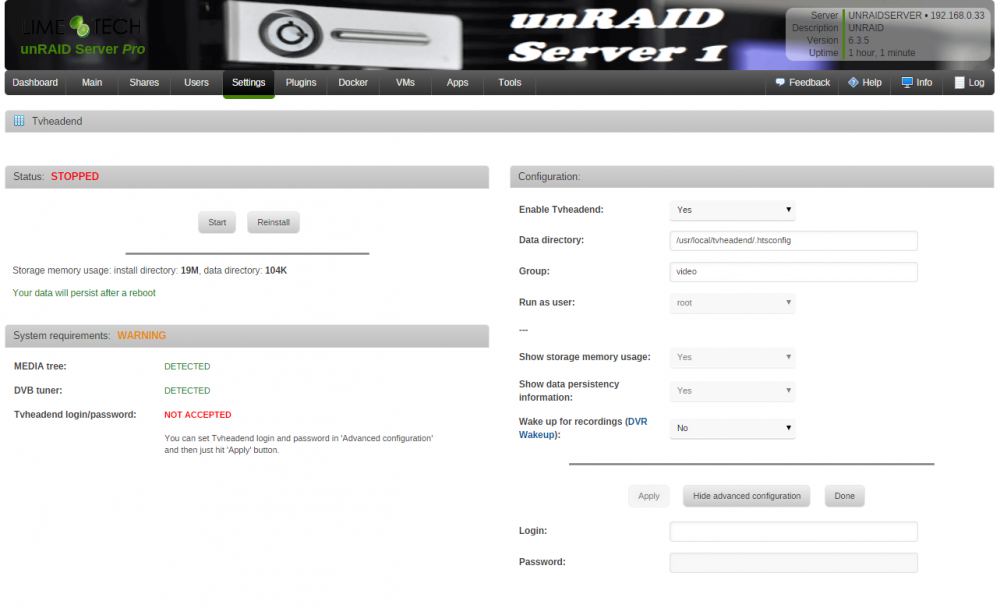
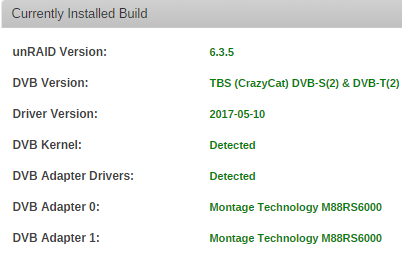
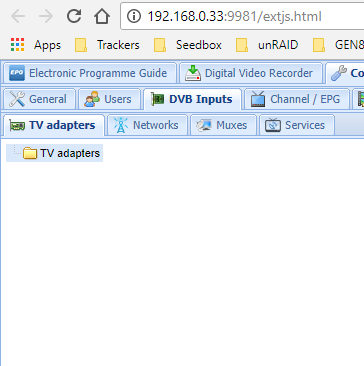
Hi, I have been experimenting with TVHeadend and this docker and had problems with it utilizing my DVBSky S952 card (only 1 tuner worked) it was recommended that I try the plugin instead but I also changed the unRAID DVB OS so not sure what fixed it but it worked! I would prefer to use the docker so I have uninstalled the plugin & rebooted several times but this docker no longer recognizes my DVBSky card? it is detected in unraid DVB OS so I presume the plugin is somehow hanging onto the card? can anyone throw some suggestions my way please? Many Thanks
-
Many thanks, that worked :-)
-
when trying to run this script I get permission denied? I am logged on as root?

-
That's great! thank you, I can now loging after disabling. entering details, re-enabling, I just have the issue where I don't think my dual tuner card is going to work as I can only get one tuner working :-(
-
Many Thanks but I cannot type in there? I have tried stopping the plugin as well but it's greyed out?