





mbc0
Members
-
Joined
-
Last visited
Everything posted by mbc0
-
Hi, I am having a problem with Plex not starting since adding a 10gbE network card? (you can see it in the log as 192.168.11.33) If I set Tunable (Enable Direct IO) to yes under settings/Global Share Settings in the unRAID Server I get full 10gbE Speed but Plex won't start (log below) if I change Tunable (Enable Direct IO) back to Auto Plex works but then I get slower than gigabit let alone 10 gigabit transfer speeds on that 10gbE card? Any ideas how to make Plex work with Tunable (Enable Direct IO) set to Yes? Many Thanks ? Starting Plex Media Server.Starting Avahi daemonFound user 'avahi' (UID 106) and group 'avahi' (GID 107).Successfully dropped root privileges.avahi-daemon 0.6.32-rc starting up.No service file found in /etc/avahi/services.Joining mDNS multicast group on interface veth0274660.IPv6 with address fe80::9c35:2cff:fed8:a45d.New relevant interface veth0274660.IPv6 for mDNS.Joining mDNS multicast group on interface vethafc2dbd.IPv6 with address fe80::38ec:bbff:fefb:84b3.New relevant interface vethafc2dbd.IPv6 for mDNS.Joining mDNS multicast group on interface veth7364e23.IPv6 with address fe80::60e9:ffff:fe93:5430.New relevant interface veth7364e23.IPv6 for mDNS.Joining mDNS multicast group on interface veth66b9265.IPv6 with address fe80::f014:9dff:fe88:fb12.New relevant interface veth66b9265.IPv6 for mDNS.Joining mDNS multicast group on interface veth0e2f9e0.IPv6 with address fe80::984e:43ff:fe09:fd5f.New relevant interface veth0e2f9e0.IPv6 for mDNS.Joining mDNS multicast group on interface vethcf418b2.IPv6 with address fe80::14d1:78ff:feab:18df.New relevant interface vethcf418b2.IPv6 for mDNS.Joining mDNS multicast group on interface veth27cf977.IPv6 with address fe80::3011:85ff:fe63:703d.New relevant interface veth27cf977.IPv6 for mDNS.Joining mDNS multicast group on interface veth200a1bb.IPv6 with address fe80::4ccc:58ff:fe8a:99cf.New relevant interface veth200a1bb.IPv6 for mDNS.Joining mDNS multicast group on interface veth01e2638.IPv6 with address fe80::80a1:a3ff:fe87:13d7.New relevant interface veth01e2638.IPv6 for mDNS.Joining mDNS multicast group on interface veth0f41f5e.IPv6 with address fe80::4044:8aff:fe23:e0c8.New relevant interface veth0f41f5e.IPv6 for mDNS.Joining mDNS multicast group on interface docker0.IPv6 with address fe80::42:d6ff:fef8:f0b0.New relevant interface docker0.IPv6 for mDNS.Joining mDNS multicast group on interface docker0.IPv4 with address 172.17.0.1.New relevant interface docker0.IPv4 for mDNS.Joining mDNS multicast group on interface br1.IPv6 with address fe80::3091:89ff:fedb:dabc.New relevant interface br1.IPv6 for mDNS.Joining mDNS multicast group on interface br1.IPv4 with address 192.168.11.33.New relevant interface br1.IPv4 for mDNS.Joining mDNS multicast group on interface eth0.IPv4 with address 192.168.0.33.New relevant interface eth0.IPv4 for mDNS.Network interface enumeration completed.Registering new address record for fe80::9c35:2cff:fed8:a45d on veth0274660.*.Registering new address record for fe80::38ec:bbff:fefb:84b3 on vethafc2dbd.*.Registering new address record for fe80::60e9:ffff:fe93:5430 on veth7364e23.*.Registering new address record for fe80::f014:9dff:fe88:fb12 on veth66b9265.*.Registering new address record for fe80::984e:43ff:fe09:fd5f on veth0e2f9e0.*.Registering new address record for fe80::14d1:78ff:feab:18df on vethcf418b2.*.Registering new address record for fe80::3011:85ff:fe63:703d on veth27cf977.*.Registering new address record for fe80::4ccc:58ff:fe8a:99cf on veth200a1bb.*.Registering new address record for fe80::80a1:a3ff:fe87:13d7 on veth01e2638.*.Registering new address record for fe80::4044:8aff:fe23:e0c8 on veth0f41f5e.*.Registering new address record for fe80::42:d6ff:fef8:f0b0 on docker0.*.Registering new address record for 172.17.0.1 on docker0.IPv4.Registering new address record for fe80::3091:89ff:fedb:dabc on br1.*.Registering new address record for 192.168.11.33 on br1.IPv4.Registering new address record for 192.168.0.33 on eth0.IPv4.Server startup complete. Host name is UNRAIDSERVER.local. Local service cookie is 3743283161.Starting Plex Media Server.Joining mDNS multicast group on interface veth67b2cbb.IPv6 with address fe80::9050:8ff:fe68:83b4.New relevant interface veth67b2cbb.IPv6 for mDNS.Registering new address record for fe80::9050:8ff:fe68:83b4 on veth67b2cbb.*.Starting Plex Media Server.Starting Plex Media Server.Starting Plex Media Server.Starting Plex Media Server.Starting Plex Media Server.Starting Plex Media Server.Starting Plex Media Server.Starting Plex Media Server.
-
I did wonder that... I am just adding a 10gbe network today on another subnet, I can add another to get over this issue but surely people have got it working on the same subnet or does everyone have to do this?
-
How did you change your IP ? My home network is 192.168.0.* I tried changing Plex, TVHeadend & plexheadend to custom br0 192.168.86.* (Like your setup) but get this error on each docker /usr/bin/docker: Error response from daemon: Invalid address 192.168.86.101: It does not belong to any of this network's subnets.
-
Bump ?
-
Hi, I am revisiting this for about the 5th time ? when I start the docker I get this in the log, Plex cannot see TVHProxy at all.. ? Any pointers please? Traceback (most recent call last):File "/usr/lib/python2.7/site-packages/flask/app.py", line 1982, in wsgi_appresponse = self.full_dispatch_request()File "/usr/lib/python2.7/site-packages/flask/app.py", line 1614, in full_dispatch_requestrv = self.handle_user_exception(e)File "/usr/lib/python2.7/site-packages/flask/app.py", line 1517, in handle_user_exceptionreraise(exc_type, exc_value, tb)File "/usr/lib/python2.7/site-packages/flask/app.py", line 1612, in full_dispatch_requestrv = self.dispatch_request()File "/usr/lib/python2.7/site-packages/flask/app.py", line 1598, in dispatch_requestreturn self.view_functions[rule.endpoint](**req.view_args)File "/opt/tvhproxy/tvhProxy.py", line 73, in devicereturn render_template('device.xml',data = discoverData),{'Content-Type': 'application/xml'}File "/usr/lib/python2.7/site-packages/flask/templating.py", line 133, in render_templatereturn _render(ctx.app.jinja_env.get_or_select_template(template_name_or_list),File "/usr/lib/python2.7/site-packages/jinja2/environment.py", line 869, in get_or_select_templatereturn self.get_template(template_name_or_list, parent, globals)File "/usr/lib/python2.7/site-packages/jinja2/environment.py", line 830, in get_templatereturn self._load_template(name, self.make_globals(globals))File "/usr/lib/python2.7/site-packages/jinja2/environment.py", line 804, in _load_templatetemplate = self.loader.load(self, name, globals)File "/usr/lib/python2.7/site-packages/jinja2/loaders.py", line 113, in loadsource, filename, uptodate = self.get_source(environment, name)File "/usr/lib/python2.7/site-packages/flask/templating.py", line 57, in get_sourcereturn self._get_source_fast(environment, template)File "/usr/lib/python2.7/site-packages/flask/templating.py", line 85, in _get_source_fastraise TemplateNotFound(template)TemplateNotFound: device.xml::ffff:192.168.0.81 - - [2018-06-15 10:16:23] "GET / HTTP/1.1" 500 412 0.004103::ffff:192.168.0.81 - - [2018-06-15 10:16:23] "GET /favicon.ico HTTP/1.1" 404 342 0.006380
-
Hi John, I know this is an old post but it is exactly what i am trying to achieve a pass through of an SSD for my gaming VM. I followed you instructions and the VM booted with 2 SCSI Controllers with no driver loaded. One of them loaded fine using the virtio CD but the other one wont accept any driver. The result I have is I can actually see the SSD in my Windows VM and also view the contents of the drive but it is write protected. I have followed the steps to remove write protection through windows using diskpart but although the program tells me write protection successfully removed It basically lies! ? I still cannot write to the disk. Below is my XML in case you think I have made an error? the Disk ID is 12 Many Thanks! PCI Devices and IOMMU Groups IOMMU group 0: [8086:3ec2] 00:00.0 Host bridge: Intel Corporation Device 3ec2 (rev 07) IOMMU group 1: [8086:1901] 00:01.0 PCI bridge: Intel Corporation Xeon E3-1200 v5/E3-1500 v5/6th Gen Core Processor PCIe Controller (x16) (rev 07) [10de:1c03] 01:00.0 VGA compatible controller: NVIDIA Corporation GP106 [GeForce GTX 1060 6GB] (rev a1) [10de:10f1] 01:00.1 Audio device: NVIDIA Corporation GP106 High Definition Audio Controller (rev a1) IOMMU group 2: [8086:3e92] 00:02.0 VGA compatible controller: Intel Corporation Device 3e92 IOMMU group 3: [8086:a2af] 00:14.0 USB controller: Intel Corporation 200 Series PCH USB 3.0 xHCI Controller IOMMU group 4: [8086:a2ba] 00:16.0 Communication controller: Intel Corporation 200 Series PCH CSME HECI #1 IOMMU group 5: [8086:a282] 00:17.0 SATA controller: Intel Corporation 200 Series PCH SATA controller [AHCI mode] IOMMU group 6: [8086:a2e7] 00:1b.0 PCI bridge: Intel Corporation 200 Series PCH PCI Express Root Port #17 (rev f0) IOMMU group 7: [8086:a2eb] 00:1b.4 PCI bridge: Intel Corporation 200 Series PCH PCI Express Root Port #21 (rev f0) IOMMU group 8: [8086:a290] 00:1c.0 PCI bridge: Intel Corporation 200 Series PCH PCI Express Root Port #1 (rev f0) IOMMU group 9: [8086:a294] 00:1c.4 PCI bridge: Intel Corporation 200 Series PCH PCI Express Root Port #5 (rev f0) IOMMU group 10: [8086:a297] 00:1c.7 PCI bridge: Intel Corporation 200 Series PCH PCI Express Root Port #8 (rev f0) IOMMU group 11: [8086:a298] 00:1d.0 PCI bridge: Intel Corporation 200 Series PCH PCI Express Root Port #9 (rev f0) IOMMU group 12: [8086:a2c9] 00:1f.0 ISA bridge: Intel Corporation Device a2c9 [8086:a2a1] 00:1f.2 Memory controller: Intel Corporation 200 Series PCH PMC [8086:a2f0] 00:1f.3 Audio device: Intel Corporation 200 Series PCH HD Audio [8086:a2a3] 00:1f.4 SMBus: Intel Corporation 200 Series PCH SMBus Controller IOMMU group 13: [8086:15b8] 00:1f.6 Ethernet controller: Intel Corporation Ethernet Connection (2) I219-V IOMMU group 14: [1000:0072] 03:00.0 Serial Attached SCSI controller: LSI Logic / Symbios Logic SAS2008 PCI-Express Fusion-MPT SAS-2 [Falcon] (rev 03) IOMMU group 15: [1ade:3038] 04:00.0 Multimedia video controller: Spin Master Ltd. PCIe Video Bridge (rev 01) IOMMU group 16: [1b21:2142] 05:00.0 USB controller: ASMedia Technology Inc. Device 2142 IOMMU group 17: [1b4b:9215] 06:00.0 SATA controller: Marvell Technology Group Ltd. Device 9215 (rev 11) IOMMU group 18: [144d:a804] 07:00.0 Non-Volatile memory controller: Samsung Electronics Co Ltd NVMe SSD Controller SM961/PM961 CPU Thread Pairings Pair 1: cpu 0 / cpu 6 Pair 2: cpu 1 / cpu 7 Pair 3: cpu 2 / cpu 8 Pair 4: cpu 3 / cpu 9 Pair 5: cpu 4 / cpu 10 Pair 6: cpu 5 / cpu 11 USB Devices Bus 001 Device 001: ID 1d6b:0002 Linux Foundation 2.0 root hub Bus 001 Device 002: ID 062a:5918 MosArt Semiconductor Corp. Bus 001 Device 003: ID 046d:c31b Logitech, Inc. Compact Keyboard K300 Bus 001 Device 005: ID 046d:c52b Logitech, Inc. Unifying Receiver Bus 001 Device 006: ID 154b:004f PNY Bus 001 Device 007: ID 1e71:170e NZXT Bus 002 Device 001: ID 1d6b:0003 Linux Foundation 3.0 root hub Bus 002 Device 002: ID 357d:7788 Sharkoon QuickPort XT Bus 003 Device 001: ID 1d6b:0002 Linux Foundation 2.0 root hub Bus 004 Device 001: ID 1d6b:0003 Linux Foundation 3.0 root hub SCSI Devices [0:0:0:0] disk SAMSUNG HD103SI 0100 /dev/sda 1.00TB [1:0:0:0] disk PNY Tech USB 2.0 FD 1100 /dev/sdb 4.05GB [2:0:0:0] disk ATA ST3000DM008-2DM1 CC26 /dev/sdc 3.00TB [2:0:1:0] disk ATA ST3000DM008-2DM1 CC26 /dev/sdd 3.00TB [2:0:2:0] disk ATA SAMSUNG HD204UI 0001 /dev/sde 2.00TB [2:0:3:0] disk ATA TOSHIBA HDWD130 ACF0 /dev/sdf 3.00TB [2:0:4:0] disk ATA TOSHIBA HDWD130 ACF0 /dev/sdg 3.00TB [2:0:5:0] disk ATA TOSHIBA HDWD130 ACF0 /dev/sdh 3.00TB [2:0:6:0] disk ATA WDC WD30EFRX-68E 0A82 /dev/sdi 3.00TB [3:0:0:0] disk ATA KINGSTON SV300S3 BBF0 /dev/sdj 480GB [4:0:0:0] disk ATA ST2000DL004 HD20 0001 /dev/sdk 2.00TB [5:0:0:0] disk ATA SAMSUNG SSD 830 3B1Q /dev/sdl 256GB [6:0:0:0] disk ATA ST2000DL001-9VT1 CC43 /dev/sdm 2.00TB [8:0:0:0] disk ATA TOSHIBA HDWD130 ACF0 /dev/sdn 3.00TB [9:0:0:0] disk ATA TOSHIBA HDWD130 ACF0 /dev/sdo 3.00TB [10:0:0:0] disk ATA TOSHIBA HDWD130 ACF0 /dev/sdp 3.00TB [11:0:0:0] disk ATA TOSHIBA HDWD130 ACF0 /dev/sdq 3.00TB [12:0:0:0] disk ATA CT480BX300SSD1 010 /dev/sdr 480GB <domain type='kvm' id='2'> <name>Windows 10</name> <uuid>beac90af-1947-1387-95ca-9fe34f8b6d24</uuid> <description>I7HEX</description> <metadata> <vmtemplate xmlns="unraid" name="Windows 10" icon="windows.png" os="windows10"/> </metadata> <memory unit='KiB'>8388608</memory> <currentMemory unit='KiB'>8388608</currentMemory> <memoryBacking> <nosharepages/> </memoryBacking> <vcpu placement='static'>6</vcpu> <cputune> <vcpupin vcpu='0' cpuset='3'/> <vcpupin vcpu='1' cpuset='9'/> <vcpupin vcpu='2' cpuset='4'/> <vcpupin vcpu='3' cpuset='10'/> <vcpupin vcpu='4' cpuset='5'/> <vcpupin vcpu='5' cpuset='11'/> </cputune> <resource> <partition>/machine</partition> </resource> <os> <type arch='x86_64' machine='pc-i440fx-2.10'>hvm</type> <loader readonly='yes' type='pflash'>/usr/share/qemu/ovmf-x64/OVMF_CODE-pure-efi.fd</loader> <nvram>/etc/libvirt/qemu/nvram/beac90af-1947-1387-95ca-9fe34f8b6d24_VARS-pure-efi.fd</nvram> </os> <features> <acpi/> <apic/> </features> <cpu mode='host-passthrough' check='none'> <topology sockets='1' cores='3' threads='2'/> </cpu> <clock offset='localtime'> <timer name='rtc' tickpolicy='catchup'/> <timer name='pit' tickpolicy='delay'/> <timer name='hpet' present='no'/> </clock> <on_poweroff>destroy</on_poweroff> <on_reboot>restart</on_reboot> <on_crash>restart</on_crash> <devices> <emulator>/usr/local/sbin/qemu</emulator> <disk type='file' device='disk'> <driver name='qemu' type='raw' cache='writeback'/> <source file='/mnt/disks/Samsung_SSD_960_EVO_250GB_S3ESNX0JB85431Y/VM/Windows 10/vdisk1.img'/> <backingStore/> <target dev='hdc' bus='virtio'/> <boot order='1'/> <alias name='virtio-disk2'/> <address type='pci' domain='0x0000' bus='0x00' slot='0x05' function='0x0'/> </disk> <disk type='file' device='cdrom'> <driver name='qemu' type='raw'/> <source file='/mnt/user/isos/Windows(FromMS).iso'/> <backingStore/> <target dev='hda' bus='sata'/> <readonly/> <boot order='2'/> <alias name='sata0-0-0'/> <address type='drive' controller='0' bus='0' target='0' unit='0'/> </disk> <disk type='file' device='cdrom'> <driver name='qemu' type='raw'/> <source file='/mnt/user/isos/virtio-win-0.1.126-1.iso'/> <backingStore/> <target dev='hdb' bus='sata'/> <readonly/> <alias name='sata0-0-1'/> <address type='drive' controller='0' bus='0' target='0' unit='1'/> </disk> <controller type='usb' index='0' model='ich9-ehci1'> <alias name='usb'/> <address type='pci' domain='0x0000' bus='0x00' slot='0x07' function='0x7'/> </controller> <controller type='usb' index='0' model='ich9-uhci1'> <alias name='usb'/> <master startport='0'/> <address type='pci' domain='0x0000' bus='0x00' slot='0x07' function='0x0' multifunction='on'/> </controller> <controller type='usb' index='0' model='ich9-uhci2'> <alias name='usb'/> <master startport='2'/> <address type='pci' domain='0x0000' bus='0x00' slot='0x07' function='0x1'/> </controller> <controller type='usb' index='0' model='ich9-uhci3'> <alias name='usb'/> <master startport='4'/> <address type='pci' domain='0x0000' bus='0x00' slot='0x07' function='0x2'/> </controller> <controller type='pci' index='0' model='pci-root'> <alias name='pci.0'/> </controller> <controller type='sata' index='0'> <alias name='sata0'/> <address type='pci' domain='0x0000' bus='0x00' slot='0x03' function='0x0'/> </controller> <controller type='virtio-serial' index='0'> <alias name='virtio-serial0'/> <address type='pci' domain='0x0000' bus='0x00' slot='0x04' function='0x0'/> </controller> <controller type='scsi' index='0'> <alias name='scsi0'/> <address type='pci' domain='0x0000' bus='0x00' slot='0x0b' function='0x0'/> </controller> <controller type='scsi' index='1' model='virtio-scsi'> <alias name='scsi1'/> <address type='pci' domain='0x0000' bus='0x00' slot='0x0a' function='0x0'/> </controller> <interface type='bridge'> <mac address='52:54:00:5e:ff:85'/> <source bridge='br0'/> <target dev='vnet0'/> <model type='virtio'/> <alias name='net0'/> <address type='pci' domain='0x0000' bus='0x00' slot='0x02' function='0x0'/> </interface> <serial type='pty'> <source path='/dev/pts/0'/> <target port='0'/> <alias name='serial0'/> </serial> <console type='pty' tty='/dev/pts/0'> <source path='/dev/pts/0'/> <target type='serial' port='0'/> <alias name='serial0'/> </console> <channel type='unix'> <source mode='bind' path='/var/lib/libvirt/qemu/channel/target/domain-2-Windows 10/org.qemu.guest_agent.0'/> <target type='virtio' name='org.qemu.guest_agent.0' state='disconnected'/> <alias name='channel0'/> <address type='virtio-serial' controller='0' bus='0' port='1'/> </channel> <input type='mouse' bus='ps2'> <alias name='input0'/> </input> <input type='keyboard' bus='ps2'> <alias name='input1'/> </input> <hostdev mode='subsystem' type='pci' managed='yes'> <driver name='vfio'/> <source> <address domain='0x0000' bus='0x01' slot='0x00' function='0x0'/> </source> <alias name='hostdev0'/> <address type='pci' domain='0x0000' bus='0x00' slot='0x06' function='0x0'/> </hostdev> <hostdev mode='subsystem' type='pci' managed='yes'> <driver name='vfio'/> <source> <address domain='0x0000' bus='0x01' slot='0x00' function='0x1'/> </source> <alias name='hostdev1'/> <address type='pci' domain='0x0000' bus='0x00' slot='0x08' function='0x0'/> </hostdev> <hostdev mode='subsystem' type='scsi' managed='no' rawio='yes'> <source> <adapter name='scsi_host12'/> <address bus='0' target='0' unit='0'/> </source> <readonly/> <alias name='hostdev2'/> <address type='drive' controller='1' bus='0' target='0' unit='0'/> </hostdev> <hostdev mode='subsystem' type='usb' managed='no'> <source> <vendor id='0x046d'/> <product id='0xc52b'/> <address bus='1' device='5'/> </source> <alias name='hostdev3'/> <address type='usb' bus='0' port='1'/> </hostdev> <hostdev mode='subsystem' type='usb' managed='no'> <source> <vendor id='0x062a'/> <product id='0x5918'/> <address bus='1' device='2'/> </source> <alias name='hostdev4'/> <address type='usb' bus='0' port='2'/> </hostdev> <hostdev mode='subsystem' type='usb' managed='no'> <source> <vendor id='0x1e71'/> <product id='0x170e'/> <address bus='1' device='4'/> </source> <alias name='hostdev5'/> <address type='usb' bus='0' port='3'/> </hostdev> <memballoon model='virtio'> <alias name='balloon0'/> <address type='pci' domain='0x0000' bus='0x00' slot='0x09' function='0x0'/> </memballoon> </devices> <seclabel type='dynamic' model='dac' relabel='yes'> <label>+0:+100</label> <imagelabel>+0:+100</imagelabel> </seclabel> </domain>
-
Hi, Just to feedback, I disabled Hypervisor on my VM and problem solved! no more lag! ? thanks for input ?
-
Hi, the video is located on my shares but I have been converting video's that way for years it is only since I have started using unRAID as my daily driver with a VM. I can convert from the same source to the same source on my VM using Handbrake so don't think that is the issue but I am currently looking at CPU assignment (pinning) as this looks like it may be the issue?
-
Hi, Thanks for that link, I found the same information from a different thread by googling in the end.. Reducing the cores does help my problem but not cure it so I am wondering if I have something wrong with my setup as I have a fairly beefy machine. If I give the docker 6 of my 12 CPU's my VM is practically unusable, with 4 it is annoyingly slow with two it is a niggle (half second delay between mouse clicks) anyone else using this method? My VM is on a PCI-E NVME so cannot get much faster than that, I have 8GB RAM free in unRAID If I run Handbrake on my WIN10 VM using all 12 cores I do not notice any kind of lag/slowdown at all? M/B: ASUSTeK COMPUTER INC. - PRIME Z370-A CPU: Intel® Core™ i7-8700K CPU @ 3.70GHz HVM: Enabled IOMMU: Enabled Cache: 384 kB, 1536 kB, 12288 kB Memory: 16 GB (max. installable capacity 32 GB)
-
There's a section in the docker FAQ on that Ah, I am sorry, I have been all through the documentation on Github and cannot find anything that mentions cores? will carry on looking
-
Hi, Is it possible to reduce the amount of cores this docker uses? when encoding X265 on my i7-8700 it maxes out all 12 cores and drags my Win 10 VM (running on NVME) to almost a halt!
-
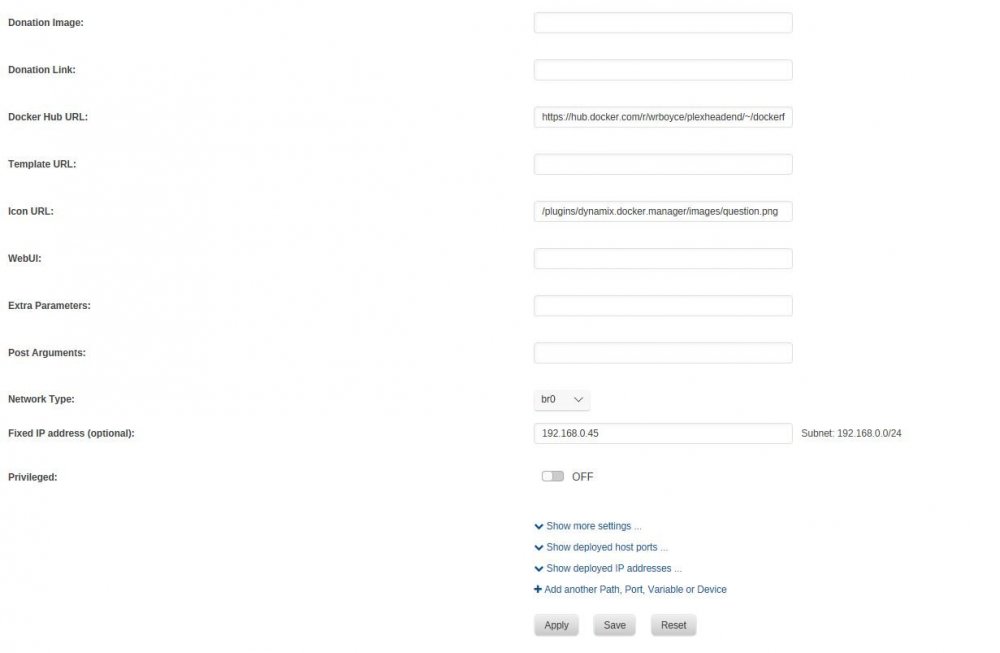
Any idea why I do not get the option to enter TVH details? I am on advance view
-
Wow! nice little hidden nugget! thank you for that!
-
Not for me?

-
I am loathed to change my Plex Docker due to the amount of time/work involved in doing that! maybe someone else can confirm if TVHProxy works on linuxserver Plex Docker? Cheers for your time so far mate!
-
ah sorry! Plex is Linuxserver
-
there is only 1?

-
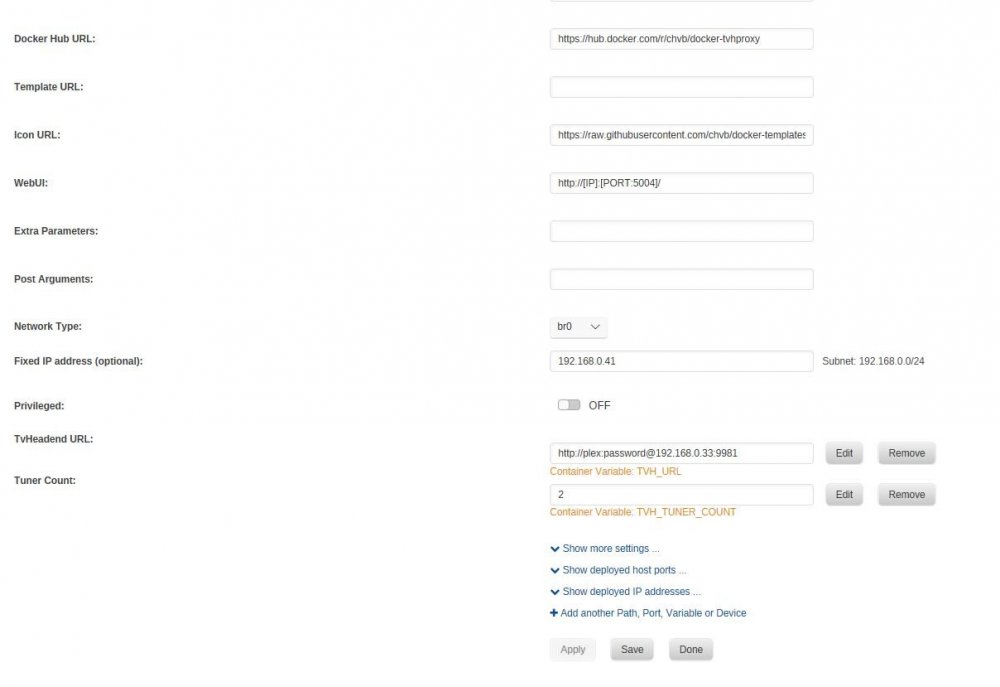
I have tried 4/5 different IP's Pinging 192.168.0.41 with 32 bytes of data: Reply from 192.168.0.41: bytes=32 time=1ms TTL=64 Reply from 192.168.0.41: bytes=32 time<1ms TTL=64 Reply from 192.168.0.41: bytes=32 time<1ms TTL=64 Reply from 192.168.0.41: bytes=32 time<1ms TTL=64 Ping statistics for 192.168.0.41: Packets: Sent = 4, Received = 4, Lost = 0 (0% loss), Approximate round trip times in milli-seconds: Minimum = 0ms, Maximum = 1ms, Average = 0ms
-
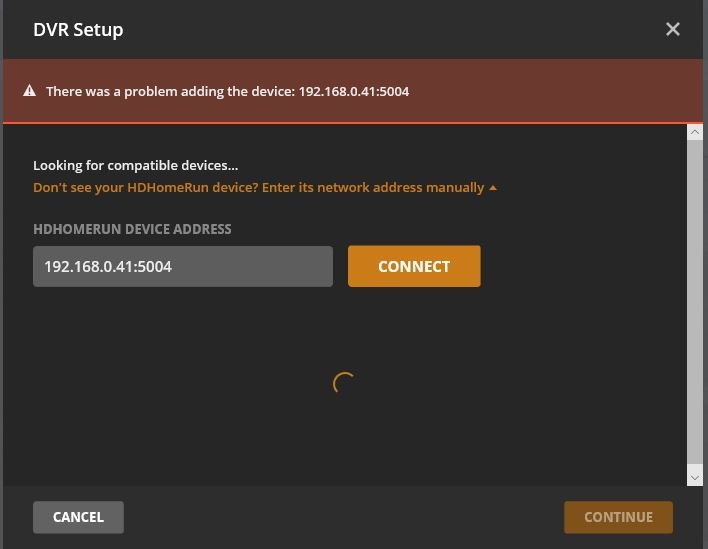
I have tried with and without password it just makes no difference. I have tried on and off at least a dozen times over the last few months can never get it to work! it seems that Plex cannot even see TVHProxy so don't think it has even got as far as checking the TVHProxy connection to TVHeadend?
-
No matter what I do, I cannot get Plex to see tvhproxy (this docker version) I can get it to work on an Ubuntu VM running tvhproxy though..
-
Tried quite a few times, can never get it to work... it's a shame as I am running an Ubuntu VM just for tvhProxy!
-
Not sure what has happened but it has started working again ??
-
Hi, engine_error & engine_output are empty but have attached service.log.0 ? crashplanlogservicelogs.rar
-
Hi, I am not sure if mine auto updated or not but it has stopped working just this last few days.. I have attached the logs :-) crashplanlogs.rar
-
Hi, I am having difficulty trying to get this to work, occasionally if I reboot Plex I see a telly tuner available but it quickly disappears. I have Plex in Host Mode and have tried telly in bridge and br0 with no luck. If I manually enter the IP and port into Plex when in br0 mode nothing is found here is my log, should it be 0.0.0.0:6077 even if I enter an IP in br0 mode? [telly] [info] booting telly v0.4.5[telly] [info] Downloading file(deleted intentionally.m3u[telly] [info] Reading m3u file /telly.m3u...[telly] [warning] telly is not attempting to strip out unneeded channels, please use the flag -filterregex if telly returns too many channels[telly] [info] telly is currently not filtering for only uk television. if you would like it to, please use the flag -uktv[telly] [info] found 80 channels[telly] [info] creating discovery data[telly] [info] creating lineup status[telly] [info] creating device xml[telly] [info] creating webserver routes[telly] [info] Building lineup[telly] [info] listening on 0.0.0.0:6077




