





mbc0
Members
-
Joined
-
Last visited
Everything posted by mbc0
-
Unfortunately a bit over my head to be honest, I just chmod -R 777 and now working fine... All my SMB Shares (I have a lot!) are working normally with correct access except my Handbrakedocker folder so I wouldn't know where to begin!
-
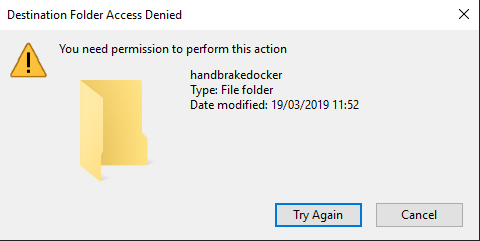
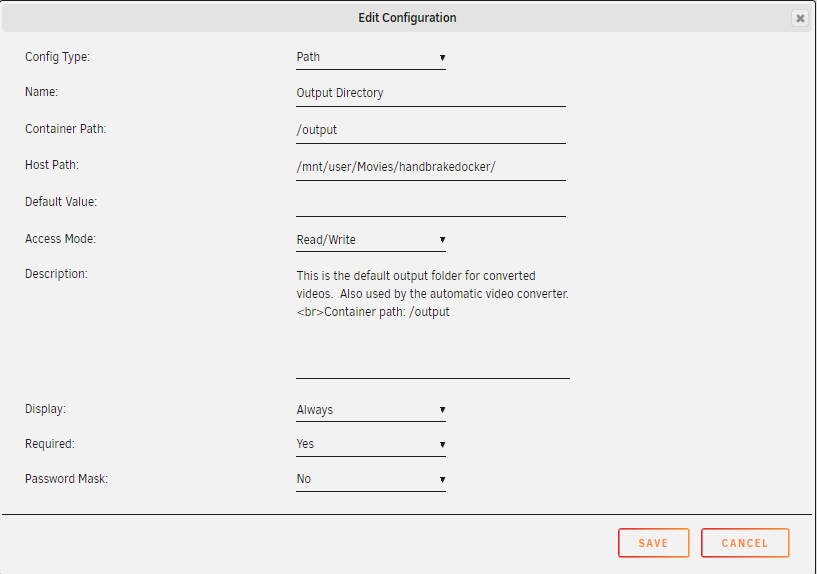
Hi, I have been using this docker for a while now and it is perfect! Again Thanks for this. Today though I am suddenly unable to write to the Handbrake output folder from my Main Rig, nothing has been changed, I have rebooted both my server and Main Rig but still no joy? I am having to use putty to delete and move files around at the moment. I run 2 Handbrake Dockers and the output folder on the other one is still accessible. the output folder is one of 5 subfolders in my Movies share on unraid, I am able to write to the other 4 with no issues Any ideas?
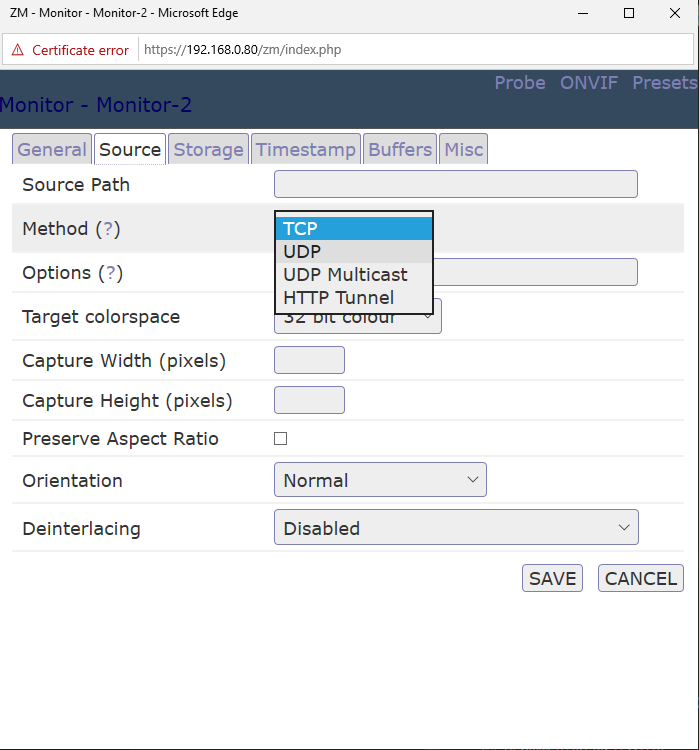
 I have been trying TCP but with no joy, can you see any obvious errors in this line? rtsp://admin:[email protected]:554/cam/realmonitor?channel=1&subtype=0Hi, I have just installed this docker as I want to move away from yearly licences and a Windows VM to run Blue Iris. I have viewed lots of guides and youtube videos to add my Hikvision Cameras but I do not have the rtsp method available from the pull down menu? How do I get around this?
 I look forward to it! 🤪Unfortunately Plex will still pick that up, I have /handbrake/movies/ so anything under that Plex will pick up. It is not really an issue, I can use the multiple watch folders for movies and another docker for TV so al should work quite nicely although seperate output folders per watch folder would be great if it ever happened!Thanks @Djoss Can I ask if it is possible to have multiple output folders as well or just the single one specified in the template? I only use automatic converting.You are a star! I have sent a donation as I really appreciate your work and help thank you! I created this script and all working flawlessly now 🙂 mkdir -p /mnt/disks/handbrakemount rclone mount --max-read-ahead 1024k --exclude *.log --exclude *.jpg --exclude *.nfo --exclude *.rar --exclude *.r0* --exclude *.r1* --exclude *.r2* --exclude *.r3* --exclude *.r4* --exclude *.r5* --exclude *.r6* --exclude *.r7* --exclude *.r8* --exclude *.r9* --exclude *sample* --exclude *trailer* --exclude *.sfv --allow-other dediseedbox: /mnt/disks/handbrakemount & If I could just trouble you one last time for any advice/example/anything! to help me add watch folders so I do not have to have multiple instances of the docker running I would really appreciate it!! Again, Thanks! 🙂I have an rclone mount to a watch folder on my seedbox where my video files are downloaded to so nothing actually downloads to my server other than the encoded file. I have tested this and it works great apart from when there is a folder with .nfo's .jpg's etc as handbrake tries to encode those as well. Does that make sense?Ok, I am way out of my depth with this! I cannot understand how to create a seperate watch folder (I have 4 instances of Handbrake docker installed!) I have folders on my ftp that contain nfo's sfv's jpg's rar's etc I just want to convert the movie files (mkv,mp4 etc) if this is a simple hook to write can you help me out with that and the how to create additional watch folders & I will make a donation in return to your paypal? I am fine if I have examples to work from as I can then work things out but everywhere I look I am coming up blank! Really appreciate your time @DjossReally been making good progress with this Docker, I really appreciate it! One thing I am stuck on at the moment is handbrake is trying to encode .nfo and .jpg files example. Folder downloads containing movie.nfo movie.jpg movie.mkv moviesample.mkv handbrake tries to encode all the files in that folder but successfully manages to encode the .nfo file into movie.mkv (0 bytes) so when handbrake gets down to the actual movie it fails with destination folder already exists. Is there a way to exclude files with handbrake or ensure only video files are encoded as unfortunately I cannot do this at source (ftp) Thanks againAh FFS!!!! So Sorry mate, GoodSync runs in that folder! Just created a new one outside of GoodSync now files are being left alone 🙄Is there a guide for this? I can set paths in the template but how do I tell handbrake to use them?ok, multiple containers may be the way forward for me until they fix the usage of available cores see here. https://github.com/HandBrake/HandBrake/pull/1824 here is the end of the log file, there is no mention of the file being deleted but it definately deletes it every time! [autovideoconverter] Encoding: 99.41 % (20.18 fps, avg 33.42 fps, ETA 00h00m01s) [autovideoconverter] Conversion ended successfully. [autovideoconverter] Watch folder '/watch' processing terminated. [autovideoconverter] Change detected in watch folder '/watch'. [autovideoconverter] Processing watch folder '/watch'... [autovideoconverter] Watch folder '/watch' processing terminated.Hi, Just one issue I am facing is that when using watchfolder the source file is being deleted after encoding, I have the value set to 1 but still deletes. I am running two of these dockers so I can have two presets on watched folders and they both delete the source files
 Thanks for the reply 🙂 I am getting similar fps using less cores (4 instead of 12) and find it uses more of the 4 cores than 16 so curious! I will let you know my findings!Bumpity Bump
 Unfortunately the docker doesn't seem to be a gui for goodsync as such, to be honest I am not sure what it does but I cannot find a way for me to backup my shares using it even.
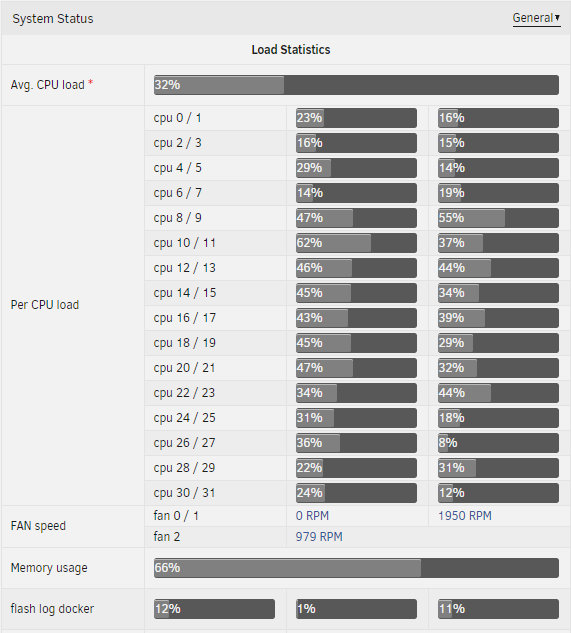
 I use a custom preset which is the same as I use on my 8700K which uses all available cpu so it is something in the docker I have not got set quite rightHi, I am runnung this docker on a 2950X Threadripper but the docker is barely pressuring any of the 16 cores resulting in approx 30fps HEVC encoding compared to 55fps I get on my 8700K The cores/threads usage according to unraid is very low, any ideas? autovideoconverter] Encoding: 3.80 % (27.03 fps, avg 29.04 fps, ETA 00h48m21s) [autovideoconverter] Encoding: 3.84 % (33.93 fps, avg 29.17 fps, ETA 00h48m06s) [autovideoconverter] Encoding: 3.90 % (40.49 fps, avg 29.34 fps, ETA 00h47m48s) [autovideoconverter] Encoding: 3.90 % (40.49 fps, avg 29.34 fps, ETA 00h47m48s) [autovideoconverter] Encoding: 3.98 % (42.86 fps, avg 29.52 fps, ETA 00h47m28s) [autovideoconverter] Encoding: 4.04 % (47.41 fps, avg 29.64 fps, ETA 00h47m16s) [autovideoconverter] Encoding: 4.08 % (41.80 fps, avg 29.67 fps, ETA 00h47m11s) [autovideoconverter] Encoding: 4.13 % (37.09 fps, avg 29.73 fps, ETA 00h47m05s) [autovideoconverter] Encoding: 4.16 % (30.93 fps, avg 29.70 fps, ETA 00h47m05s) [autovideoconverter] Encoding: 4.16 % (30.93 fps, avg 29.70 fps, ETA 00h47m05s) [autovideoconverter] Encoding: 4.18 % (25.92 fps, avg 29.63 fps, ETA 00h47m12s) [autovideoconverter] Encoding: 4.23 % (23.44 fps, avg 29.61 fps, ETA 00h47m13s) [autovideoconverter] Encoding: 4.23 % (23.44 fps, avg 29.61 fps, ETA 00h47m13s) [autovideoconverter] Encoding: 4.28 % (27.78 fps, avg 29.66 fps, ETA 00h47m07s) [autovideoconverter] Encoding: 4.31 % (28.71 fps, avg 29.60 fps, ETA 00h47m11s) [autovideoconverter] Encoding: 4.36 % (30.25 fps, avg 29.62 fps, ETA 00h4 [cont-init.d] 00-app-script.sh: exited 0. [cont-init.d] 00-app-user-map.sh: executing... [cont-init.d] 00-app-user-map.sh: exited 0. [cont-init.d] 00-clean-logmonitor-states.sh: executing... [cont-init.d] 00-clean-logmonitor-states.sh: exited 0. [cont-init.d] 00-clean-tmp-dir.sh: executing... [cont-init.d] 00-clean-tmp-dir.sh: exited 0. [cont-init.d] 00-set-app-deps.sh: executing... [cont-init.d] 00-set-app-deps.sh: exited 0. [cont-init.d] 00-set-home.sh: executing... [cont-init.d] 00-set-home.sh: exited 0. [cont-init.d] 00-take-config-ownership.sh: executing... [cont-init.d] 00-take-config-ownership.sh: exited 0. [cont-init.d] 00-xdg-runtime-dir.sh: executing... [cont-init.d] 00-xdg-runtime-dir.sh: exited 0. [cont-init.d] 10-certs.sh: executing... [cont-init.d] 10-certs.sh: exited 0. [cont-init.d] 10-cjk-font.sh: executing... [cont-init.d] 10-cjk-font.sh: exited 0. [cont-init.d] 10-nginx.sh: executing... [cont-init.d] 10-nginx.sh: exited 0. [cont-init.d] 10-vnc-password.sh: executing... [cont-init.d] 10-vnc-password.sh: exited 0. [cont-init.d] 10-web-index.sh: executing... [cont-init.d] 10-web-index.sh: exited 0. [cont-init.d] 95-check-optical-drive.sh: executing... [cont-init.d] 95-check-optical-drive.sh: looking for usable optical drives... [cont-init.d] 95-check-optical-drive.sh: no usable optical drive found. [cont-init.d] 95-check-optical-drive.sh: exited 0. [cont-init.d] 95-check-qsv.sh: executing... [cont-init.d] 95-check-qsv.sh: Processor: AMD Ryzen Threadripper 2950X 16-Core Processor [cont-init.d] 95-check-qsv.sh: Intel Quick Sync Video not supported: not an Intel processor. [cont-init.d] 95-check-qsv.sh: exited 0. [cont-init.d] handbrake.sh: executing... [cont-init.d] handbrake.sh: core dump file location: core [cont-init.d] handbrake.sh: core dump file size: 0 (blocks) [cont-init.d] handbrake.sh: exited 0. [cont-init.d] done. [services.d] starting services [services.d] starting s6-fdholderd... [services.d] starting certsmonitor... [services.d] starting nginx... [services.d] starting xvfb... [nginx] starting... [certsmonitor] disabling service: secure connection not enabled. [xvfb] starting... [services.d] starting autovideoconverter... [services.d] starting logmonitor... [services.d] starting statusmonitor... [logmonitor] no file to monitor: disabling service... [services.d] starting openbox... [statusmonitor] no file to monitor: disabling service... [autovideoconverter] starting... [openbox] starting... [autovideoconverter] Processing watch folder '/watch'... [autovideoconverter] Watch folder '/watch' processing terminated. [services.d] starting x11vnc... [services.d] starting app... [x11vnc] starting... [app] starting HandBrake... 06/03/2019 12:29:05 passing arg to libvncserver: -rfbport 06/03/2019 12:29:05 passing arg to libvncserver: 5900 06/03/2019 12:29:05 passing arg to libvncserver: -rfbportv6 06/03/2019 12:29:05 passing arg to libvncserver: -1 06/03/2019 12:29:05 passing arg to libvncserver: -httpportv6 06/03/2019 12:29:05 passing arg to libvncserver: -1 06/03/2019 12:29:05 passing arg to libvncserver: -desktop 06/03/2019 12:29:05 passing arg to libvncserver: HandBrake 06/03/2019 12:29:05 x11vnc version: 0.9.14 lastmod: 2015-11-14 pid: 965
Maybe I misunderstood the docker or you? Can I connect to the server docker via a Windows Client and control it?I use Goodsync running on my VM to download sonarr & radarr files from my seedbox and also to backup all my files to my Google Drive (Unlimited) I run a WIN10 VM at the moment to run Goodsync but would love to have a GUI Driven docker as this is all the VM does!At the end of the day, Goodsync is the only option I have found that works 100% (for me) and I would love a docker for this but until then it works perfectly in a VM, just a waste having a VM purely for GoodSync
I use a custom preset which is the same as I use on my 8700K which uses all available cpu so it is something in the docker I have not got set quite rightHi, I am runnung this docker on a 2950X Threadripper but the docker is barely pressuring any of the 16 cores resulting in approx 30fps HEVC encoding compared to 55fps I get on my 8700K The cores/threads usage according to unraid is very low, any ideas? autovideoconverter] Encoding: 3.80 % (27.03 fps, avg 29.04 fps, ETA 00h48m21s) [autovideoconverter] Encoding: 3.84 % (33.93 fps, avg 29.17 fps, ETA 00h48m06s) [autovideoconverter] Encoding: 3.90 % (40.49 fps, avg 29.34 fps, ETA 00h47m48s) [autovideoconverter] Encoding: 3.90 % (40.49 fps, avg 29.34 fps, ETA 00h47m48s) [autovideoconverter] Encoding: 3.98 % (42.86 fps, avg 29.52 fps, ETA 00h47m28s) [autovideoconverter] Encoding: 4.04 % (47.41 fps, avg 29.64 fps, ETA 00h47m16s) [autovideoconverter] Encoding: 4.08 % (41.80 fps, avg 29.67 fps, ETA 00h47m11s) [autovideoconverter] Encoding: 4.13 % (37.09 fps, avg 29.73 fps, ETA 00h47m05s) [autovideoconverter] Encoding: 4.16 % (30.93 fps, avg 29.70 fps, ETA 00h47m05s) [autovideoconverter] Encoding: 4.16 % (30.93 fps, avg 29.70 fps, ETA 00h47m05s) [autovideoconverter] Encoding: 4.18 % (25.92 fps, avg 29.63 fps, ETA 00h47m12s) [autovideoconverter] Encoding: 4.23 % (23.44 fps, avg 29.61 fps, ETA 00h47m13s) [autovideoconverter] Encoding: 4.23 % (23.44 fps, avg 29.61 fps, ETA 00h47m13s) [autovideoconverter] Encoding: 4.28 % (27.78 fps, avg 29.66 fps, ETA 00h47m07s) [autovideoconverter] Encoding: 4.31 % (28.71 fps, avg 29.60 fps, ETA 00h47m11s) [autovideoconverter] Encoding: 4.36 % (30.25 fps, avg 29.62 fps, ETA 00h4 [cont-init.d] 00-app-script.sh: exited 0. [cont-init.d] 00-app-user-map.sh: executing... [cont-init.d] 00-app-user-map.sh: exited 0. [cont-init.d] 00-clean-logmonitor-states.sh: executing... [cont-init.d] 00-clean-logmonitor-states.sh: exited 0. [cont-init.d] 00-clean-tmp-dir.sh: executing... [cont-init.d] 00-clean-tmp-dir.sh: exited 0. [cont-init.d] 00-set-app-deps.sh: executing... [cont-init.d] 00-set-app-deps.sh: exited 0. [cont-init.d] 00-set-home.sh: executing... [cont-init.d] 00-set-home.sh: exited 0. [cont-init.d] 00-take-config-ownership.sh: executing... [cont-init.d] 00-take-config-ownership.sh: exited 0. [cont-init.d] 00-xdg-runtime-dir.sh: executing... [cont-init.d] 00-xdg-runtime-dir.sh: exited 0. [cont-init.d] 10-certs.sh: executing... [cont-init.d] 10-certs.sh: exited 0. [cont-init.d] 10-cjk-font.sh: executing... [cont-init.d] 10-cjk-font.sh: exited 0. [cont-init.d] 10-nginx.sh: executing... [cont-init.d] 10-nginx.sh: exited 0. [cont-init.d] 10-vnc-password.sh: executing... [cont-init.d] 10-vnc-password.sh: exited 0. [cont-init.d] 10-web-index.sh: executing... [cont-init.d] 10-web-index.sh: exited 0. [cont-init.d] 95-check-optical-drive.sh: executing... [cont-init.d] 95-check-optical-drive.sh: looking for usable optical drives... [cont-init.d] 95-check-optical-drive.sh: no usable optical drive found. [cont-init.d] 95-check-optical-drive.sh: exited 0. [cont-init.d] 95-check-qsv.sh: executing... [cont-init.d] 95-check-qsv.sh: Processor: AMD Ryzen Threadripper 2950X 16-Core Processor [cont-init.d] 95-check-qsv.sh: Intel Quick Sync Video not supported: not an Intel processor. [cont-init.d] 95-check-qsv.sh: exited 0. [cont-init.d] handbrake.sh: executing... [cont-init.d] handbrake.sh: core dump file location: core [cont-init.d] handbrake.sh: core dump file size: 0 (blocks) [cont-init.d] handbrake.sh: exited 0. [cont-init.d] done. [services.d] starting services [services.d] starting s6-fdholderd... [services.d] starting certsmonitor... [services.d] starting nginx... [services.d] starting xvfb... [nginx] starting... [certsmonitor] disabling service: secure connection not enabled. [xvfb] starting... [services.d] starting autovideoconverter... [services.d] starting logmonitor... [services.d] starting statusmonitor... [logmonitor] no file to monitor: disabling service... [services.d] starting openbox... [statusmonitor] no file to monitor: disabling service... [autovideoconverter] starting... [openbox] starting... [autovideoconverter] Processing watch folder '/watch'... [autovideoconverter] Watch folder '/watch' processing terminated. [services.d] starting x11vnc... [services.d] starting app... [x11vnc] starting... [app] starting HandBrake... 06/03/2019 12:29:05 passing arg to libvncserver: -rfbport 06/03/2019 12:29:05 passing arg to libvncserver: 5900 06/03/2019 12:29:05 passing arg to libvncserver: -rfbportv6 06/03/2019 12:29:05 passing arg to libvncserver: -1 06/03/2019 12:29:05 passing arg to libvncserver: -httpportv6 06/03/2019 12:29:05 passing arg to libvncserver: -1 06/03/2019 12:29:05 passing arg to libvncserver: -desktop 06/03/2019 12:29:05 passing arg to libvncserver: HandBrake 06/03/2019 12:29:05 x11vnc version: 0.9.14 lastmod: 2015-11-14 pid: 965
Maybe I misunderstood the docker or you? Can I connect to the server docker via a Windows Client and control it?I use Goodsync running on my VM to download sonarr & radarr files from my seedbox and also to backup all my files to my Google Drive (Unlimited) I run a WIN10 VM at the moment to run Goodsync but would love to have a GUI Driven docker as this is all the VM does!At the end of the day, Goodsync is the only option I have found that works 100% (for me) and I would love a docker for this but until then it works perfectly in a VM, just a waste having a VM purely for GoodSync


