mbc0
Members
-
Joined
-
Last visited
Everything posted by mbc0
-
also just to add to that, is it possible to restore just one folder? I had a problem with lidarr (self inflicted) and wanted to restore just that folder
-
Hi, I am just looking into some very large backups (125GB) and would like to exclude all the artwork folders from lidarr, emby, sonarr, radarr etc as they are the bulk of the backups & why they take so long. I see I can exclude the root folder but cannot go into each folder to disable sub folders in the backup settings? am I missing something or is this not possible? Many Thanks!
-
Hi, Thanks so much for your time, I updated to RC as I was suffering like a lot of people with speed issues that have now been resolved in this RC version, normally I like to stay on stable. the version of the plugin is the latest (2019.10.14 Fusermount compatibility fix take two) but still not working for me sadly root@UNRAIDSERVER:/mnt/disks# umount -l /mnt/disks/dediseedbox/ umount: /mnt/disks/dediseedbox/: not mounted. root@UNRAIDSERVER:/mnt/disks# rclone mount --max-read-ahead 1024k --allow-other --allow-non-empty dediseedbox: /mnt/disks/dediseedbox & [1] 129862 root@UNRAIDSERVER:/mnt/disks# 2019/10/20 18:49:52 mount helper error: fusermount: unknown option 'nonempty' 2019/10/20 18:49:52 Fatal error: failed to mount FUSE fs: fusermount: exit status 1
-
I have been using rclone mount for a long time to mount my media libraries on my VPS and make them accessible on my unraid server, I followed a video guide from spaceinvaderone a long time ago and all worked perfectly until I upgraded to the new RC unRAID which has the new fudermount V3. I cannot find another way to acheive mounting a remote share on unraid so really stuffed at the moment.
-
Hi, that is what I used to do but nonempty no longer works on this latest version rclone mount --max-read-ahead 1024k --allow-other --allow-non-empty dediseedbox: /mnt/disks/dediseedbox & 2019/10/15 00:04:26 mount helper error: fusermount: unknown option 'nonempty'
-
Hi, Is there still no way of using rclone mount to directories that have data in them? (nonempty) Thank you
-
Anyone got any ideas? over on the Github they told me to make sure I am mounting empty directories, but I have always used rclone mount to mount my media folders on my VPS
-
Many thanks for the reply, I did read that before I posted on here and again since your reply but I am still clueless lol! Basically I am reading that I cannot use this mount option anymore? is there any way I can mount my seedbox using rclone mount or do I need to find another way?
-
Hi, The 6.8.0-rc1 update as I have read changes from fusermount2 to 3 but I cannot find a way around the nonempty option? if you look below fusermount tells me to use the option but then when I try to it tells me it is invalid? I have had this working for quite some time before the update, any help would be apprecited! 🙂 root@UNRAIDSERVER:~# rclone mount --max-read-ahead 1024k --allow-other dediseedbox: /mnt/disks/dediseedbox & [1] 59677 root@UNRAIDSERVER:~# 2019/10/15 00:04:09 Fatal error: Directory is not empty: /mnt/disks/dediseedbox If you want to mount it anyway use: --allow-non-empty option root@UNRAIDSERVER:~# rclone mount --max-read-ahead 1024k --allow-other --allow-non-empty dediseedbox: /mnt/disks/dediseedbox & [2] 61241 [1] Exit 1 rclone mount --max-read-ahead 1024k --allow-other dediseedbox: /mnt/disks/dediseedbox root@UNRAIDSERVER:~# 2019/10/15 00:04:26 mount helper error: fusermount: unknown option 'nonempty' 2019/10/15 00:04:26 Fatal error: failed to mount FUSE fs: fusermount: exit status 1
-
Can't believe I missed that! thanks Sparkly 🙂
-
Hi, Can anyone help with why SABnzb (this docker) downloads then extracts files without privileges for me to delete them please?

-
at least you have a way forward mate
-
must be a corrupt database my guess! 😞
-
Hi @Dreytac I am sorry I cannot help but can confirm that the latest docker works, I have run hundreds of albums through it over the last few days
-
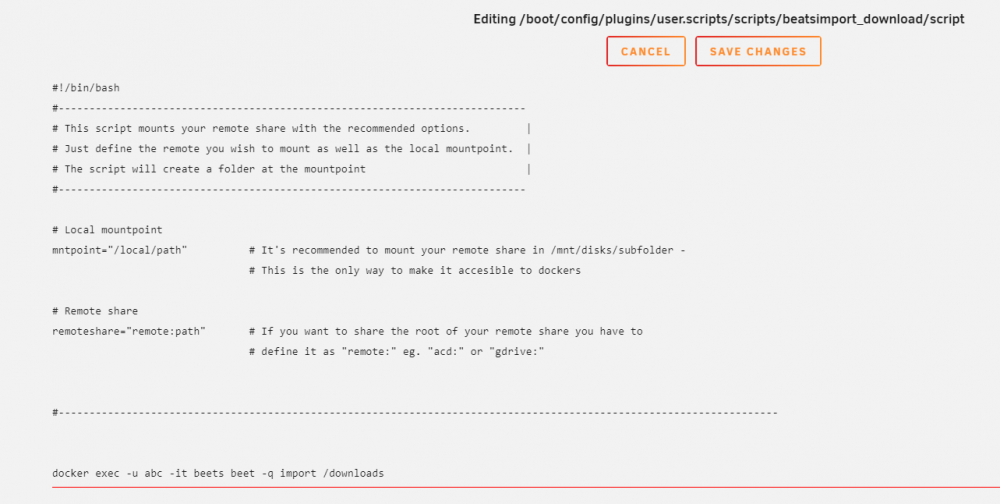
Thanks for your time @saarg I am aware that it will only work on music I have imported, I am trying the permissions file again, I think I see where I went wrong! this is how I configured my script but as I say it just does nothing... I know that the line works as it is what I use to import manually, I guess I am missing something but I have managed to create successfully several other scripts that work fine.
-
Hi @saarg sorry if I offended you, certainly not my intention, I am well aware of what you do and please don't think it is unappreciated. that permissions plugin did not work for me so I ended up creating a cron job to chmod the folder every minute to get around that issue. The one I am hoping to find an answer for was regarding the automation? I tried creating a cron job to run hourly in user scripts but nothing happens, although the command works fine from the console (docker exec -u abc -it beets beet -q import /downloads) so it is probably my stupidity and lack of knowledge stopping it from working! 🤔
-
I guess this docker/forum is not maintained any more? 😢
-
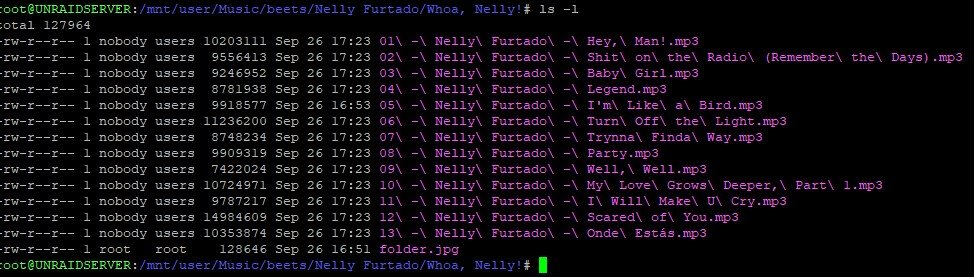
*UPDATE* It looks like it is the file permissions rather than the folder permissions that are the problem?
-
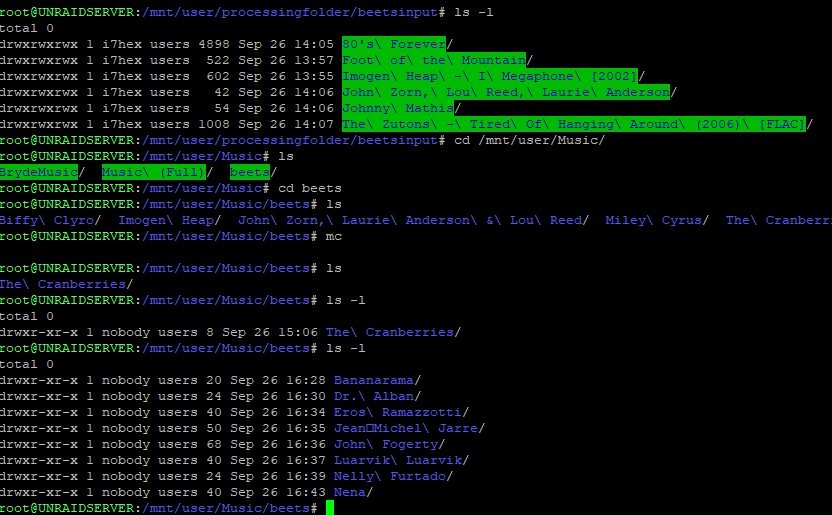
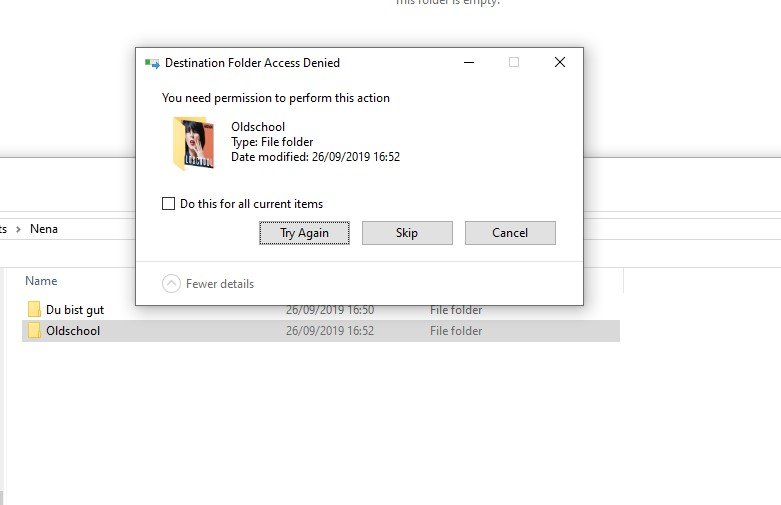
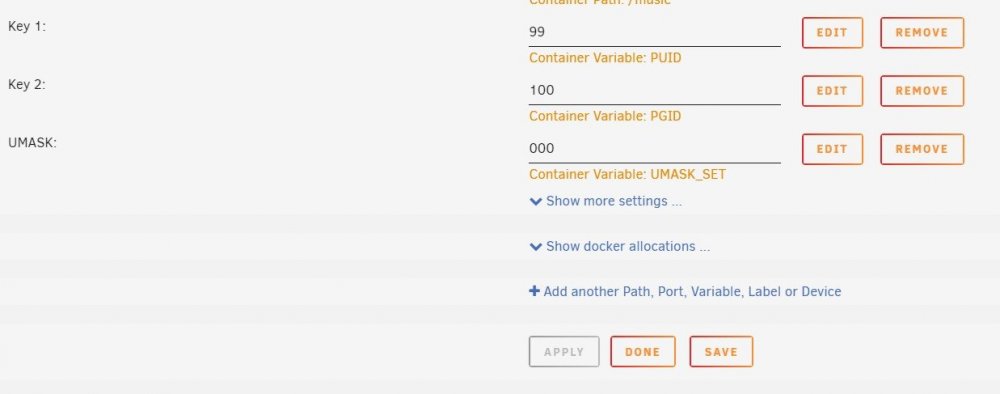
also, I am unable to modify the folder/files created by beets on my Windows desktop machine, I can access the beets source folder ok it's only after beets has processed them that I can't. can anyone help with that please as have to keep using crusader or chmod Thank you
-
Hi, How does everyone run the terminal window? just start one up and leave it running in the background or is there a more elegant way? Cheers!
-
Hi, is there a way this docker can pull the development or nightly builds please?
-
thanks for taking the time for a detailed reply 🙂 sonarr, radarr & windows vm's are running through your privoxy docker, and your delugevpn docker is being used as well so all good there! I will do some reading regarding the socks5 proxy vs vpn tunnel for IPTV Thanks again!
-
lol, yes I know what you are saying! trouble is, when googling this kind of thing opinions are all over the place! would love to know your opinion on my friend that runs sonarr, radarr, deluge & streams IPTV would need it or not 😄
-
Thanks binhex, I appreciate it! I decided to run the docker on my other unRAID server anyway all running as expected! I just need to try and understand if socks is necessary or not! all new to me!! Thanks again for making fantastic dockers!!
-
Hi, as I use your delugevpn docker, 8118 is already used, I have changed everything to 8119 but the log still shows 8118 being used (and obviously not working) is there somewhere else I need to change to 8119? 2019-09-24 09:08:18,994 DEBG 'watchdog-script' stdout output: [info] Privoxy process started [info] Waiting for Privoxy process to start listening on port 8118... 2019-09-24 09:08:19,003 DEBG 'watchdog-script' stdout output: [info] Privoxy process listening on port 8118