





mbc0
Members
-
Joined
-
Last visited
Everything posted by mbc0
-
@binhex Hi, sorry to bother but wonder if you could chime in please? this is getting more and more frequent and has already happened twice today. Thank you
-
Hi, This is a regular occurance, and it seems to be every 4-5 days, again today I see the notifications in sonarr/radarr telling me there is no connection?
-
Hi, My Docker has been working great for over a year but the last month or so I seem to lose connection to the webgui? the docker appears to be "running" as I can acess the console but the messages in the log file are hours old so it seems to have stopped? I can restart the docker and all is well again for a few days, I am not sure the best way to diagnose this? Thank you
-
Hi, I want to run a command every 12 hours, here is the command and it works from putty docker exec -u abc -it sabnzbdrninja /downloads/opus/opus.bash /music if I put that in user scripts it does not work? #!/bin/bash docker exec -u abc -it sabnzbdrninja /downloads/opus/opus.bash /music here is the log output, do I need to do something else? Script Starting Jun 02, 2020 15:14.32 Full logs for this script are available at /tmp/user.scripts/tmpScripts/music folder - flac to opus/log.txt the input device is not a TTY Script Finished Jun 02, 2020 15:14.32 Full logs for this script are available at /tmp/user.scripts/tmpScripts/music folder - flac to opus/log.txt Many Thanks
-
Ok, thank you for the info, I have found the command to change the UID & GID but what user does the sab container use?
-
Hi, Thanks for the reply, as I said the container created the folder so not sure why it is not using 99:100 as it is in the template

-
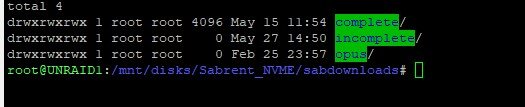
Hi, I have just replaced my download disk and now getting "Cannot change permissions of /downloads/incomplete" I have deleted the folder and let the container re-create it and the permissions look fine, any ideas?



-
Thanks so much for your detailed reply! some of the problems I had today was getting the static IP to stick in SWOS mode I factory reset many times and was generally having a nightmare with it. I updated it to 2.11 after about 5 attempts it took but ended up going back to routeros as it wouldn't play nice! So in theory if I can get it to work I should be able to put swos back on in bridge mode and disconnect the lan port from my desktop, I found that if I had my Dekstop Lan and gigabit lan both in the 192.168.0.* range I was getting strange errors, perhaps that is normal? I tried bridging them both together (Windows 10) but that would not play either!
-
Hi @1812 Great to read your review! I have been struggling all day with the CRS305-1G-4S+IN but have some new cables and transceivers coming tomorrow but can I ask if the configuration I would like is possible please? I have my Desktop in my Office and two unraid servers in the garage I have had 10gbe using 2 nic's and a fibre cable for about a year but have now added a second server in the garage hence the purchase of the CRS305-1G-4S+IN I would like to connect all 3 machines together using the CRS305-1G-4S+IN but with the ethernet port I would like to add that to my standard 1gbit switch which serves the rest of the house so in effect I would no longer need the 1gbit LAN connection from my desktop to the garage. Would that benefit me at all or should I keep the switch in swos mode and just use a different ip range for 10gbe? Any advice/pointers would be greatly appreciated! Thank you!
-
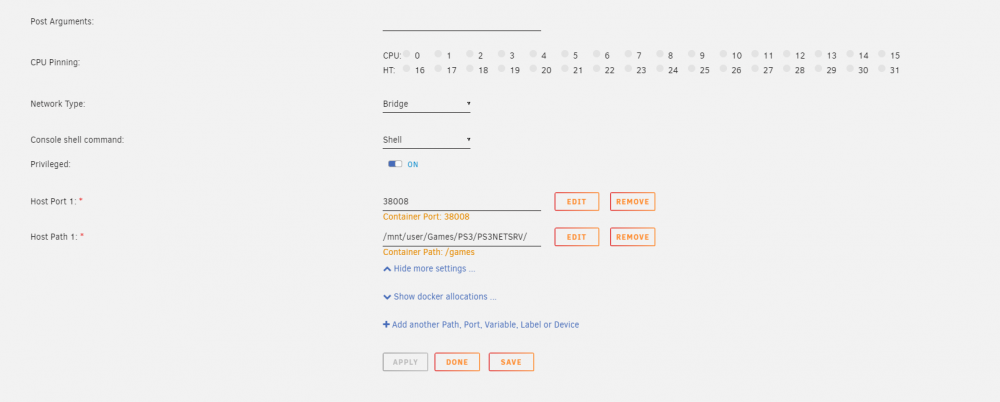
Not much to it to be honest, here is the only part of the template that is configurable
-
-
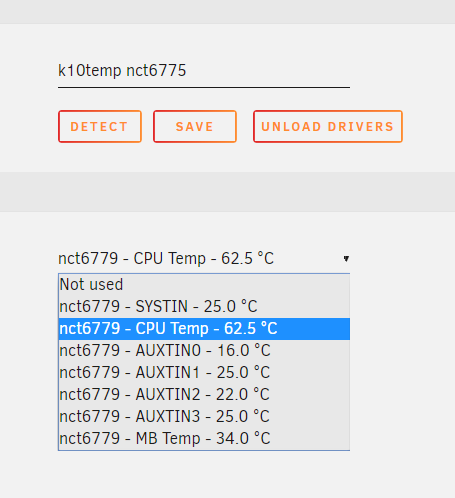
Hi, I have just built a backup server using an Asrock X470 Taichi and 3600X CPU and the temps are not reporting correctly (CPU always -62.5) and the others don't budge even when encoding a video. Is this not working for this combination yet or is there anything I can do? M/B: ASRock X470 Taichi Version - s/n: BIOS: American Megatrends Inc. Version P3.90. Dated: 01/10/2020 CPU: AMD Ryzen 5 3600X 6-Core @ 4000 MHz HVM: Enabled IOMMU: Enabled Cache: 384 KiB, 3072 KiB, 32768 KiB Memory: 16 GiB DDR4 (max. installable capacity 128 GiB) Network: bond0: fault-tolerance (active-backup), mtu 1500 eth0: 1000 Mbps, full duplex, mtu 1500 Kernel: Linux 4.19.107-Unraid x86_64 OpenSSL: 1.1.1d
-
ok, thank you for that, I was hoping if I did appdata and userdata it would magically be all done 🙂 I can only try and see what happens!
-
ah, fantastic, so I copy all appdata then the user shares then run that command? 🙂
-
Hi, I have just built myself a new server and need to move the nextcloud docker to it, I have tried copying the appdata and user shares but they do not display, I cannot find a guide other than for a VM, can anyone help me out please? Thank you 🙂
-
Hi, The docker wouldn't start because of those extra params anyway, so they were removed and everything seems ok. I just so happened to have an update for the docker today so that happened as well with no issues. Sorry for posting in the wrong thread!
-
Hi, yes nextcloud is the name but I mistakingly asked for help in here but I meant to do so in the linuxio thread as that is what I have installed, I imagine that is why I get the error? Very sorry about that.
-
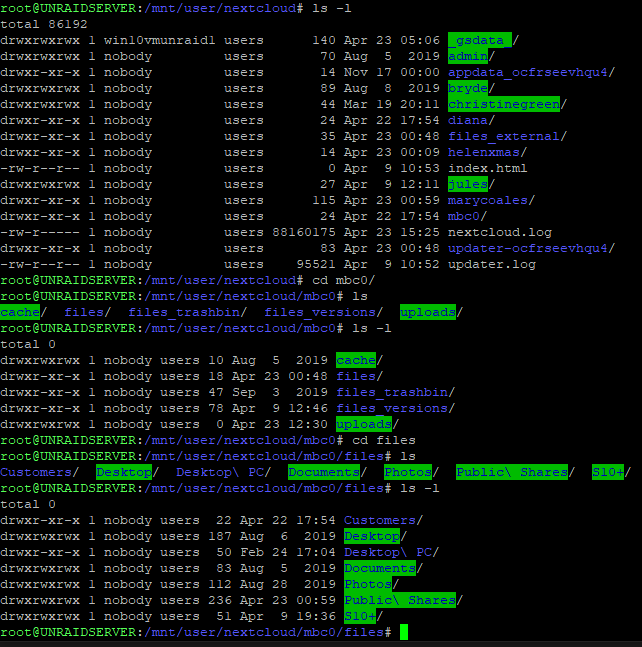
Hi, I have been able to modify/create files in my nextcloud container ever since installation 6 months+ ago but as of this week I no longer can? Some of the permissions seemed to have changed for some users? (mine is mbc0) I mistakingly posted in the wrong thread (knex666 Nextcloud 18) and he said to enter these parameters/arguments to resolve the issue. extra params --user 99:100 --sysctl net.ipv4.ip_unprivileged_port_start=0 post args && docker exec -u 0 nextcloud /bin/sh -c 'echo "umask 000" >> /etc/apache2/envvars This causes an error (s6-mkdir: warning: unable to mkdir /var/run/s6: Permission denied) I presume because it is the wrong docker? Is there something similar I can use for this docker to give me back the permissions needed to use SMB again please? Thank you
-
Hi, many thanks for this! did something change in an update recently to require these pre & post arguments to be put in place as I have never entered them before. I am obviously doing something wrong! althought the perms are now fixed and I can access the files in my shares again the docker will not longer start s6-mkdir: warning: unable to mkdir /var/run/s6: Permission denied Here are my extra params --user 99:100 --sysctl net.ipv4.ip_unprivileged_port_start=0 Here are my post args && docker exec -u 0 nextcloud /bin/sh -c 'echo "umask 000" >> /etc/apache2/envvars'
-
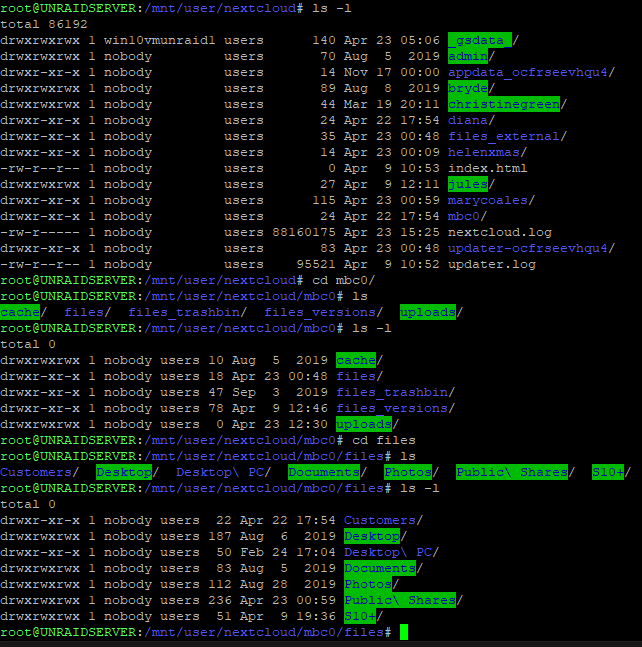
Hi, Something has changed with my installation/unraid? I have always navigated to my unraid nextcloud share and dropped new files in my files folder but now I do not have permission? my username is mbc0 and you can see that some users have changed permissions, some have not? I can obviously chmod to resolve this but worried it might break something? is it ok to do so and any idea why this could have changed?
-
ok, thank you for replying 🙂
-
Hi, just looking at this as my shares are a bit of a mess! in my situation for example I have tv shows spread over disks 1 - 20, I have since specified the share to use only disks 1 -4 can unbalance move everything from disks 5 - 20 into the share required disks 1 - 4? Many Thanks 🙂
-
Thanks for letting me know 🙂
-
Hi, yes I have binhex delugevpn doing its own thing and binhex privoxy simultaneously running and pass through xteve, jackett and several others, all running perfectly.
-
Hi, Thanks to a youtube video I have been made aware of this plugin, even though I have been running two unraid servers for 5+ years! 😄 I have been reading through and found conflicting reports about the mover does/does not move .recycle.bin I would prefer the .recycle.bin to either stay on the cache drive until the 7 day timer is up or be written directly to the array, basically I do not want the mover to be moving from cache to the array. Can anyone let me know the current situation with this please? Many Thanks 🙂


