





mbc0
Members
-
Joined
-
Last visited
Everything posted by mbc0
-
Hi, Does anyone know how to install the OPUS encoder into this docker please? Thank you
-
Hi, Do you mean the settings for the docker or for ps3netserv?
-
-
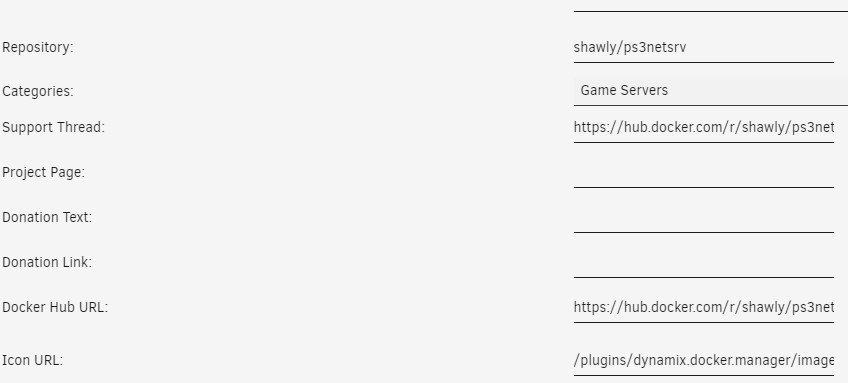
Hi, Thanks for your reply! This is what I currently have, so if I delete it & images but then change the repository to mccloud/ps3netsrv I should be good to go on the latest?
-
No worries, that docker I made started working so perhaps I was not patient enough! thanks for your original contribution and replying 🙂
-
Hi @Squid Thanks for taking the time to look at that for me, I appreciate it! I found the one you mentioned, installed it and copied the settings from the original docker mentioned on my first post that has now been removed Network Type: Bridge Host Port 38008 Host Path /mnt/user/Games/PS3/PS3NETSRV/ So now when looking at the 2 dockers they look identical except on the old original one works. Is there more to this than I realize? Many Thanks Again!
-
ah bugger.... there are no alternatives when searching for ps3 under the apps section 😪 Thanks anyway
-
I know this is a very old thread! is this version of ps3netserv maintained/updated at all? Thanks
-
ok, I will switch back to deluge until I am out of the RC, I only moved to the RC due to disk speed issues which have now been resolved for me (1st time I have used an RC release) Thanks for your time
-
Hi @binhex I am running 6.8.0-rc4 are there still performance issues on that version? sorry to bother you if it is nothing to do with your docker, I expect it is something to do with my config it's just that I run 20+ dockers and only have an issue with this one. 😞
-
Hi @binhex sorry to nag but wonder if you have any ideas what could cause these performance issues? it becomes unusable, lidarr, radarr, sonarr all lose connection to this docker and the UI is too slow to use. It seems to sort itself out after a while and may be ok for hours then it does it again. As I stated earlier, I have masses of resources available so don't know where to start with diagnosis. Never had any issues with your deluge docker but need the features of rtorrent. Thanks
-
Hi, I was trying to find a way to recover this without losing all my settings and I did! 🙂 I moved the appdata, re-installed, docker ran then xteve updated and was working so I then stopped the docker and copied the appdata back (all apart from authentication.json which I guess for security would not read?) but all working perfectly again now on 2.1.0 with all my recovered settings! 🙂 hope this helps someone else, thanks so much for this docker and your time @alturismo
-
Hi, Thanks for the reply, sadly that didn't work 😞 I have made the change and removed the docker & image, reinstalled but still the same 2019/10/28 20:37:38 [xTeVe] System IP Addresses: IPv4: 5 | IPv6: 7 2019/10/28 20:37:38 [xTeVe] Hostname: UNRAIDSERVER2 2019/10/28 20:37:38 [xTeVe] System Folder: /root/.xteve/test/ 2019/10/28 20:37:38 [xTeVe] Load Settings: /root/.xteve/test/settings.json 2019/10/28 20:37:38 [xTeVe] [ERROR] json: cannot unmarshal string into Go struct field SettingsStrcut.buffer of type bool () - EC: 0 2019/10/28 20:37:38 [xTeVe] [ERROR] json: cannot unmarshal string into Go struct field SettingsStrcut.buffer of type bool () - EC: 0 "api": false, "authentication.api": false, "authentication.m3u": false, "authentication.pms": false, "authentication.web": false, "authentication.xml": false, "backup.keep": 10, "backup.path": "/root/.xteve/backup/", "git.branch": "master", "buffer": "-", "buffer.size.kb": 1024, "buffer.timeout": 500, "cache.images": false, "epgSource": "PMS", "files": { "hdhr": {}, "m3u": {}, "xmltv": {} }, "files.update": true, "filter": {}, "language": "en", "log.entries.ram": 500, "m3u8.adaptive.bandwidth.mbps": 10, "mapping.first.channel": 1000, "port": "34400", "ssdp": true, "temp.path": "/tmp/xteve/", "tuner": 1, "update": [ "0000" ], "user.agent": "xTeVe", "uuid": "2019-09-3095-E0X854", "version": "2.0.0", "xepg.replace.missing.images": true, "xteveAutoUpdate": true }
-
Hi! I have not touched the buffers (or any settings for that matter) as xteve works flawlessly for me so not sure what has happened? Here is my settings.json file, thank you! "api": false, "authentication.api": false, "authentication.m3u": false, "authentication.pms": false, "authentication.web": false, "authentication.xml": false, "backup.keep": 10, "backup.path": "/root/.xteve/backup/", "git.branch": "master", "buffer": false, "buffer.size.kb": 1024, "buffer.timeout": 500, "cache.images": false, "epgSource": "PMS",
-
Hi, One of my xteve dockers (typically the one I need today) 😄 has the following error. I see that it is cleared with V 2.10 but this one does not update from 2.03? I have deleted the docker & image, re-installed and it pulls from alturismo/xteve:latest but still only 2.03? /config/cronjob.sh exist For help run: ./xteve -h 2019/10/28 09:38:47 [xTeVe] [WARNING] Don't run this as Root! 2019/10/28 09:38:47 [xTeVe] Version: 2.0.3 Build: 0030 2019/10/28 09:38:47 [xTeVe] Database Version: 2.0.0 2019/10/28 09:38:47 [xTeVe] System IP Addresses: IPv4: 5 | IPv6: 7 2019/10/28 09:38:47 [xTeVe] Hostname: UNRAIDSERVER2 2019/10/28 09:38:47 [xTeVe] System Folder: /root/.xteve/test/ 2019/10/28 09:38:47 [xTeVe] Load Settings: /root/.xteve/test/settings.json 2019/10/28 09:38:47 [xTeVe] [ERROR] json: cannot unmarshal string into Go struct field SettingsStrcut.buffer of type bool () - EC: 0 2019/10/28 09:38:47 [xTeVe] [ERROR] json: cannot unmarshal string into Go struct field SettingsStrcut.buffer of type bool () - EC: 0
-
The docker won't start unless vpn connection is successful and you can test for further peace of mind here https://www.vpnuniversity.com/bittorrent/how-to-check-your-torrent-ip-address
-
Hi, Is it possible to put an entire docker or VM through this docker? I currently have a VM running through it using Internet proxy settings so when I browse the internet I can see that I am running through PIA and I am in another country but through a command prompt on the same windows 10 VM it shows my real IP instead of the PIA one. is it possible to put the whole VM or a docker through privoxy?
-
Thats's great to hear Squid, I ended up doing in manually with Krusader and all went well for me! Look forward to the future feature! 🙂
-
Hi! I just swapped last week from your deluge vpn to this rtorrent vpn and it has been much better for me (extra features & performance) however today (since rc3 update) I am getting dog slow performance! don't know if it is related or not but no matter what browser I use it takes minutes to respond and constant timeouts, any ideas? I am using a Threadripper with 40GB free ram and barely a tickle on the cores 2019-10-23 23:00:33,957 DEBG 'watchdog-script' stdout output: [info] rTorrent running [info] Initialising ruTorrent plugins (checking nginx is running)... 2019-10-23 23:00:33,965 DEBG 'watchdog-script' stdout output: [info] nginx running [info] Initialising ruTorrent plugins... 2019-10-23 23:00:34,010 DEBG 'watchdog-script' stdout output: 2019-10-23 23:00:34,032 DEBG 'watchdog-script' stdout output: [info] ruTorrent plugins initialised 2019-10-23 23:30:35,333 DEBG 'watchdog-script' stdout output: [info] Attempting to curl https://portchecker.co/check... 2019-10-23 23:30:36,398 DEBG 'watchdog-script' stdout output: [info] Curl successful for https://portchecker.co/check, response code 200 2019-10-23 23:33:15,522 DEBG 'rutorrent-script' stderr output: 2019/10/23 23:33:15 [error] 1214#1214: *1859 upstream timed out (110: Connection timed out) while reading response header from upstream, client: 172.17.0.1, server: localhost, request: "POST /RPC2 HTTP/1.1", upstream: "scgi://127.0.0.1:5000", host: "192.168.0.33:9080" 2019-10-23 23:35:45,549 DEBG 'rutorrent-script' stderr output: 2019/10/23 23:35:45 [error] 1214#1214: *1894 upstream timed out (110: Connection timed out) while reading response header from upstream, client: 172.17.0.1, server: localhost, request: "POST /RPC2 HTTP/1.1", upstream: "scgi://127.0.0.1:5000", host: "192.168.0.33:9080"
-
No mate, no response as yet
-
-
ah, ok, normally I just click update for all my plugins and they just do the biz! Do you know if this update resolves the nonempty issue I am having?
-
That update is not working on my rc3? plugin: updating: rclone.plg +============================================================================== | Skipping package rclone-2019.10.13-bundle (already installed) +============================================================================== Downloading rclone Downloading certs Archive: /boot/config/plugins/rclone/install/rclone-current.zip creating: /boot/config/plugins/rclone/install/rclone-v1.49.5-linux-amd64/ inflating: /boot/config/plugins/rclone/install/rclone-v1.49.5-linux-amd64/README.html inflating: /boot/config/plugins/rclone/install/rclone-v1.49.5-linux-amd64/rclone.1 extracting: /boot/config/plugins/rclone/install/rclone-v1.49.5-linux-amd64/git-log.txt inflating: /boot/config/plugins/rclone/install/rclone-v1.49.5-linux-amd64/README.txt inflating: /boot/config/plugins/rclone/install/rclone-v1.49.5-linux-amd64/rclone Copy failed - is rclone running? plugin: run failed: /bin/bash retval: 1
-
I have been given a patch for this problem on Github, does anyone know how to implement it? The patch to fix this is quite simple diff --git a/cmd/cmount/mount.go b/cmd/cmount/mount.go index b11ad16f4..05836fbdb 100644 --- a/cmd/cmount/mount.go +++ b/cmd/cmount/mount.go @@ -74,9 +74,6 @@ func mountOptions(device string, mountpoint string) (options []string) { options = append(options, "-o", "volname="+mountlib.VolumeName) } } - if mountlib.AllowNonEmpty { - options = append(options, "-o", "nonempty") - } if mountlib.AllowOther { options = append(options, "-o", "allow_other") } diff --git a/cmd/mount/mount.go b/cmd/mount/mount.go index 117eb76da..9e0982803 100644 --- a/cmd/mount/mount.go +++ b/cmd/mount/mount.go @@ -46,9 +46,6 @@ func mountOptions(device string) (options []fuse.MountOption) { if mountlib.NoAppleXattr { options = append(options, fuse.NoAppleXattr()) } - if mountlib.AllowNonEmpty { - options = append(options, fuse.AllowNonEmptyMount()) - } if mountlib.AllowOther { options = append(options, fuse.AllowOther()) } However this is backwards incompatible with fuse 2. I haven't figured out a way of working out which fuse version we are talking to to make it adapt. I guess I could add a --fuse-version flag which would be untidy.
-
ah, gutted! saw an update for rclone but still cannot mount nonempty directories 😪
