





Vr2Io
Members
-
Joined
Everything posted by Vr2Io
-
I never found Unraid will control FAN PWM, I also make adjustment on PWM by user script, just simple set the value and no fluctuation. But the path different as you, you may try echo 1 > /sys/devices/platform/f71882fg.656/pwm1_enable echo 32 > /sys/devices/platform/f71882fg.656/pwm1 echo 1 > /sys/devices/platform/nct6775.656/hwmon/hwmon1/pwm1_enable echo $rpm > /sys/devices/platform/nct6775.656/hwmon/hwmon1/pwm1
-
Unraid CPU is 9700K, in longtime ago test, both directions got near 10Gbps result. No matter real-virtual or virtual-virtual. Haven't much idea currently.
-
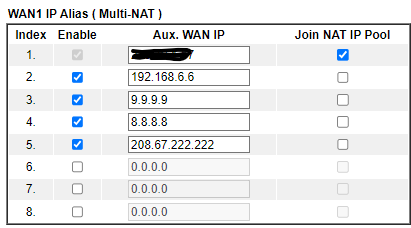
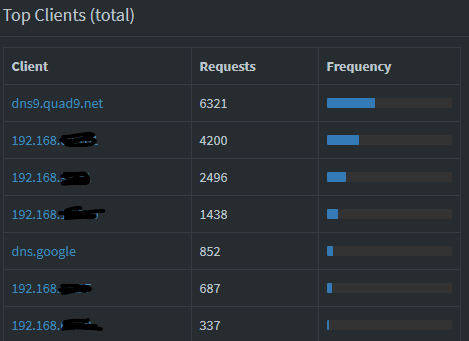
My router have a feature name "WAN IP Alias" and I never aware that, it is something like you can add a virtual IP to your WAN. With those WAN IPs, you can open port and loop back to local. The advantage was it so easy for routing different subnet / vlan traffic to local, the drawback was source IP will change to WAN IP then you can't identify the traffic from which local client. With "IP alias", you can set additional IP under WAN I/F, then when you access those Internet IP, it will route to your local service. Because I limit the source IP must be same as alias, so basically no Internet traffic will route to local. With those setting, now I can - Access 192.168.6.6 "WAN IP" to different service which host in other subnet, even actual WAN IP change, I don't need change again. - Traditional DNS resolve to 8.8.8.8 / 9.9.9.9 will redirect to local DNS ( 192.168.2.5 ) - Once local DNS down or maintenance, I can simple disable the alias, then those traffic will go to Internet as usual. Now you will found 8.8.8.8 and 9.9.9.9 record in your DNS server. I also add other DNS traffic ( i.e. DNS resolve not follow DNS setting ) to local too.


-
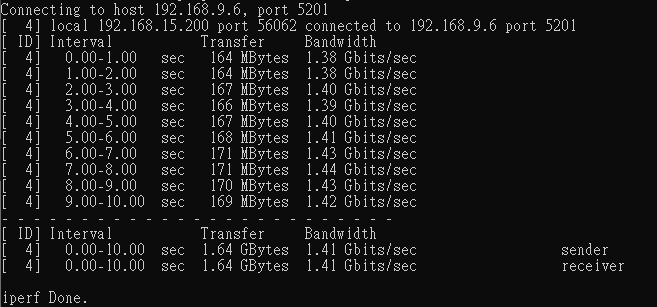
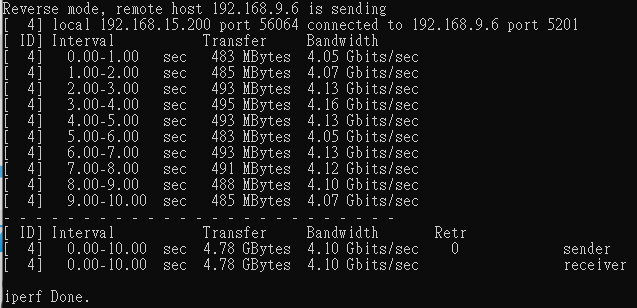
Longtime haven't test, I got similar result, btw try different setting ..... got best iperf3 in virtual environment top at 5Gbps, reverse mode usually got higher result.
-
Pls setting SMB Security to "public" for troubleshooting first.
-
RAM really doesn't use lot of power, you would found even single phase power circuit would be enough, but if you add some voltage to it, then power will raise dramatically but still neglectable if compare to CPU power usage. For CPU, it also same, the pkg power was low because CPU run in minimal working voltage. I never concern deep C-states, I usually focus on those power hungry appliances, i.e. air-conditioner, heater etc. Take over control its cool on / off by automation have saving more.
-
Unraid can't confirm does the drive already zeroed even it have signatures. So designer will keep zeroing to the end ..... But you can decide to stop or not.
-
If you haven't change the USB stick in past year, then you copy the pro.key file to the new USB, it will allow you migrate the licence to new flash. Anyway, no data will wipe.
-
Both box got same behaviour ? This strange. In general, display will blank due to saving suspension, but once press any key, monitor output will resume. For immediate shutdown behaviour on power outage (different UPS), I don't thing this related, it is because power unstable won't cause crash, system will just reboot or keep in power off.
-
Force powe off or shutdown by power button ? You should attach monitor and keyboard to verify does network issue only.
-
I apply routing (Pihole) and install duplicate docker for different need, to install duplicate docker really easy, just copy the template then change its name and appdata path. I don't like that method, it will affect network traffic and cause security concern.
-
Try uninstall Tailscale and check again.
-
You could try to use onboard LAN and check any different. You should check log and provide them, we don't know what kind of error base on above description. If Unraid under Proxmor, there should have virtual console screen for check.
-
Most people will apply dynamic DNS service to register a domain to map your ISP IP, then open necessary port ( i.e. HA is TCP 8123 ) at your router and point to the IP of HA. But this may be dangerous, so people will limit the internet IP range to allow access or add reverse proxy between them. There are many free dyn DNS service provider, you could try Google Duck DNS https://www.duckdns.org . For HA, Android have HA apps, this would provide much great user experience then web browser to access on mobile device. Once you have a domain, you can open different port for different service for internet access. This normal, router default won't routing traffic between different subnet / vlan, it default only routing private traffic to internet. So you need set routing rule, i.e. the rule for other subnet to access Pihole. There are also another method was each subnet ( vlan ) have its own Pihole, then you don't need additional routing.
-
Did you solve this problem finally ?
-
That mean Tailscale + Docker service combination got problem. Btw, I never try Tailscale, so no idee. 🙃
-
Seems you mean UI unreachable gone now ?
-
If a device at same subnet and vlan of eth0 (local), then no much reason will unreachable when docker service start. If still that, pls try unplug eth1 cable before docker start. Not much idea. Pls also try access UI by putting client in eth1 same vlan and 30.X subnet. To eliminate network / switch related, direct connect Unraid and client then stat docker service .... also a step to troubleshooting. ** Pls also confirm Pihole haven't turn on DHCP server function **
-
I found abnormal on docker part, there are no gateway in 30.X and 60.X, pls check why. It should auto copy from network setting. This may be why UI lost when you start docker as gateway gone and you access the UI were route through UDM and Unraid instead locally.
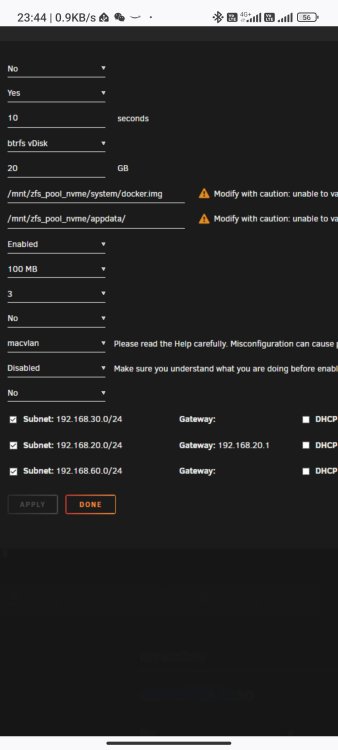
-
1st suggestion if I use two ethernet port in Unraid. Don't set same untag network to eth0 and eth1. Pls setting untag 6 ( just don't same as eth0 ) and tag 6 to eth1 port. Or simple blank the setting in eth1 setting and only keep lower part vlan6. That means 20.X and 60.X truly seperate from eth0 30.X first. Then check does problem gone.
-
Let me check and reply later, I m at work now.
-
I wrongly identify it under docker or VM. Pls post more detail in network and docker setting. You found I have both too, and it can run under different vlan without any problem. But I don't use bridge mode. But I don't thing bridge mode will cause any problem.
-
Could you try stop Tailscale ? Pls stop array and other service first, if no way to access Unraid UI again, then short press power button to shutdown and reboot Unraid.
-
You use IP or domain to access Unraid GUI ?? Pls try use IP. If Unraid GUI unreachable, there should because two reason 1. Unraid GUI web service crash, pls check any abnormal from syslog. 2. Unraid MAC address resolve wrong to verify, type below command ( if Windows ) and check the MAC address correct or not arp -d ping -n 1 192.168.10.6 ( Unraid IP ) arp -a ( mark down the MAC address of Unraid ) < Start docker / VM > and Unraid unreachable ping -n 1 192.168.10.6 ( Unraid IP ) arp -a ( Check does MAC address still show and correct )
-
For me this not a problem, you will found I only use one port for all service, so many mac address under same port. I only care about what IP assignment make me easy to identify what they are. For example 1xx was mobile device in "Internet valn" 1st sister 11x ( so allow 0-9 device ) 2nd sister 12x 3rd brother 13x etc. And I use Wireshark to capture some important traffic too, i.e. DHCP assignment, easy to check in one place what device have access network

