





Vr2Io
Members
-
Joined
Everything posted by Vr2Io
-
沒有, 我是全部設備接上交換器, 路由器 lan 是單口.
-
Oh .... Yes 😝 Is it possible disable by port or different USB controller. Pls also try assign device on different controllers and apply different BIOS setting. Edit : Pls also try different USB boot emulation BIOS setting.
-
你試下禁止"主機訪問自定義網絡", 看看有否不同. 另外亦試下刪除那個 emby 自定義網絡. 另外, 軟路由可以做到雙 WAN 吧, 那樣不用兩隻軟路由, LAN + vlan 行一個網口就可.
-
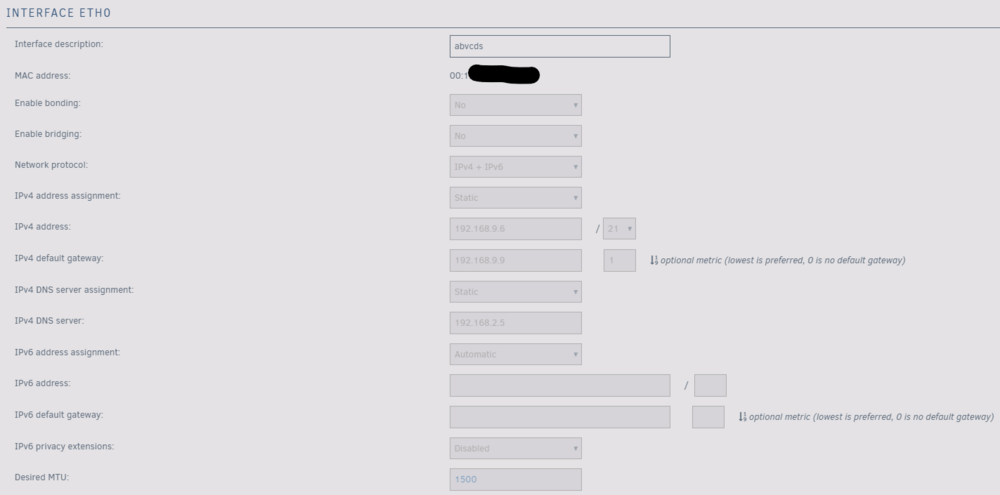
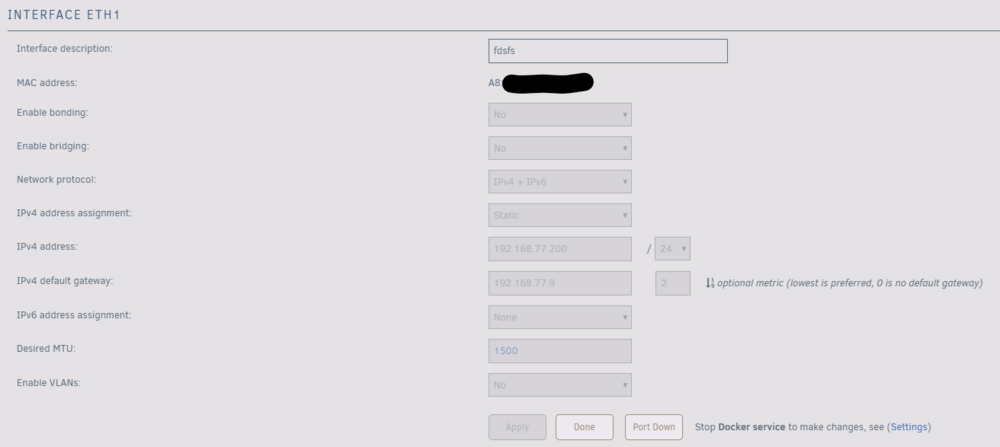
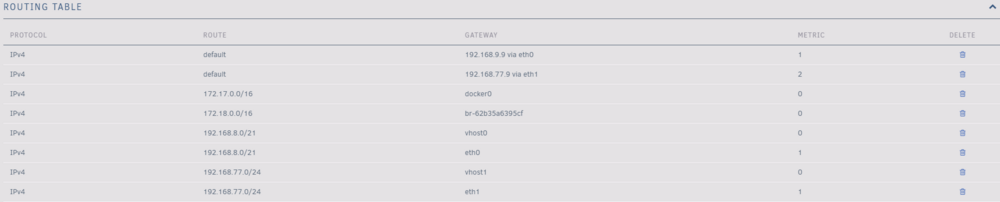
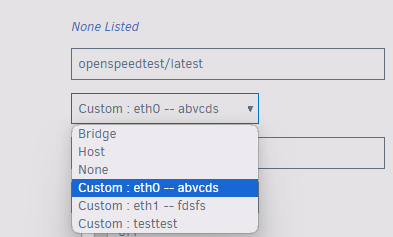
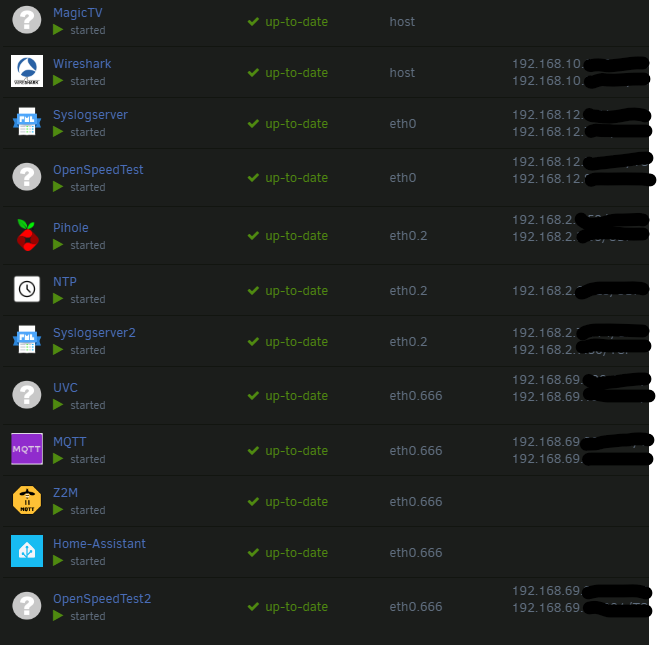
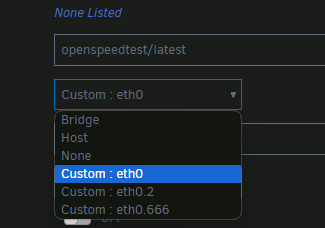
我與你的設定差別主要是 "主機訪問自定義網絡", 但我跟你設定成enable, 仍是沒有問題, 我亦改了由自動ip變成靜態ip, 增加一個自定義網絡, 由 ipv4 only 變成ipv4+ipv6 .... 總之都無法複製你嘅問題. 我是用 6.12.10, 但這個冇關係的, 因為我早前的 version 都可以喺docker度選不同 custom network. 奇怪. 是一樣的, 我本身只得一個 ISP, 因為有多段網絡, 所以每段都有自己的網關. 我是行vlan, 那樣就一個網口做不同網段, 其實你可以加vlan 交換器, tplink 那種沒有web介面很便宜, 就可以用一個網口行不同網段, 去到router前就分返開兩個口便可. 以下係一個參考 三個網絡正常顯示

-
USB boot confirm disable ?
-
不會的, 只要是不同網段就可, 各自走各自網关. 但是你想它們互通就難做, 正常要在 router 層面處理. 最好當然一隻多功能 dual wan router 可以適合不同場景.


-
I doubt that parity could recover corrupted file. If recover become true , it just because some how integrity issue and lucky recover the file.
-
It is normal for macvtap. Below are some solution, but I haven't try. https://wiki.libvirt.org/TroubleshootMacvtapHostFail.html Or simple use ipvlan by enable network bridge.
-
Oops ... /dev/ttyS0 seems correct, any info. from gsmsms "debug" ? ( I never try setup GSM-modules/sticks on linux / docker ) I think first troubleshoot does AT command ( ? ) have send to device and got response. https://github.com/forelleblau/ioBroker.gsmsms Edit : I notice you set the ttys0 is variable, it should be device, for example my USB Zigbee dongle setting as below



-
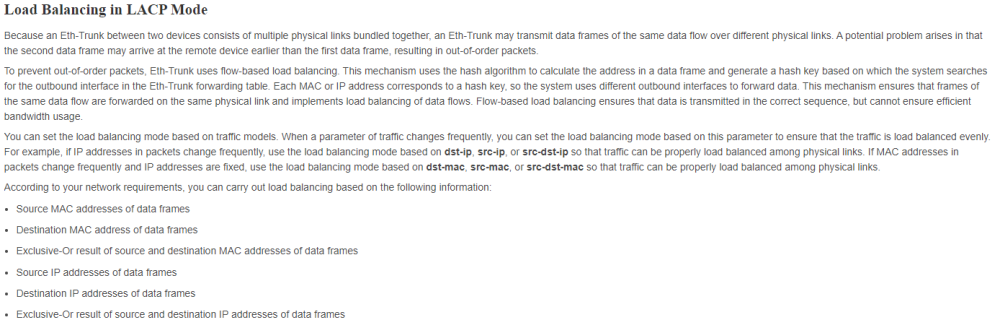
Iperf3 test in multiple session ? if single session, then traffic will happen in one link only. ( Even multiple session, I am not sure does traffic will balance on different interface, because they are same source-destination mac address ) https://support.huawei.com/enterprise/en/doc/EDOC1100086560 https://www.jannet.hk/etherchannel-pagp-lacp-zh-hant/
-
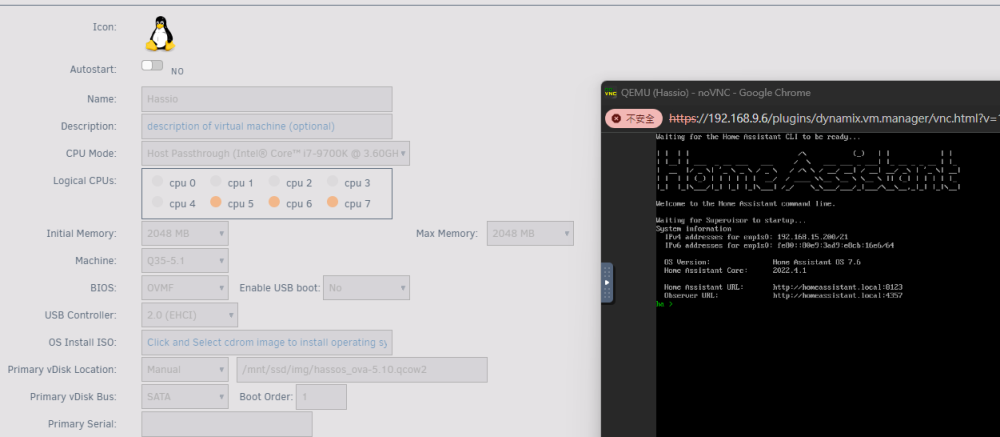
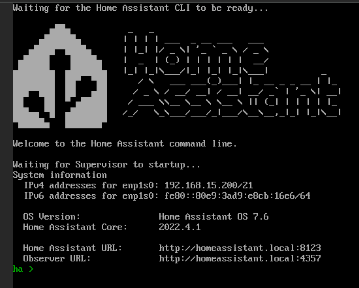
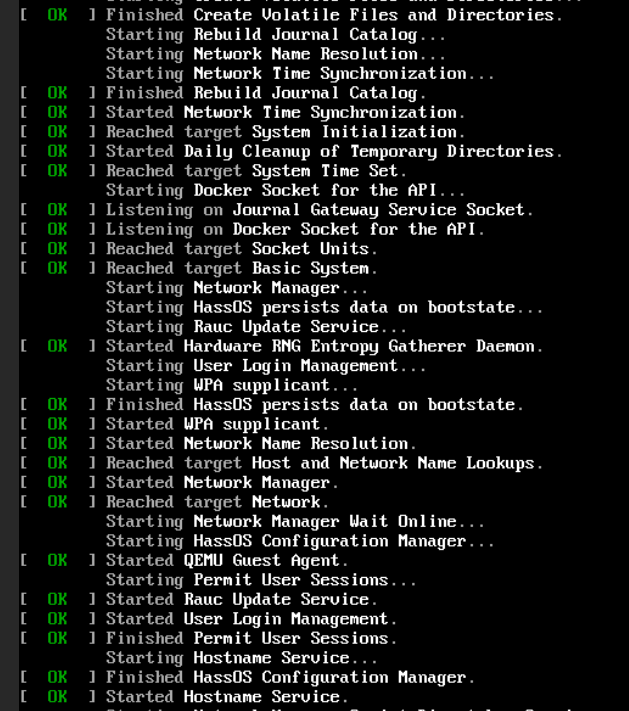
The image can be put to any path you want, it doesn't matter. If nothing have change and only restart the HA VM then image file delete, then I will assume something wrong in your HA restore. Pls try re-create the VM, start it and don't restore it, then restart the VM again ..... and check image file gone or not. Below are the VM setting look like and the VNC console I believe it have self update and the console look different now. ( As mention I change to use docker now ) Just type the command "host reboot" in console, then it reboot normally.
-
Strange, I use HA docker for longtime . In previous, the qcow2 image HA VM never disappear and VNC console always work too.
-
To summarize, Pls try - disable host access - disable bridge - disable bonding - stop VM Then check does different mac have same IP (assign / static) and promiscuous mode flapping gone. ( you may need waiting enough aging time for switch forgot the mac ) If positive, we can assume problem come from VM then focus on VM part / setting.
-
To be honest, those are your assumption. We need solid founding.
-
I think you should change the device mode from mass storage to modem / network mode. https://askubuntu.com/questions/1145645/huawei-e3131-modem-shows-as-mass-storage https://askubuntu.com/questions/776497/huawei-modem-does-not-work-with-16-04
-
That's know, but why OP have the said problem ( flipping and source destination same mac )
-
For vhost got same IP problem, this likely due to host access enable and your network environment relate. in general said, once enable that always trouble. I use macvtap at all ( ipvlan also fine ), just disable bridge and host access. For same mac on source destination, this usually because routing relate and easy happen when use multiple NIC. To simple my question, does all problem gone if you disable bridge and host access and never touch UR routing table? ( exclude HA unreachable and HA can't access share issue )
-
I m not expert of docker network, but interest on what other people doing and why need preserve custom network, in first, I m thinking does any VPN plugin / docker cause problem. Anyway you found another solution, btw due to I put docker path to /tmp so every reboot need re-download all docker, that may help fix some hidden issue. And I also apply VLAN to separate stuff for what I need.
-
My first HA VM was use official qcow2 image, just need to note if you change the XML then you need manual config image type to qcow2 again. I just restore the backup from Raspberry then migrate finish. https://www.home-assistant.io/installation/linux
-
But still no report for testing from @bing281 and JorgeB estimate min. throughput down 73MB/s per disk.
-
If that, does it make conflict ? What special of that custom networks must preserve and no other method to eliminate it.
-
Thats great, but do you have UPS ? For non-UPS protect system, I will config limit / minimize continue writing ( i.e. security camera recording ) to one NVMe / disks instead most of storage. This will major prevent FS corruption in suddenly power off. This not a problem if you never mind the warning. I like btrfs more then ZFS, mainly bcz better performance. That depends on what capacity you need and how you define pool / array is main / backup. For me, I use array as backup tier, but it also share for some user because array has better user access control. As I want to transfer file quickly, so pool are 1st place to store file then periodic sync to array. ( I don't like mover design, so array and pool always independent )
-
In longtime ago, I also use USB enclosure for the build, I buy two different 5 bays enclosure, the first one never reliable and the 2nd one finally reliable by adding a USB hub ( dedicate chips ) and change the firmware of the enclosure. Both enclosure architecture are USB to SATA phy + port multipler but they use different chips solution. Nowadays, some USB enclosure use different architecture, they are USB to USB hub + multiple USB-SATA phys, this may be more reliable, but still many issue could cause problem. In simple say, you could try adding USB 3.X hub in between and test any different.
-
You should provide more detail how they connect, does all running long cable in SATA protocol so cause error ? If that, you can fix it by make them in SAS protocol in all long path, only last mile in SATA. With connect HBA to SAS expander, then this path will be SAS and support long distance < 10m, in each enclosure then fan-out from expander to SATA harddisk will be SATA and make them shorter then 1m. Next was rack disk swap case, rack case have backplane, so it eliminate mass power cabling to power up all disks. But also due to backplane only have small area to passthrough air flow, so it very hard to cool well even you putting 3000rpm or high pressure fan for cooling. I build in two box, it is a 3U expander (w mobo) case + 2U raw case (disk only), I add a expander ace-82885t in 2U enclosure and use one 8644 cable ( 50cm ) to connect them, the HBA are 9300-4i4e. It have different generation, the first version use two 9211-8i, one for internal and one for external, the external use a pair 8087 2m cable and IBM expander for the 2U path. The second version was 9211-8i + 1000-8e .... and currently only use one 9300-4i4e.
-
Yes, /sys/class/ path should better I also make some test on my fan, low range dead zone was 15 ( 328rpm, lower then 15 will be 0rpm ) and no high range dead zone ( 3000rpm ) .... but this should be fan spec. related.






