





Vr2Io
Members
-
Joined
Everything posted by Vr2Io
-
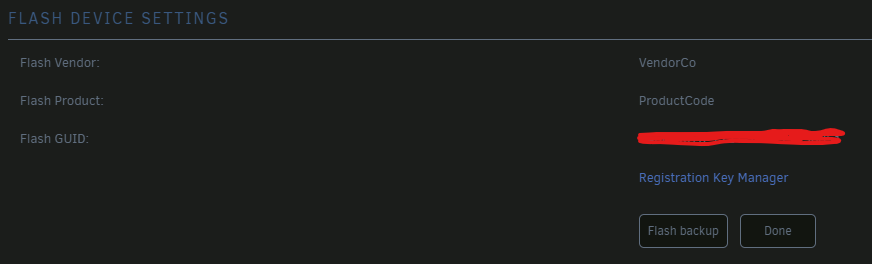
You can backup the flash before each update, if you want go back then restore it. There are no big change in current v6 Unraid which will affect your requirement. For Windows SMB access, it may prompt input username / password even the share is public, but input something would be fine. For Player SMB access ( I set logon need ), player will remember in initial SMB shortcut setup, I don't need input again.
-
Understand, I have many times diak failure in 1.5T / 3T Seagate or WD disk which longtime ago, but just 2 or 3 times in next 8yrs.
-
You mean they are not actually failure, but generate abnormal sound ? I use lot of Toshiba 6TB disk, but next 8TB - 18TB were WD, because they are cheapest.
-
I don't agree problem cause by disk pool, I use several btrfs/zfs pool and they work really well even in heavy load. But I don't like cache ( mover ). I run docker in ram disk ( small total docker size ), this not because the storage can't handle it, just because spinner disk ( noise and heat ) or SSD ( endurance ) concern.
-
Sound like you are not pass through NVMe to VM, for better performance, you should try pass through NVMe, dedicated for single VM. Toshiba, which model ?
-
That's fine, we can assume memory / its setting fine.
-
For robust network setup, especial Unraid / multiple ethernet server, the best way was never config. same subnet to multiple ethernet interface and use VLAN to seperate them. After that you will avoid any starnge issue.
-
May be best in 4 passed. I will simple clock down to 2400MT/s, this is a quick way to remove memory problem then 2 passed and going further troubleshoot, you can set back to auto or 3200MT/s later if you confirm problem not come from memory. Not suggest manual set the voltage. I never found a mobo will use 3200MT/s but config in 1.2v instead standard 1.35v.
-
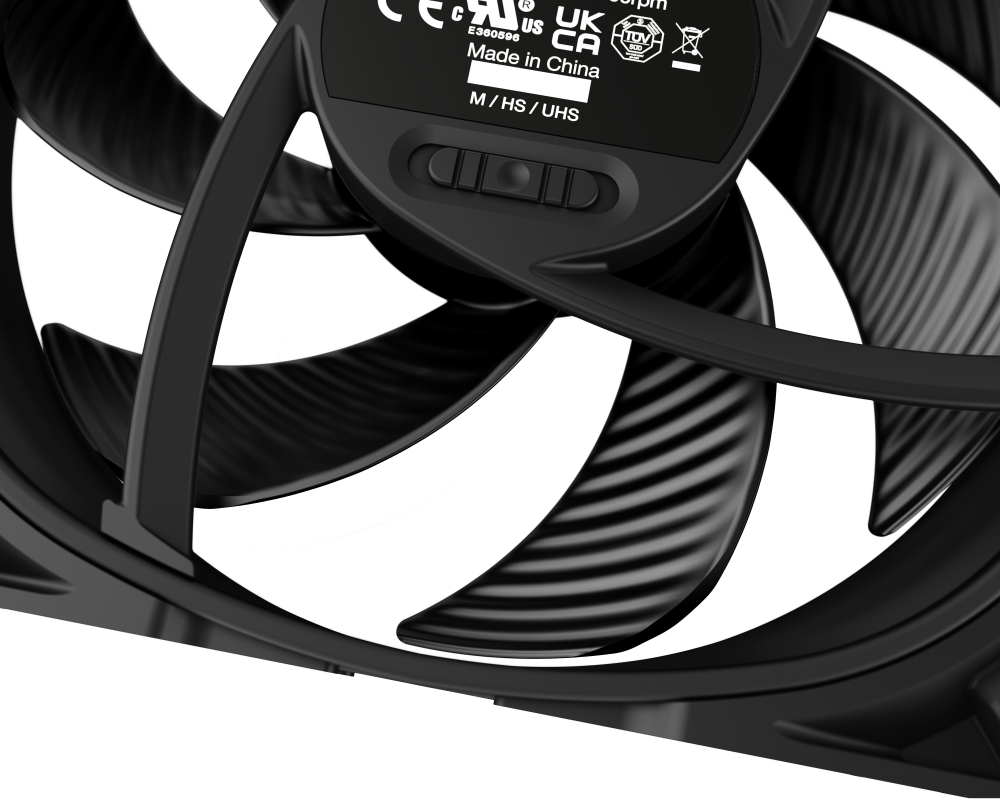
I think so, I test that too. I replace those fan with some cheap PWM fan, currently have over temp issue,. but my rack not 7x24. ( FAN max in 1200rpm ) I will prefer replacement in around 3000rpm fan, Noctua or SILENT WINGS PRO 4 should be my first choice. One of problem you need to be address, those fan thinner then bundle fan, so if fan mount to the housing, then a big gap with exist between the fan and fan plate, you may need mount the fan to the plate for better performance. https://www.bequiet.com/en/casefans/3705 ( it have speed switch, I think it would have large speed rang adjustment )
-
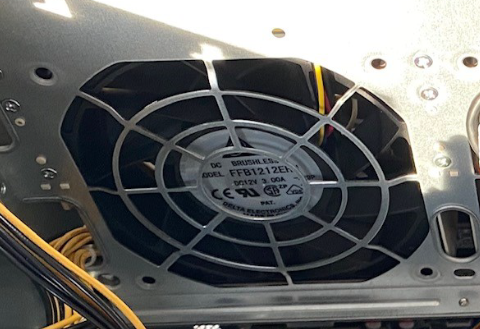
I enlarge the photo, confirm it is 3A, pls don't direct plug to mobo. It is possible if backplane / fan controller support connect to mobo fan header to take control. For external or 3rd party fan controller, this usually won't support high power fan. Need consider air flow / pressure will drop a lot even Noctua Industrial type.
-
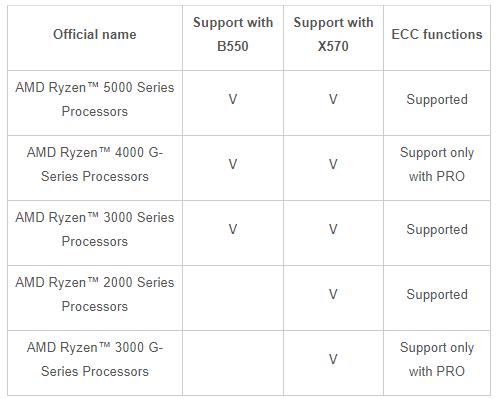
AMD 3000G / A320 chipsert may not support ECC memory. Below table ( not A320 ) also indicate different CPU with different chipset have different ECC support. I believe motherboard problem ( or other unknown reason ) more then memory. Could you try copy some file to /tmp ( ram disk ) then monitor does file content / hash will change with time ? There also not sense if it is memory problem - If memory problem, system will crash, not just file corrupt. - If array disk file corrupt, then it also expect system file / USB file corrupt too, as result system will also crash. I have a strange experience, a new build platform, all test was great and running well, but when I insert a NVMe, file copy to it will corrupt immediate, no different with different NVMe ( no any error log / even PCIe error and no problem on SATA disk ). But problem suddenly gone after few days troubleshoot. Finally, I RMA this mobo and problem never happen again.
-
Does use Unraid build-in memtest ? You must solid pass memtest 1st. I check your diagnostic, the memory config have problem. no reason memory stick would run at 3200MT/s but just 1.2v. ( Pls tuning BIOS memory setting or simple disable XMP, so it will clock down the memory ) Configured Memory Speed: 3200 MT/s Minimum Voltage: 1.2 V Maximum Voltage: 1.2 V Configured Voltage: 1.2 V This not a problem.
-
That depends on how robust of those memtest program to make test, different software have different test algorithms. Unraid have update the build-in memtest86+ ver. since 6.12.5, in old ver., it also unreliable and I always use 3rd party memtest program. Anyway, all depends on which test program use, it doesn't relate come from BIOS, Unraid or whatever. https://github.com/memtest86plus/memtest86plus?tab=readme-ov-file#memory-testing-philosophy ( your BIOS memtest were come from PassMark software, they are compititor )


-
This normal.
-
If memory test fine, I believe it is other issue cause corrupt problem. As mention, if static file just seat at storage, no much reason it will corrupt. Could you change it to read only and monitor its content will be change ? Pls ensure no one have copy/backup it in same destinations, and no user share to disk share or vise reverse.
-
You need relocate your main machine and NAS in same area and connect both in physical wire, then access Internet by WiFi or Powerline or whatever.
-
Agree, likely mobo problem.
-
I agree 24hrs memory test already enough, in fact, I usually test in several hrs or several pass only. I never have ecc-memory. The problem is not much trouble shoot info. have provide, so I don't know how to provide problem fix direction. When you download a file to Unraid, what hash at source and destination ? How long it will corrupt ? If it is a static file, this also hard to imagine why it will corrupt later. Pls make some test by rsync, copy some file to /mnt/user/test1/ then rsync -ah /mnt/user/test1/ /mnt/user/test2/ Does success without error ?
-
Great, those are PWM fan, any spec. photo could share ?
-
All above not the reason for file corrupt. Are you access file through network ? Pls check network part too. In local ( Unraid ), you can hash a file i.e. b3sum <file> and keep track does the hash result always different.
-
Those sever fan may draw 1.5A to 3A, don't direct plug to mobo. For me, I use PWM fan ( 4 wire , but most bundle server fan won't be PWM type ) and split the TACH & PWM ( speed control ) to one of mobo fan harder ( 2 wire ). The power draw ( molex ) was direct connect to PSU. So, speed adjust will sync to all 4 fan. Below are the sample what does those spliter looklike.
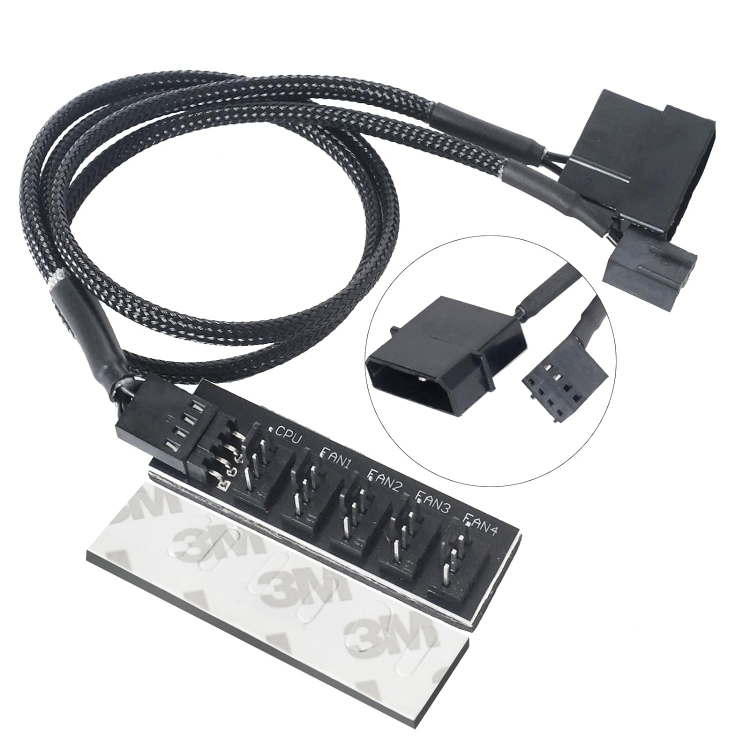
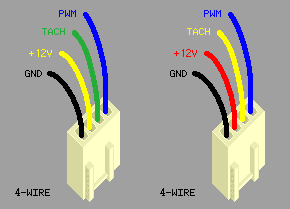
-
Pls use other memory slot for test. From my experience, single stick can put in any slot. If still flaky, then you need reseat CPU. I trend to believe it could be mobo issue, during movement + CPU heatsink mass, something were broken due to vibration.
-
I have similar experience, BIOS post sometimes will stuck and no boot, but reset several times usually will solve, if not, I need power off and re-insert some PCIe card then also fix. Due to problem occur were random and intermittent, so I think it is mobo issue and I haven't another mobo support same CPU, so I live this in longtime. But, one day I want to shoot this out ..... finally identify problem come from LSI 9201-16, and I also remember other platform have similar problem once with this HBA. That means I wrongly recognise all cause by mobo unstable and put it in test bed.
-
Agree unlikely both set RAM bad, also as early reply, try clock down it ( 2400Mhz even 2133Mhz ) and make some test. In DDR4 gen, I have around 3 times RMA, it easy to identify by individual test to rule out which one were fail. So you may need test those one by one.
-
You have many ARRS application and Plex, could you disable those and monitor crash or not ? If still crash, you may need disable docker service, the aim were identify does problem come from docker. Your system temperature in 6x degree, does this true or wrong sensors select ? ( It doesn't make sense as CPU temp in 7x degree only with 50% loading when system temp in 6x )




