





Vr2Io
Members
-
Joined
Everything posted by Vr2Io
-
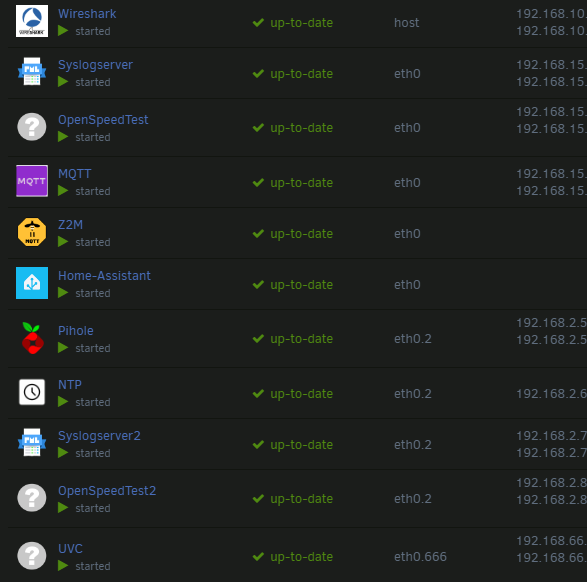
I ( in fact most people ) will setting like that to separate the network as they need. - Main & Main IoT ( because they need communicate each other ) - Aux IoT - CCTV ( vlan666 ) - Guest Internet only
-
Yes ( assume subnet mask was 255.255.255.0 or /24 )
-
No, LAN1 and LAN2 must different subnet. Vlan1 with lan1, vlan2 with lan2
-
Some router support same subnet for different VLAN, but most won't support that, I am not sure UDM support or not. But even UDM support, Unraid just not, so you need setting them in different subnet. And this not relate macvlan nor ipvlan. The advantage of use same subnet for different VLAN was IP assignment won't change even device sit on different VLAN.
-
Unraid will turn off display after some peroid from bootup, notebook screen never turn off ? If folding notebook screen, it won't power off the monitor ? If that, it likely power draw come from GPU instead LCD.
-
All battery have lifetime, it will shorter if you haven't keep UPS attach to mains for longtime.
-
The other will found a way for their life, no smart home, electronic security system .... really not that importance ... and they may life better 🤣
-
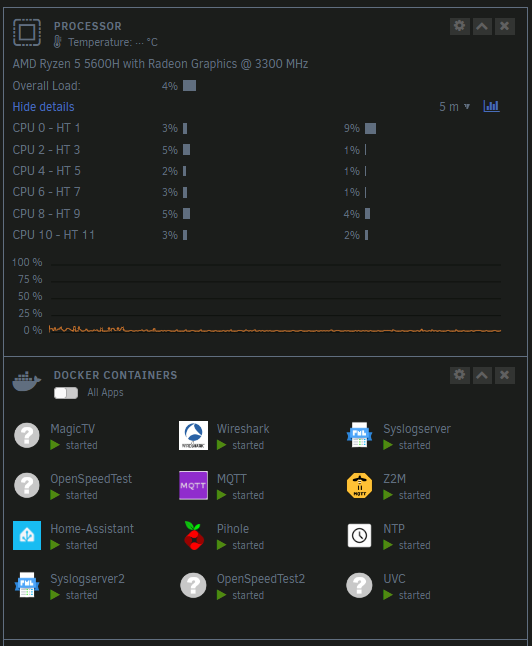
Thats great, if you take power usage from UPS then it just meaningless. Like other person suggestion, check all hardware setting first. I suggest you troubleshoot at system in idle with spin down disk, because other factor would affect the power usage a lot too. Check "disable SVID" setting in BIOS I would expect idle should under 100w. If base on my builds ( no special hard turning ) 9800x , 256G ram, 16 disks, 10gNIC, LSI-3008, expander backplane, GT710, idle at 100w 9700k, 64G ram, 2 disks, 10gNIC, 2 NVMe, idle at 30w 5600h , 64G ram, 2 NVMe, 12 docker, average loading 20w, idle may be 15w
-
What device you use to take power usage figure ?
-
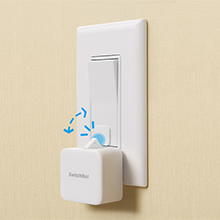
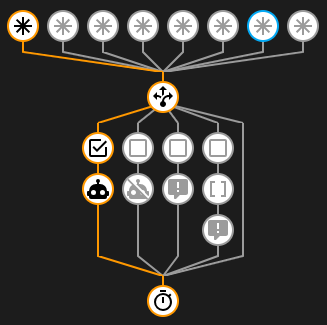
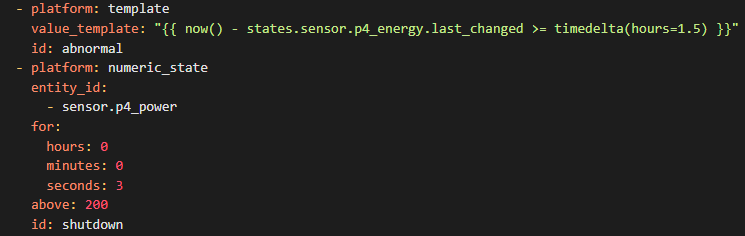
When you add a SMART plug, it means one more failure point. In your case, the best solution was make WOL work for power on Unraid. Or simple use Switch robot to press the power-switch of the PC. I use different kind SMART plug with home-assistance (HA) to keep track the power usage and monitoring the working state of different home appliances, about a week ago the Refrigerator plug crash, it switch-off but the reading still going, so this haven't trigger the abnormal alert ( push message to my mobile ). Finally I have add some rule in HA to overcome this case. ( If energy usage not change more then 1.5 hrs or power usage above 200w in 3sec then shutdown and alert me )
-
因為不可同一個網段
-
The reading come from tasmota device. It is accumulated energy usage from last reset, you can reset it under device web console anytime.
-
Then you may try format the USB in FAT32 / NTFS.
-
You need enable USB_Boot too. But HP BIOS may have UEFI boot problem with Unraid, you could try press F9 ( take a photo for ref. ) and use "Boot from EFI file" to boot Unraid in UEFI.
-
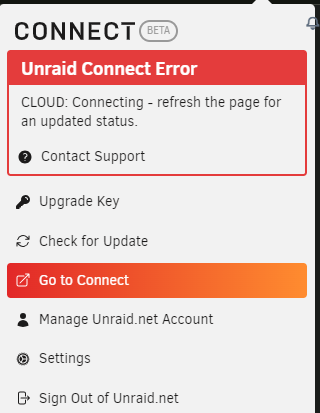
Just note all sever in offline state, re-signin show below error.
-
For Issue_2, this need enable host access, but I check your diagnostics this actually enable. If some docker work, that likely docker issue.
-
Unifi claim 2nd hardware version of 16XG have fix copper port 10G issue, check your switch HW version and get help in Unifi forum.
-
Seems it haven't provide the pin assignment, otherwise you can build yourself, hope you can found the correct cable.
-
Sound good for getting console message from enclosure. ( suppose RJ45 not RJ11 ? )
-
The enclosure have detect. Feb 18 16:00:13 VMHost kernel: scsi 2:0:0:0: Enclosure Promise J830s 060= PQ: 0 ANSI: 6 Feb 18 16:00:13 VMHost kernel: scsi 2:0:0:0: set ignore_delay_remove for handle(0x000a) Feb 18 16:00:13 VMHost kernel: scsi 2:0:0:0: SES: handle(0x000a), sas_addr(0x500015554091333e), phy(36), device_name(0x0000000000000000) Feb 18 16:00:13 VMHost kernel: scsi 2:0:0:0: enclosure logical id (0x500015554091333f), slot(36) Feb 18 16:00:13 VMHost kernel: scsi 2:0:0:0: qdepth(254), tagged(1), scsi_level(7), cmd_que(1) Feb 18 16:00:13 VMHost kernel: scsi 2:0:0:0: Attached scsi generic sg5 type 13 But end-up no response and remove. Feb 18 16:18:47 VMHost kernel: expander present: handle(0x0009), sas_addr(0x500015554091333f), port:255 Feb 18 16:18:47 VMHost kernel: mpt2sas_cm0: search for expanders: complete Feb 18 16:18:47 VMHost kernel: mpt2sas_cm0: mpt3sas_base_hard_reset_handler: SUCCESS Feb 18 16:18:47 VMHost kernel: mpt2sas_cm0: _base_fault_reset_work: hard reset: success Feb 18 16:18:47 VMHost kernel: mpt2sas_cm0: removing unresponding devices: start Feb 18 16:18:47 VMHost kernel: mpt2sas_cm0: removing unresponding devices: end-devices Feb 18 16:18:47 VMHost kernel: mpt2sas_cm0: Removing unresponding devices: pcie end-devices Feb 18 16:18:47 VMHost kernel: mpt2sas_cm0: removing unresponding devices: expanders Feb 18 16:18:47 VMHost kernel: mpt2sas_cm0: removing unresponding devices: complete
-
Problem like compatibly issue, I haven't found those cable / socket finicky. Try found firmware update for 847 blackplane may solve the problem.
-
Not sure what type, but you can try use a 10K resistor ( should got 25C reading ) or real 10K NTC. You can search "ntc 10k 3950" at Amazon to found. Beta value 39XX should be most commonly used. https://www.ametherm.com/thermistor/ntc-thermistor-beta
-
Pls also check does disk have enough space for 20GB+ and check minimum space setting too.
-
Note, but I haven't similar problem show in the video, fan have several time ramp up & down. Mine only ramp to 100% during booting in several sec. ( I exclude the CPU sensor, because it shouldn't a good source to determine the fan PWM ) I bet the bundle fan max at 5000+rpm, thats fine because you can control those through IPMI. That also why I perfer 3000rpm fan in previous. ( i.e. P12 Max )
-
Ensure BIOS fast boot was disable.



