





Vr2Io
Members
-
Joined
Everything posted by Vr2Io
-
A short answer is set the switch port-9 be access port ( untag of vlan100 ), no need add vlan 100 to eth2 ( br2). Unraid / VM no need to know it is vlan100 in such setup.
-
If you confirm UPS functional normal ( putting on battery mode ) by press UPS physical button, then it should be USB port or APCUPSD / NUT issue. Pls try APCUPSD / NUT both, if still got issue, I will suggest add a USB hub ( best USB 2.0 ) between them.
-
I believe some docker or add-on make your network down, other people also report similar case, I think you haven't much options, you need stop something to troubleshoot. For me, I never got this problem with Unraid. ( several Unraid build in 5yrs+, one build were 7*24 in 1.5yrs) May be Plex ?? I haven't that.
-
OMG 🫠
-
Then it look like no problem on docker system now. All DNS server must accessible by all subnet, client will randomly resolve on all DNS server according the setting, not 1st one then 2nd then 3rd.
-
Interesting, but don't know why 10.1.3.251 not work, because eth0 no gateway ? This also the difference on my setup, my private DNS ( Pihole ) was on eth0.2, not the router or public DNS. But my private DNS endup also lookup on a public DNS.
-
After start docker service Still no gateway at eth0 ? Unraid routing table look nornal ?
-
In fact I am not sure OP really fix or not, but no matter how I change the network setting, I couldn't reproduce OP's docker problem. I store docker in /tmp ( ram file system ), so each reboot will redownload all docker ( only need restore appdata ) and I never do extra docker setting, that may be help always keep docker system clean up and so no trouble at all.
-
Yes, problem pointing to docker system instead network or network setting. You may try start from scratch by remove docker image / folder to fix it.
-
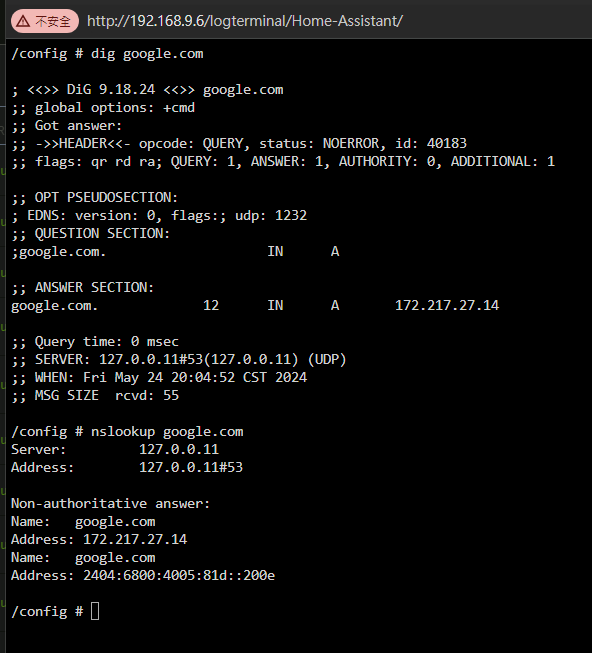
Your dig result haven't answer session, anyway depends on docker itself, my HA docker have dig and nslookup. The DNS translate also 127.0.0.11 I am not sure how to diagnostic if DNS resolve not work in docker.
-
/boot/config/parity-checks.log
-
No, for 10.1.2.xx or 10.1.5.xx, if DNS was 10.1.3.xx it should direct route through router. For example, traceroute in Unraid console, 192.168.9.x subnet route through 192.168.9.9 gateway traceroute 192.168.2.5 traceroute to 192.168.2.5 (192.168.2.5), 30 hops max, 60 byte packets 1 192.168.9.9 (192.168.9.9) 0.115 ms 0.107 ms 0.229 ms 2 * * * 3 * * * traceroute in docker console, 192.168.68.x subnet route through 192.168.68.9 gateway traceroute 192.168.2.5 traceroute to 192.168.2.5 (192.168.2.5), 30 hops max, 46 byte packets 1 192.168.68.9 (192.168.68.9) 0.088 ms 0.099 ms 0.089 ms 2 * * * 3 * * * 4 * * * 5 * * * 6 * * * 7 * * *
-
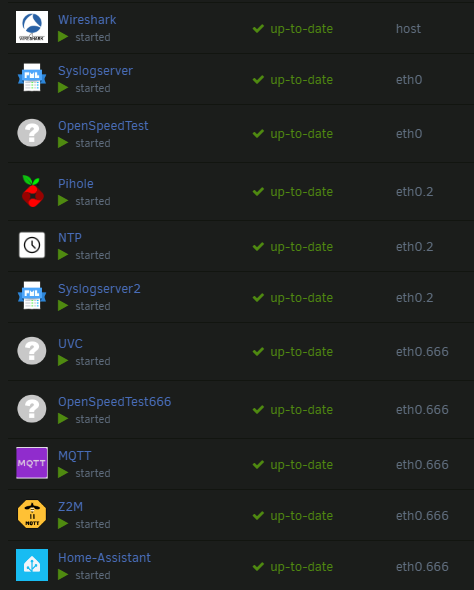
This indicate problem on docker system, I have reach a case, the OP have similar problem, always can't found the custom network, finally OP mark the case resolve by remove other previous docker network. So pls check does other create network left and remove it by "docker network rm xxxxx". Also perform some check on all existing docker network. That's also / may be why we change all network setting and problem still occur. Sometimes, docker network like a black box, when you confirm your physical network haven't issue, but always got trouble. Then you may need further verify by VM network first. For DNS problem, do you confirm not problem on router routing ? For me, all docker could reach private DNS and internet, also other subnet. docker network ls NETWORK ID NAME DRIVER SCOPE 669a79230488 bridge bridge local 61f4b403738e eth0 macvlan local a5af90fcb721 eth0.2 macvlan local e4473591c365 eth0.666 macvlan local a642478c8a6d host host local 33db889adf1b none null local docker network inspect a5af90fcb721 [ { "Name": "eth0.2", "Id": "a5af90fcb721b1133c84995351c516a77c6d3464c66a60b0a505047507bd8ef4", "Created": "2024-05-18T10:51:40.796286014+08:00", "Scope": "local", "Driver": "macvlan", "EnableIPv6": false, "IPAM": { "Driver": "default", "Options": {}, "Config": [ { "Subnet": "192.168.2.0/24", "Gateway": "192.168.2.9" } ] }, "Internal": false, "Attachable": false, "Ingress": false, "ConfigFrom": { "Network": "" }, "ConfigOnly": false, "Containers": { "1e404021ac2b09835323d92888db216c69b46dfe26a213c33a4599fce449e1a9": { "Name": "Pihole", "EndpointID": "7489add3c1bc4b7eacc43bb65541a914b39a4a63ae40ef1acfdeb08265bf0564", "MacAddress": "02:42:c0:a8:02:05", "IPv4Address": "192.168.2.5/24", "IPv6Address": "" }, "cfaa6db42d9c4023309fa94ef10458b77d3cb184d7b5eb03b4c064f8996fed66": { "Name": "NTP", "EndpointID": "7009d52484bc8ca96171d088b7f1fbe592a6c435753448952d51b560b1369c2e", "MacAddress": "02:42:c0:a8:02:06", "IPv4Address": "192.168.2.6/24", "IPv6Address": "" }, "d7ffa44f7c40585d323f540599adf7880750480881f2d1163bfb43541dbba245": { "Name": "Syslogserver2", "EndpointID": "8d800260429264b6278caf086f5a77be0cade18ab7bfd9028155ac6f9037fee0", "MacAddress": "02:42:c0:a8:02:07", "IPv4Address": "192.168.2.7/24", "IPv6Address": "" } }, "Options": { "parent": "vhost0.2" }, "Labels": {} } ] Yes. Each interface have a PVID, so if you don't want untag traffic going to a port, then you can assign an unuse PVID to it.
-
Enable / disable vlan on eth0 won't cause problem, but best set to "no". As mention, I don't found problem on your UnraId setting, I just try to provide some change to troubleshoot. That's a good sign, for DNS queries problem, if you use router / public DNS, then all subnet should be access without problem. If you use private DNS ( like me ) then you need do some routing at router to make DNS accessible. You don't need setting docker config., all docker will use Unraid setting DNS. For example, my docker on different vlan just need set the IP, that's all and no any special tuning. I don't think above have problem. I understand , my bad. for more detail : set that switch port ( connect to eth2 ) with a new vlan id then vlan3 won't go there. Pls also setting as below. If still got problem, pls also try ipvlan.


-
I don't found the graph. You mean you have three AP to serve three different vlan ? anyway this fine. But if you connect three port to a AP then it usually form some looping. A more elegant solution were use single AP and different ssid corresponding to different vlan, my AP support eight ssid, and different ssid bond to different vlan, then tag all to single ethernet port only.
-
This incorrect, OP have different subnet, so each subnet have their gateway is normal. And you use port-base vlan and untag all at access port, this is completely different setup as OP. People always think use vlan to seperate things but in other way think they need communicate each other ..... Your Unraid setup haven't problem, just your network environment have problem ( likely looping ) so network down. If you want simple separate stuff, pls try not use tag-base vlan and use port-base vlan + single subnet only. For me I apply tag-base + port-base + different subnet.

-
This odd, I have similar config. but only use one interface, management subnet were untag and others subnet were tag. Edit : Pls try don't untag vlan 2 to eth2. Pls also ensure, no bridge or inter vlan routing between different subnet at router side for troubleshooting.
-
192.168.1.x address block and is now a 192.168.50.x Pls provide network config. file, it likely DHCP wasn't set to yes, or if you remember the original IP address 192.168.1.x, then manual config the access client to 192.168.1.x and try to access. Also check does a diagnostics ( recent ) file already automatic save on USB stick.
-
Check does the LED on network card and router/switch have change, it show link / speed status. If you have keyboard monitor attach to Unraid , then access it local and provide the diagnostics ( tools -> diagnostics ) file here.

-
It indicate a station STA:16:d8:85:1a:91:0c connect to router through WiFi but reject. As Unraid doesn't support WiFi connection, so those shouldn't relate to Unraid.
-
It work !!
-
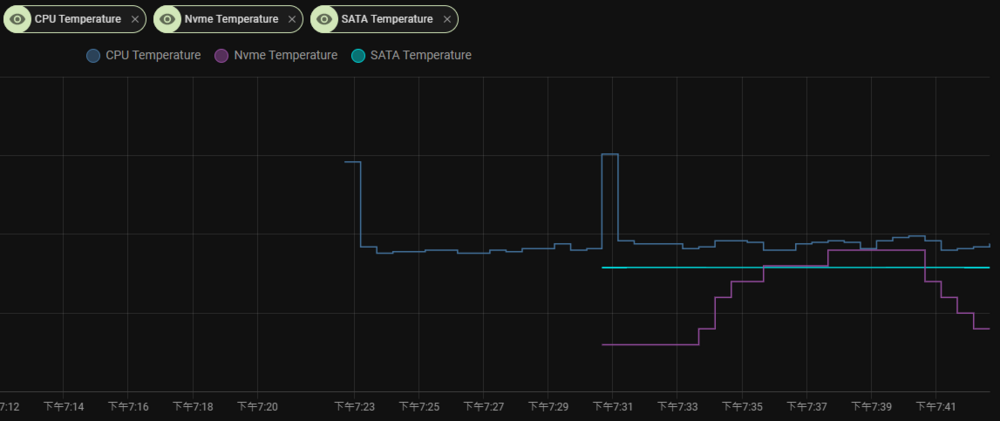
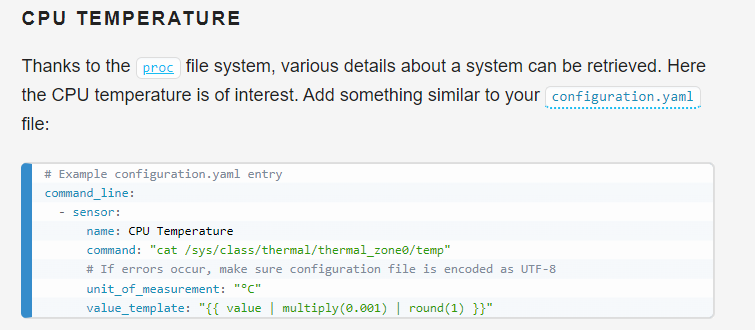
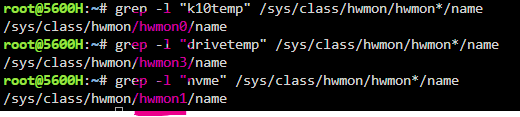
Just try something, I surprise HA could get those CPU & disk temperature directly. I use HA docker and under HA console, you can easy got the reading as below. So, don't need MQTT. /config # cat /sys/class/hwmon/hwmon3/temp1_input 41000 /config # cat /sys/class/hwmon/hwmon1/temp1_input 44850 /config # cat /sys/class/hwmon/hwmon1/temp1_input 44850 /config # cat /sys/class/hwmon/hwmon1/temp1_input 45850 /config # cat /sys/class/hwmon/hwmon1/temp1_input 44850 /config # cat /sys/class/hwmon/hwmon1/temp1_input 44850 /config # cat /sys/class/hwmon/hwmon0/temp1_input 47125 /config # cat /sys/class/hwmon/hwmon0/temp1_input 46875 /config # cat /sys/class/hwmon/hwmon0/temp1_input 46625 /config # cat /sys/class/hwmon/hwmon0/temp1_input 46500 When you type sensors in Unraid console, it will show something as below root@5600H:~# sensors amdgpu-pci-0500 Adapter: PCI adapter vddgfx: 1.02 V vddnb: 781.00 mV edge: +45.0°C PPT: 13.00 W k10temp-pci-00c3 Adapter: PCI adapter Tctl: +46.8°C drivetemp-scsi-2-0 Adapter: SCSI adapter temp1: +41.0°C nvme-pci-0100 Adapter: PCI adapter Composite: +45.9°C (low = -273.1°C, high = +81.8°C) (crit = +84.8°C) Sensor 1: +45.9°C (low = -273.1°C, high = +65261.8°C) Below is the methods how you know the path https://www.baeldung.com/linux/hdd-ssd-temperature And last is convert it to sensors https://www.home-assistant.io/integrations/command_line/
-
igc means 2.5G and ix1 is 10G ? But why ix1 was linkdown ? Does mlx4 00:02:c9:56:8c:1e show in router ? # PCI device 0x15b3:0x6750 (mlx4_core) SUBSYSTEM=="net", ACTION=="add", DRIVERS=="?*", ATTR{address}=="00:02:c9:56:8c:1e", ATTR{dev_id}=="0x0", ATTR{type}=="1", KERNEL=="eth*", NAME="eth0" If you can access Unraid locally and make test on 10g have pass some network test, i.e. ping other client and router, then problem likely opensense relate.
-
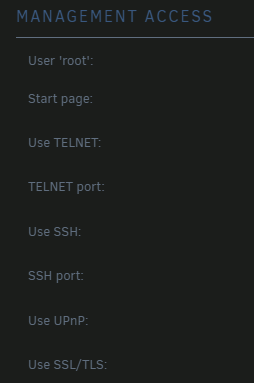
Does still on-line even 2.5g port plug-out ? Your switch is manage 10G switch ? To simplify troubleshoot, disable bonding, put ConnecX-2 be eth0, disconnect eth1 ( also don't setting eth0,eth1 in same subnet), disable array auto-start until you solve the problem. Also temporary setting "use SSL/TLS" to "no".
-
Connect in wire or WiFi ? Pls also try both.




