





Vr2Io
Members
-
Joined
Everything posted by Vr2Io
-
That means system couldn't resume after sleep. Not all system can resume after sleep, you may try tuning some BIOS setting to fix that.
-
Disk disable before Unraid reboot, so no log for that. Pls also check disk power cable. There are no guaranty problem gone even you start from scratch, you need troubleshoot logically and rule out different possibility. The problem disk were connect Marvell 91xx controller, it should have two port, pls ensure you have try connect to other controller for troubleshooting.
-
Yes correct.
-
Deleted. Pls provide the detail of that cable, i.e. internet link.
-
If disk spinning then not 3.3v issue.
-
Also perform built-in memtest, you only have 4 disk doesn't like power issue.
-
Seems your USB stick was 64GB, it may not support in old platform, pls also try some smaller size USB. Also make sure it format in fat32 instead NTFS.
-
Try reboot Unraid first.
-
This could be the problem, WiFi always bad for performance.
-
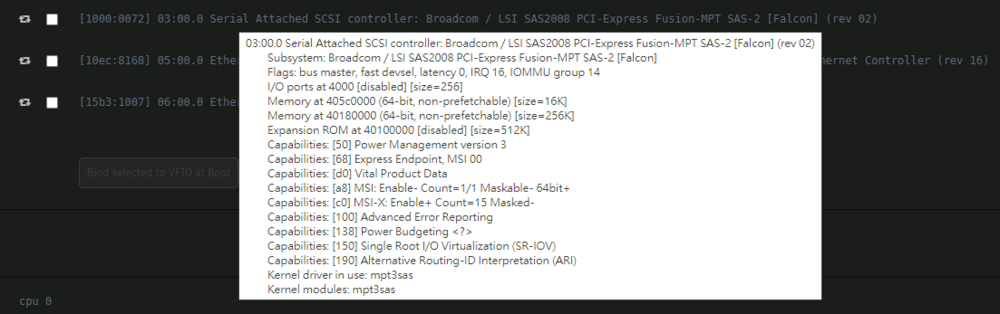
I haven't any SAS2008 in system, but your one show RAID bus controller, it look like IR firmware, anyway this doesn't matter. Below is my previous SAS2008 HBA look like.
-
As no problem found after booting in Unraid, so you may ignore the BIOS error and start parity check. If reboot again, does BIOS always show same error ? What are the another addon HBA onhand ?
-
Great if you crossflash addon 9211 ( 2008 IR ) to ( 2008 IT ) for best combination.
-
Through you have more then 8 disks and you need two controller, can't isolate the controller to test. Because I thinking if a fault controller will affect another good one, but this I can't confirm. In normal booting, does LSI BIOS will show two controller in same list ? The error message said addon ( 2008, 01:00.0 ) fail, but onboard ( 2308, 02:00.0 ) fine. What are the another addon HBA on hand ?
-
Just notice you have onboard (2008) (2308) and addon HBA (2308) (2008). Need check does disk drop at either HBA or cross.
-
Never found this type / form error, likely HBA or Mobo related, because disks won't cause this. How many disk detect when booting in Unraid ?
-
Actually this fine for start another parity check, this is current know method to trigger disk drop until you found a quickest way.
-
The 5v requirement is most trouble part, you are in gambling if you allow insufficient power for that. If SSD draw 1A+, that means the x8 cage will handle 8A+, really a challenge. I always wish a day, HDD / SDD only need single 12v input.
-
When battery not charging then it actually was in discharging, so it may not a fault and it may not trigger NUT to go shutdown routine. It likely relate APC have some change in some UPS model's firmware, and not as usual. The key point is dose NUT going to shutdown routine. For example, I test my APC UPS and got below message, but NUT won't going to shutdown. I think most important message are online or on battery. If that true, may be NUT should not RED all online status.

-
My friend have similar problem, sometime plugin update fail ( haven't docker ). And his Internet also unstable in random time ( sometime were normal, we use same ISP but in different location ) A simple way to use Mobile network as alternate ISP for testing was connect a USB ethernet adapter to Android phone act as ISP, useful to identify problem.
-
Yes, bad cooling and room temp 30c 😅
-
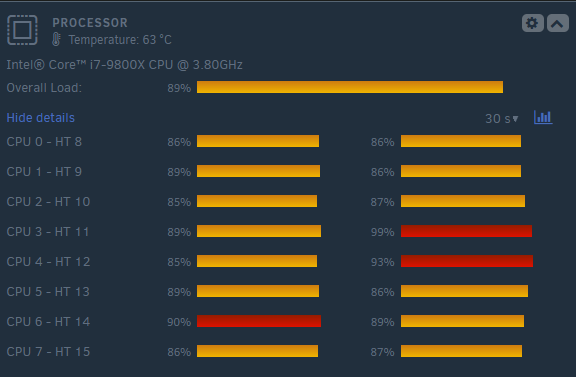
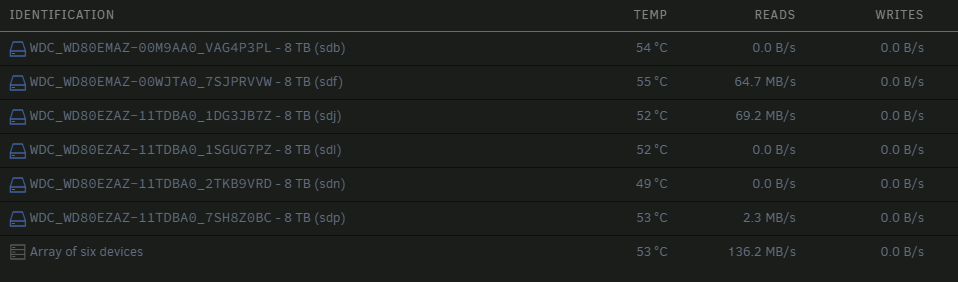
Checking on different log, there are no clear reason for disk drop, just random time. Once disk drop in array, you will got below in syslog and disk reconnect within 3 second and change drive letter, this was normal disk drop result. Aug 24 11:42:49 MRPUNRFSX1 kernel: sd 1:0:1:0: device_block, handle(0x0009) Aug 24 11:42:51 MRPUNRFSX1 kernel: sd 1:0:1:0: device_unblock and setting to running, handle(0x0009) Aug 24 11:42:55 MRPUNRFSX1 kernel: sd 1:0:5:0: Attached scsi generic sg8 type 0 Aug 24 11:42:55 MRPUNRFSX1 kernel: sd 1:0:5:0: Power-on or device reset occurred Aug 24 11:42:57 MRPUNRFSX1 unassigned.devices: Disk with ID 'WDC_WD60EFPX-68C5ZN0_WD-WX52D53L37PL ()' is not set to auto mount. ----- Aug 23 13:57:35 MRPUNRFSX1 kernel: sd 3:0:4:0: device_block, handle(0x000d) Aug 23 13:57:37 MRPUNRFSX1 kernel: sd 3:0:4:0: device_unblock and setting to running, handle(0x000d) Aug 23 13:57:41 MRPUNRFSX1 kernel: sd 3:0:5:0: Attached scsi generic sg11 type 0 Aug 23 13:57:41 MRPUNRFSX1 kernel: sd 3:0:5:0: Power-on or device reset occurred Aug 23 13:57:43 MRPUNRFSX1 unassigned.devices: Disk with ID 'WDC_WD60EFPX-68C5ZN0_WD-WX52D53L37PL (dev1)' is not set to auto mount. ----- Aug 23 16:57:20 MRPUNRFSX1 kernel: sd 4:0:3:0: device_block, handle(0x000c) Aug 23 16:57:22 MRPUNRFSX1 kernel: sd 4:0:3:0: device_unblock and setting to running, handle(0x000c) Aug 23 16:57:29 MRPUNRFSX1 kernel: sd 4:0:5:0: Attached scsi generic sg10 type 0 Aug 23 16:57:29 MRPUNRFSX1 kernel: sd 4:0:5:0: Power-on or device reset occurred Aug 23 16:57:30 MRPUNRFSX1 unassigned.devices: Disk with ID 'WDC_WD60EFPX-68C5ZN0_WD-WX52D53L37PL (sdu)' is not set to auto mount. (1) Pls ensure drop disk fall to UD, you can mount it and read the file content, then you actually not need rebuild it. And after problem fixing, then re-add to array and rebuild-parity. (2) Stop disk auto spin-down. (3) Open a terminal, type "dmesg -wT" to keep track does any "I/O error" or "tail -f /var/log/syslog" to check any device_block & device_unblock. You can press "Enter" anytime for easy check any new log after that. (4) Parity operation should generate maximum I/O and useful stress disk to drop-out, but in this case seems not. So I will suggest some different test hop can reproduce problem ASAP. But I won't know what will trigger this, so just try it. Pls open 3 terminal, execute below command, concurrent two hash for big file should provide enough loading to CPU, the 3rd one just make another hash for small file. find /mnt/disk5 -type f -size +8G -exec b3sum {} \; hash file on disk5 which large then 8GB. find /mnt/disk6 -type f -size +8G -exec b3sum {} \; hash file on disk6 which large then 8GB. find /mnt/user -type f -size -5k -print0 | sort -Rz | xargs -0 -n1 b3sum Hash file on user share ( random sort ) which smaller then 5k.
-
Note and thanks, when I build or make change on hardware, I will first make memtest because it absolutely importance for system stability verify. Form my memory, I haven't DDR3 bad record but for DDR4 I got about 4 times bad record.
-
Note, I m recheck different diagnostics's syslog before request some different test.
-
I suggest you stop rebuild any disk, if disk were drop-out due to read error or crash and actually no problem. When disk drop-out, does it can mount by UD ? if answer is positive then no meaning to fully write disk once. Problem happen over a week. current troubleshooting method doesn't work, you need proactive or a way which could quickly reproduce the problem, so make work more effectively. Could you use built in memtest to test, the one in Unraid booting menu( I know you have test by memtest plugin ) Then I will request some stress test later.
-
Really trouble seems corrupt file system too. Pls use some dummy disk for test, and best got a trial Unraid on new USB stick for testing.



