





Vr2Io
Members
-
Joined
Everything posted by Vr2Io
-
First, I would think why don't use Frigate to perform both fulltime recording and event recording, as you family with Frigate. May be I know the reason, it hard to only sent event to HA and if Frigate mix fulltime and event recording, it may cause some missing in fulltime recording when event happen. I use an obselate UVC docker to record fulltime and event video, not perfect but it need little resources and storage, for example, for 1024x768 stream ( something like that ) it only need 4GB per day per CAM. But UVC record video in 1sec per file, so fulltime recording for one CAM per day will generate 80k+ file. And you need housekeep those file, if you don't housekeep and store too much days then it will respond in very slow. I housekeep in month bias. This are the only reason why I feedback this post. You not care about the video quality and functionality and I never have hang in recording.
-
If you haven't device need to passthrough to docker, then remove that entry.
-
Unraid support VLAN, so physical NIC could have different subnet by VLAN. As said, I don't know how you could achieve your goal in NVR docker. But no problem if VM. Or simple ask, does Agent DVR docker support multiple network interface ?
-
This not a first problem, the real problem are most docker not support multiple virtual network interface or multiple subnet. When you found NIC have different IP, actually they are point to different virtual interface through same physical NIC.
-
-
直接用 command 就可, rsync. 網絡上很多用法資料. 十分好用又強大. 最後加入 -n 就是模擬一下先, 這可避免做錯事. 如不想每次輸入 command, 安裝 user script 來執行便可. 例如以下, 意思是傳送了 162MB, 更新了 1751 個檔案. Number of files: 69,787 (reg: 69,778, dir: 9) Number of created files: 1,751 (reg: 1,751) Number of deleted files: 0 Number of regular files transferred: 1,751 Total file size: 6.43G bytes Total transferred file size: 162.17M bytes Literal data: 162.17M bytes Matched data: 0 bytes File list size: 3.80M File list generation time: 0.001 seconds File list transfer time: 0.000 seconds Total bytes sent: 166.17M Total bytes received: 33.35K
-
Bus 001 是 USB 2, Bus 002 才是 USB 3. Bus 002 Device 002: ID 0951:1666 Kingston Technology DataTraveler 100 G3/G4/SE9 G2/50 Bus 002 Device 001: ID 1d6b:0003 Linux Foundation 3.0 root hub Bus 001 Device 004: ID 174c:55aa ASMedia Technology Inc. ASM1051E SATA 6Gb/s bridge, ASM1053E SATA 6Gb/s bridge, ASM1153 SATA 3Gb/s bridge, ASM1153E SATA 6Gb/s bridge Bus 001 Device 009: ID 2109:8817 VIA Labs, Inc. USB Billboard Device Bus 001 Device 008: ID 152d:0578 JMicron Technology Corp. / JMicron USA Technology Corp. JMS578 SATA 6Gb/s Bus 001 Device 012: ID 2109:8817 VIA Labs, Inc. USB Billboard Device Bus 001 Device 011: ID 152d:0578 JMicron Technology Corp. / JMicron USA Technology Corp. JMS578 SATA 6Gb/s Bus 001 Device 010: ID 152d:0578 JMicron Technology Corp. / JMicron USA Technology Corp. JMS578 SATA 6Gb/s Bus 001 Device 007: ID 2109:2817 VIA Labs, Inc. USB2.0 Hub Bus 001 Device 006: ID 152d:0578 JMicron Technology Corp. / JMicron USA Technology Corp. JMS578 SATA 6Gb/s Bus 001 Device 005: ID 152d:0578 JMicron Technology Corp. / JMicron USA Technology Corp. JMS578 SATA 6Gb/s Bus 001 Device 003: ID 2109:2817 VIA Labs, Inc. USB2.0 Hub Bus 001 Device 002: ID 2109:2820 VIA Labs, Inc. VL820 Hub Bus 001 Device 001: ID 1d6b:0002 Linux Foundation 2.0 root hub
-
Then case become interesting.
-
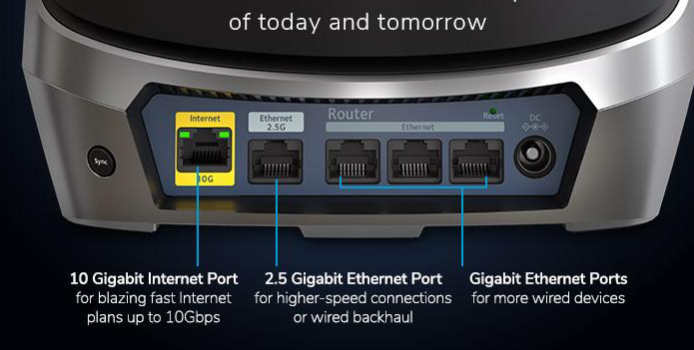
Does Orbi have router and satellite and Unraid connect to satellite ? To simply troubleshoot, pls ensure Unraid and access client connect in same router or satellite, if they communicate in local then nothing relate to router, almost impossible fail ping each other. If below are the outlook of Orbi 960, how you connect your equipment, if connect through 2.5g port, does it play special because it can use as wire backhaul.
-
This fine, I also do that when I first try on 10G, start from a cheap NIC then other expensive equipment. This also my concern in pass, but it have many limitation and not that important now. A mobo have much PCIe slot already enough.
-
As said, I haven't found much different between Mellanox between Intel. I have two Mellanox ConnecX3-pro and 3 or 4 82599, the 2nd Mellanox was used and I buy recently, I haven't put it to live because no immediate benefit. But when I test it I got TWO trouble to make it work, after half-day work, I identify it is because SRIOV issue, when it disable in BIOS ( or enable in BIOS, I can't remember that ) then its driver will stop working, Another trouble relate to mobo, when it connect the NIC in PCIe 3.0 it will got error but no error if I downgrade the slot to PCIe 2.0 ..... BTW, you would found different possible issue for Mellanox or Intel card, but in simple say, Intel should less trouble from my experiences. The only reason for me to choice between them is PCIe interface related , 82599 are PCIe 2.0x8 , ConnectX-3 are PCIe 3.0x4, so ConnectX-3 are the winner. Which 10G switch you own ? If still haven't, you may deeply consider use SFP+ or not. ( I don't mean not use SFP+ ).
-
I don't think relate C states, Windiws and Linux power management should similar, I suspect power draw come from A380, you may try without it does power drop, may be Unraid haven't take power management on A380. Don't too quickly conclude it's Ryzen issue.
-
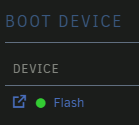
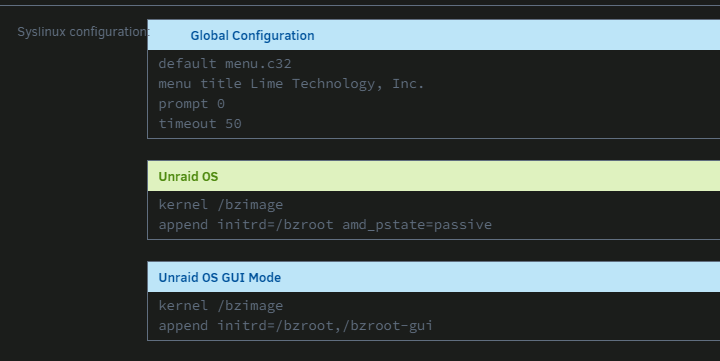
You can click on "Flash" then edit in GUI
-
No any negative effect, we always do that to get a trial Unraid for testing or troubleshooting. Of course, backup stick and only keep licence file and make a fresh OS also easy, this also a reason why I like Unraid. You also can downgrade OS through GUI too.
-
You may check what power management driver use and try change to old one, but according your descriptions it doesn't like CPU work in light load and I doubt it will help. I use cpufreq to diagnostic, no experience on powertop. You need keep track what average CPU freq. multiplier to compare power usage between different OS. https://forums.unraid.net/bug-reports/prereleases/7-0-0-beta1-cpu-use-twice-power-r3038/? When you say Unraid use much power then Windows, does both running similar task ?
-
Those adapter only work if you direct connect to disk.
-
Could you capture the array screen after " unassigned disable disk ( disk 4 ? ) then start and stop array "
-
No need replace the drive, if it rebuild success.
-
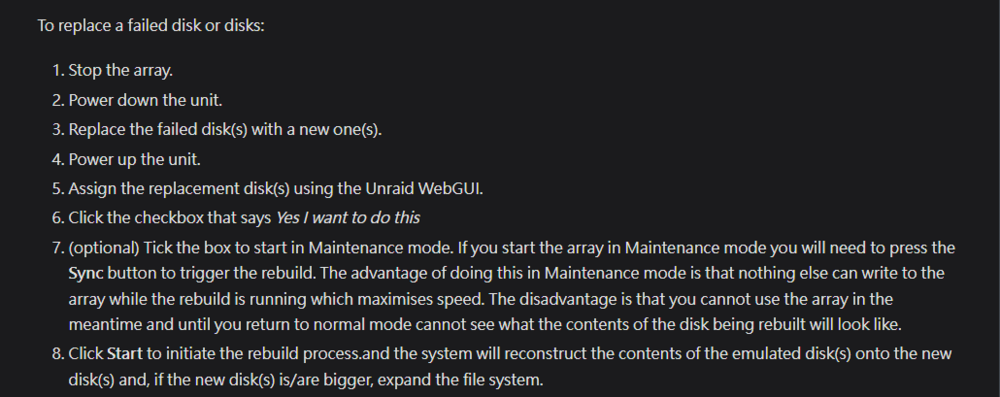
As step (8) said, click "start", then it will rebuild. And you may need an extra step, stop array then unassigned the emulated disk and start array, then stop.
-
If that you can rebuild as usual.
-
Does emulated disk look normal ? If it doesn't normal then don't rebuild on-it. https://docs.unraid.net/unraid-os/manual/storage-management/ Section : To replace a failed disk or disks: You may skip step (2) to (4).
-
Not likely disk problem, if the emulated disk content look fine, then you may rebuild on it. Yes. But the new diagnostics haven't record it ( may be due to short during ), pls keep check.
-
Disk drop on 8-Sep 01:00, but don't know why it have spin-up on 13-Sep. Pls try reboot and post diagnostics again. Sep 8 01:00:32 Skynet kernel: sd 1:0:4:0: task abort: SUCCESS scmd(0x000000007078cd1c) Sep 8 01:00:32 Skynet kernel: sd 1:0:4:0: [sdf] tag#3685 UNKNOWN(0x2003) Result: hostbyte=0x00 driverbyte=DRIVER_OK cmd_age=19s Sep 8 01:00:32 Skynet kernel: sd 1:0:4:0: [sdf] tag#3685 Sense Key : 0x2 [current] Sep 8 01:00:32 Skynet kernel: sd 1:0:4:0: [sdf] tag#3685 ASC=0x4 ASCQ=0x0 Sep 8 01:00:32 Skynet kernel: sd 1:0:4:0: [sdf] tag#3685 CDB: opcode=0x8a 8a 08 00 00 00 02 00 05 91 40 00 00 00 08 00 00 Sep 8 01:00:32 Skynet kernel: I/O error, dev sdf, sector 8590299456 op 0x1:(WRITE) flags 0x20800 phys_seg 1 prio class 2 Sep 8 01:00:32 Skynet kernel: md: disk4 write error, sector=8590299392 Sep 13 14:06:27 Skynet emhttpd: spinning up /dev/sdf Sep 13 14:06:42 Skynet kernel: sd 1:0:4:0: attempting task abort!scmd(0x000000005ba4e52f), outstanding for 15080 ms & timeout 15000 ms Sep 13 14:06:42 Skynet kernel: sd 1:0:4:0: [sdf] tag#3667 CDB: opcode=0x85 85 06 20 00 00 00 00 00 00 00 00 00 00 40 e3 00 Sep 13 14:06:42 Skynet kernel: scsi target1:0:4: handle(0x000d), sas_address(0x4433221106000000), phy(6) Sep 13 14:06:42 Skynet kernel: scsi target1:0:4: enclosure logical id(0x500605b00a6bd240), slot(5) Sep 13 14:06:46 Skynet emhttpd: sdspin /dev/sdf up: 22 Sep 13 14:06:46 Skynet emhttpd: read SMART /dev/sdf Sep 13 14:06:46 Skynet kernel: sd 1:0:4:0: task abort: SUCCESS scmd(0x000000005ba4e52f) 2nd issue, you need check why the NVMe non-stop got AER error, it is Samsung 980pro, pls try clean-up contact pin and re-seat.
-
Then try don't spin down disk to narrow down the problem first. Some user got spin down up then disk drop problem.
-
Pls try boot in safe mode and test does disk drop again.


