





Vr2Io
Members
-
Joined
Everything posted by Vr2Io
-
That's good, so problem not related to disk itself because no problem when it be disk11. Due to problem stick to disk 15, would you try empty slot 15 and temporary assign the disk to i.e. 17. This iused to rule out does something affect disk15 only, as you use single parity so this no hurt to reassign data disk.
-
Could you also use built in memory test to test, I found test no. 7 would effectively detect error, so you could only test that for time saving. For thise case, although it look like disk problem, but the log which record in disk didn't match at all. As mention, you can 1. Apply RMA on that disk and check does problem gone. Or 2. Swap another disk with it and check does problem follow on same physical disk or still disk 15.
-
Just periodic backup then you won't worry about that, my oldest stick use in day 1 with UR, 6+ yrs still in service.
-
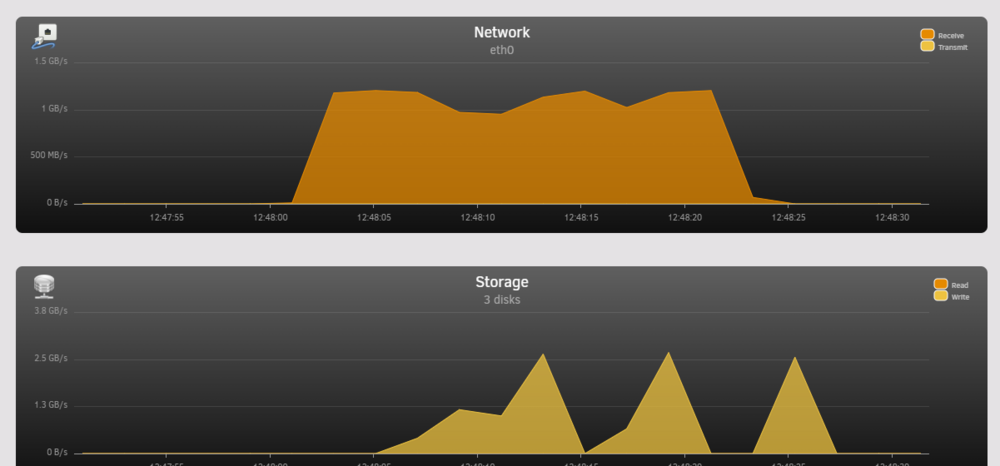
I have same problem in longtime ago, unable to solve. Since then I haven't use NVMe as cache and use RAM cache and directly write to stripe spinner disk pool. Just make test again after update 6.12.13, it got full speed on SMB writing to NVMe ( already minimize cache level and confirm it flush to NVMe in same time ) ....... Anyway, just FYR
-
In general, SMART test won't clear the error and according to the log, last 3 extended test was abort by host. SMART Extended Self-test Log Version: 1 (1 sectors) Num Test_Description Status Remaining LifeTime(hours) LBA_of_first_error # 1 Extended offline Aborted by host 90% 8722 - # 2 Extended offline Interrupted (host reset) 90% 8722 - # 3 Short offline Completed without error 00% 8699 - # 4 Short offline Completed without error 00% 8697 - # 5 Short offline Completed without error 00% 8697 - # 6 Extended offline Aborted by host 90% 8626 - # 7 Short offline Completed without error 00% 8626 - # 8 Extended offline Completed without error 00% 7752 - # 9 Short offline Completed without error 00% 7737 - #10 Short offline Completed without error 00% 1289 - #11 Extended offline Completed without error 00% 1017 - #12 Short offline Completed without error 00% 1006 - If according the log, it also record 1 times error only. Error 1 [0] occurred at disk power-on lifetime: 8449 hours (352 days + 1 hours) When the command that caused the error occurred, the device was active or idle. After command completion occurred, registers were: ER -- ST COUNT LBA_48 LH LM LL DV DC -- -- -- == -- == == == -- -- -- -- -- 40 -- 51 00 00 00 00 a9 a9 87 98 40 00 Error: UNC at LBA = 0xa9a98798 = 2846459800 Commands leading to the command that caused the error were: CR FEATR COUNT LBA_48 LH LM LL DV DC Powered_Up_Time Command/Feature_Name -- == -- == -- == == == -- -- -- -- -- --------------- -------------------- 60 01 00 00 00 00 00 a9 a9 87 90 40 00 04:03:47.620 READ FPDMA QUEUED 60 01 00 00 00 00 00 a9 a9 86 90 40 00 04:03:47.619 READ FPDMA QUEUED 60 01 00 00 00 00 00 a9 a9 85 90 40 00 04:03:47.618 READ FPDMA QUEUED 60 01 00 00 00 00 00 a9 a9 84 90 40 00 04:03:47.616 READ FPDMA QUEUED 60 01 00 00 00 00 00 a9 a9 83 90 40 00 04:03:47.615 READ FPDMA QUEUED Assume completed, any result ? If same disk periodic failure and have warranty, not bad to go RMA.
-
But unless I want start from scratch, I will copy the old USB to new one, then run in trial. After restore all file to new server then transfer the license. I usually won't re-setup docker and VM due to lazy.
-
You should setup new server and ensure it can completely replace the old one. Then copy the key file to new USB and confirm license transfer.
-
You have pool ? If no pool then no mover would invoke.
-
Sure you can rebuild the parity, just ensure all data disk found and correctly assign to be data disk, no file lost. Then assign remain disk be parity and it will rebuild parity on that disk. For VM ( if Windows VM, you can boot orignal image, but it will lost licence ) and other setting / config, you need re do all.
-
3 pin not means it can't control the fan speed. Speed adjustment was controlling the voltage apply to the fan. If you haven't found any fan adjustment on BIOS then this most likely the 3pin header ( CPU fan ) may not have any control, just always run at full-speed ( low rpm fan ). To confirm this true or not, use a multimeter to measure the voltage across red-black wire, if it always 12v, this mean no control there.
-
The backup already have original disk assignment and all config. So, restore it to new USB and bootup should got all back, unless the backup is outdated or mismatch original config.
-
Yes
-
First, I have assume the backup was a single image file, but according your descriptions it likely was a branch directory and file backup of the USB, does it correct ? If that, you need assign all disk to array to get whole directory and file from different disk. Don't assign any disk to parity.
-
Only parity disk can't mount, all data disk will mountable and you can check the content in GUI. Once you find the backup image, then download it to your laptop and perform restore. As mention, you don't need assign disk to array and also shouldn't do that. This used to ensure don't make mistakes and also not necessary.
-
Not all log will notify because their serverty. A simple triggering were make change on disk temperature alert then make some work load on disk to see have push notification or not.
-
Did you power the disk with 12v ( external power ) ?
-
Clear disk or not won't affect speed.
-
You can install Unraid to new USB stick and running in trial. This only aim to get the backup from array. The problem is you don't know the backup locate at which disk. To simplify, install UD to mount disk and found it. After that, restore to same USB and confirm the licence migrate to this stick, and then perform parity check/sync to ensure array consistent.
-
In general, UPS power not provide RMS power reading or not really take power-factor in account, after use smart power meter plug, I generally ignore UPS power meter function. 2nd, UPS also draw power, depends on UPS model it could draw 40w+ (RMS). I would expect your UPS draw around 15w+, you can take the reading when unplug Unraid to measure the power usage of the UPS.
-
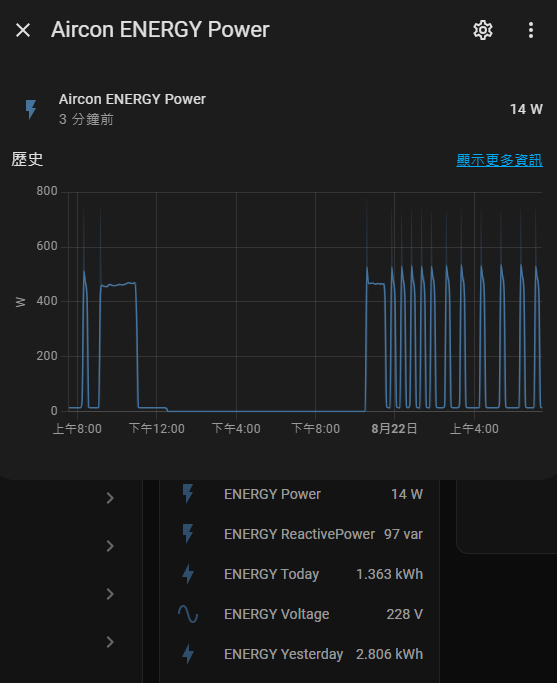
Recommend home-assistant, almost all my SMART power meter ( different type ) were integrate to HA. My UPS haven't integrate because it locate away from Unraid and I don't want waste power to powerup a machine to monitor this. HA support NUT and APCUPSD too ( be host or client ), all reading figure will record and provide graph data. For example, something as below.
-
Does crash only happen if VM running ? Seems you have passthrough many device, could you temporary disable GPU passthrough ? Also try disable Resizable BAR ( Smart Access Memory ) if BIOS have that.
-
In other post I have try helping to fix similar problem, but result negative. Strange that I never have such problem even many network config change on different build.
-
Look like some dirty data, there shouldn't show br1 as you haven't eth1. Suggest try stop docker service then reboot then start docker service.

-
It may not fully load CPU, suggest check CPU temp in memtest, if sit at 85c+, you need check the cooling.
-
If you temporary unplug all SAS disk, does SATA disk show up ?



