





Vr2Io
Members
-
Joined
Everything posted by Vr2Io
-
Because I am not sure which is the best, so I buy both platform to test, as those not enterprise equipment, so rather cheaper and I could afford buy several mobo. During play with Unraid, I always found a good mobo far more important then everything.
-
Haven't experience for EPYC, my previous build (3.5yrs ago) also due to need for PCIe lane slot and memory slot. Cost also a key point, they are Intel X299 and AMD X399 platform. I like those hardware, flexible for IO expansion, but a bit higher power usage, so both won't 7x24. Finally, X299 is winner for Unraid purpose, because 1) More mobo choice then X399 ( I have three X299 mobo and one X399 mobo finally ) 2) More cooler choice to fit in 3U rack case. 3) My X399 mobo not have great compatibility with different PCIe card.
-
Depends on the price you got, Mellanox ConnectX3 or Intel 82599 is my favourite. Recently use back us-16-xg because it have 12 SFP+ port, also add some SFP+ Ethernet converter, so now have 2.5Gbps device running in the network and upgrade switch trunk from 1G to 10G ( use existing 15m ethernet CAT3 cable )
-
Oh yes. Suggest you try connect the TB ethernet to another 1G port to verify it work first. It could be the Tplink SFP+ converter not work with 82599. Also same reverse, connect the Tplink converter to another 1G port to verify it work or not.
-
How you connect the 82599 SFP+ to TB ethernet device ? You have attach two Unraid capture screen which setting same IP but they are different MAC address.
-
Don't put both in same subnet. So, in most case you won't need the 1gb link.
-
👍 👍👍
-
Each docker network / brigde must in standalone subnet.
-
This not because how many pin, it is because APC have USB (4pin) and Serial (3 pin, not all model have) in the RJ50 (10pin) and no ethernet there.
-
It still look like network setting issue, pls provide setting -> docker page screen dump for ref. Also ensure the setting were correct.

-
Are you access thr http://10.0.0.158 ?
-
Don't do that !! Only if you confirm the cable / adapter are the right one. It seem that UPS use SNMP, pls connect the UPS Ethernet to your network and well config it, then also try config NUT/APCUPSD with SNMP setting.

-
Update to 7, no problem but CPU power raise from ~5w to ~10w, my CPU is AMD 5600h, as result, CPU temp raise from 44C to 55C. CPU usage graph haven't different, but actual temperature and pkg[0] have noticeable change. Just report and keep monitoring first. Tips and Tweaks "Performance Boost" pull-down haven't selection and driver was "Driver: amd-pstate-epp", not sure does this change since 7. ** Edit : It look like relate driver different, with Linux 6.3's New AMD P-State EPP Driver ** https://www.phoronix.com/review/amd-pstate-epp-ryzen-mobile/6
-
UEFI and legacy can coexist, if you remove - and make stick also legacy bootable, then actual boot mode will depends on BIOS setting.
-
To be honest, this issue also happen in different Unraid build, seems some people haven't face this but I always found different user suffer the same ( ceiling at 300MB/s ) . My solution was equip the build with much much memory as cache, so it will regulate slow network transfer issue, but this not a real solution, and you need understand. From my experience, stripe storage may got great performance then single storage ( for network file transfer ), even single storage was high end device. I never use cache pool / mover because this not the best for my use case, I use stripe pool in general. With many memory cache + stripe storage, I can transfer file in an acceptable speed, it haven't issue even transfer in 100TB data.
-
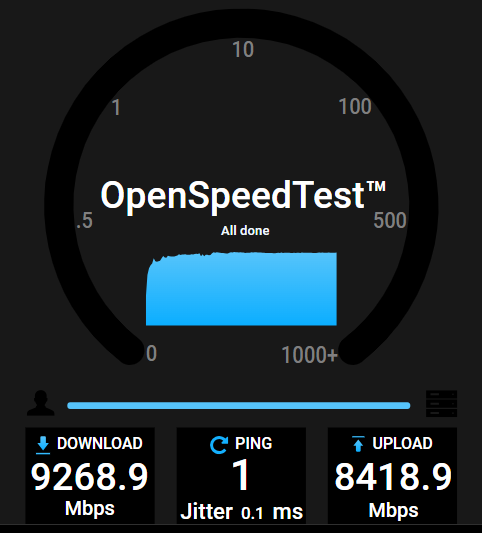
You may try test in parallel streams by option "-P". With two streams it reach 9.37Gbps for my X520. All my Unraid use X520 and a ConnectX-3 with Windows, so far so good. I like OpenSpeedTest docker more then iperf3, btw both available per the need. For Unraid network sharing not reach 10Gbps, this is other issue and you may not fix by change different type NIC. [ 4] 6.00-7.00 sec 686 MBytes 5.75 Gbits/sec [ 4] 7.00-8.00 sec 691 MBytes 5.80 Gbits/sec [ 4] 8.00-9.00 sec 691 MBytes 5.79 Gbits/sec [ 4] 9.00-10.00 sec 689 MBytes 5.78 Gbits/sec - - - - - - - - - - - - - - - - - - - - - - - - - [ ID] Interval Transfer Bandwidth [ 4] 0.00-10.00 sec 6.71 GBytes 5.77 Gbits/sec sender [ 4] 0.00-10.00 sec 6.71 GBytes 5.76 Gbits/sec receiver [ 4] 8.00-9.00 sec 583 MBytes 4.89 Gbits/sec [ 6] 8.00-9.00 sec 538 MBytes 4.51 Gbits/sec [SUM] 8.00-9.00 sec 1.09 GBytes 9.40 Gbits/sec - - - - - - - - - - - - - - - - - - - - - - - - - [ 4] 9.00-10.00 sec 582 MBytes 4.89 Gbits/sec [ 6] 9.00-10.00 sec 534 MBytes 4.48 Gbits/sec [SUM] 9.00-10.00 sec 1.09 GBytes 9.37 Gbits/sec - - - - - - - - - - - - - - - - - - - - - - - - - [ ID] Interval Transfer Bandwidth [ 4] 0.00-10.00 sec 5.68 GBytes 4.88 Gbits/sec sender [ 4] 0.00-10.00 sec 5.68 GBytes 4.88 Gbits/sec receiver [ 6] 0.00-10.00 sec 5.24 GBytes 4.50 Gbits/sec sender [ 6] 0.00-10.00 sec 5.24 GBytes 4.50 Gbits/sec receiver [SUM] 0.00-10.00 sec 10.9 GBytes 9.38 Gbits/sec sender [SUM] 0.00-10.00 sec 10.9 GBytes 9.38 Gbits/sec receiver
-
In general, it won't hang on logo screen, if that, it means BIOS POST process not success and haven't go to booting process. Pls try unplug the USB and check does still hang at there. ** Just ensure fast boot always in disable **
-
Not true, flow control were some old technic to tell pause to others, it usually won't happen in nowadays network and make negative effect because it will make unnecessary pause to all other clients. For 10G with 2.5G communicate ( high speed with low speed communication ), the protocol stack will address this instead achieve by flow control.
-
You should check the iperf result at client side and not on server side, your windows show TX near 10Gbps.
-
Yes, this no problem, just let 710 power it's backplane. You need focus on why 430 haven't detect the add on SAS controller, your link show it is 8e card but text description said 8i (match your photo), quite confusing. BTW, pls try plug the controller to 710 to ensure it detectable. If two different controller can't detect on 430. Pls try different slot and double check does 430 BIOS have any PCIe setting which disable the add on SAS controller.
-
I haven't use proxy, but in longtime ago make some test with ipvlan and all work. Could you try macvlan / ipvlan have different ? This could be normal, I can't ping custom ethx.y Container to HOST ( I haven't docker in bridge ) and I use macvlan ( macvtap ).
-
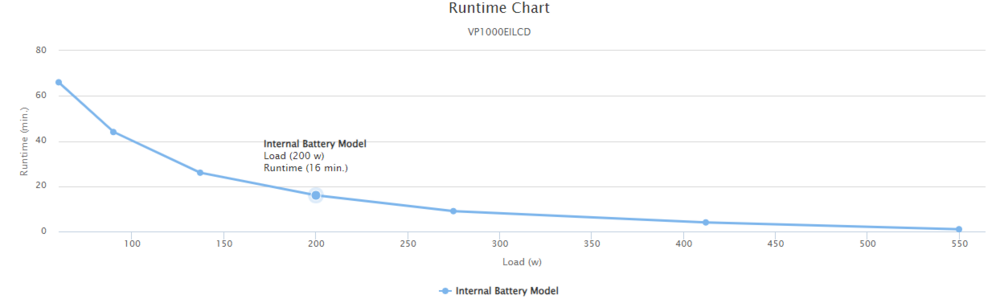
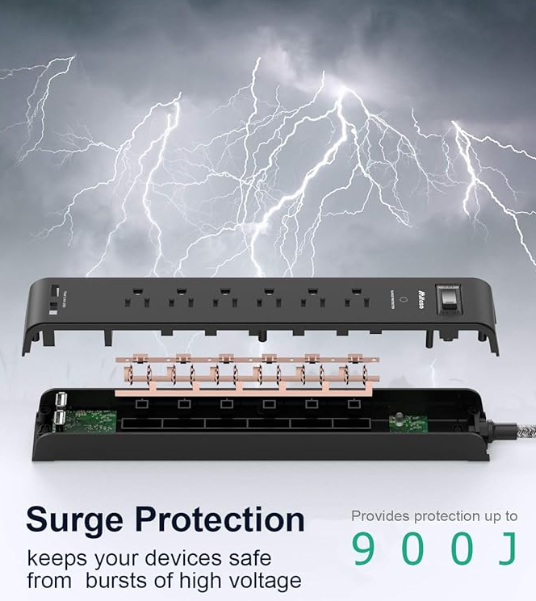
You haven't do anything wrong, if according official runtime chart, it should provide up to 16min backup time. Pls try disconnect Unraid server, then use another load with around 200W+ to ensure UPS work with similar loading. Pls also ensure no any "surge protect power bar" between UPS and the server.
-
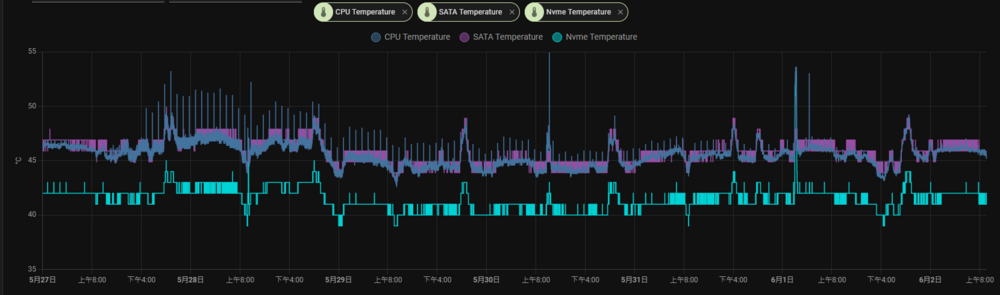
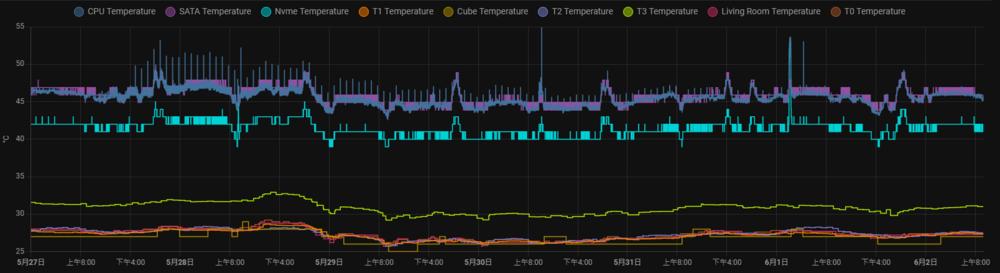
Below are the sensor config which I input to configuration.yaml. That's all. command_line: - sensor: name: CPU Temperature command: "cat /sys/class/hwmon/hwmon0/temp1_input" # If errors occur, make sure configuration file is encoded as UTF-8 state_class: measurement device_class: temperature unit_of_measurement: °C value_template: "{{ value | multiply(0.001) | round(1) }}" - sensor: name: SATA Temperature command: "cat /sys/class/hwmon/hwmon1/temp1_input" # If errors occur, make sure configuration file is encoded as UTF-8 state_class: measurement device_class: temperature unit_of_measurement: "°C" value_template: "{{ value | multiply(0.001) | round(1) }}" - sensor: name: Nvme Temperature command: "cat /sys/class/hwmon/hwmon3/temp1_input" # If errors occur, make sure configuration file is encoded as UTF-8 state_class: measurement device_class: temperature unit_of_measurement: "°C" value_template: "{{ value | multiply(0.001) | round(1) }}" It work.
-
It likely your server overload the UPS, you need confirm the Watts and VA of server draw, ensure it haven't over the limit of the UPS. There also could be battery problem, it can't provide enough power even UPS actually haven't overload. For UPS can't communicate to Unraid, this is next issue.
-
If br2 can't got IP from DHCP, then it is UDMP / USW issue. I haven't use UBNT network stuff.




