





Vr2Io
Members
-
Joined
Everything posted by Vr2Io
-
That could be true if you apply routing rule in Unraid, so Unraid would acting router to route traffic between VLAN. ( I am not sure about that ) But I perform this at router side and I never add routing in Unraid.
-
VLAN are use to separate network, so can't communicate each other is normal.
-
You shouldn't bound them and set the MTU as default 1500. Then this not only DNS unavailable, it means internet unavailable. I think problem could be 3 possible. 1. Some Network switch have a VLAN switch, pls ensure it is disable. 2 When you bond both NIC, then it will use single MAC address to access network. So problem pointing to MAC address binding issue with ISP, you may waiting for 1hrs and try again. ( But according your description, your ISP provide a router for you, so this less likely because this ) 3. If the new switch have management feature, then it may have IP conflict with your ISP router.
-
Sorry I miss that. It should be normal, the setting won't permanently store in NIC's firmware. We don't need permanently, if mobo BIOS disable WOL then it won't wakeup even NIC WOL was enable, this shouldn't affect shutdown or anything. I use WOL always and apply in different platform in Iongtime. I think problem need fix by new BIOS release.
-
This not relate WOL, the problem are PC fail to shutdown and power off, pls also note it even haven't reboot. It likely in HALT state. Pls try boot in safe mode and then shutdown and feedback.
-
Strange, no idea. I will got slow docker update / pull if 1st DNS ( self local host ) not available then access 2nd DNS ( public ).
-
This look like was aggregation limitations, in simple say single session test won't increase the speed. I will avoid aggregation, because usually trouble.
-
Then suggest temporary disable aggregation to verify.
-
Also confirm DNS resolve in normal.
-
Reasonable, never think those high capacity modules will draw so much power. ( I use eight 32G module, some build also Gooxi case )
-
The error should come from disk controller first, both are below SSD. Due to no error on other disks, so pls check power and link cable. If problem persist, pls try move both SSD to onboard SATA controller. Feb 20 16:55:17 Tower emhttpd: import 31 cache device: (sdg) Samsung_SSD_870_EVO_500GB_S6PXNJ0W605111T Feb 20 16:55:17 Tower emhttpd: import 32 cache device: (sde) Samsung_SSD_870_EVO_500GB_S6PXNJ0W604602X
-
Could you test does Unraid manual shutdown success ? Or any share or remote share mount ? https://forums.unraid.net/topic/186916-guaranteed-unraid-shutdown/#findComment-1525610
-
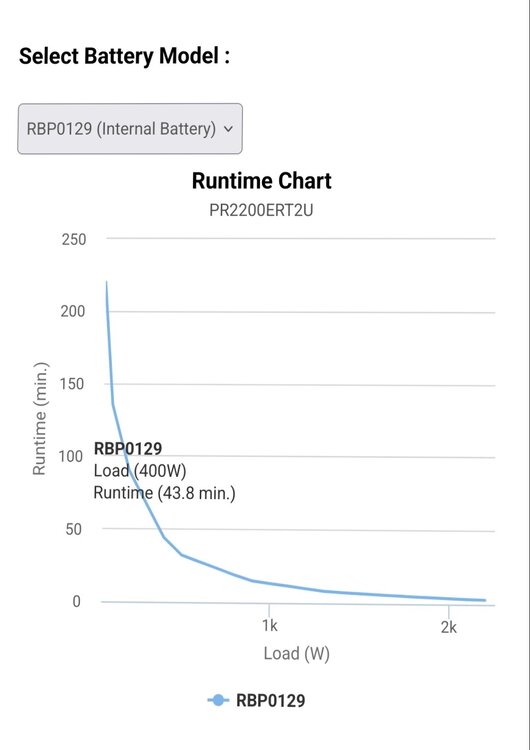
If you found other UPS powered device haven't power interruption, then it almost prove problem not on UPS. With compare the runtime chart, it indicate the battery in excellent condition, no degrade. Then you can't found out why trouble happen.
-
Does Unraid and docker in same physical interface ? Does host access enable ?
-
If Unrad and backup locate in different location or far away each other, then you need both are standalone server.
-
There are also an option to build something as a disk shelf, when you need doing backup, just power it on and after all disk detect then mount it by UD. When backup finish, then unmount those disk and power off the shelf. I notice you use two HBA in Unraid, you may consider use expander to provide necessary fanout of SATA port. The pons are you don't need extra licence and more power green and may got best backup speed.
-
For my understanding, docker container won't got IP from outside (unraid) DHCP.
-
Problem should relate fast boot have turn on. Pls ensure it is off in Bios setting.
-
No. Also ensure they are in same network bridge, i.e. br0 br1 etc.
-
Above adapter different was dual port vs single port, actually they are USB 2.0 adapter.
-
My network also VLANed and I use physical router to make cross VLAN possible. Flattening network also fine for home environment, just lost some degree accsss control, but always simple and troubless.
-
So, WiFi and Wire not in same network. In general, if WiFi AP were VLAN capable, then multiple VLANs will set on wire and WiFi, and no matter device connect thr Wire or WiFi, they will got same IP subnet on same VLAN network. Unraid ( or others ) won't notice the client connect thr wire or WiFi. If WiFi and Wire not in same network but both could communicate before update OS, then I would say something in untraditional setup and haven't mention clearly.
-
When you say success access by wire does the VLAN ID same as if access by WiFi ?
-
Those are DAC cable name ID only, you need confirm actual speed too.
-
You also need check what speed negotiate at Router port. And most case, problem usually there.


