1812
Members
-
Joined
-
Last visited
Everything posted by 1812
-
Are you passing through a bluetooth usb device or a usb card? (looks like usb device from the previous xml) if only the device, might try looking into passing through a usb card, or passing through a part of your usb bus. there are several usb cards that work with macos and are pretty cheap.
-
Ryzen has weird issues. I believe is you search for "Ryzen vm slow boot" or similar, you might find some tips. Also, start your own thread, as this one is originally 2.5 yrs old.
-
technically, maybe very slightly faster but you wont notice a difference. there are some that feel (myself included) that this is somehow less secure than doing it via software to access the network. It's an odd feeling for some that the your server is just a software bridge away from exposing itself to the internet. Others point out that it's essentially the same thing, since the software just outputs via a hardware port to a switch with no filtering back to the server. There are discussions about it in several places on the internet. I'm not sure my belief is grounded in reality, but mine still access the pfsense vm via a switch.
-
Yeah, autocorrect is a birch! Now I have to change it... THE SHAME! I agree 100% ¯\_(ツ)_/¯
-
added update 2 which includes iperf tests.
-
I've never dual booted osx in a vm, but it works on bare metal. Boot camp or something.... Are you currently sharing osx vm cores with anything else or are they isolated in unRaid? If you haven't done this, you should. OSX vm's are very finicky about audio and sharing cores, even with the host. I've only used bluetooth a handful of times via an adapter on my usb card and haven't had issues.
-
Add on usb card would probably be fine too, but I don’t have space to dedicate to just that. i use a cheap 10 dollar usb “7.1 channel” adapter from microcenter, says it’s osx compatible. https://www.microcenter.com/product/340583/usb-20-(type-a)-male-to-35mm-female-stereo-audio-adapter https://www.microcenter.com/product/364947/3d-audio-sound-card-usb-adapter i havent read this thread closely, but if you are sharing OS X vm cores with anything else (non-isolated, including unRaid) that can introduce audio issues. I’ve had audio issues because of that before.
-
I got tired of playing/fighting with this stuff a year ago and instead use a usb audio adapter. Best time saving choice I ever made.
-
You can also download the external drive app within next cloud (or whatever it’s called) and map to a share or folder on your system. Or your user path for all shares, if that floats your boat.
-
I edited the first post but here is the info again: set your ip on your computer manually to 192.168.88.2 or .4 or something close, subnet 255.255.255.0, set your gateway to 192.168.88.1 (switch default) and apply settings. then go to the web gui 192.168.88.1, login is admin and no password. I didn't try to set a static ip, I just navigated to the (iirc) last tab, told it to update, and then when it rebooted it pulled an ip from the router, which is now where the web access goes through.
-
Yeah I’ve made sure it was same ip range and subnet. If it was just one switch, I would have thought just a bad switch but two in a row. Im not a networking engineer but my quanta was easier to access than this...which is saying a lot because that was a pain. —- edit: figured it out finally and will update the review
-
Already tried both of those.
-
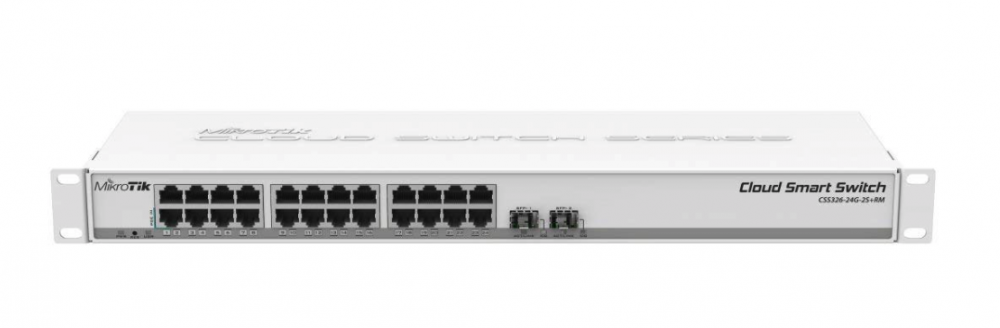
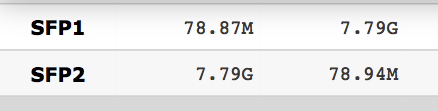
I don’t typically write reviews, but there have been some enthusiastic discussions about MikroTik’s switches lately, especially since they are much cheaper than expected. So I thought I’d share my experience with their CSS326-24G-2S+RM, a 24 port gigabit switch with 2 sfp+ ports. Originally I wanted to purchase a CRS305-1G-4S+IN but they are either currently sold out everywhere or 50 dollars over MSRP. [UPDATE: I bought one... review is here: So the switch arrived. The metal appears a bit thin and the paint job isn't really durable. Putting in screws into the ears (with plastic washers) already removed the paint around the screw holes.... The gigabit ports feel "loose" to me vs my quanta, or even any other d link/comparable consumer switch I've had, and I've had to readjust a gigabit cable seating once or twice as it didn't show connected on the simple lighted panel below the ports. It's cheap and feels like it. But for me, that's ok if it works. And it sort of does? I followed the directions to access the web gui. Nothing happened. The directions were simple: “go to 192.168.88.1 and you’re there.”(more details on everything I did can be found on their forum here: https://forum.mikrotik.com/viewtopic.php?f=17&t=143728 I don't fee like rehashing it al here, but long story short, nothing will allow me to connect to the web gui. ) The switch was operational, as in, I could pass traffic through it, but not modify any of the limited settings or update firmware due to lack of GUI access. So I returned that switch assuming it was defective and another showed up. Same issue. I contacted email support who informed me that when the switch is placed in a network with a DHCP server, it will get an IP and the web gui will be there. Protip for Mikrotik: That would have been nice to know in the one page of documentation that came with the switch AND/OR online anywhere…. Except, that didn’t actually work either. My router would offer an address and the switch would not respond to the DHCPOFFER. None of my other devices on the network have this issue, so I know it's the switch. Support also told me I could use a serial cable to find out what ip the switch was using, except this model doesn’t have a serial port….. thanks again for the assistance. This switch also currently “works” but without the ability to adjust any settings like before. I’m very tempted to return it and change all my devices over to 10gbe ethernet since I already wired my house with cat 6a. It would cost more, but work most likely work properly. I have been so let down that I haven't even really tried to push the sfp+ ports to see what their real saturation numbers are yet. So, you get what you pay for I guess. I’m currently waiting for a followup from support and as of writing this, only one person has offered some advice on the their forum but it did not lead to a resolution. And digging through other posts on that site, it seems that their products are hit and miss, and more times than not, software updates break things. A bit disappointed. ——- UPDATE A chance comment on the Mikrotik forum lead me to a discovery. While I had changed my ip and subnet to be in the same range, I had not thought to change the gateway to the default ip of the switch (as I’ve never had to do this before with similarly configured devices.) Nowhere does this requirement appear in Mikrotik’s documentation or anything I read online. After making this change and putting my ip in the same range of the default ip of the switch again, I was able to finally access the web GUI. After looking around the basic functions including vlans, I decided to update the firmware. The process was simple, click a button to update. The web GUI then went blank and I thought “great, I’ve bricked it...” then I wondered if the update from 2.7 to 2.9 fixed the dhcp issue. So I changed my ip/subnet/gateway back and sure enough, there was a new dhcp lease for the switch in my router logs. I ran some quick bandwidth tests from my unRaid server (files on a Samsung ssd) to a RAM disk on computer via dac cable, using a cheap mellanox connectx2 card and a solar flare cars. File reads pegged out the max drive read speed at 550- 600MBps. Higher is certainly possible I believe. TLDR: Mikrotik shipped the switch twice with faulty firmware meaning it wouldn’t acquire a DHCP lease, and doesn’t provide any quality information regarding how to access the switch including information about changing your gateway to the switch address, which caused me to waste a few hours over a few days, return one switch that I thought was faulty, contact tech support who had no answers, and finally get lucky on their forums. I still haven’t decided if I’m keeping it yet... but happy I can finally play around with it. -------- UPDATE 2 about a week and a half later and here is what I've found: after a while, the web gui won't respond to the DHCP assigned address. It's annoying, but can be fixed with a quick reboot. Switch still seems fully functional when you can't access the web gui. but still dumb. Ran some iperf tests on it, from an osx vm on one unraid server using a solar flare card (passed through to the vm) to another unraid server running iperf via nerd tools, 10 threads: switch showed similar speeds in the web gui This is on 1500 frames... so some room for improvement if I bumped up to 9000, but I may also have a bent dac cable causing lower speeds. Before posting, for fun I changed the threads from 10 (above) to 100 and pushed it to: still on 1500 frames. Although the web gui and DHCP issues are fairly annoying, its nice to be able to pull this switch out of my sound dampening server rack and have it out by my desk, vs having the lb4m just suck power and make noise in the rack. ALSO It has no fan and is quiet, but runs quite warm within its parameters. The specs say the switch is rated up to 70c. Mine hovers around 64-66c. This is even after pulling the top cover off and letting air circulate over the heatsink. So I do have a few concerns about longevity if it's hanging out at the top of it's range. There are no (visible to me after a quick look) places on the board to add on a small fan. But hitting it with multiple runs of iperf didn't really move the needle on temps. So who knows.... SO It's not as fast as my LB4M? Maybe it is, I never tested the LBRM to capacity, but since my cache drives only write about 400MB/s and I can currently read at about 800MB/s, it's fast enough for now. I have a few more days, but will probably keep it. It's cheap, quite, and only mildly annoying to modify settings. ________ Update March 28, 2020 SO I've been using this switch for a little over a year. It has given me no issues running about 16-20 ports of gigabit lan fro the house and a 10gbe trunk from my server. Quite pleased, really. I don't really know what else to say... I guess we'll check back in a year from now (if I remember...)


-
I'm not here to get into a pissing contest with you over this, but nowhere does it say "attn users: don't do what this messages says to do if this container doesn't do what IT is suppose to be doing automatically." So it's natural that when something goes awry, and a user checks the logs to see what the problem is, and sees that message, they are going to attempt it. I enjoy everything the LSIO team does, and am the beneficiary of many containers. And even admit that I probably borked it somehow after it initially would not auto renew as it should have (and I gave zero grief to anyone about that.) So instead of wagging your finger at me, how about saying "oh yeah, I see how that could be confusing, maybe we could but a line in about not to do that, or mess with anything in the container at the top of the log after our nifty logo. I bet that would stop a lot of problems with users screwing up our containers needlessly."' ¯\_(ツ)_/¯ Either way, thanks for the feedback/information and keep up the good work!
-
that was my understanding, that it was suppose to auto renew, and i figured i'd just give it a little "nudge" to make it happen... and probably broke it. but in my defense, the log does state Your cert will expire on 2019-04-05. To obtain a new or tweaked version of this certificate in the future, simply run certbot again. To non-interactively renew *all* of your certificates, run "certbot renew"
-
having an issue updating an expired cert..... not sure why.... running certbot renew shows: root@aa9ae2ae9c79:/$ certbot renew Saving debug log to /var/log/letsencrypt/letsencrypt.log - - - - - - - - - - - - - - - - - - - - - - - - - - - - - - - - - - - - - - - - Processing /etc/letsencrypt/renewal/cloud.-redacted-.org.conf - - - - - - - - - - - - - - - - - - - - - - - - - - - - - - - - - - - - - - - - Cert is due for renewal, auto-renewing... Plugins selected: Authenticator standalone, Installer None Attempting to renew cert (cloud.-redacted-.org) from /etc/letsencrypt/renewal/cloud.-redacted-.org.conf produced anunexpected error: HTTPSConnectionPool(host='acme-v02.api.letsencrypt.org', port=443): Max retries exceeded with url: /directory (Caused by NewConnectionError('<urllib3.connection.VerifiedHTTPSConnection object at 0x150dae5a02d0>: Failed to establish anew connection: [Errno -3] Try again',)). Skipping. All renewal attempts failed. The following certs could not be renewed: /etc/letsencrypt/live/cloud.-redacted-.org/fullchain.pem (failure) - - - - - - - - - - - - - - - - - - - - - - - - - - - - - - - - - - - - - - - - All renewal attempts failed. The following certs could not be renewed: /etc/letsencrypt/live/cloud.-redacted-.org/fullchain.pem (failure) - - - - - - - - - - - - - - - - - - - - - - - - - - - - - - - - - - - - - - - - 1 renew failure(s), 0 parse failure(s) root@aa9ae2ae9c79:/$ and the docker log upon booting shows: ------------------------------------- _ () | | ___ _ __ | | / __| | | / \ | | \__ \ | | | () | |_| |___/ |_| \__/ Brought to you by linuxserver.io We gratefully accept donations at: https://www.linuxserver.io/donate/ ------------------------------------- GID/UID ------------------------------------- User uid: 99 User gid: 100 ------------------------------------- [cont-init.d] 10-adduser: exited 0. [cont-init.d] 20-config: executing... [cont-init.d] 20-config: exited 0. [cont-init.d] 30-keygen: executing... using keys found in /config/keys [cont-init.d] 30-keygen: exited 0. [cont-init.d] 50-config: executing... Variables set: PUID=99 PGID=100 TZ=America/New_York URL=-redacted-.org SUBDOMAINS=cloud EXTRA_DOMAINS= ONLY_SUBDOMAINS=true DHLEVEL=2048 VALIDATION=http DNSPLUGIN= EMAIL=-redacted- STAGING= 2048 bit DH parameters present SUBDOMAINS entered, processing SUBDOMAINS entered, processing Only subdomains, no URL in cert Sub-domains processed are: -d cloud.-redacted-.org E-mail address entered: -redacted- http validation is selected Certificate exists; parameters unchanged; starting nginx [cont-init.d] 50-config: exited 0. [cont-init.d] done. [services.d] starting services [services.d] done. Server ready nginx: [warn] "ssl_stapling" ignored, host not found in OCSP responder "ocsp.int-x3.letsencrypt.org" in the certificate "/config/keys/letsencrypt/fullchain.pem" nginx: [warn] "ssl_stapling" ignored, host not found in OCSP responder "ocsp.int-x3.letsencrypt.org" in the certificate "/config/keys/letsencrypt/fullchain.pem" nginx: [warn] "ssl_stapling" ignored, host not found in OCSP responder "ocsp.int-x3.letsencrypt.org" in the certificate "/config/keys/letsencrypt/fullchain.pem" note: -redacted- is mine, not in the actual logs/process responses. This was a working config, nothing changed, just the cert expired. It expired and auto-renewed once previously but this time its not working. Any help would be much appreciated!! —-edit—— i think this was ultimately a few things. I tried creating a new install and it would work, verified firewall settings, nothing. Eventually docket crapped out and locked up the server. So I removed my Nat settings not my firewall, nuked the docket image, started with fresh settings, fresh docket image, and fresh letsenceypt install and its back to working. I tried using the previous app data on a reinstall but it still wouldn’t work after all that. so, this post isn’t going to help anyone unless they just want to start over...
-
Yeah, when I boot up my server, it takes what feels like 1-2 minutes just loading the recycling bin, and the same stopping. actually, looking at the log, I think it's just displaying that it is starting the recycle bin, does it, but getting hung on auto-mounting (and failing to mount) remote disks via unassigned devices... so disregard for now.
-
How long is it suppose to take for the recycle bin to load and unload at array start/stop. I feel like me is taking longer and longer...
-
Now that I remember, I did have a Mellanox card die 2 years ago... and it had performance issues before it completely tanked.
-
I just replied in your other thread. I don’t think it’s an hp issue. I could be wrong, but I haven’t had issues using mellanox cards in hp servers.
-
Please define the problem. Since it’s not the onboard nic, you may just have a general non-hp issue.
-
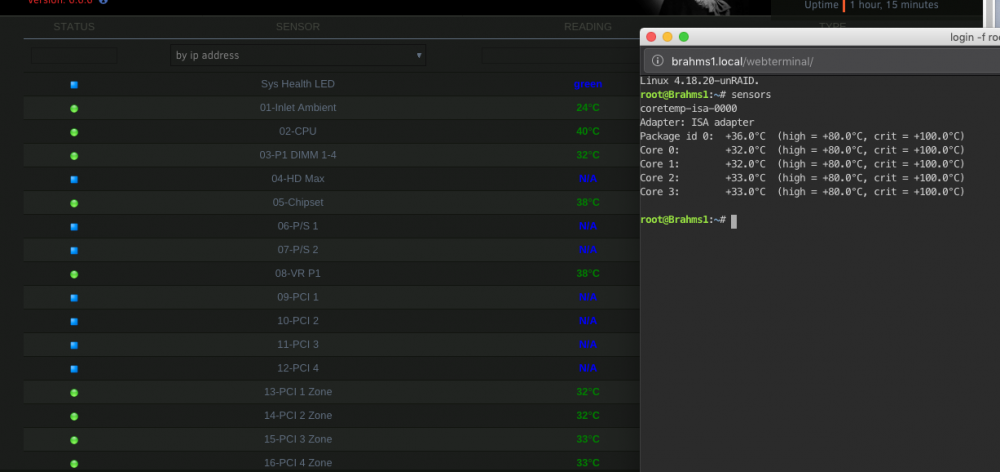
I've had inconsistent temp readings from unraid and hp servers/workstations since around/after 6.2. Even when using the impi plugin, the temp doesn't exactly align with coretemp, which usually doesn't work now with dynamix system temp. This is from an ML30 G9 I would trust iLO. There may be something that can be loaded in the OS by limetech, but I haven't spent anytime researching what that could be.
-
on the attached screenshot, it the dashboard and netdata show 100% usage, while the system stats and glances show 1/4 of that (but glances also reports high cpu wait). in terminal, top also shows 1/4-1/2 usage. screenshots and diagnostics attached. brahms1-diagnostics-20181224-1755.zip
-
I've run up to 64 cores (max allowed under osx.) the trick is to remove topology.
-
I just looked, i'm on gray theme (I couldn't remember) black looks like this for me on firefox on the dashboard