





tjb_altf4
Members
-
Joined
-
Last visited
Everything posted by tjb_altf4
-
I find that strange, what versions do they specify? Current stable version is 2 years old.
-
I think that would be a good option
-
Would I be interested in reading new blog posts. YES. Do I typically use RSS for anything? NO. Email notification or a forum post notification would be my own preference.
-
I wonder if anyone with single NIC systems is having issues, or whether it is only users with multiple NICs encountering issues? Might test on my single NIC test system to see if DNS issues exist on that system.
-
Another DNS issue here, have forced a static IP instead of the one managed by my router, as suggested above. Strangely this never presented as an issue during 6.7rc8, but I tried rolling back and it is an issue now... bandaid fix will do for now
-
You need to edit the auth file in appdata folder and create a user/pass to access deluge by adding a line like so: username:userpassword:10 These are the credentials you use to access via the thin client More info here: https://dev.deluge-torrent.org/wiki/UserGuide/ThinClient
-
Smooth upgrade from rc8, no issues to report.
-
After install I was able to flip back to QXL successfully. Not sure whether you passing through a GPU also?
-
I just installed Manjaro Gnome, so I thought I'd bump this topic. To get up and running I used the arch template as a starting point and found I only needed to change vnc mode to cirrus, OVMF / Q35 worked with no workaround needed. Without the VNC change I had the flashing white cursor, I suspected VNC mode was the issue as eventually (+10min later) it spat out some errors about the vnc keyboard.
-
Alt + numkey e.g. copy is Alt + 5, quit is Alt + 0
-
If PIA sock5 is broken, you could always spin up PrivoxyVPN and proxy to your pia vpn. That's how my jackett has been setup for quite some time, albeit with DelugeVPN, but same same.
-
Not there, if you expand the template view to advanced (toggle is top left right) it will expose extra fields including one called Extra Parameters.

-
Should be able to get by using extra parameters field (advanced settings) to add the dns options (as per link in first post)
-
Just had to do the same (on 6.7 rc5) to get unbalance running again, cheers 👍
-
+1 to this suggestion, would be very handy, whether you use DHCP reservations or not. There are supposed to be a couple of methods via virsh or qemu-guest, but they're not working for me or seem to be disabled. I found a bash script that works well for me though and should be generic enough. HOSTNAME=YOURVMNAMEHERE MAC=$(virsh domiflist $HOSTNAME | awk '{ print $5 }' | tail -2 | head -1) arp -a | grep $MAC | awk '{ print $2 }' | sed 's/[()]//g' Or seeing as we already now the mac address from the vm template the script can be simplified further: MAC=YOUR:MAC:ADDRESS:HERE arp -a | grep $MAC | awk '{ print $2 }' | sed 's/[()]//g'
-
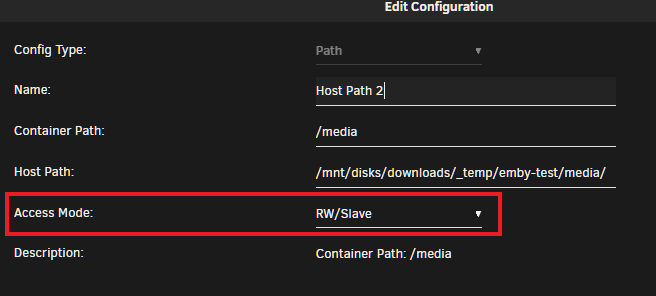
If using unassigned devices, make sure your using the "RW/Slave" option for the volume being passed. It's the recommended practice for passing unassigned device drives into a docker, and might be the cause of the issue.
-
Not using this docker so I can't test, but this should get you setup. Looks like you need to create an appdata config path like most dockers in unraid are setup AND create a variable with the key of SYNAPSE_CONFIG_PATH pointing to the container side path i.e. /config as the value If postgres is installed you need to create the synapse database user and database itself. You will need to use the console for the docker container to complete this OR you can use the GUI tool like pgAdmin Documentation details what needs to be done: https://github.com/matrix-org/synapse/blob/master/docs/postgres.rst It also details porting from sqlite, but I would start clean slate. Dockerhub details the container variables you need to pass for postgres, the snippet below should be enough to get the synapse talking to postgres. https://hub.docker.com/r/matrixdotorg/synapse/
-
I like the immutable attribute solution, but a bandaid is to pass media shares to the docker as read-only instead of r/w. This will have some limitations, but is a quick solution to implement to secure data.
-
VM icon change in XML view mode doesn't apply, leaving icon unchanged after update is applied. However you can manually edit the XML metadata to change to a different icon if you know the filename. VM icon change in GUI edit mode still works as expected.
-
Should be able to extract via backend using a sql query, or import/export via gui sqlite tools.
-
Which plugins? The maximum in the plg file might have been set to 6.6.6 Only Dynamix System Stats now, other one updated for me just then.
-
Only issue I've come across is a few plugins that have been updated recently won't allow install on 6.6.7 plugin: installed Unraid version is too low, require at least version 6.7.0-rc1 Not a biggie, but something to be aware of.
-
Docker port conflicts are no longer highlighted to the user in template editor. Previously port numbers would be highlighted in red on the docker allocations drop-down, when template default port conflicted with existing port allocations... signifying an issue to be rectified. If a user doesn't pickup the conflict manually, the result is a failed container creation.
-
Take a look at jellyfin, its a project forked from emby 3.5.2. If your not happy with the direction emby has taken, this is a good alternative.
-
+1 on Android icon, was just about to post to see if nuking my app was warranted. iOS icon still correct.



