





thomas
Members
-
Joined
-
Last visited
Everything posted by thomas
-
Thanks. Unfortunately for me Ubuntu or any other linux is not working. Windows is always fine with the RadeonReset service from https://github.com/inga-lovinde/RadeonResetBugFix For context, I'm using an Asrock deskmini X300W with proxmox.
-
Hi, have you done anything special to passthrough the igpu under ubuntu? For me, I can only boot it with modeset parameter otherwise the screen will turn off and in dmesg I will see amdgpu giving errors. Due to modeset there is no video acceleration, so it is not usable. Thanks
-
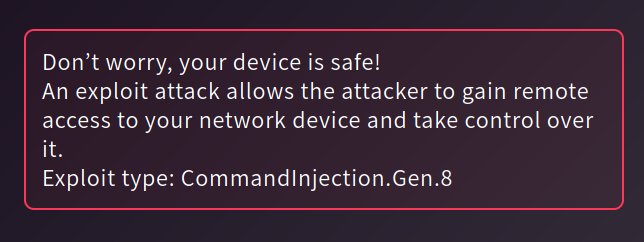
@linuxserver.io Lately I have some CVE attacks on my Unraid due to Nextcloud container using nginx v1.18.0. The attacks are being blocked by Netgear Armor (Bitdefender) and I only receive a notification that it was blocked and it says there is a vulnerability due to nginx v1.18.0. Is there a way to update nginx to a newer/secure version? Thanks
-
Solution is to add a new Variable called DISABLE_AUTH and set the value TRUE. I also deleted the 2 GUAC parameters. Read morehttps://guacamole.apache.org/doc/0.9.6/gug/configuring-guacamole.html
-
Have you tried to use http://kb.macrium.com/KnowledgebaseArticle50005.aspx?Keywords=VHD and then convert the VHD to IMG with something like qemu-img convert -f vpc -O raw lamp-3-x86.vhd lamp.raw ?
-
I'm also using Legacy Mode, because with the UEFI it never worked properly. Also the vbios is required for me to actually show the image before fully loading the OS...
-
"Summary Add emulation of the ICH9 host chipset as an alternative to the current I440FX emulation. This will allow for better support of PCI-E passthrough since ICH9 uses a PCI-E bus whereas the I440FX only supports a PCI bus." from https://wiki.qemu.org/Features/Q35 You can read more in forum, but this is a good post I also have an AMD graphic card and I have seen a lot of your issues.
-
Change the machine type to Q35.
-
This is just to confirm the fix is working properly in your case.
-
For me, when a VM gets stuck at Tianocore it usually after a force stop of a VM and the graphic card remaining in an unknown power state. My only way to recover is to power down the server, then power it up and the VM with passthrough graphic card will start properly. Try that and see how it goes...
-
diskutil apfs resizeContainer disk0s2 0 In this case, diskutil automatically claims all available free space on the physical storage device, but you can also replace 0 with a size value, if you want a specific one
-
After waking the system from sleep the spin up drive indicator is not refreshed. It stays grey (spin down) when is should be green (spin up). If I press the arrow to spin it up the colour changes. See below a part of the log file. Feb 27 20:08:19 unRAID s3_sleep: Disk activity on going: sdc Feb 27 20:08:19 unRAID s3_sleep: Disk activity detected. Reset timers. Feb 27 20:08:46 unRAID kernel: mdcmd (40): spinup 1 # I pressed the spin up button for sdc to see if it gets refreshed, and it did Feb 27 20:09:19 unRAID s3_sleep: Disk activity on going: sdc Feb 27 20:09:19 unRAID s3_sleep: Disk activity detected. Reset timers. Feb 27 20:10:19 unRAID s3_sleep: Disk activity on going: sdc Feb 27 20:10:19 unRAID s3_sleep: Disk activity detected. Reset timers.
-
I have DNS1 set to 9.9.9.9 and DNS2 set to 1.0.0.1, but I'm blocking at the router level 8.8.8.8 and 8.8.4.4. With these settings, the update status for unraid and plugins is always "unknown". If I remove the blocking for google DNS, the update status works right away. I'm thinking that the checking for updates are done using only google DNSs and not the ones specified in the network setings. Attached is the diagnostics. unraid-diagnostics-20180803-1537.zip
-
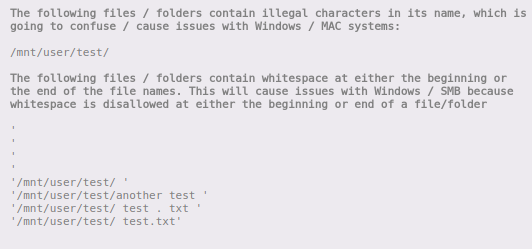
I created some files with whitespaces and they are properly identified. See the results below. LE: I found the files with the problem. See below. Now there are no issues. Thanks

-
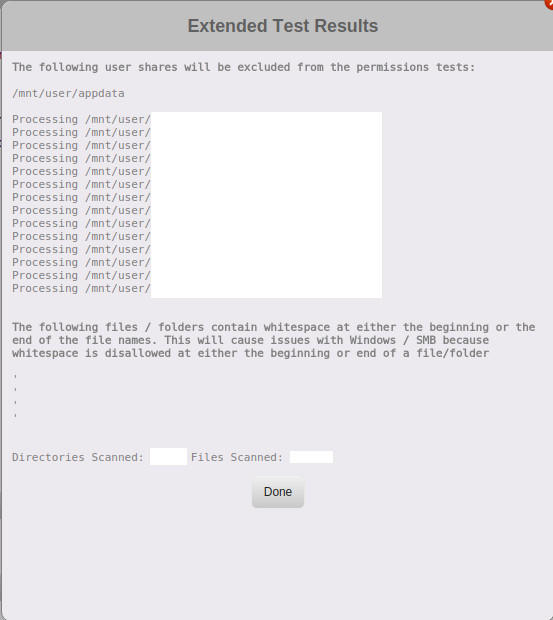
Hi, When I'm running the extended test I always get errors, but I can't find the files/directories with issues. See the picture below. How can I find them? Thanks, Thomas
-
Hi, Can you add also this new gui for aria http://ariang.mayswind.net? Maybe on another port? Or create a new docker? I think this one is better... Thanks.
-
That's good to know...
-
I checked and I had one script being executed at startup of the array, I disabled it and now it's working properly. The script was finding and deleting some temp files on the array, but my VMs are located on the cache drive (SSD) so I thought they won't be impacted by this... If you have any scripts running at startup, the VMs will wait until the scripts are finished in order to load, or they are competing for resources (cpu,ram) and eventually will load? Thanks
-
When I enable this plugin the time between the unraid displays the console login and the autostart of VM is increased to 60+ seconds. Without this plugin it's around 5 seconds. Is there anything that I should/can do to make this plugin "faster" to load? Thanks LE: I'm on 6.4.0, if it matters...


