





nerbonne
Members
-
Joined
-
Last visited
Everything posted by nerbonne
-
My use case has nothing to do with WAN traffic. I have two internet connections, one for my gaming pc's and one for my server. The wifi is connected to the gaming lan. I have a wifi camera that I want to connect to a blue iris docker container on the server lan. Therefore, I need the server lan to connect to the gaming lan. Physically, the two lan's are connected. (Tecnically I have a 3rd WAN connection but we don't need to discuss that as it is outside the scope of the question). Additionally, it is not possible for me to use one router for both WAN connections, I must use two router as they are physically separated and the link between the two is wifi. Therefore, the question at hand is, "is it possible to make one network card talk to two routers". While I do appreciate that you took the time to respond, you read into my question and answered a question which I did not have.
-
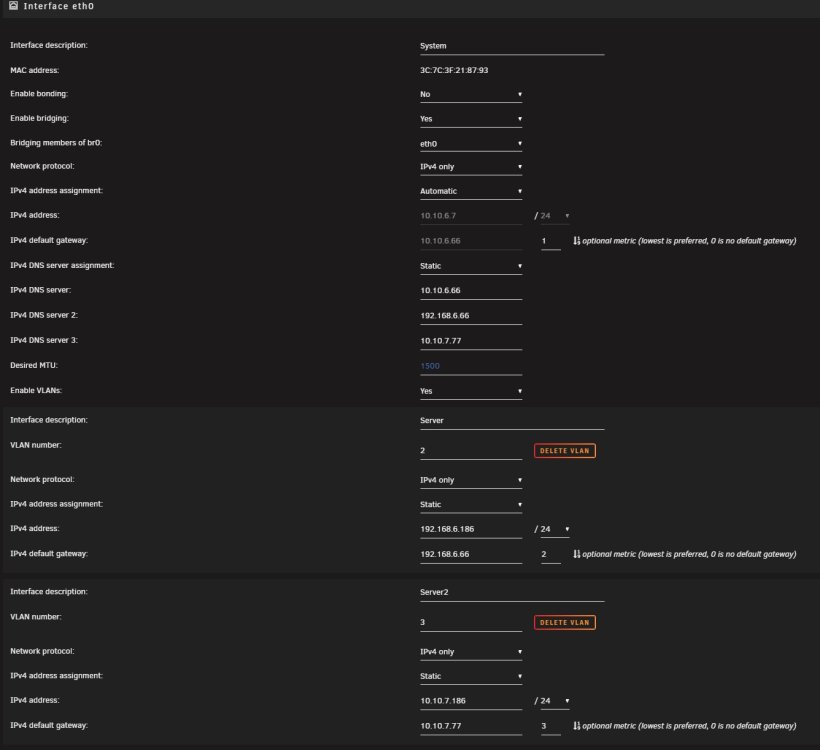
I'm a networking noob and I really need help. I have 3 routers, and I want to be able to talk to all three of them but my NAS box only has one ethernet port. I added two VLANs in the network settings but I can only ping the primary router on br0, br0.2 and br0.3 routers are not pingable. Can someone take a look at my network settings and give me some advice.

-
Says right there "public server started on 28967", which is the default port so thats the port your first install is using. You need to set it up on a different public port and forward that port in your router to your second container.
-
I started my storj node with a small amount of space because I wanted to test it before I went big. Can I just change this 1TB to say, 8TB?

-
I'm seeing the same thing. Would love to know the answer. I have a 1050 ti passed thru, if that matters.
-
Reboot worked but I had to force it, poweroff wouldn't work. Also deleted my nvidia drivers for some reason...
-
Here are the diags. server-diagnostics-20221003-1950.zip
-
Update: I manually killed the pid and then restarted nginx. I'm noticing that the pid in /run/nginx.pid file is always one number lower than the actual pid. Is this normal behavior? Does it matter? After killing the pid and starting nginx and verifying nginx was running, the web gui still doesn't load.
-
root@Server:~# tail -f /var/log/syslog Oct 3 18:44:21 Server sudo: root : TTY=pts/18 ; PWD=/root ; USER=root ; COMMAND=/usr/bin/nano /var/log/nginx/error.log Oct 3 18:44:21 Server sudo: pam_unix(sudo:session): session opened for user root(uid=0) by root(uid=0) Oct 3 18:45:07 Server sudo: pam_unix(sudo:session): session closed for user root Oct 3 18:50:56 Server webGUI: Successful login user root from 10.10.7.76 Oct 3 18:51:22 Server sudo: root : TTY=pts/18 ; PWD=/root ; USER=root ; COMMAND=/usr/bin/nano /var/log/nginx/error.log Oct 3 18:51:22 Server sudo: pam_unix(sudo:session): session opened for user root(uid=0) by root(uid=0) Oct 3 18:51:50 Server sudo: pam_unix(sudo:session): session closed for user root Oct 3 18:54:47 Server php-fpm[7043]: [WARNING] [pool www] server reached max_children setting (50), consider raising it The first login is from a seperate network over a VPN connection. I thought maybe that was causing an issue, so I connected directly to the network and tried again. Then, it says I'm at max_children, I guess this is web processes? Trying to restart the nginx process doesn't seem to do anything, even if I do graceful or quick. root@Server:~# /etc/rc.d/rc.nginx status Nginx is running root@Server:~# /etc/rc.d/rc.nginx restart Checking configuration for correct syntax and then trying to open files referenced in configuration... nginx: the configuration file /etc/nginx/nginx.conf syntax is ok nginx: configuration file /etc/nginx/nginx.conf test is successful Shutdown Nginx gracefully... ^C root@Server:~# /etc/rc.d/rc.nginx term Shutdown Nginx quickly...
-
Well, looking at your log files, you have multiple VM's running, and some of them are configured to allow a max of 16gb of memory use, but your server only has 32gb of memory, so without digging too deep, I'd say your literally out of memory...
-
Well your server only has 24gb of memory installed and your running a Windows VM, which looks like its configured to only use 4gb of memory, so you "should" be fine. But something is using up your memory. You'll have to run top from terminal and watch it and see what is using alot of memory. On my server, qbittorrent alone uses about 4gb, so some of your docker containers might be using alot of memory. Additionally, I see you have nerdpack installed, which, unrelated to this problem, is not an approved plugin under 6.11 anymore... FYSA.
-
Anyone know how to make Brave work NOT in incognito mode? Is there some kind of site whitelist or adblocker exemption? Brave has been giving me fits for months and I just figured out it was causing this issue, I thought it was a problem with my VPN configurations....
-
Just to be clear, if I backup the libvirt.img file using "Backup/Restore Appdata" plugin, I don't need to backup the individual xml files?
-
I ended up making a mysql dump using the login/password for nextcloud (this is what was using the database), then deleting the mariadb instance, installing a new copy, and then importing the mysql dump.
-
I get this error, any ideas? MariaDB [(none)]> FLUSH PRIVILEGES; ERROR 1146 (42S02): Table 'mysql.db' doesn't exist
-
Ok, I got it. There was a bit more swearing until I realized one gateway needed a "1" and the other needed a "2"... Thanks for the help.
-
So I could just add public DNS server there in the eth0 spot and that will fix it?
-
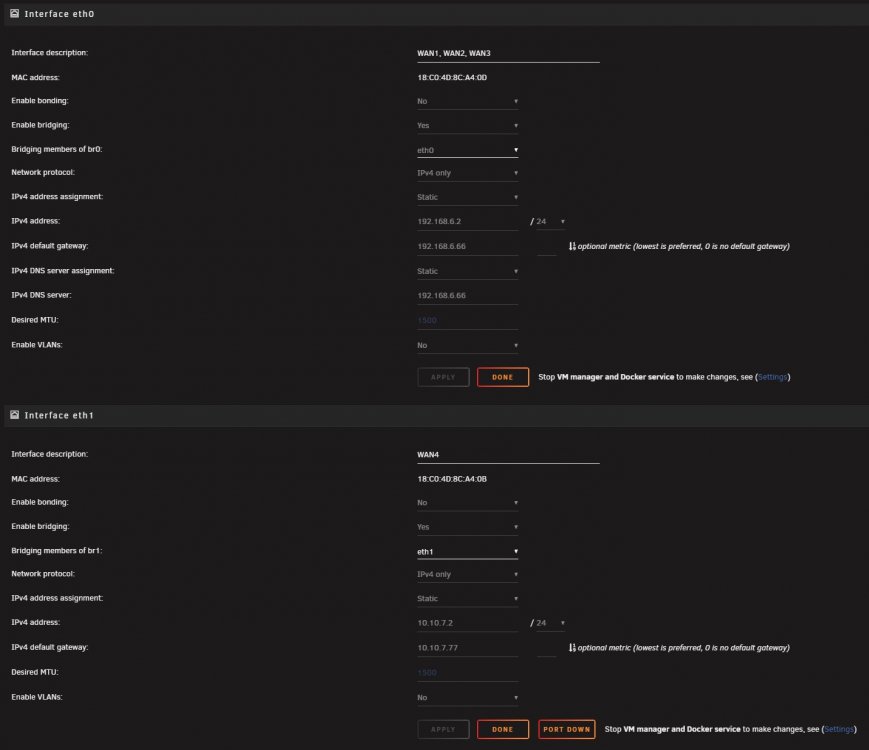
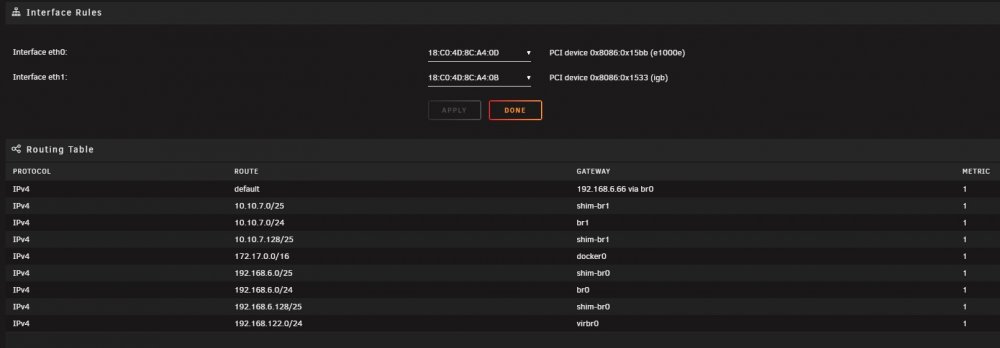
I just setup a second router and plugged in eth1. But there is no field for IPv4 DNS in the configuration and my docker containers don't get DNS, although weirdly, the windows VM does? I don't understand why it's not available? server-diagnostics-20220730-1559.zip
-
Can you tell me how this worked? Also, does it support drives larger than 3TB. All the docs say max of 3TB but thats a weird size and I feel like it's just because that was the largest drive available at the time.
-
I have an unRaid server that I have 5 Windows 10 VMs on. Users connect remotely using VPN and RDP and use Quickbooks mainly. Currently there are no passed thru GPUs. I came into a few AMD R5 340 GPUs. They are fairly low spec, 1Gb DDR5 and from 2015. Would passing thru this GPU to the VM improve any perfomance? Would it reduce CPU load by offloading the VNC graphics? When all 5 users use their VMs, the CPU load is quite high.
-
When I added a second drive to a 4 bay USB enclosure, something happened and neither drive will mount. Previously when only 1 drive was in the enclosure, the 1 drive mounted fine. I have 7 Unassigned Drives connected via the HBA. The 8th drive was the one in the 4 bay USB 3.0 enclosure. It was formatted and working fine. I turned off the enclosure and added a 9th drive. Now, both drives are listed as Dev 9 and the one that should be Dev 8 has no device label (should be sdaa) and both show the same mount point "tvshows2" which was the mount point for Dev 8 as the new Dev 9 is not formatted and has not been mounted. This is the entries from the system log. It looks like the UUID was duplicated and I tried changing the UUID on the settings page but now it's telling me there is a pending log to replay. xfs_repair has been running for about 2 hours on a 3TB disk, not sure how long I need to let it run. Can anyone tell me how to fix this? logs.txt

-
Also get this when trying to change the UUID. Apr 19 09:51:18 Tower ool www[13312]: /usr/local/emhttp/plugins/unassigned.devices/scripts/rc.settings 'uuid_change' Apr 19 09:51:18 Tower unassigned.devices: Changed partition UUID on '/dev/sdaa1' with result: ERROR: The filesystem has valuable metadata changes in a log which needs to be replayed. Mount the filesystem to replay the log, and unmount it before re-running xfs_admin. If you are unable to mount the filesystem, then use the xfs_repair -L option to destroy the log and attempt a repair. Note that destroying the log may cause corruption -- please attempt a mount of the filesystem before doing this.
-
I removed Dev 9 until I can get an answer, getting this error for the original and unchanged Dev 8. Apr 18 19:27:35 Tower kernel: usb 2-8: new SuperSpeed Gen 1 USB device number 4 using xhci_hcd Apr 18 19:27:35 Tower kernel: usb-storage 2-8:1.0: USB Mass Storage device detected Apr 18 19:27:35 Tower kernel: scsi host11: usb-storage 2-8:1.0 Apr 18 19:27:36 Tower kernel: scsi 11:0:0:0: Direct-Access Hitachi HDS723030ALA640 0125 PQ: 0 ANSI: 6 Apr 18 19:27:36 Tower kernel: sd 11:0:0:0: Attached scsi generic sg0 type 0 Apr 18 19:27:36 Tower kernel: sd 11:0:0:0: [sdaa] Very big device. Trying to use READ CAPACITY(16). Apr 18 19:27:36 Tower kernel: sd 11:0:0:0: [sdaa] 5860533168 512-byte logical blocks: (3.00 TB/2.73 TiB) Apr 18 19:27:36 Tower kernel: sd 11:0:0:0: [sdaa] 4096-byte physical blocks Apr 18 19:27:36 Tower kernel: sd 11:0:0:0: [sdaa] Write Protect is off Apr 18 19:27:36 Tower kernel: sd 11:0:0:0: [sdaa] Mode Sense: 67 00 10 08 Apr 18 19:27:36 Tower kernel: sd 11:0:0:0: [sdaa] No Caching mode page found Apr 18 19:27:36 Tower kernel: sd 11:0:0:0: [sdaa] Assuming drive cache: write through Apr 18 19:27:36 Tower kernel: sdaa: sdaa1 Apr 18 19:27:36 Tower kernel: sd 11:0:0:0: [sdaa] Attached SCSI disk Apr 18 19:27:37 Tower unassigned.devices: Disk with ID 'HDS723030ALA640_152D00539000 (sdaa)' is not set to auto mount. Apr 18 19:28:22 Tower emhttpd: cmd: /usr/local/emhttp/plugins/dynamix/scripts/disk_log sdaa Apr 18 19:28:36 Tower unassigned.devices: Adding partition 'sdaa1'... Apr 18 19:28:36 Tower unassigned.devices: Mounting partition 'sdaa1' at mountpoint '/mnt/disks/tvshows2'... Apr 18 19:28:36 Tower unassigned.devices: Mount drive command: /sbin/mount -t 'xfs' -o rw,noatime,nodiratime '/dev/sdaa1' '/mnt/disks/tvshows2' Apr 18 19:28:36 Tower kernel: XFS (sdaa1): Filesystem has duplicate UUID 42df9b8c-66be-4d9a-986b-522f706f27ad - can't mount Apr 18 19:28:36 Tower unassigned.devices: Mount of 'sdaa1' failed: 'mount: /mnt/disks/tvshows2: wrong fs type, bad option, bad superblock on /dev/sdaa1, missing codepage or helper program, or other error. ' Apr 18 19:28:36 Tower unassigned.devices: Partition 'tvshows2' cannot be mounted.
-
I have 7 Unassigned Drives connected via the HBA. I had an 8th drive in a 4 bay USB 3.0 enclosure. It was formatted and working fine. I turned off the enclosure and added a 9th drive. Now, both drives are listed as Dev 9 and the one that should be Dev 8 has no device label (should be sdaa) and both show the same mount point "tvshows2" which was the mount point for Dev 8 as the new Dev 9 is not formatted and has not been mounted. This is the entries from the system log: Apr 18 18:59:12 Tower kernel: usb 2-8: new SuperSpeed Gen 1 USB device number 3 using xhci_hcd Apr 18 18:59:12 Tower kernel: usb-storage 2-8:1.0: USB Mass Storage device detected Apr 18 18:59:12 Tower kernel: scsi host11: usb-storage 2-8:1.0 Apr 18 18:59:13 Tower kernel: scsi 11:0:0:0: Direct-Access Hitachi HDS723030ALA640 0125 PQ: 0 ANSI: 6 Apr 18 18:59:13 Tower kernel: sd 11:0:0:0: Attached scsi generic sg0 type 0 Apr 18 18:59:13 Tower kernel: sd 11:0:0:0: [sdaa] Very big device. Trying to use READ CAPACITY(16). Apr 18 18:59:13 Tower kernel: sd 11:0:0:0: [sdaa] 5860533168 512-byte logical blocks: (3.00 TB/2.73 TiB) Apr 18 18:59:13 Tower kernel: sd 11:0:0:0: [sdaa] 4096-byte physical blocks Apr 18 18:59:13 Tower kernel: scsi 11:0:0:1: Direct-Access Hitachi HDS723030ALA640 0125 PQ: 0 ANSI: 6 Apr 18 18:59:13 Tower kernel: scsi 11:0:0:1: Attached scsi generic sg27 type 0 Apr 18 18:59:13 Tower kernel: sd 11:0:0:0: [sdaa] Write Protect is off Apr 18 18:59:13 Tower kernel: sd 11:0:0:0: [sdaa] Mode Sense: 67 00 10 08 Apr 18 18:59:13 Tower kernel: sd 11:0:0:1: [sdab] Very big device. Trying to use READ CAPACITY(16). Apr 18 18:59:13 Tower kernel: sd 11:0:0:0: [sdaa] No Caching mode page found Apr 18 18:59:13 Tower kernel: sd 11:0:0:0: [sdaa] Assuming drive cache: write through Apr 18 18:59:13 Tower kernel: sd 11:0:0:1: [sdab] 5860533168 512-byte logical blocks: (3.00 TB/2.73 TiB) Apr 18 18:59:13 Tower kernel: sd 11:0:0:1: [sdab] 4096-byte physical blocks Apr 18 18:59:13 Tower kernel: sd 11:0:0:1: [sdab] Write Protect is off Apr 18 18:59:13 Tower kernel: sd 11:0:0:1: [sdab] Mode Sense: 67 00 10 08 Apr 18 18:59:13 Tower kernel: sd 11:0:0:1: [sdab] No Caching mode page found Apr 18 18:59:13 Tower kernel: sd 11:0:0:1: [sdab] Assuming drive cache: write through Apr 18 18:59:13 Tower kernel: sdaa: sdaa1 Apr 18 18:59:13 Tower kernel: sdab: sdab1 Apr 18 18:59:13 Tower kernel: sd 11:0:0:0: [sdaa] Attached SCSI disk Apr 18 18:59:13 Tower kernel: sd 11:0:0:1: [sdab] Attached SCSI disk Apr 18 18:59:14 Tower unassigned.devices: Disk with ID 'HDS723030ALA640_152D00539000 (sdaa)' is not set to auto mount. Apr 18 18:59:14 Tower unassigned.devices: Disk with ID 'HDS723030ALA640_152D00539000 (sdab)' is not set to auto mount. Apr 18 18:59:17 Tower emhttpd: Hitachi_HDS723030ALA640_152D00539000-0:1 (sdab) 512 5860533168 Apr 18 18:59:17 Tower emhttpd: read SMART /dev/sdab

-
Parsec looks cool but expensive...





