





severanced
Members
-
Joined
-
Last visited
Everything posted by severanced
-
I figured it out myself! I tried reindexing and it looks like everything is back.
-
So I added a huge folder to HPX and it seemed to add things well, I then added another data folder to the docker and brought it back up and it looks like the tags and artists are there but the gallery is empty. I tried scanning the folder again but it seems like nothing is showing up in the gallery. Anything I can try?
-
Hi, I've been following this project for a while and I'm glad it's on Unraid. Is there some tutorial or documentation that I can follow that's not developer targeted? I don't really understand the difference between a Gallery and Collection and the documentation on GitHub is largely for developers
-
Thanks so much, it was something dumb, that was the issue, I had the wrong LAN network specified. Once I used the calculator on the FAQ it worked great, thanks again for the help!
-
I'm sorry to add to the deluge of comment, but I've been pulling my hair out trying to get DelugeVPN to work after I updated Unraid to 6.8.3. I keep getting the old "DEPRECATED OPTION: --cipher set to 'aes-256-gcm' but missing in --data-ciphers (AES-256-GCM:AES-128-GCM)." warning so I went through question 22 in the FAQ and made my ovpn file look like this: remote ca-montreal.privacy.network 1198 resolv-retry infinite nobind persist-key cipher aes-256-gcm ncp-disable auth sha1 tls-client remote-cert-tls server Still no luck. I turned on STRICT_PORT_FORWARDING, no luck, turn it off, checked my credentials, and to make sure they're not over 99 characters, and I'm still stuck. I apologize for adding to the mess and I hope that I just missed something minor. supervisord.log
-
Very basic question. I have several folders within other existing shares that I'd like to sync with SyncThing. I'm somewhat confused as to what path should be in the Host Path 2 field. Would I just put /mnt/user so it has access to the all the shares and I can pick and choose from there or does it need its own separate share apart from all of the others? I obviously wouldn't what to sync my entire server.
-
That seems to have worked! Although what's weird is that it only shows the one VM and all of this started when I created another VM and then downloaded the new VirtIO. Is there anything I could have done to have caused this or anything I can do to prevent this? I do need to either build or import that existing VM again.
-
I'm not sure what I should restore. The Flash drive?
-
diagnostics-20200325-1117.zip Here they are
-
Just tried starting it in safe mode, started up the array manually and got the same error. Should I upload the diagnostics?
-
Nothing that I know of, would I just boot it without plugins? I see there's a no plugin and a no plugin, no gui option.
-
Just tried rebooting again, same issue, still says "Libvirt Service failed to start"
-
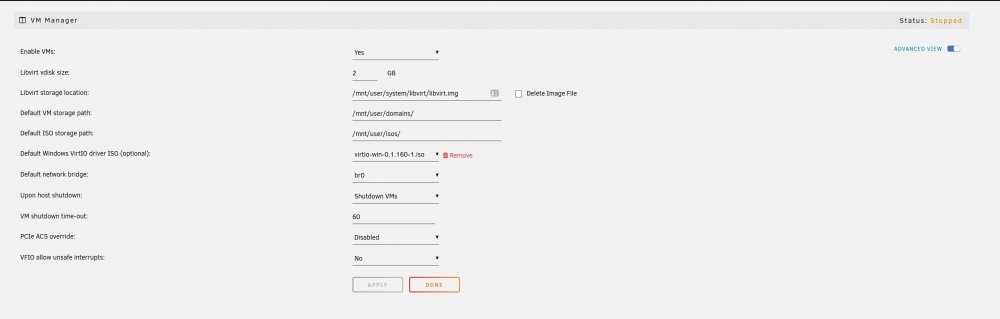
Hello, I didn't want to create a new topic as I'm experiencing this same issue with "Libvert Service failed to start" appearing. I've rebooted, I've tried to restore the previous Libvert.img. I've made sure that it's pointing to an img file as shown here I've included the diagnostics. What's strange is this happened after I downloaded the newest VirtIO Driver ISO after building a second VM. diagnostics-20200324-2258.zip
-
Should we ever update Jdownloader through the program itself or should we ONLY ever update it through the docker? I'm just curious since I'm waiting for Jdownlaoder to fix this Katfile issue.
-
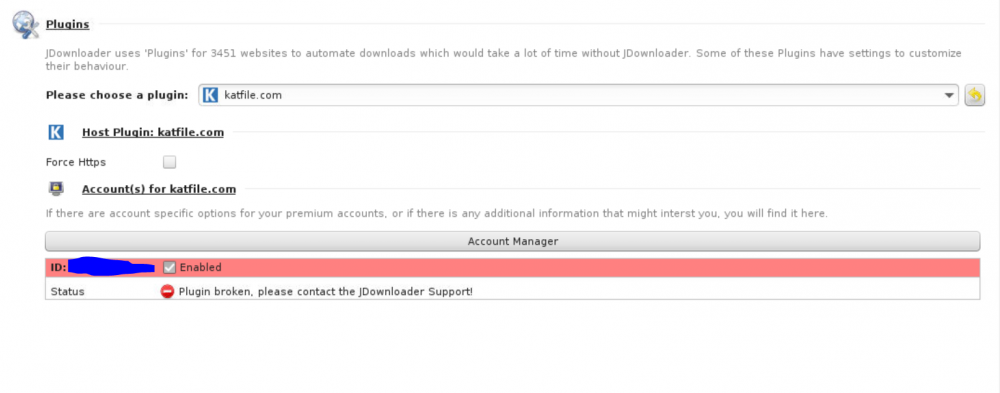
It looks like the Katfile plugin is broken? I guess Jdownloader themselves will have to fix this?
-
Seems to work now, thanks!!!
-
Not sure if this is useful but the output.log shows: THREAD: 24 24|Log.L.log 9/22/18 9:21:12 PM - INFO [ org.appwork.utils.swing.dialog.AbstractDialog$8(runInEDT) ] -> Force Dummy Init 24|Log.L.log 9/22/18 9:21:12 PM - INFO [ org.appwork.utils.swing.dialog.AbstractDialog$11(runInEDT) ] -> Reset Dummy Info 24|Log.L.log 9/22/18 9:21:12 PM - INFO [ org.appwork.utils.swing.dialog.AbstractDialog(displayDialog) ] -> Display Dialog: dialog_Enter_Captcha_for_uploaded_to_to_continue_ 24|Log.L.log 9/22/18 9:21:12 PM - INFO [ org.appwork.storage.JsonKeyValueStorage(<init>) ] -> Prefer (merged) JSon Storage from File: /config/cfg/CaptchaDialogSize/ac0a36b21a78223e9656c3e76d1ffb6b.json 24|Log.L.log 9/22/18 9:21:12 PM - FINER [ org.appwork.storage.config.handler.StorageHandler(<init>) ] -> Init StorageHandler for Interface:org.appwork.utils.swing.dialog.LocationStorage|Path:/config/cfg/CaptchaDialogSize/ac0a36b21a78223e9656c3e76d1ffb6b 24|Log.L.log 9/22/18 9:21:12 PM - INFO [ org.appwork.storage.JsonKeyValueStorage(<init>) ] -> Prefer (merged) JSon Storage from File: /config/cfg/RememberAbsoluteLocator-CaptchaDialog_uploaded.to.json 24|Log.L.log 9/22/18 9:21:12 PM - FINER [ org.appwork.storage.config.handler.StorageHandler(<init>) ] -> Init StorageHandler for Interface:org.appwork.utils.swing.dialog.LocationStorage|Path:/config/cfg/RememberAbsoluteLocator-CaptchaDialog_uploaded.to true org.appwork.utils.swing.dialog.InternDialog[Enter Captcha for uploaded.to to continue!,368,281,544x206,hidden,layout=java.awt.BorderLayout,MODELESS,title=Enter Captcha for uploaded.to to continue!,defaultCloseOperation=DO_NOTHING_ON_CLOSE,rootPane=javax.swing.JRootPane[,5,25,534x176,layout=javax.swing.JRootPane$RootLayout,alignmentX=0.0,alignmentY=0.0,border=javax.swing.plaf.synth.SynthBorder@512a5c7f,flags=16777673,maximumSize=,minimumSize=,preferredSize=],rootPaneCheckingEnabled=true] TO_FRONT_FOCUSED Request toFront(use toFront): org.appwork.utils.swing.dialog.InternDialog[Enter Captcha for uploaded.to to continue!,368,281,544x206,hidden,layout=java.awt.BorderLayout,MODELESS,title=Enter Captcha for uploaded.to to continue!,defaultCloseOperation=DO_NOTHING_ON_CLOSE,rootPane=javax.swing.JRootPane[,5,25,534x176,layout=javax.swing.JRootPane$RootLayout,alignmentX=0.0,alignmentY=0.0,border=javax.swing.plaf.synth.SynthBorder@512a5c7f,flags=16777673,maximumSize=,minimumSize=,preferredSize=],rootPaneCheckingEnabled=true] Inconsistency detected by ld.so: dl-lookup.c: 128: check_match: Assertion `version->filename == NULL || ! _dl_name_match_p (version->filename, map)' failed!
-
I'm having an issue where Jdownloader won't stay operational. Every time I start it, it seems to shut down in less than a minute. My log output looks like this: [services.d] stopping openbox... [services.d] stopping statusmonitor... [services.d] stopping logmonitor... [services.d] stopping xvfb... [services.d] stopping certsmonitor... [services.d] stopping nginx... [services.d] stopping s6-fdholderd... [cont-finish.d] executing container finish scripts... [cont-finish.d] done. [s6-finish] syncing disks. [s6-finish] sending all processes the TERM signal. [s6-finish] sending all processes the KILL signal and exiting. [s6-init] making user provided files available at /var/run/s6/etc...exited 0. [s6-init] ensuring user provided files have correct perms...exited 0. [fix-attrs.d] applying ownership & permissions fixes... [fix-attrs.d] done. [cont-init.d] executing container initialization scripts... [cont-init.d] 00-app-niceness.sh: executing... [cont-init.d] 00-app-niceness.sh: exited 0. [cont-init.d] 00-app-script.sh: executing... [cont-init.d] 00-app-script.sh: exited 0. [cont-init.d] 00-app-user-map.sh: executing... [cont-init.d] 00-app-user-map.sh: exited 0. [cont-init.d] 00-clean-logmonitor-states.sh: executing... [cont-init.d] 00-clean-logmonitor-states.sh: exited 0. [cont-init.d] 00-clean-tmp-dir.sh: executing... [cont-init.d] 00-clean-tmp-dir.sh: exited 0. [cont-init.d] 00-set-app-deps.sh: executing... [cont-init.d] 00-set-app-deps.sh: exited 0. [cont-init.d] 00-set-home.sh: executing... [cont-init.d] 00-set-home.sh: exited 0. [cont-init.d] 00-take-config-ownership.sh: executing... [cont-init.d] 00-take-config-ownership.sh: exited 0. [cont-init.d] 00-xdg-runtime-dir.sh: executing... [cont-init.d] 00-xdg-runtime-dir.sh: exited 0. [cont-init.d] 10-certs.sh: executing... [cont-init.d] 10-certs.sh: exited 0. [cont-init.d] 10-cjk-font.sh: executing... [cont-init.d] 10-cjk-font.sh: exited 0. [cont-init.d] 10-nginx.sh: executing... [cont-init.d] 10-nginx.sh: exited 0. [cont-init.d] 10-vnc-password.sh: executing... [cont-init.d] 10-vnc-password.sh: exited 0. [cont-init.d] 10-web-index.sh: executing... [cont-init.d] 10-web-index.sh: exited 0. [cont-init.d] jdownloader2.sh: executing... [cont-init.d] jdownloader2.sh: exited 0. [cont-init.d] done. [services.d] starting services [services.d] starting s6-fdholderd... [services.d] starting certsmonitor... [services.d] starting nginx... [services.d] starting xvfb... [certsmonitor] disabling service: secure connection not enabled. [nginx] starting... [xvfb] starting... [services.d] starting logmonitor... [logmonitor] no file to monitor: disabling service... s6-svwait: fatal: timed out [services.d] starting statusmonitor... [services.d] starting openbox... [statusmonitor] no file to monitor: disabling service... [openbox] starting... [services.d] starting x11vnc... [services.d] starting app... [x11vnc] starting... [app] starting JDownloader 2... [services.d] done. [jdsupervisor] JDownloader2 not started yet. Proceeding... 22/09/2018 21:12:49 passing arg to libvncserver: -rfbport 22/09/2018 21:12:49 passing arg to libvncserver: 5900 22/09/2018 21:12:49 passing arg to libvncserver: -rfbportv6 22/09/2018 21:12:49 passing arg to libvncserver: -1 22/09/2018 21:12:49 passing arg to libvncserver: -httpportv6 22/09/2018 21:12:49 passing arg to libvncserver: -1 22/09/2018 21:12:49 passing arg to libvncserver: -desktop 22/09/2018 21:12:49 passing arg to libvncserver: JDownloader 2 22/09/2018 21:12:49 x11vnc version: 0.9.14 lastmod: 2015-11-14 pid: 13835 22/09/2018 21:12:49 Using X display :0 22/09/2018 21:12:49 rootwin: 0x43 reswin: 0x400001 dpy: 0x9ec16a00 22/09/2018 21:12:49 22/09/2018 21:12:49 ------------------ USEFUL INFORMATION ------------------ 22/09/2018 21:12:49 X DAMAGE available on display, using it for polling hints. 22/09/2018 21:12:49 To disable this behavior use: '-noxdamage' 22/09/2018 21:12:49 22/09/2018 21:12:49 Most compositing window managers like 'compiz' or 'beryl' 22/09/2018 21:12:49 cause X DAMAGE to fail, and so you may not see any screen 22/09/2018 21:12:49 updates via VNC. Either disable 'compiz' (recommended) or 22/09/2018 21:12:49 supply the x11vnc '-noxdamage' command line option. 22/09/2018 21:12:49 X COMPOSITE available on display, using it for window polling. 22/09/2018 21:12:49 To disable this behavior use: '-noxcomposite' 22/09/2018 21:12:49 22/09/2018 21:12:49 Wireframing: -wireframe mode is in effect for window moves. 22/09/2018 21:12:49 If this yields undesired behavior (poor response, painting 22/09/2018 21:12:49 errors, etc) it may be disabled: 22/09/2018 21:12:49 - use '-nowf' to disable wireframing completely. 22/09/2018 21:12:49 - use '-nowcr' to disable the Copy Rectangle after the 22/09/2018 21:12:49 moved window is released in the new position. 22/09/2018 21:12:49 Also see the -help entry for tuning parameters. 22/09/2018 21:12:49 You can press 3 Alt_L's (Left "Alt" key) in a row to 22/09/2018 21:12:49 repaint the screen, also see the -fixscreen option for 22/09/2018 21:12:49 periodic repaints. 22/09/2018 21:12:49 GrabServer control via XTEST. 22/09/2018 21:12:49 22/09/2018 21:12:49 Scroll Detection: -scrollcopyrect mode is in effect to 22/09/2018 21:12:49 use RECORD extension to try to detect scrolling windows 22/09/2018 21:12:49 (induced by either user keystroke or mouse input). 22/09/2018 21:12:49 If this yields undesired behavior (poor response, painting 22/09/2018 21:12:49 errors, etc) it may be disabled via: '-noscr' 22/09/2018 21:12:49 Also see the -help entry for tuning parameters. 22/09/2018 21:12:49 You can press 3 Alt_L's (Left "Alt" key) in a row to 22/09/2018 21:12:49 repaint the screen, also see the -fixscreen option for 22/09/2018 21:12:49 periodic repaints. 22/09/2018 21:12:49 22/09/2018 21:12:49 XKEYBOARD: number of keysyms per keycode 7 is greater 22/09/2018 21:12:49 than 4 and 51 keysyms are mapped above 4. 22/09/2018 21:12:49 Automatically switching to -xkb mode. 22/09/2018 21:12:49 If this makes the key mapping worse you can 22/09/2018 21:12:49 disable it with the "-noxkb" option. 22/09/2018 21:12:49 Also, remember "-remap DEAD" for accenting characters. 22/09/2018 21:12:49 22/09/2018 21:12:49 X FBPM extension not supported. 22/09/2018 21:12:49 X display is not capable of DPMS. 22/09/2018 21:12:49 -------------------------------------------------------- 22/09/2018 21:12:49 22/09/2018 21:12:49 Default visual ID: 0x21 22/09/2018 21:12:49 Read initial data from X display into framebuffer. 22/09/2018 21:12:49 initialize_screen: fb_depth/fb_bpp/fb_Bpl 24/32/5120 22/09/2018 21:12:49 22/09/2018 21:12:49 X display :0 is 32bpp depth=24 true color 22/09/2018 21:12:49 22/09/2018 21:12:49 Listening for VNC connections on TCP port 5900 22/09/2018 21:12:49 22/09/2018 21:12:49 Xinerama is present and active (e.g. multi-head). 22/09/2018 21:12:49 Xinerama: number of sub-screens: 1 22/09/2018 21:12:49 Xinerama: no blackouts needed (only one sub-screen) 22/09/2018 21:12:49 22/09/2018 21:12:49 fb read rate: 644 MB/sec 22/09/2018 21:12:49 fast read: reset -wait ms to: 10 22/09/2018 21:12:49 fast read: reset -defer ms to: 10 22/09/2018 21:12:49 The X server says there are 10 mouse buttons. 22/09/2018 21:12:49 screen setup finished. 22/09/2018 21:12:49 The VNC desktop is: 1ffe852a3617:0 0 ****************************************************************************** Have you tried the x11vnc '-ncache' VNC client-side pixel caching feature yet? The scheme stores pixel data offscreen on the VNC viewer side for faster retrieval. It should work with any VNC viewer. Try it by running: x11vnc -ncache 10 ... One can also add -ncache_cr for smooth 'copyrect' window motion. More info: http://www.karlrunge.com/x11vnc/faq.html#faq-client-caching 22/09/2018 21:12:54 Got connection from client 127.0.0.1 22/09/2018 21:12:54 other clients: 22/09/2018 21:12:54 Got 'ws' WebSockets handshake 22/09/2018 21:12:54 Got protocol: binary 22/09/2018 21:12:54 - webSocketsHandshake: using binary/raw encoding 22/09/2018 21:12:54 - WebSockets client version hybi-13 22/09/2018 21:12:54 Disabled X server key autorepeat. 22/09/2018 21:12:54 to force back on run: 'xset r on' (3 times) 22/09/2018 21:12:54 incr accepted_client=1 for 127.0.0.1:46580 sock=10 22/09/2018 21:12:54 Client Protocol Version 3.8 22/09/2018 21:12:54 Protocol version sent 3.8, using 3.8 22/09/2018 21:12:54 rfbProcessClientSecurityType: executing handler for type 1 22/09/2018 21:12:54 rfbProcessClientSecurityType: returning securityResult for client rfb version >= 3.8 22/09/2018 21:12:54 Pixel format for client 127.0.0.1: 22/09/2018 21:12:54 32 bpp, depth 24, little endian 22/09/2018 21:12:54 true colour: max r 255 g 255 b 255, shift r 16 g 8 b 0 22/09/2018 21:12:54 no translation needed 22/09/2018 21:12:54 Enabling NewFBSize protocol extension for client 127.0.0.1 22/09/2018 21:12:54 Enabling full-color cursor updates for client 127.0.0.1 22/09/2018 21:12:54 Using image quality level 6 for client 127.0.0.1 22/09/2018 21:12:54 Using JPEG subsampling 0, Q79 for client 127.0.0.1 22/09/2018 21:12:54 Using compression level 9 for client 127.0.0.1 22/09/2018 21:12:54 Enabling LastRect protocol extension for client 127.0.0.1 22/09/2018 21:12:54 rfbProcessClientNormalMessage: ignoring unsupported encoding type Enc(0xFFFFFECC) 22/09/2018 21:12:54 Using tight encoding for client 127.0.0.1 22/09/2018 21:12:54 client_set_net: 127.0.0.1 0.0000 22/09/2018 21:12:54 created xdamage object: 0x40002c 22/09/2018 21:12:54 copy_tiles: allocating first_line at size 41 22/09/2018 21:12:54 client 1 network rate 3288.4 KB/sec (60099.5 eff KB/sec) 22/09/2018 21:12:54 client 1 latency: 1.5 ms 22/09/2018 21:12:54 dt1: 0.0181, dt2: 0.0481 dt3: 0.0015 bytes: 215185 22/09/2018 21:12:54 link_rate: LR_LAN - 1 ms, 3288 KB/s 22/09/2018 21:13:03 created selwin: 0x40002d 22/09/2018 21:13:03 called initialize_xfixes() [jdsupervisor] JDownloader2 no longer running. Exiting... [services.d] stopping services [services.d] stopping app... [services.d] stopping x11vnc... caught signal: 15 22/09/2018 21:13:07 deleted 40 tile_row polling images. 22/09/2018 21:13:07 Restored X server key autorepeat to: 1 [services.d] stopping openbox... [services.d] stopping statusmonitor... [services.d] stopping logmonitor... [services.d] stopping xvfb... [services.d] stopping nginx... [services.d] stopping certsmonitor... [services.d] stopping s6-fdholderd... [cont-finish.d] executing container finish scripts... [cont-finish.d] done. [s6-finish] syncing disks. [s6-finish] sending all processes the TERM signal. [s6-finish] sending all processes the KILL signal and exiting. [s6-init] making user provided files available at /var/run/s6/etc...exited 0. [s6-init] ensuring user provided files have correct perms...exited 0. [fix-attrs.d] applying ownership & permissions fixes... [fix-attrs.d] done. [cont-init.d] executing container initialization scripts... [cont-init.d] 00-app-niceness.sh: executing... [cont-init.d] 00-app-niceness.sh: exited 0. [cont-init.d] 00-app-script.sh: executing... [cont-init.d] 00-app-script.sh: exited 0. [cont-init.d] 00-app-user-map.sh: executing... [cont-init.d] 00-app-user-map.sh: exited 0. [cont-init.d] 00-clean-logmonitor-states.sh: executing... [cont-init.d] 00-clean-logmonitor-states.sh: exited 0. [cont-init.d] 00-clean-tmp-dir.sh: executing... [cont-init.d] 00-clean-tmp-dir.sh: exited 0. [cont-init.d] 00-set-app-deps.sh: executing... [cont-init.d] 00-set-app-deps.sh: exited 0. [cont-init.d] 00-set-home.sh: executing... [cont-init.d] 00-set-home.sh: exited 0. [cont-init.d] 00-take-config-ownership.sh: executing... [cont-init.d] 00-take-config-ownership.sh: exited 0. [cont-init.d] 00-xdg-runtime-dir.sh: executing... [cont-init.d] 00-xdg-runtime-dir.sh: exited 0. [cont-init.d] 10-certs.sh: executing... [cont-init.d] 10-certs.sh: exited 0. [cont-init.d] 10-cjk-font.sh: executing... [cont-init.d] 10-cjk-font.sh: exited 0. [cont-init.d] 10-nginx.sh: executing... [cont-init.d] 10-nginx.sh: exited 0. [cont-init.d] 10-vnc-password.sh: executing... [cont-init.d] 10-vnc-password.sh: exited 0. [cont-init.d] 10-web-index.sh: executing... [cont-init.d] 10-web-index.sh: exited 0. [cont-init.d] jdownloader2.sh: executing... [cont-init.d] jdownloader2.sh: exited 0. [cont-init.d] done. [services.d] starting services [services.d] starting s6-fdholderd... [services.d] starting certsmonitor... [services.d] starting nginx... [services.d] starting xvfb... [nginx] starting... [certsmonitor] disabling service: secure connection not enabled. [xvfb] starting... [services.d] starting x11vnc... [services.d] starting logmonitor... [logmonitor] no file to monitor: disabling service... [services.d] starting statusmonitor... [statusmonitor] no file to monitor: disabling service... [x11vnc] starting... [services.d] starting openbox... [openbox] starting... 22/09/2018 21:20:49 passing arg to libvncserver: -rfbport 22/09/2018 21:20:49 passing arg to libvncserver: 5900 22/09/2018 21:20:49 passing arg to libvncserver: -rfbportv6 22/09/2018 21:20:49 passing arg to libvncserver: -1 22/09/2018 21:20:49 passing arg to libvncserver: -httpportv6 22/09/2018 21:20:49 passing arg to libvncserver: -1 22/09/2018 21:20:49 passing arg to libvncserver: -desktop 22/09/2018 21:20:49 passing arg to libvncserver: JDownloader 2 22/09/2018 21:20:49 x11vnc version: 0.9.14 lastmod: 2015-11-14 pid: 13795 22/09/2018 21:20:49 Using X display :0 22/09/2018 21:20:49 rootwin: 0x43 reswin: 0x200001 dpy: 0xefe80a00 22/09/2018 21:20:49 22/09/2018 21:20:49 ------------------ USEFUL INFORMATION ------------------ 22/09/2018 21:20:49 X DAMAGE available on display, using it for polling hints. 22/09/2018 21:20:49 To disable this behavior use: '-noxdamage' 22/09/2018 21:20:49 22/09/2018 21:20:49 Most compositing window managers like 'compiz' or 'beryl' 22/09/2018 21:20:49 cause X DAMAGE to fail, and so you may not see any screen 22/09/2018 21:20:49 updates via VNC. Either disable 'compiz' (recommended) or 22/09/2018 21:20:49 supply the x11vnc '-noxdamage' command line option. 22/09/2018 21:20:49 X COMPOSITE available on display, using it for window polling. 22/09/2018 21:20:49 To disable this behavior use: '-noxcomposite' 22/09/2018 21:20:49 22/09/2018 21:20:49 Wireframing: -wireframe mode is in effect for window moves. 22/09/2018 21:20:49 If this yields undesired behavior (poor response, painting 22/09/2018 21:20:49 errors, etc) it may be disabled: 22/09/2018 21:20:49 - use '-nowf' to disable wireframing completely. 22/09/2018 21:20:49 - use '-nowcr' to disable the Copy Rectangle after the 22/09/2018 21:20:49 moved window is released in the new position. 22/09/2018 21:20:49 Also see the -help entry for tuning parameters. 22/09/2018 21:20:49 You can press 3 Alt_L's (Left "Alt" key) in a row to 22/09/2018 21:20:49 repaint the screen, also see the -fixscreen option for 22/09/2018 21:20:49 periodic repaints. 22/09/2018 21:20:49 GrabServer control via XTEST. 22/09/2018 21:20:49 22/09/2018 21:20:49 Scroll Detection: -scrollcopyrect mode is in effect to 22/09/2018 21:20:49 use RECORD extension to try to detect scrolling windows 22/09/2018 21:20:49 (induced by either user keystroke or mouse input). 22/09/2018 21:20:49 If this yields undesired behavior (poor response, painting 22/09/2018 21:20:49 errors, etc) it may be disabled via: '-noscr' 22/09/2018 21:20:49 Also see the -help entry for tuning parameters. 22/09/2018 21:20:49 You can press 3 Alt_L's (Left "Alt" key) in a row to 22/09/2018 21:20:49 repaint the screen, also see the -fixscreen option for 22/09/2018 21:20:49 periodic repaints. 22/09/2018 21:20:49 22/09/2018 21:20:49 XKEYBOARD: number of keysyms per keycode 7 is greater 22/09/2018 21:20:49 than 4 and 51 keysyms are mapped above 4. 22/09/2018 21:20:49 Automatically switching to -xkb mode. 22/09/2018 21:20:49 If this makes the key mapping worse you can 22/09/2018 21:20:49 disable it with the "-noxkb" option. 22/09/2018 21:20:49 Also, remember "-remap DEAD" for accenting characters. 22/09/2018 21:20:49 22/09/2018 21:20:49 X FBPM extension not supported. 22/09/2018 21:20:49 X display is not capable of DPMS. 22/09/2018 21:20:49 -------------------------------------------------------- 22/09/2018 21:20:49 22/09/2018 21:20:49 Default visual ID: 0x21 22/09/2018 21:20:49 Read initial data from X display into framebuffer. 22/09/2018 21:20:49 initialize_screen: fb_depth/fb_bpp/fb_Bpl 24/32/5120 22/09/2018 21:20:49 22/09/2018 21:20:49 X display :0 is 32bpp depth=24 true color 22/09/2018 21:20:49 22/09/2018 21:20:49 Listening for VNC connections on TCP port 5900 22/09/2018 21:20:49 22/09/2018 21:20:49 Xinerama is present and active (e.g. multi-head). 22/09/2018 21:20:49 Xinerama: number of sub-screens: 1 22/09/2018 21:20:49 Xinerama: no blackouts needed (only one sub-screen) 22/09/2018 21:20:49 22/09/2018 21:20:49 fb read rate: 1694 MB/sec 22/09/2018 21:20:49 fast read: reset -wait ms to: 10 22/09/2018 21:20:49 fast read: reset -defer ms to: 10 22/09/2018 21:20:49 The X server says there are 10 mouse buttons. 22/09/2018 21:20:49 screen setup finished. 22/09/2018 21:20:49 The VNC desktop is: 1ffe852a3617:0 0 ****************************************************************************** Have you tried the x11vnc '-ncache' VNC client-side pixel caching feature yet? The scheme stores pixel data offscreen on the VNC viewer side for faster retrieval. It should work with any VNC viewer. Try it by running: x11vnc -ncache 10 ... One can also add -ncache_cr for smooth 'copyrect' window motion. More info: http://www.karlrunge.com/x11vnc/faq.html#faq-client-caching [services.d] starting app... [app] starting JDownloader 2... [services.d] done. [jdsupervisor] JDownloader2 not started yet. Proceeding... [jdsupervisor] JDownloader2 no longer running. Exiting... [services.d] stopping services [services.d] stopping app... [services.d] stopping openbox... [services.d] stopping statusmonitor... [services.d] stopping logmonitor... [services.d] stopping x11vnc... caught signal: 15 22/09/2018 21:21:18 deleted 40 tile_row polling images. [services.d] stopping xvfb... [services.d] stopping nginx... [services.d] stopping certsmonitor... [services.d] stopping s6-fdholderd... [cont-finish.d] executing container finish scripts... [cont-finish.d] done. [s6-finish] syncing disks. [s6-finish] sending all processes the TERM signal. [s6-finish] sending all processes the KILL signal and exiting.
-
It was as simple as that. Thanks so much!
-
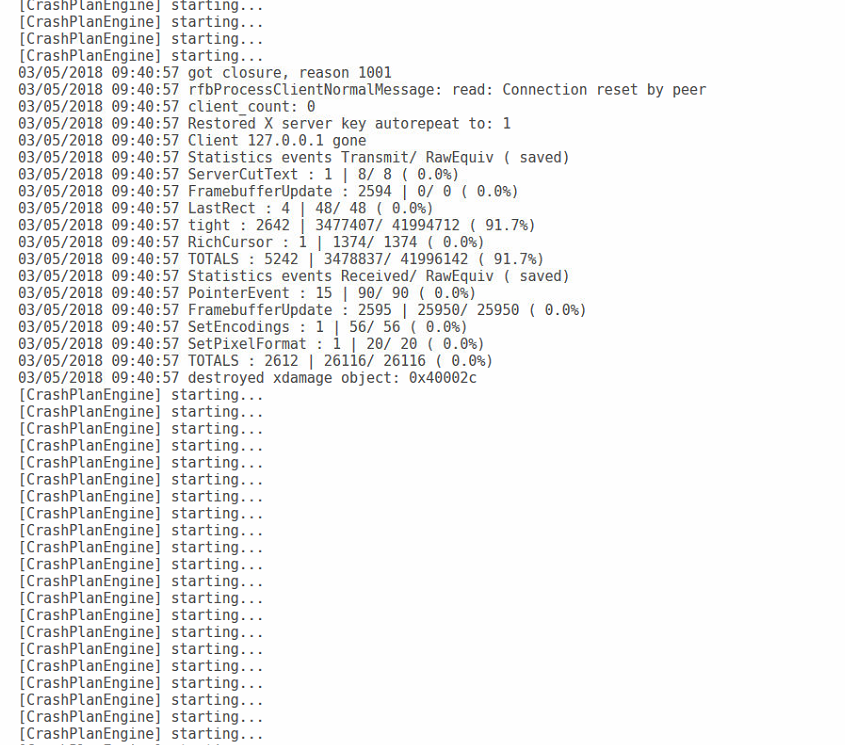
I'm hoping that you can help. I've been going through this great topic and trying various things to fix this. I installed CrashPlanPRO as a migration from CrashPlan. I finally got my first backup to work and when I woke up I saw a bunch of errors in the docker for having run out of memory. I edited the memory for a maximum of 3072, restarted and (not sure if any of this is related). Crashplan won't fully start up. The logs show a constant "CrashPlanEngine is starting". I saw others were having this issue so I ran the command I saw there: "docker exec CrashPlanPRO /usr/glibc-compat/sbin/ldconfig" it ran once I started the docker with no errors, but didn't seem to fix the issue. I restarted the docker a few times. I increased the memory, then removed the maximum memory as well, all to no avail. Here is a sample of my log file: Is there something I'm doing wrong? Thanks so much for your help and this docker.
-
I figured it out. I had an "&" in the name of my share which messed up the command.
-
Is anyone getting an error when they try to install Calibre? I get a "The command failed" every time.

-
I just figured this out. You are right, my server changed it's IP address so it couldn't find the right path. Fixed that with my router!
-
Thanks, that seems to have solved that problem, but now another one crops up. I get an errors saying "Exit(1) Unable to open URL: < urlopen error [Errno 113] No route to host>" in SAB, although I'm not sure if it's a SAB error or not.
-
You're going to have to use baby gloves with me here, I have absolutely no idea what you mean, is this a command line thing I have to run?


