






SimonF
Community Developer
-
Joined
-
Last visited
Everything posted by SimonF
-
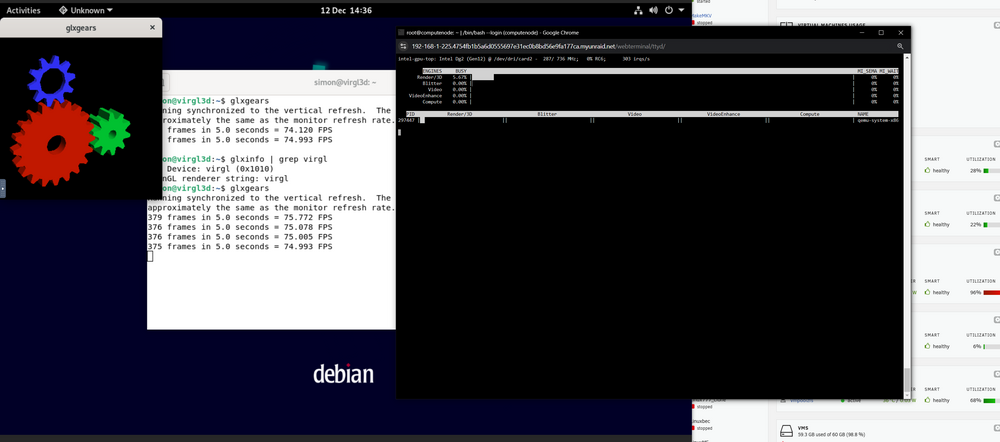
I have virgl working on my test system.
-
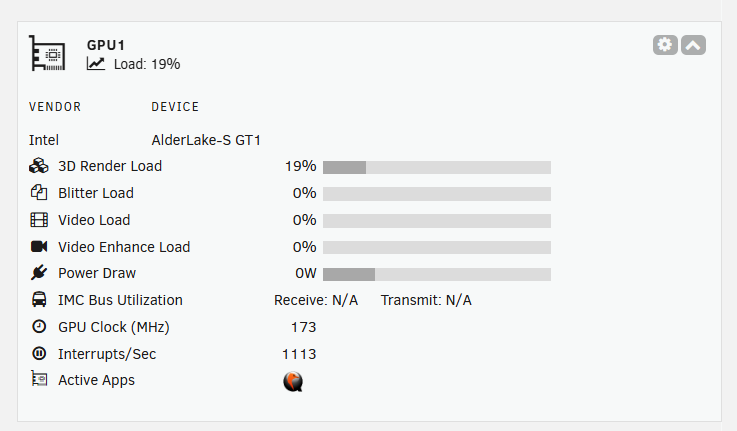
I have been able to make some progress with VirGL and have a working solution. Currently working thru deps to add into OS and the Gui changes needed to support. Also will add to gpustat to should QEMU is using the GPU.
-
Have you added to vfio and as a PCI devices with a boot order. Post xml.
-
Have a look at this thread to see if it is answered there.
-
GVT is not correct for you hardware. Issue is that you need i915.force_probe=7d55 in the i915.conf in modprode.d. The two plugins sort this. Use intel GPU top not gvt.
-
Anything in the logs? May need next XE driver with is not in kernels currently used. lspci -nnv | grep VGA
-
Maybe worth logging a bug on prerelease as it has been integrated in 7.
-
Sorry not had the time to look at it. Happy to take PRs
-
I guess this will be next kernel release 6.13 Unraid 7 is on 6.6 and I cannot see this back ported as yet.
-
Log looks fine was 1227 you stopping and restart fanctl?
-
@Andrea3000 Could you share the test binary. Im a looking at what is required for virgl support and I would find this useful. I have virgl working on a test system.
-
Thanks doesn't not show any errors, but thanks for providing.
-
Lack of support for zfs on 6.12 and is the current lts kernel.
-
I think it goes to the home dir of the user, mine is /root root@computenode:~# pwd /root root@computenode:~#
-
I am just looking for the fanlog root@Tower:~# cat /var/log/ipmifan 2024-12-04 17:16:28 Starting Fan Control 2024-12-04 17:16:28 Board: Supermicro Board Model: X10SL7-F 2024-12-04 17:16:28 SM Board selection: 10 2024-12-04 17:16:28 Setting fans to full speed 2024-12-04 17:16:39 Fan:Temp, FAN1234(34%):HDD Spundown using System Temp(40 °C), FANA(43%):CPU Temp(45 °C) 2024-12-04 17:17:39 Fan:Temp, FAN1234(38%):HDD Spundown using System Temp(42 °C), FANA(38%):CPU Temp(42 °C) root@Tower:~#
-
I have just repackaged the plugin update to 2024.12.03 and test to see if that fixes.
-
Are you are running 2024.11.28?
-
VM manager just adds to xml and libvirt does the work. It is possible to use bus and device IDs but they changed all the time. USBM also supports automatic hot plugging and usbip so unlikely to be added to core.
-
-
New CPUs will need the XE driver which is replacing i915. Not in current kernels. Needs > 6.8 when it was first added but would need to be min 6.12 I think for stable.
-
Are you using the sriov driver as this is different to core i915. Arc does not support sriov. If you are not virtualising the igpu remove sriov plugin and reboot.
-
VM template uses vendor product to map devices 10c4:ea60. Have a look at my usb manager plugin as supports mapping by bus devids. You remove from VM template if using usb manager Have a look at my usb manager pl
-
Is there nothing in the fan logs? /var/log/ipmifan
-
What os version are you running, any thing in the fan logs or PHP logs, later can be found in tools PHP settings
-
Fixed thanks.




