






orlando500
Members
-
Joined
Everything posted by orlando500
-
did ever get any feedback elsewhere on this?
-
yep works better now 🙂
-
plugin: updating: unassigned.devices.plg plugin: downloading: "https://raw.githubusercontent.com/dlandon/unassigned.devices/master/unassigned.devices-2022.11.09.tgz" ... failed (Invalid URL / Server error response) plugin: "https://raw.githubusercontent.com/dlandon/unassigned.devices/master/unassigned.devices-2022.11.09.tgz" download failure (Invalid URL / Server error response)
-
Hi, have anyone seen this one? kernel: mlx4_core 0000:01:00.0: DMFS high rate steer mode is: disabled performance optimized steering. Anything important? fix? diag attached battlestar-diagnostics-20221030-1700.zip
-
thanks, i was thinking it was related to the driver and config as plugin. But will post there.
-
Hi, have anyone seen this one? kernel: mlx4_core 0000:01:00.0: DMFS high rate steer mode is: disabled performance optimized steering. Anything important? fix?
-
first time install of the grafana docker, got this errors on 6.11.1: Failed to start grafana. error: failed to connect to database: failed to create SQLite database file "/var/lib/grafana/grafana.db": open /var/lib/grafana/grafana.db: permission denied failed to connect to database: failed to create SQLite database file "/var/lib/grafana/grafana.db": open /var/lib/grafana/grafana.db: permission denied Failed to start grafana. error: failed to connect to database: failed to create SQLite database file "/var/lib/grafana/grafana.db": open /var/lib/grafana/grafana.db: permission denied failed to connect to database: failed to create SQLite database file "/var/lib/grafana/grafana.db": open /var/lib/grafana/grafana.db: permission denied GF_PATHS_DATA='/var/lib/grafana' is not writable. You may have issues with file permissions, more information here: http://docs.grafana.org/installation/docker/#migrate-to-v51-or-later logger=settings t=2022-10-30T12:47:56.624988995+01:00 level=info msg="Starting Grafana" version=9.2.2 commit=78a3e64e4f branch=HEAD compiled=2022-10-25T13:10:01+02:00 logger=settings t=2022-10-30T12:47:56.625135894+01:00 level=info msg="Config loaded from" file=/usr/share/grafana/conf/defaults.ini logger=settings t=2022-10-30T12:47:56.625144001+01:00 level=info msg="Config loaded from" file=/etc/grafana/grafana.ini logger=settings t=2022-10-30T12:47:56.62514775+01:00 level=info msg="Config overridden from command line" arg="default.paths.data=/var/lib/grafana" logger=settings t=2022-10-30T12:47:56.625151003+01:00 level=info msg="Config overridden from command line" arg="default.paths.logs=/var/log/grafana" logger=settings t=2022-10-30T12:47:56.6251541+01:00 level=info msg="Config overridden from command line" arg="default.paths.plugins=/var/lib/grafana/plugins" logger=settings t=2022-10-30T12:47:56.625157813+01:00 level=info msg="Config overridden from command line" arg="default.paths.provisioning=/etc/grafana/provisioning" logger=settings t=2022-10-30T12:47:56.625160836+01:00 level=info msg="Config overridden from command line" arg="default.log.mode=console" logger=settings t=2022-10-30T12:47:56.625164002+01:00 level=info msg="Config overridden from Environment variable" var="GF_PATHS_DATA=/var/lib/grafana" logger=settings t=2022-10-30T12:47:56.625167692+01:00 level=info msg="Config overridden from Environment variable" var="GF_PATHS_LOGS=/var/log/grafana" logger=settings t=2022-10-30T12:47:56.625170546+01:00 level=info msg="Config overridden from Environment variable" var="GF_PATHS_PLUGINS=/var/lib/grafana/plugins" logger=settings t=2022-10-30T12:47:56.625173493+01:00 level=info msg="Config overridden from Environment variable" var="GF_PATHS_PROVISIONING=/etc/grafana/provisioning" logger=settings t=2022-10-30T12:47:56.625176421+01:00 level=info msg="Config overridden from Environment variable" var="GF_SERVER_ROOT_URL=http://192.168.10.25" logger=settings t=2022-10-30T12:47:56.625179271+01:00 level=info msg="Config overridden from Environment variable" var="GF_SECURITY_ADMIN_PASSWORD=*********" logger=settings t=2022-10-30T12:47:56.6251822+01:00 level=info msg="Path Home" path=/usr/share/grafana logger=settings t=2022-10-30T12:47:56.625185256+01:00 level=info msg="Path Data" path=/var/lib/grafana logger=settings t=2022-10-30T12:47:56.625188127+01:00 level=info msg="Path Logs" path=/var/log/grafana logger=settings t=2022-10-30T12:47:56.625190845+01:00 level=info msg="Path Plugins" path=/var/lib/grafana/plugins logger=settings t=2022-10-30T12:47:56.625193823+01:00 level=info msg="Path Provisioning" path=/etc/grafana/provisioning logger=settings t=2022-10-30T12:47:56.625196785+01:00 level=info msg="App mode production" logger=sqlstore t=2022-10-30T12:47:56.62537492+01:00 level=info msg="Connecting to DB" dbtype=sqlite3 logger=sqlstore t=2022-10-30T12:47:56.625505687+01:00 level=info msg="Creating SQLite database file" path=/var/lib/grafana/grafana.db GF_PATHS_DATA='/var/lib/grafana' is not writable. You may have issues with file permissions, more information here: http://docs.grafana.org/installation/docker/#migrate-to-v51-or-later logger=settings t=2022-10-30T12:48:02.3491785+01:00 level=info msg="Starting Grafana" version=9.2.2 commit=78a3e64e4f branch=HEAD compiled=2022-10-25T13:10:01+02:00 logger=settings t=2022-10-30T12:48:02.34931427+01:00 level=info msg="Config loaded from" file=/usr/share/grafana/conf/defaults.ini logger=settings t=2022-10-30T12:48:02.349344862+01:00 level=info msg="Config loaded from" file=/etc/grafana/grafana.ini logger=settings t=2022-10-30T12:48:02.349351061+01:00 level=info msg="Config overridden from command line" arg="default.paths.data=/var/lib/grafana" logger=settings t=2022-10-30T12:48:02.349354943+01:00 level=info msg="Config overridden from command line" arg="default.paths.logs=/var/log/grafana" logger=settings t=2022-10-30T12:48:02.349358259+01:00 level=info msg="Config overridden from command line" arg="default.paths.plugins=/var/lib/grafana/plugins" logger=settings t=2022-10-30T12:48:02.349361549+01:00 level=info msg="Config overridden from command line" arg="default.paths.provisioning=/etc/grafana/provisioning" logger=settings t=2022-10-30T12:48:02.349366827+01:00 level=info msg="Config overridden from command line" arg="default.log.mode=console" logger=settings t=2022-10-30T12:48:02.349370388+01:00 level=info msg="Config overridden from Environment variable" var="GF_PATHS_DATA=/var/lib/grafana" logger=settings t=2022-10-30T12:48:02.34937372+01:00 level=info msg="Config overridden from Environment variable" var="GF_PATHS_LOGS=/var/log/grafana" logger=settings t=2022-10-30T12:48:02.349376994+01:00 level=info msg="Config overridden from Environment variable" var="GF_PATHS_PLUGINS=/var/lib/grafana/plugins" logger=settings t=2022-10-30T12:48:02.349380304+01:00 level=info msg="Config overridden from Environment variable" var="GF_PATHS_PROVISIONING=/etc/grafana/provisioning" logger=settings t=2022-10-30T12:48:02.349383479+01:00 level=info msg="Config overridden from Environment variable" var="GF_SERVER_ROOT_URL=http://192.168.10.25" logger=settings t=2022-10-30T12:48:02.34938828+01:00 level=info msg="Config overridden from Environment variable" var="GF_SECURITY_ADMIN_PASSWORD=*********" logger=settings t=2022-10-30T12:48:02.349392209+01:00 level=info msg="Path Home" path=/usr/share/grafana logger=settings t=2022-10-30T12:48:02.349395477+01:00 level=info msg="Path Data" path=/var/lib/grafana logger=settings t=2022-10-30T12:48:02.349398636+01:00 level=info msg="Path Logs" path=/var/log/grafana logger=settings t=2022-10-30T12:48:02.349401783+01:00 level=info msg="Path Plugins" path=/var/lib/grafana/plugins logger=settings t=2022-10-30T12:48:02.349405813+01:00 level=info msg="Path Provisioning" path=/etc/grafana/provisioning logger=settings t=2022-10-30T12:48:02.349423475+01:00 level=info msg="App mode production" logger=sqlstore t=2022-10-30T12:48:02.349652529+01:00 level=info msg="Connecting to DB" dbtype=sqlite3 logger=sqlstore t=2022-10-30T12:48:02.349774725+01:00 level=info msg="Creating SQLite database file" path=/var/lib/grafana/grafana.db ** Press ANY KEY to close this window **
-
is GUS been maintained? any point in installing now?
-
@binhex any plans to support version 4 of sonarr in the docker releases now?
-
Well you are not using the binhex version of sabnzb as far as i can see. Tried the binhex-sabnzbdvpn docker?
-
anyone had problems with unpacker suddenly will not start and no logs. Tried reinstall but no change.
-
they say the use of RAM for temp files for sabnzb should speed up the unpacking process. but i have not figured out the setup for that yet my self.
-
Hi, in not that good with the vpn element of this docker. but is there a way to see what ip adress the docker has inside my network? In the docker config there is only visible the adresses that are bound to the docker its self. " 172.17.0.4:8989/TCP192.168.10.20:8992 172.17.0.4:9897/TCP192.168.10.20:9898" But im guessing the vpn uses a ip also to route traffic of some sort. The reason for me asking it are that i see on my security solution that there is some network scanning from a 192.241.220.196 Adress. And the vpn is the only one that i got exposed to the internet for traffic so wanted to check if the traffic is from this connection.
-
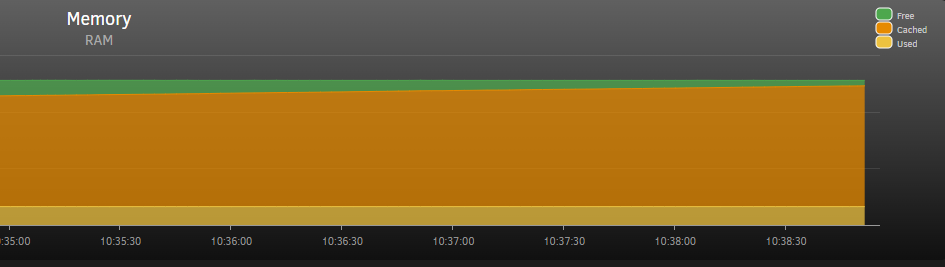
hi, im trying to make use of /tmp as a temp download directory in sabnzb. And it worked great last night. But today i get an error saying its not any available space (it reached the limit i have set in folders settings in sabnzb) As far as i read the faq on unraid it should free up memory from cache to dockers needing it. So what are im doing wrong? mem stats look like this:
-
can you show your config and how you are using custom br0? i have a mollex 10gb card and the same issue trying to give different routes
-
tried to install the PowerPanel software for linux ?
-
blacklisting? was news for me...
-
i was thinking i could use the my server backup of the usb. but that plugin updated the backup in the cloud the "second" i booted so that had the wrong files. Next time i will do a better backup 🙂
-
After crash and burn today with the update from 6.10.0 to 6.10.2 that had me loose network config, nvidia driver config and plugins i rlly want a snapshot setup where i could just roll back to working config. Had saved me hours i guess....
-
EDIT: FIXED, i got tired and installed qbit, worked like a charm Hi, updated to latest binhex-delugevpn, and i was running deluge fine. But suddenly today deluge shutdown and when i restart the docker it seem to be stopping at "[info] Attempting to start Deluge... [info] Removing deluge pid file (if it exists)... 2022-05-02 00:07:04,297 DEBG 'watchdog-script' stdout output: [info] Deluge key 'listen_interface' currently has a value of '10.1.112.220' [info] Deluge key 'listen_interface' will have a new value '10.1.112.220' [info] Writing changes to Deluge config file '/config/core.conf'... 2022-05-02 00:07:04,429 DEBG 'watchdog-script' stdout output: [info] Deluge key 'outgoing_interface' currently has a value of 'tun0' [info] Deluge key 'outgoing_interface' will have a new value 'tun0' [info] Writing changes to Deluge config file '/config/core.conf'..." Webgui dont start. And im left guessing what to do as everything should work. i have not changed any config edit: 20 min later "2022-05-02 00:22:03,545 DEBG 'start-script' stdout output: [info] Successfully assigned and bound incoming port '38349'" but still no webgui. edit again: never mind. Got tired of all the problems with deluge and installed qbit, worked right out of the box.
-
i can understand that, but i think podcasts and video content not necessary compete. i watch a lot of videos from spaceinvader and ibracorp etc. but i love podscasts when im driving or traveling. And i love podcasts like selfhostet etc. they mix tech talk and entertainment. And the podcast could also be talking with developers of dockers in the app store, or all the cool guys that makes plugins, have small or big servers etc... i guess lots of stuff that can be talk about than cant fit in a instructional video. So im still voting for new podcasts episodes 🙂
-
what happend to uncast? no new eps since last year as far as i can see... miss them.
-
yeah i had kernel help also... was woundering if i needed that or just nvidida driver plugin
-
hi seems i have been missing something here. What should i do to keep using my p400 without the kernel driver plugin? tnx
-
There is a docker in apps now called Focalboard i see.. but it stops right after starting as default... seems the db config is off. did you get it to work?

