






Koshy
Members
-
Joined
-
Last visited
-
My HBA had failed and none of the drives connected to the HBA were showing up on unraid. I ordered a new HBA and replaced the one on my server. All the drives now showed up but the parity drive shows up as disabled, the server was off while I got my HBA replaced so it has been over 60 days since the last parity check if that matters. I tried swapping the cables around, tried connecting it to a SATA port on the motherboard but it still showed up as disabled. Then I did an Extended SMART Test on the Parity Drive and everything seemed to go well. I've had 1 reported incorrect sector on my drive for a long time now, other than that I don't see anything wrong with the drive. Can I still use the drive, I've attached the SMART Test results and the diagnostics. tower-smart-20220501-2248.zip tower-diagnostics-20220501-1414.zip
-
My LSI 9207-8i card died. I want to know if the LSI 9210-8i is a suitable replacement for the LSI 9207-8i. Does it have any known issues with unraid?
-
I do not have another PC to to plug it into. Can you tell me where in the diagnostics.zip the LSI is mentioned? Do you think LSI SAS 9210-8i is a good replacement for the card?
-
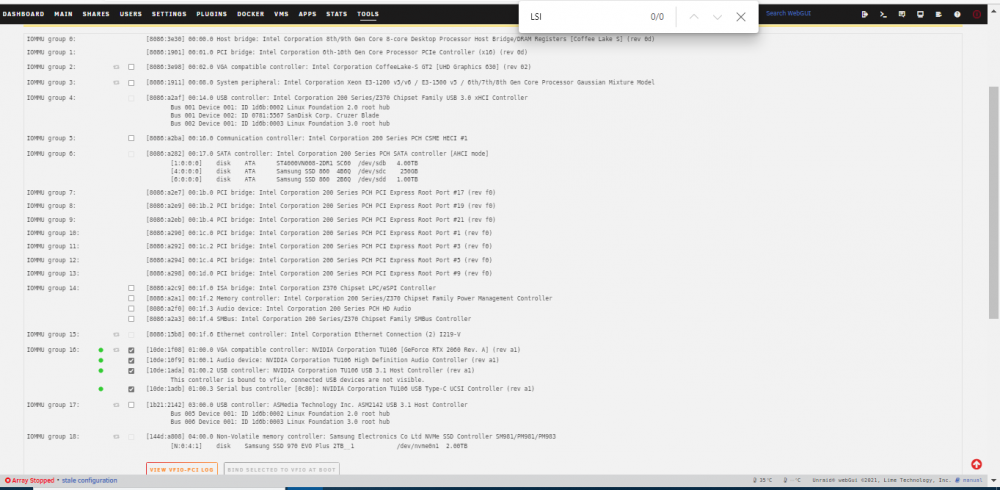
It is not showing up for me
-
I tried reseating the card and tried different PCIe slots as well but no luck. Where in the diagnostics does it indicate that the LSI HBA is detected?
-
All the drives connected to this HBA stopped showing up on unraid. When I connected these drives to the SATA ports on the motherboard they showed up. Can you confirm the HBA is not working, I will attach the diagnostics. LSI Logic SAS 9207-8i is the HBA in question tower-diagnostics-20220411-1803.ziptower-diagnostics-20220411-1803.ziptower-diagnostics-20220411-1803.zip tower-diagnostics-20220411-1803.zip
-
Currently I have unraid running on an Intel System with with multiple Windows VMs (without GPU passthrough) running at the same time. I want to build a new machine, if I switch to AMD Ryzen (3900X) on the next build will I be able to do the same thing. I know that Ryzen doesn't come with an iGPU so will this be an issue.
-
There are lots of entries like these in my syslog. How do I resolve this. Jul 13 13:56:32 Tower dhcpcd[2366]: br0: failed to request information Jul 13 13:56:42 Tower dhcpcd[2366]: br0: failed to request information Jul 13 13:56:52 Tower dhcpcd[2366]: br0: failed to request information Jul 13 13:57:02 Tower dhcpcd[2366]: br0: failed to request information Jul 13 13:57:12 Tower dhcpcd[2366]: br0: failed to request information Jul 13 13:57:22 Tower dhcpcd[2366]: br0: failed to request information Jul 13 13:57:32 Tower dhcpcd[2366]: br0: failed to request information Jul 13 13:57:42 Tower dhcpcd[2366]: br0: failed to request information Jul 13 13:57:52 Tower dhcpcd[2366]: br0: failed to request information I have attached my diagnostics. tower-diagnostics-20210713-1405.zip
-
Dynamic Cache Dirs I had a issue were mounting an external USB Hard Drive via unassigned devices lead to High iowait and extremely low file transfer speeds. I was eventually able to figure with the help of robobub it was Dynamic Cache Dirs that was causing the issue. Dynamic Cache Dirs scanning the External USB Drive was what lead to high iowait. I was able to resolve the issue by excluding the external drive from Cache Dirs. But it would be really nice if you could add an option to exclude all drive mounted via Unassigned devices automatically.
-
Other than laggy mouse cursor movement on binhex-krusader everything else seems to work just fine.
-
This would be great.
-
32GB of which 24GB is allocated to a Windows VM.
-
Thank you, I found the file.
-
BLAKE2 hash key mismatch, (720p_30fps_H264-192kbit_AAC).mp4 is corrupted I got this error on a Disk 3, is there any way I can find can out where on disk 3 this file is?
-
I would like one.

