





bastl
Members
-
Joined
-
Last visited
Everything posted by bastl
-
The issue is, the packet is bigger than most of the apps and a timeout set in the configs triggers an error, because the download didn't finished in the configured time period. You have to edit the following file inside the the docker /config/www/nextcloud/lib/private/Http/Client/Client.php adjust the following from default 30 to something like 400+ depending on your internet speed RequestOptions::TIMEOUT 400
-
I think this plugin can be really dangerous for some users which don't know what they are doing. As explained above it's easy to bind a controller for your storage and after next server restart you have a big problem. It's easy to tick a couple check boxes and hit apply, maybe it's to easy for some people to screw up their setups. Maybe as an idea change the plugin so it shows on default only let's say VGA, SOUND and USB controllers, even if the last one if the Unraid usb stick is connected to, can be a problem if the controller is bound to vfio and hide all other devices in an advanced section with some big warnings. The [RESET] feature of a device is also really important for users to understand. If a let's say USB controller isn't able to be reset, after a restart of the VM using the controller, it will stop working until you restart the whole server.
-
@Iceman24 Nextcloud is the only exception I stumbled accross so far. If you wanna update NC, check under settings >>> overview which version and release chanel you're on. From there you can update NC. But like with other software you might have to recheck after a couple days of release of a new version, because they rolling out the updates in waves.
-
@arough Nextcloud isn't updated by the docker itself, you have to use the WebUI updater or commandline to update NC.
-
@CHBMB Thanks for the explanation. I guess same as the most users I already have the mail, calender, photos app etc. already enabled and if I wanna use the new talk and office stuff I only have to install it from the store. Sounds easy. I hope it will work that easy 😉
-
Wait, so I can't update NC 17 to 18 with the internal update routine?
-
Did someone already got the update to NC 18 now called "Nextcloud Hub" with a lot of new features. Most interesting are the preconfigured and already implemented office features. No more extra containers like collabora needed.
-
Is this docker still maintained? As said before, I didn't received an update in a while
-
@PeteAsking If you use the snapshot feature it will create a .snap file which collects the changes of the VM during the main vdisk is copied and these changes will be committed to the base vdisk file after the copy process is done. So if there is no error during the process, you only have 1 vdisk file.
-
As some users mentioned before this particular container usually got multiple updates per day, but now I don't see any updates anymore. I think early december I updated it last time.
-
First thing I noticed, the page is loaded really quick now. Great improvement 😀 Just an idea which might be possible to implement, maybe not. In case you passthrough a physical device (hdd, ssd, nvme), image the whole disk would be a nice feature. Snapshots won't work, sure, but shutdown the VM and make an image of the physical device would be neat. Did you ever thought about such a functionality and maybe played around with it already? I know thats a big thing I'am asking for, handling all the different kind of source devices and filesystems people maybe using might be a hassle. See it only as an idea in case you have to much time left 😂 Thanks again for this great plugin and the effort you put into it. I wish you and your family and friends a great start into 2020 🥂
-
Thanks to clear things up. UD+ is only an addon for the addon so to say. Maybe add that info in the first post. I had to read the last couple pages after reading the adjusted first post to find the info. I get the point, why you strip things out to slim down the plugin to the base it always meant to be. Maybe I'am allowed to asked is this the first step to prepare UD to become implemented by default into Unraid by Limetech? I remember there were a couple discussions to implement the functionality of UD into Unraid.
-
@pankleks Did you tried the card in another pci slot of your board?
-
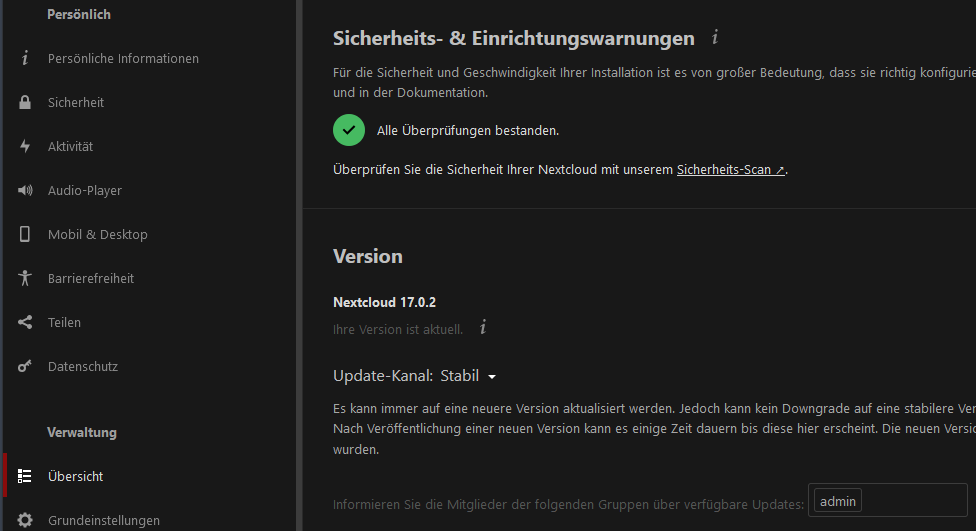
Updating the docker is not updating nextcloud itself. Login with an admin account and go to the settings >>> overview ("Übersicht" in my case on the left side) and you should see your current version and a hint if a newer version is available. From there you can start the update/upgrade process
-
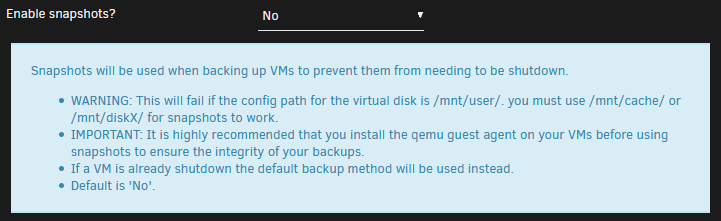
You have to adjust the path for each VM to make the snapshots work.
-
@JTok Just one little thing I need is a big red button labled "BACKUP NOW" 😂
-
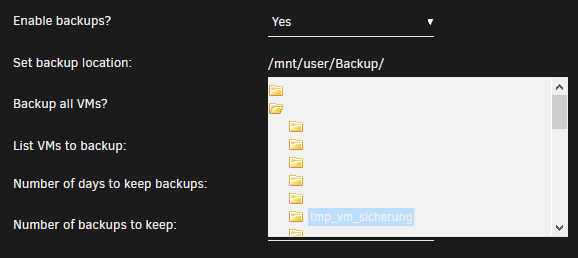
@JTok Big thanks in the first place for your work. Looks like the plugin works for me with a quick test on a single VM, normal backup+compression. A small issue I've found is when selecting the target path for the backup. It's basically not possible to read the dropdown menu items. I'am using the Black theme with Firefox. Same with Brave browser and Chrome on Unraid 6.8. Just to let you know.
-
@skroonigan Make sure you type the name for the user correct. It's case sensitive admin vs Admin is different.
-
@mojotaker Edit your VM like shown above and you should be good.
-
The question as always is what you need more for your VMs and your workflow? It's kinda easy for a VM which has only one usecase lets say video encoding. Check the specific programs you are using and test it in both scenarios. Each program behaves differently and I think for daily use the lower latency is the way to go. Did you saw any users in the forums yet with the newer TRX4 platform and the 3rd gen chips? @jbartlett The new chip layouts shouldn't have these latency issues.
-
@joelones It could be possible for some excessive CPU operations you can see performance decreases if a specific CPU feature is emulated. I think if you're not routing hundreds of clients through Pfsense or have couple VPN connections incoming at the same time, you won't notice it. I did a couple tests with a Linux and Win7 VM in parallel using my Test-Pfsense environment and it was stable with full download speeds and no packet drops. Might be different on a larger scale. For me it's fine for testing.
-
@aim60 The exact same link Farrukh already posted 😂 but thanks anyways 👍
-
Thanks for the info 👍
-
I found a workaround for this! The culprit is the cpu-mode "host-passthrough". If I switch to "Emulated QEMU64" the VM boots up again. Switching it in the gui should work if you havn't setup any special CPU flags. Another way is to edit the xml like the following: change <cpu mode='host-passthrough' check='none'> <topology sockets='1' cores='2' threads='1'/> </cpu> to <cpu> <topology sockets='1' cores='2' threads='1'/> </cpu> also forces the CPU into emulated QEMU64 mode. Another option is to emulate a Intel Skylake CPU for example with the following: <cpu mode='custom' match='exact' check='full'> <model fallback='forbid'>Skylake-Client</model> <topology sockets='1' cores='2' threads='1'/> <feature policy='require' name='hypervisor'/> <feature policy='disable' name='pcid'/> <feature policy='disable' name='hle'/> <feature policy='disable' name='erms'/> <feature policy='disable' name='invpcid'/> <feature policy='disable' name='rtm'/> <feature policy='disable' name='mpx'/> <feature policy='disable' name='spec-ctrl'/> </cpu> Edit: "AES-NI CPU Crypto" isn't supported on "Emulated QEMU64" mode. For future Pfsense versions this is a requirement if I remember correctly.
-
@Farrukh Can you explain a bit further what you did? Only creating a dummy vdisk inside the VM folder without attaching it to the VM shouldn't do anything. What is the format your Pfsense VM are using? Qcow2 or RAW?


